
TL;DR
Hotel operators comparing ID scanning vendors should prioritize PMS transfer, chargeback documentation, Do-Not-Rent alerts, supported ID types, and multi-property access. GuestBan ID Scanning is the strongest fit for hospitality-specific workflows, while IDScan.net, AdriaScan, and 365id may suit broader identity verification or document authentication needs.
Hotel ID scanning is no longer just a front desk convenience; it now affects chargebacks, guest safety, privacy controls, and multi-property risk decisions. Operators researching IDScan.net alternatives for hotels should compare more than scan speed because general identity platforms may not include hotel-specific workflows such as Do-Not-Rent alerts or PMS data transfer. GuestBan ID Scanning is built around those hotel use cases, including ID capture, guest verification, DNR management, screening alerts, user roles & permissions, multi-property and secure cloud access.
Table of Contents
What are IDScan.net alternatives for hotels?
IDScan.net alternatives for hotels are identity scanning platforms that capture guest ID data, verify documents, store records, support front desk workflows, and help hotel teams manage risk during check-in. The best options go beyond ID parsing by adding PMS transfer, Do-Not-Rent workflows, chargeback documentation, role-based access, and multi-property controls.
Hotel ID scanning software: A front desk system that scans driver licenses, passports, passport cards, visas, green cards, and other identity documents to capture guest details for verification, reporting, and operational use.
IDScan.net appears in the market through products and pages such as VeriScan, ParseLink, scanner accessories, scanner comparison tools, use cases, technology, support, pricing, industries, apps, and competitor comparison pages. Its own hotel content positions ID scanning as a way to improve arrivals, handle authentication, and support data sync into hotel systems.
Hotel buyers should separate general ID verification from hospitality operations. A nightclub, bank, rental office, and hotel may all scan IDs, but hotels also need arrival records, incident history, room-risk context, DNR enforcement, privacy policies, and documentation for disputed charges.
Key takeaway: the right alternative is not simply the scanner with the most authentication features; it is the platform that fits front desk decisions, guest records, and hotel risk workflows.
Best 2026 alternatives at a glance
The best hotel ID scanning alternatives differ most in workflow fit, not in the basic ability to scan an ID.
Comparison table for hotel operators
| Platform | Best fit | Hospitality strengths | Watch during evaluation |
|---|---|---|---|
| GuestBan ID Scanning | Hotels needing ID capture plus risk workflows | PMS transfer, property-level and network-wide DNR lists, chargeback reports, secure web portal, multi-user access | Confirm scanner setup, PMS workflow, and screening preferences by property |
| IDScan.net VeriScan and ParseLink | Businesses wanting broad ID scanning, authentication, and parsing tools | Windows, iOS, and Android scanning are promoted by IDScan.net, along with access management, mobile scanning, hardware options, and integrations | Validate hotel-specific DNR, chargeback, and multi-property workflows instead of assuming they are standard |
| AdriaScan IDDEX | Properties focused on document scanning and hotel data capture | Competitor pages describe IDDEX as part of hotel ID authentication and data sync discussions | Compare support for North American IDs, PMS transfer, and incident workflows |
| 365id | Teams prioritizing document authentication | IDScan.net competitor content presents 365id as an identity verification comparison point | Check whether operational hotel features are included beyond authentication |
For a broader feature checklist before vendor demos, the related guide to hotel ID scanning software covers passport capture, audit trails, alerts, secure storage, and front desk controls.
How GuestBan ID Scanning handles hotel workflows
GuestBan ID Scanning is designed for hotels that need guest identity capture to connect directly with front desk decisions.
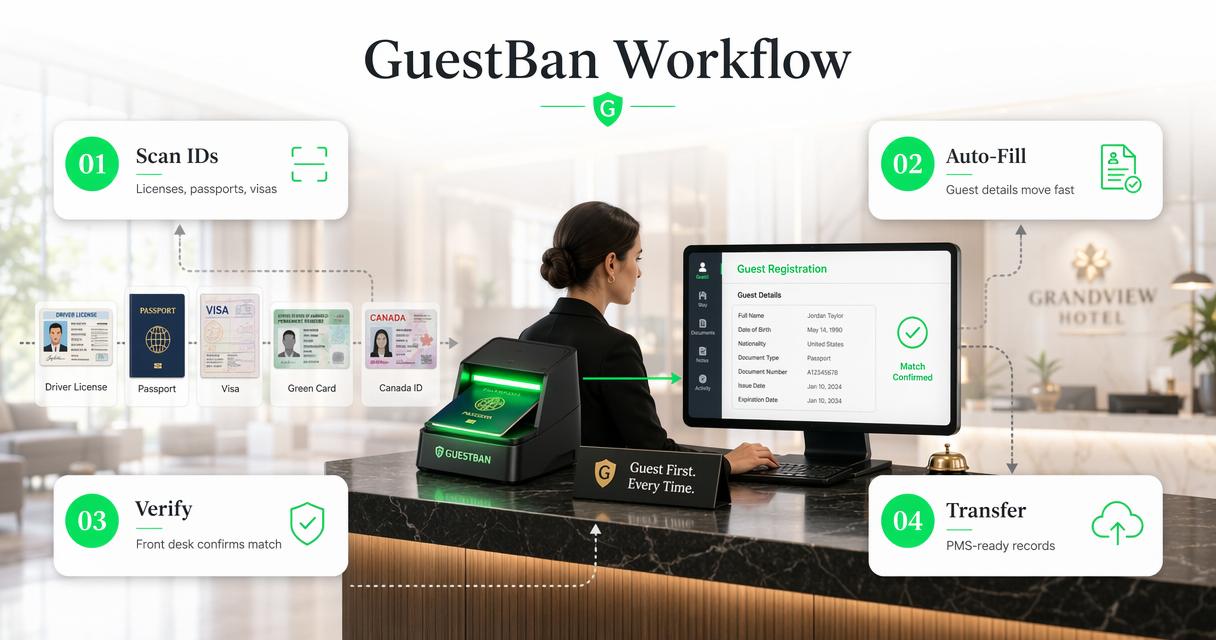
The platform scans driver licenses, passports, passport cards, visas, green cards, Puerto Rico IDs, select Mexico ID cards, U.S. and Canadian driver licenses, and select international IDs. That matters for hotels with domestic guests, cross-border travelers, flight crews, contractors, and long-stay guests.
Captured guest details can be used for front desk verification and PMS transfer. That reduces manual typing and helps teams avoid mismatched names, transposed document numbers, and incomplete guest records.
Hotel-focused capabilities to verify first
- PMS transfer: Captured ID data can support faster, cleaner guest profile entry.
- Do-Not-Rent controls: Property-level and network-wide lists can trigger alerts during check-in.
- Chargeback reporting: Stored ID records, guest details, ID images, printable reports, and incident reports support dispute documentation.
- Cloud access: A secure web portal gives authorized users access to records across roles and locations.
- Screening options: Add-ons may include sex offender checks, criminal background screening, UV security capture, and law enforcement reporting.
GuestBan ID Scanning also supports multi-user access and role-based permissions. Those controls help ownership groups separate front desk activity, management review, and loss prevention oversight without relying on a single workstation.
What should hotels look for in an IDScan.net alternative?
Hotels should evaluate ID scanning vendors by check-in outcomes: accurate records, lower fraud exposure, enforceable DNR alerts, useful reports, and secure access controls.
Buyer checklist for front desk and operations teams
- Confirm supported ID types. Include local driver licenses, passports, passport cards, visas, green cards, and common international documents.
- Test PMS data transfer. A scanner that captures data but leaves staff copying fields manually may not reduce workload.
- Review DNR workflow depth. Look for alerts, incident notes, property-level controls, and network visibility.
- Check chargeback evidence. Confirm whether reports include ID images, timestamps, guest details, and incident documentation.
- Validate access permissions. Multi-property groups need role controls, cloud access, and audit-friendly records.
- Ask about privacy and retention. Stored identity data needs clear policies, limited access, and compliance review.
Price should be reviewed after workflow fit. IDScan.net publishes a VeriScan identity platform pricing page, but hotel teams still need to compare the cost of software, scanners, support, setup, add-ons, and integration work.
Operational fit also matters more than device aesthetics. Scanner accessories and compare-scanner tabs can help narrow hardware choices, but a front desk team ultimately needs consistent capture, fast lookup, and clear exceptions when an ID cannot be read.
Properties reviewing legal obligations should also read current ID scanning laws by state before storing documents or expanding retention policies.
How do IDScan.net, AdriaScan, and 365id compare?
IDScan.net, AdriaScan, and 365id compete around identity capture and authentication, while hotel operators should compare them against hospitality-specific recordkeeping and risk controls.
IDScan.net promotes ID scanning, ID verification, and parsing across Windows, iOS, and Android. Its site also highlights access management, scanner accessories, mobile scanning, backend visitor management, document authentication, and integrations. IDScan.net has a public support center and hotel-focused educational content, including posts on EU hotel ID scanning laws, GDPR, digital identity, chargebacks, liquor liability, and whether hotels must check IDs.
AdriaScan is commonly discussed in hotel ID scanner comparisons through its IDDEX product. Competitor research frames it around ID authentication and data sync into hotel systems, making it relevant for properties that start with document capture and PMS data needs.
365id appears in comparison content as a document authentication option. That makes it more relevant for organizations prioritizing ID fraud prevention and document checks than hotels seeking a combined DNR, chargeback, and incident workflow.
Decision guide by hotel type
| Hotel profile | Better evaluation focus | Why it matters |
|---|---|---|
| Small independent hotel | Simple setup, low training burden, DNR alerts | Lean teams need quick adoption and clear front desk prompts |
| Mid-sized hotel | PMS transfer, chargeback reports, cloud records | Higher volume increases typing errors and dispute risk |
| Large hotel or group | Multi-property access, role permissions, network DNR | Central teams need visibility without weakening local controls |
| Extended-stay property | Incident history, guest records, screening options | Longer stays raise repeat-guest and safety concerns |
| Airport or border-market hotel | Passport and international ID support | Guest documents vary more by region and traveler mix |
Which option fits small, mid-sized, and large hotels?
The best alternative depends on the size of the property group, front desk complexity, and how often guest risk data must travel across locations.
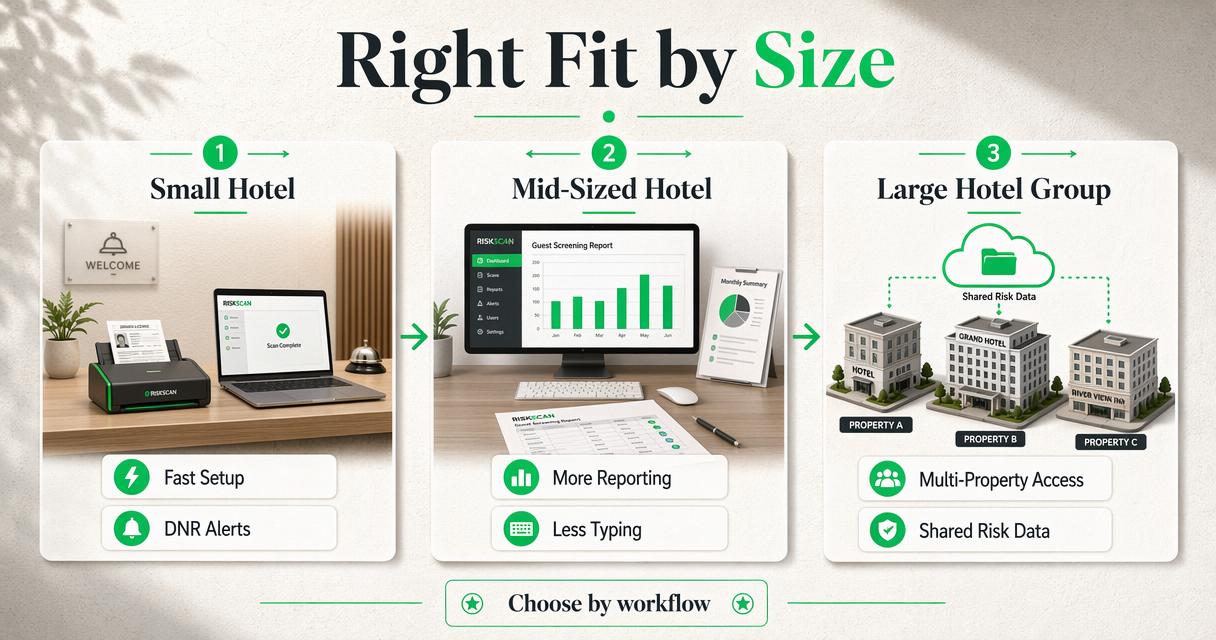
Small hotels usually need the fastest path from ID scan to accurate guest record. For these properties, setup time, staff training, and clear alerts often matter more than advanced authentication features. A useful system should help one desk agent scan an ID, confirm guest details, and flag known DNR records without searching spreadsheets.
Mid-sized hotels tend to need stronger reporting. More check-ins mean more opportunities for manual entry mistakes, disputed stays, and repeat incidents. Chargeback packets become easier to prepare when ID images, guest details, and incident notes are stored in one system.
Large hotels and management groups need governance. Multi-property access, role-based permissions, and network-wide DNR visibility allow corporate operations or loss prevention teams to see patterns without giving every user unrestricted access.
Hotel scale changes the buying decision: small properties need speed, mid-sized hotels need reporting, and hotel groups need shared risk controls.
For teams still comparing manual workflows against scanner-based intake, the 2026 guide to ID scanners versus manual ID entry at hotel check-in breaks down accuracy, speed, chargebacks, compliance, and front desk workload.
What privacy and compliance issues affect hotel ID scanning?
Hotel ID scanning privacy depends on what is collected, why it is collected, who can access it, how long it is retained, and which laws apply.
Identity documents contain sensitive personal data. Hotels should document the business purpose for scanning, limit access to authorized roles, apply retention rules, and avoid collecting more information than the operation requires. Legal review is especially important for multi-state groups because ID scanning rules can vary by jurisdiction.
California operators should review hotel privacy obligations carefully. The resource on hotel CCPA compliance gives hospitality teams a starting point for thinking about consumer data, storage practices, and guest rights.
Compliance questions for vendor demos
- What fields are stored from each scanned document?
- Are ID images stored, and can retention periods be configured?
- Which users can view, export, or print guest records?
- Are access logs available for management review?
- How are cloud records protected from unauthorized access?
- Does the vendor support different policies by property or state?
Compliance is not only a legal topic. Better permission design also reduces operational risk by keeping sensitive guest data away from users who do not need it for check-in, reporting, or management review.
What will change for hotel ID scanning in 2027?
Hotel ID scanning in 2027 will likely move toward tighter PMS automation, more privacy review, and more connected risk signals across properties.
Digital identity and mobile verification will keep influencing guest arrival workflows, but physical IDs will remain common at hotels because passports, driver licenses, and government documents are still central to travel and payment disputes. The practical shift will be better routing of captured data into hotel systems.
Screening will also become more configurable. Some properties may only need DNR alerts, while others may evaluate sex offender checks, criminal background screening add-ons, UV security capture, or law enforcement reporting based on risk profile and local policy.
PMS integration will remain a top differentiator. The most valuable platforms will not simply scan faster; they will reduce duplicate entry, keep records searchable, and help management teams prove what happened during a disputed stay.
Hotels comparing vendors in 2026 should ask about product roadmaps. Useful questions include support for additional ID types, audit reporting improvements, configurable retention, deeper PMS field mapping, and group-level DNR controls.
FAQ
What is the strongest IDScan.net alternative for hotel risk workflows?
GuestBan ID Scanning is a strong alternative for hotels that want ID capture connected to Do-Not-Rent management, PMS transfer, chargeback documentation, secure web access, and optional screening support. That combination fits front desk, operations, ownership, and loss prevention needs better than tools focused only on document authentication.
Do hotels need passport scanning as well as driver license scanning?
Many hotels need both because guest documents vary by market. Airport hotels, border-region properties, tourist destinations, and extended-stay hotels may see passports, passport cards, visas, green cards, and international IDs alongside U.S. and Canadian driver licenses. Vendor evaluation should include real sample documents from the property’s guest mix.
Can ID scanning help with hotel chargebacks?
ID scanning can support chargeback documentation when the platform stores relevant guest details, ID images, timestamps, and printable reports. The value depends on record quality and retrieval speed. Hotels should test whether staff can quickly produce a complete dispute packet without searching multiple systems.
Should hotel groups use one shared DNR list?
Hotel groups often benefit from network-wide DNR visibility, but access should be controlled carefully. A good setup allows property-level decisions, group-level alerts, role-based permissions, and incident context. Shared lists work best when staff can see enough information to act without exposing unnecessary guest data.
Conclusion
The best IDScan.net alternatives for hotels should be judged by hotel outcomes: faster check-in, cleaner PMS records, stronger DNR enforcement, better chargeback evidence, and safer access to guest data. Generic ID verification tools may scan documents well, but hospitality teams need workflows that connect identity capture to the realities of front desk operations.
GuestBan ID Scanning is worth shortlisting first when a property wants ID scanning, PMS transfer, Do-Not-Rent management, chargeback reporting, cloud access, and optional screening in one hotel-focused platform. For a practical next step, operators can map current check-in pain points, gather sample IDs, define DNR rules, and request a workflow review at guestban.com.