
TL;DR
Guest verification software should confirm identity, capture usable guest records, flag known risk, and move data into the hotel workflow without slowing check-in. Hotels should prioritize ID scanning, document support, DNR alerts, PMS transfer, incident records, permissions, and privacy controls before comparing vendors.
A front desk ID check is no longer just a glance at a driver license; it is the first risk-control step in the stay. Guest verification software for hotels helps teams confirm who is checking in, capture clean records, and respond when a guest creates safety, payment, or property-risk concerns. Guest verification software: a hotel system that scans or captures guest identity documents, validates key data, stores a guest record, and connects that record to check-in, DNR, incident, and PMS workflows. For operators who want purpose-built hotel ID capture, GuestBan ID Scanning focuses on the practical front desk workflow rather than generic identity checks.
Table of Contents
What is guest verification software for hotels?
Guest verification software for hotels is a digital tool that verifies guest identity at check-in by capturing ID data, checking document details, comparing records against internal risk lists, and saving evidence for operations. The best systems help staff move faster while creating a clearer audit trail for guest safety, chargebacks, and incident follow-up.
A hotel does not need the same workflow as a bank, airport, or vacation-rental marketplace. Hotels need speed at the desk, support for many document types, simple staff permissions, and records that match real operational events.
Key takeaway: The right verification system should answer four questions quickly: who is the guest, what ID was presented, has this person caused a prior issue, and where is the record stored?
Software verification and validation, as defined in software engineering, checks whether a system meets specifications and requirements. That principle matters here because a hotel verification platform should be judged against hotel requirements, not just a generic identity-verification checklist.
Why hotels need more than manual ID checks
Manual ID checks are inconsistent because they depend on staff experience, shift pressure, lighting, handwriting, and memory. A night auditor, defined in hospitality as the reception employee working the overnight shift, often handles check-ins with fewer nearby managers, so the system must support clear decisions when staffing is lean.
Manual entry also creates bad data. A mistyped name, transposed birth date, or missing ID number can weaken a chargeback file, slow a police request, or make a repeat problem guest hard to recognize.
"Security is a process, not a product.", Bruce Schneier, The Process of Security
That quote fits hotel operations well. Buying a scanner is not enough; the process must connect the ID, reservation, payment, alert, staff action, and incident record.
Manual checks versus software-supported verification
| Check-in task | Manual process | Software-supported process |
|---|---|---|
| Read ID data | Staff types details by hand | Scanner captures fields from the document |
| Spot repeat issues | Staff remembers names or checks notes | System flags matching DNR or internal records |
| Create evidence | Paper copies, screenshots, or loose notes | Guest record links ID, time, staff user, and incident data |
| Train new staff | Depends on shadowing and manager judgment | Uses repeatable steps and required fields |
| Multi-property use | Each hotel keeps separate memory | Shared rules can support group-level oversight |
Must-have features in a hotel verification platform
A hotel verification platform should combine ID capture, risk alerts, record keeping, and workflow transfer in one staff-friendly process. In my view, the fastest way to evaluate a system is to ask whether it helps the front desk make a better decision in under a minute.
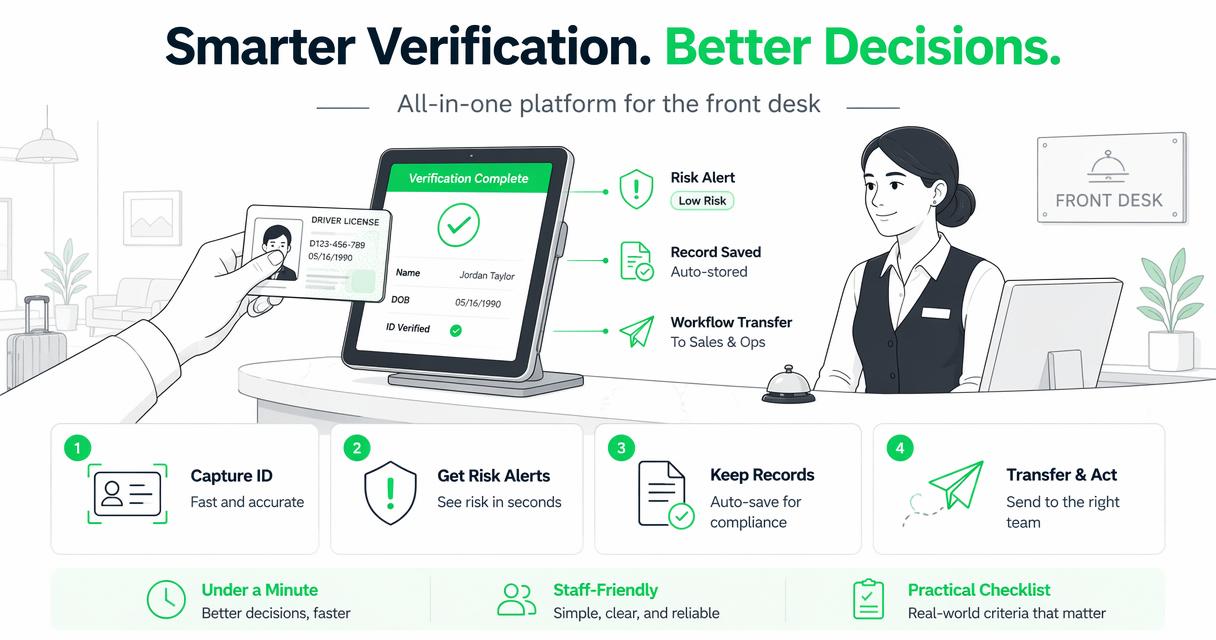
The strongest buyer checklist is practical, not flashy:
- ID capture: scans driver licenses, state IDs, passports, and other common travel documents.
- Supported document types: covers local, out-of-state, and international guests where your property receives them.
- Screening alerts: flags internal risks, age restrictions, payment concerns, or known guest issues.
- DNR checks: compares the guest with your do not rent records before keys are issued.
- PMS transfer: reduces retyping by moving captured details into the property workflow.
- Incident records: stores notes, photos, witnesses, police details, and staff actions.
- User permissions: limits who can view, edit, export, or delete sensitive guest data.
Hotels comparing guest record tools can also review this 2026 guide to guest record management software for hotels for a deeper feature comparison.
Feature priority by hotel type
| Hotel type | Highest-priority features | Why it matters |
|---|---|---|
| Limited-service hotel | Fast ID scan, DNR alert, PMS transfer | Smaller teams need quick, repeatable check-in controls |
| Full-service hotel | Incident records, permissions, guest history | More departments touch the guest relationship |
| Extended-stay property | ID retention rules, repeat-guest tracking, payment notes | Longer stays increase documentation needs |
| Multi-property group | Network DNR, role controls, audit trails | Risk patterns can move from one property to another |
| Airport or tourist hotel | Passport support, multilingual document handling | Guest identity documents vary more often |
How GuestBan ID Scanning handles hotel verification
The GuestBan ID Scanning platform is built around the hotel desk reality: capture the guest ID, connect it to a record, and help staff recognize repeat risk before the stay begins. That matters because hotels often do not need a complex enterprise identity suite; they need fast capture, clear alerts, and records that managers can actually use.
A strong workflow with GuestBan ID Scanning can support:
- Scan the guest ID during check-in.
- Capture key identity fields into the guest record.
- Check the guest against property risk notes or DNR records.
- Attach incident history when needed.
- Keep a clearer record for managers, chargebacks, or law-enforcement follow-up.
For hotels building a step-by-step front desk procedure, this related guide explains how to verify guest ID at hotel check-in without overcomplicating the staff script.
Operational rule: Pick software that matches the desk workflow your employees already run, then improve that workflow with required fields, alerts, and audit records.
What should hotels check before buying?
Hotels should check document coverage, alert quality, PMS fit, data controls, retention settings, staff usability, and support before buying verification software. A demo should not only show a successful scan; it should show what happens when the ID is damaged, the guest is already on a DNR list, or the front desk is busy.
Ask vendors direct questions:
- Which IDs and passports are supported for my guest mix?
- Can staff search by name, date of birth, phone, ID number, or prior incident?
- Does the system support role-based permissions for front desk, managers, and owners?
- Can we attach notes, images, police report numbers, and follow-up actions?
- How does the platform handle data retention and deletion requests?
- Can it transfer data into our PMS or at least reduce retyping?
- What happens if internet service is unstable during check-in?
Do not buy only for facial recognition, AI language, or a glossy dashboard. Research on generative AI and digital systems, including the 2023 paper by Dwivedi, Kshetri, Hughes, and coauthors on AI opportunities and challenges, reinforces the need to weigh usefulness, policy, and risk together, not just automation claims (International Journal of Information Management).
Privacy and compliance questions to settle early
Privacy controls should be part of the buying decision before a single guest ID is scanned. Hotels collect sensitive personal information, so managers need clear answers on consent, retention, access, storage, exports, and state-specific ID scanning rules.
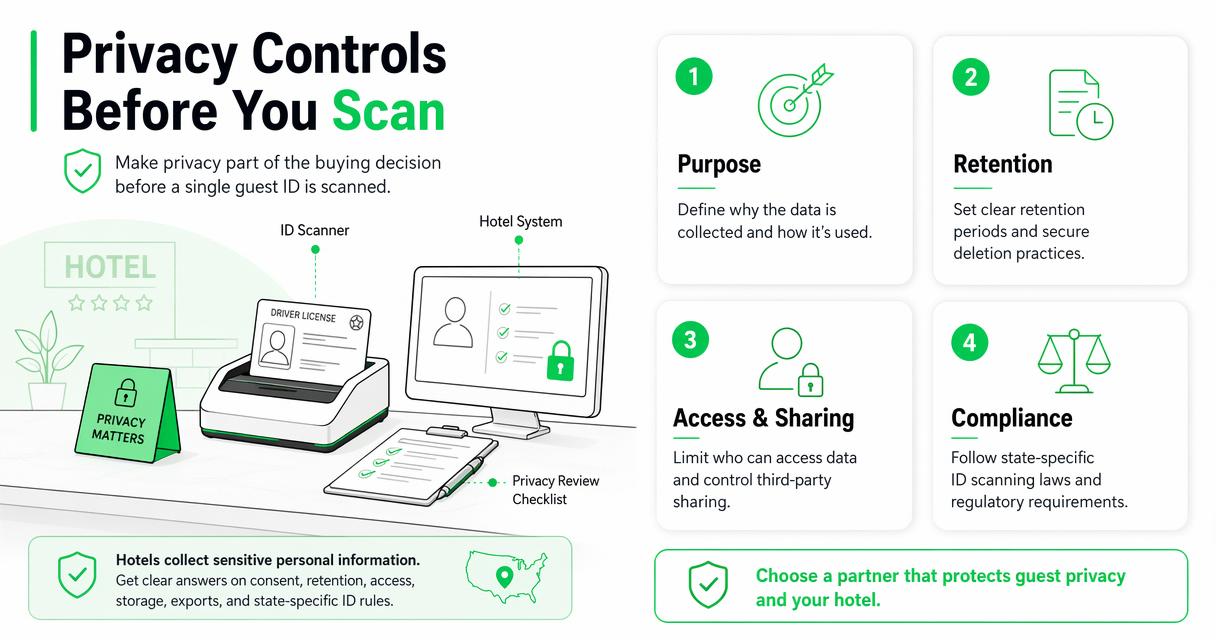
A good privacy review should cover:
- Purpose: define why the hotel scans IDs and when scanning is required.
- Notice: tell guests what data is collected and how it is used.
- Access: limit sensitive records to staff who need them.
- Retention: set a practical schedule for keeping and deleting records.
- Security: protect stored images, ID numbers, and incident notes.
- State rules: confirm local restrictions before rollout.
Operators can start with GuestBan's overview of hotel ID scanning laws and its page on hotel CCPA compliance when building a privacy checklist.
"Arguing that you don't care about the right to privacy because you have nothing to hide is no different than saying you don't care about free speech because you have nothing to say.", Edward Snowden, Reddit AMA
Hotels should avoid treating privacy as a back-office topic. Guests may accept ID checks, but they expect professional handling of their information.
How to implement verification without slowing check-in
Hotels can implement verification without slowing check-in by designing a short script, assigning staff roles, testing edge cases, training every shift, and reviewing reports weekly. The goal is not to add friction; it is to replace inconsistent manual steps with a repeatable check-in routine.
Use this rollout plan:
- Map the current desk flow: document what staff ask, type, copy, and store today.
- Choose required fields: decide which ID fields, reservation fields, and incident fields are mandatory.
- Write the guest script: keep it brief, such as, "We scan ID at check-in to confirm the reservation and keep accurate records."
- Test common exceptions: expired ID, foreign passport, no reservation match, DNR alert, and payment mismatch.
- Train each shift: include night audit, weekend staff, and relief managers.
- Review records weekly: check scan quality, missing fields, alert handling, and staff notes.
I recommend starting with one property or one shift before group-wide rollout. That pilot reveals small issues, such as where the scanner sits, who resolves alerts, and which reports managers actually read.
What to expect in 2027
Hotel verification will move toward more connected risk records, tighter privacy controls, and smarter document handling in 2027. The direction is clear from current buyer demand: managers want faster check-in, but they also want better proof when something goes wrong.
Expect three practical shifts:
- More AI-assisted review: systems will help detect mismatched document fields, duplicate identities, and incomplete records, but staff will still need final judgment.
- Better multi-property controls: hospitality groups will want shared DNR visibility with local permissions and careful documentation.
- Stronger privacy workflows: deletion requests, access logs, and state-specific policies will become standard buying criteria.
GuestBan ID Scanning fits this shift because it is tied to hotel records, DNR workflows, and front desk evidence needs, not only identity capture. For properties comparing tools in 2026, the smart move is to buy for the workflow you need now while making sure the system can support tighter controls next year.
FAQ about hotel guest verification
Hotel teams usually ask the same questions once they move from manual ID checks to digital verification. These answers are short enough for staff training and manager review.
Does every hotel need guest verification software?
Not every hotel needs the same level of verification, but most properties benefit from a digital ID record and repeatable check-in process. Limited-service hotels often need speed and DNR alerts. Larger hotels may need permissions, incident records, and multi-department access. The deciding factor is risk, not room count.
Is ID scanning the same as guest screening?
ID scanning captures and records identity details from a document. Guest screening uses that identity data to check for risk signals, such as a DNR match, incident history, age restriction, or payment concern. A complete hotel workflow usually needs both capture and screening.
Can verification software reduce chargeback problems?
Verification software can support chargeback response by preserving cleaner guest records, ID details, timestamps, staff actions, and related notes. It cannot guarantee a chargeback win because card network rules and evidence requirements vary, but it can make the hotel's documentation more organized and credible.
Should hotels store images of guest IDs?
Hotels should store ID images only when there is a clear business, legal, or risk-management reason and when local law allows it. Managers should define access limits, retention periods, and deletion procedures before scanning. If the hotel only needs extracted fields, storing fewer details may reduce privacy risk.
Conclusion
Guest verification software for hotels should do more than prove that a document exists. It should help your staff scan IDs, recognize repeat risk, transfer clean data, document incidents, protect guest privacy, and support management review. Start by writing your must-have workflow, then test vendors against real front desk scenarios instead of a perfect demo.
If you want a hotel-focused starting point, review GuestBan ID Scanning and build your checklist around ID capture, DNR alerts, incident records, and privacy controls. For next steps, assign one manager to audit your current check-in process this week, list the records your team wishes it had during the last guest dispute, and visit guestban.com when you are ready to compare a purpose-built option.