

TL;DR
Cloud storage for scanned guest IDs should give hotel teams fast retrieval, strict permissions, clear retention rules, and printable records for chargebacks, DNR documentation, and front desk verification. Start by mapping who needs access, what must be searchable, how long images should be retained, and how the system supports privacy obligations in each state.
A scanned guest ID can protect a hotel during a chargeback, incident review, or front desk dispute, but only if the record is stored securely and can be found fast. Cloud storage for scanned guest IDs is no longer just a digital filing cabinet; in 2026, it needs role-based access, audit trails, searchable guest records, retention controls, and clear reporting. For hotels that want ID capture tied to operational risk controls, GuestBan ID Scanning is built around the real workflows front desks use every day.
Table of Contents
What is cloud storage for scanned guest IDs?
Cloud storage for scanned guest IDs is the secure remote storage of identity document images and related guest data so authorized hotel staff can access, search, retain, report, and protect records over a network. A cloud system should store IDs in controlled logical pools, matching the general definition of cloud storage described by Wikipedia.
Cloud storage: A model of data storage where information is stored remotely, accessed through a network, and managed through logical pools rather than local paper files or a single front desk computer.
Scanned guest ID record: A digital record that may include an ID image, parsed guest details, reservation context, staff notes, timestamps, device source, and access history.
For hotel operators, the goal is not to collect more data than needed. The goal is to keep the right record, restrict access, and retrieve evidence when there is a legitimate business need.
Why hotels are moving ID records to secure cloud systems
Hotels are moving scanned ID records into cloud systems because local storage, paper photocopies, and shared folders are hard to control across shifts, managers, and properties.
A front desk record needs to be available at 11 p.m. during a dispute, at 8 a.m. during accounting review, and months later during a chargeback. Cloud access makes that possible without asking staff to search drawers, email attachments, or a back-office desktop.
Operational uses hotels should plan for
- Front desk verification: Confirm that the ID matched the reservation, payment card, or house policy at check-in.
- Chargeback evidence: Retrieve ID records, timestamps, signed documents, and staff notes for a response package.
- DNR documentation: Support a Do Not Rent decision with consistent incident records and identity details.
- Multi-property review: Let authorized managers see relevant records without giving every employee access to every guest file.
- Audit and training: Review who scanned, viewed, printed, or exported a record.
If your property is building a chargeback file, the workflow should connect ID records with signed forms and incident notes. The GuestBan guide to hotel chargeback documentation and ID scanning explains how evidence packages are typically assembled.
Key takeaway: Cloud storage only helps if the record is searchable, permissioned, and tied to the guest event that created the risk.
What secure ID storage should include in 2026
Secure ID storage should include encryption, role-based permissions, searchable records, retention settings, printable reports, activity logs, and clear export controls.
A hotel ID record sits at the intersection of operations, privacy, and fraud prevention. The system should serve the front desk without turning sensitive identity images into a free-for-all file archive.
Feature checklist for hotel ID records
| Capability | Why it matters for hotels | What to verify before buying |
|---|---|---|
| Role-based permissions | Limits access by job role, property, or manager level | Can front desk, GM, accounting, and corporate users have different rights? |
| Searchable guest records | Finds records by name, date, room, document type, or incident | Does search cover parsed ID fields and manual notes? |
| Image retention controls | Reduces unnecessary storage of sensitive ID images | Can you set retention rules by property or policy? |
| Printable reports | Supports disputes, law enforcement requests, and chargebacks | Are reports timestamped and readable? |
| Access logs | Shows who viewed, changed, printed, or exported data | Are logs visible to managers or only vendor support? |
| Export controls | Prevents casual downloading or emailing of ID images | Can exports be restricted or approved? |
| Mobile support | Helps teams scan passports, visas, and driver licenses quickly | Are iOS and Android supported if mobile scanning is needed? |
I like to evaluate these features in a live front desk scenario, not just a sales demo. Ask a clerk to scan a driver license, find the record by guest name, print a report, and show the access history. Weak systems usually fail during that practical test.
"Security is a process, not a product.", Bruce Schneier, The Process of Security
How digital ID scanning works at check-in
Digital ID scanning works by capturing a passport, driver license, visa, or identity card, extracting key fields, attaching the record to a guest profile or incident, and storing the image and data under controlled access.
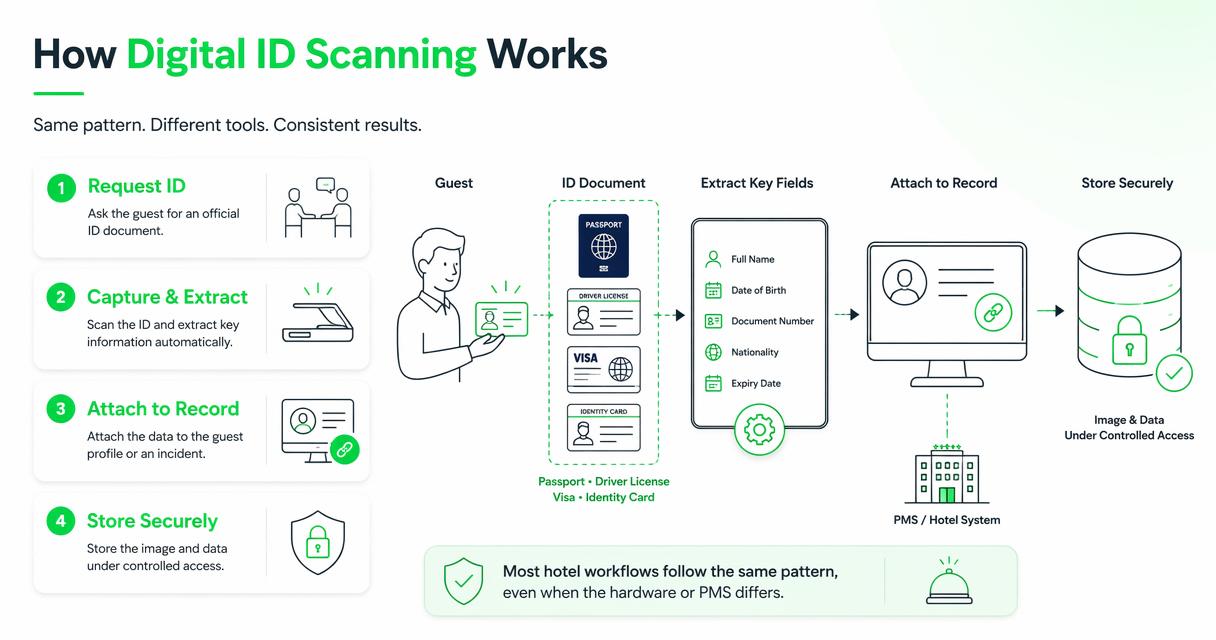
Most hotel workflows follow the same pattern, even when the hardware or PMS differs.
Recommended front desk sequence
- Request the ID under house policy: Staff should explain why the ID is needed and match it to the reservation.
- Scan the document: Use a desktop scanner, mobile device, or supported camera workflow for IDs, passports, visas, or driver licenses.
- Review parsed data: Confirm name, document type, date of birth if used by policy, and expiration details.
- Attach context: Link the ID to the stay, incident, DNR review, payment issue, or guest profile.
- Store with permissions: Save the image and fields to a controlled cloud record, not an email inbox or local folder.
- Apply retention rules: Keep records only as long as policy, law, or business need requires.
- Log access: Record who scanned, viewed, printed, or exported the file.
For staff training, pair the storage policy with a practical check-in standard. The GuestBan walkthrough on how to verify guest ID at hotel check-in is useful for turning policy into repeatable steps.
GuestBan ID Scanning supports this kind of operational flow by focusing on identity capture, record lookup, and hotel risk documentation instead of treating the ID scan as an isolated image.
Privacy rules shape how long ID images should stay stored
Privacy rules shape cloud ID storage because hotels must balance fraud prevention, guest safety, legal duties, and data minimization.
The European Union's General Data Protection Regulation gives a useful privacy principle even for hotels outside Europe: collect and retain personal data with a defined purpose. State privacy laws in the United States may also affect guest records, depending on location and data use.
"Personal data shall be processed lawfully, fairly and in a transparent manner in relation to the data subject.", European Parliament and Council, General Data Protection Regulation, Article 5
Retention questions to answer before rollout
- What guest ID fields are needed for check-in, payment defense, or incident review?
- Which users can view the full image, and which users only need text fields?
- How long are ID images retained after checkout?
- Are DNR records retained differently from normal stay records?
- Who approves exports, prints, or law enforcement responses?
- How does the hotel handle deletion requests where applicable?
A single-property motel and a multi-state hotel group may need different rules. If you operate in California or serve California residents, review GuestBan's resource on hotel CCPA compliance as part of your privacy planning.
Good privacy practice also improves operations. Fewer unnecessary copies mean fewer places to search, fewer access questions, and less confusion when a manager needs a defensible record.
Cloud storage vs local folders, PMS notes, and paper copies
Cloud storage is usually better for scanned ID records than local folders, PMS notes, or paper copies because it can combine access control, search, retention, and audit history in one managed system.
Local storage can look simple until a property changes computers, loses a manager, or needs evidence from a past stay. PMS notes are useful, but they may not preserve the scanned document image or show who accessed it. Paper copies create their own risk because they are hard to track and easy to misplace.
Storage method comparison for hotel teams
| Storage method | Best use | Main limitation |
|---|---|---|
| Secure cloud ID system | Searchable ID images, permissions, reporting, multi-property access | Requires policy setup and staff training |
| PMS notes only | Basic reservation context and staff comments | May not store or protect ID images well |
| Local desktop folder | Small temporary files before proper upload | Weak access tracking and device dependence |
| Email attachments | Rare approved transfer to a defined recipient | Poor retention control and easy forwarding |
| Paper photocopies | Legacy process or legal file where required | Hard to search, audit, or restrict by role |
Research on cloud-connected systems repeatedly points to security monitoring as an ongoing requirement, not a one-time setup. The 2021 survey Cyber Security in IoT-Based Cloud Computing covers cloud security risks across connected systems, while the 2023 review of anomaly detection strategies explains how threat detection helps identify unusual behavior in complex systems: Ahmad, Rasool, and Javed, Jeffrey, Tan, and Villar.
Key takeaway: A scanned ID should not live wherever the clerk happened to save it. It should live where access, retention, and reporting can be governed.
How GuestBan ID Scanning handles hotel ID records
GuestBan ID Scanning handles hotel ID records by aligning ID capture with the operational tasks hotels care about: verification, DNR documentation, chargeback support, and controlled record access.
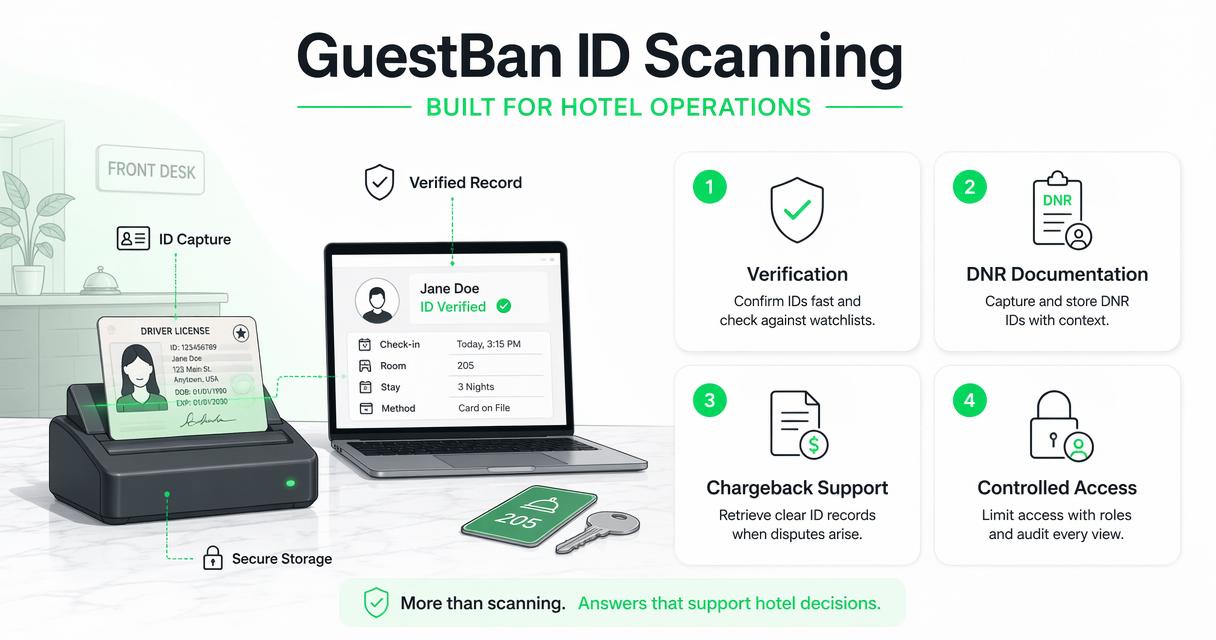
Many scanning tools focus only on reading a document. That solves data entry, but it may leave managers asking harder questions later: who saw the record, where is the incident note, can accounting print a useful report, and can another property see the right DNR warning?
Where the platform fits in daily operations
- Front desk teams can capture guest identity records during check-in and reduce manual typing.
- General managers can review records tied to incidents, stay history, or payment disputes.
- Loss prevention teams can support DNR decisions with identity-linked documentation.
- Hotel groups can think beyond one property and plan consistent access rules across locations.
If your team is formalizing DNR procedures, read the explanation of what Do Not Rent means in hotels before setting retention and access rules. DNR documentation should be factual, permissioned, and tied to clear house policy.
GuestBan ID Scanning is a strong fit when a hotel wants scanned IDs to support risk control, not just faster typing. Visit guestban.com when you are ready to compare scanner workflows against your current front desk process.
Common setup mistakes hotels should avoid
Hotels should avoid storing guest IDs without a written purpose, giving broad employee access, keeping images forever, and relying on untracked exports.
The most common mistake I see is treating scanned IDs as a technology project instead of a records policy. A scanner can capture the image, but management must decide who can use it, when it is needed, and when it should be removed.
Red flags in an ID storage workflow
- Staff can download every ID image without approval.
- Former employees still have access after leaving.
- Records cannot be searched by stay date, guest name, or incident type.
- The system stores images indefinitely by default.
- Managers cannot see who printed or exported a record.
- ID scans are saved in shared drives, email threads, or desktop folders.
- DNR records lack incident notes, witness details, or manager review.
Another overlooked issue is energy and infrastructure planning. Cloud services run on data centers, and the 2022 survey on energy efficiency in cloud computing data centers reviews software-side approaches for reducing data center energy use: Katal, Dahiya, and Choudhury. Hotels do not need to manage the data center, but they should choose vendors that treat cloud operations as a managed discipline.
Fix the policy first. Then configure the technology to enforce it.
What to expect from ID storage in 2027
Hotel ID storage in 2027 will likely become more automated, more privacy-specific, and more connected to fraud signals, DNR controls, and PMS workflows.
AI-assisted document capture is already pushing hotels toward faster field extraction and better mismatch detection. The next step is not just reading the ID; it is helping staff understand whether the record connects to a prior incident, a payment risk, or a policy exception.
Practical changes to watch
- More selective retention: Hotels will store full ID images for defined reasons and rely more on limited fields when images are not needed.
- Better permission tiers: Corporate, GM, front desk, accounting, and security roles will get more precise access rules.
- Stronger audit expectations: Managers will expect clear logs for views, edits, prints, exports, and deletions.
- More mobile scanning: iOS and Android workflows will matter for properties that do not want dedicated scanner hardware at every station.
- Tighter PMS connection: ID records, reservations, incidents, and reports will need cleaner handoffs.
I would not buy a storage workflow in 2026 that cannot grow into these expectations. Even if a hotel starts with one property, record controls should be ready for multiple shifts, managers, and locations.
FAQ about scanned guest ID storage
Should hotels store scanned copies of guest IDs?
Hotels may store scanned guest IDs when there is a lawful business purpose, clear policy, and proper access control. Common reasons include guest verification, payment dispute evidence, incident documentation, or local legal requirements. Hotels should avoid collecting more data than needed and should set retention rules before scanning begins.
How long should a hotel keep scanned ID images?
A hotel should keep scanned ID images only as long as its legal obligations, dispute windows, insurance needs, or documented risk policies require. Retention should not be unlimited by default. Separate normal stay records from incident or DNR records because those categories may require different review and retention periods.
Who should be allowed to access scanned guest IDs?
Access should be limited to staff with a defined operational need. Front desk staff may need to scan and confirm records, while managers, accounting, or loss prevention may need review and reporting rights. A strong system uses role-based permissions so every employee does not see every document.
Are scanned IDs useful for hotel chargebacks?
Scanned IDs can help chargeback responses when they are paired with reservation details, signed documents, payment records, timestamps, and staff notes. The ID alone is rarely the whole case. A printable report that ties the scan to the stay and staff action is much more useful.
Can hotels scan passports, visas, and driver licenses?
Many hotel ID scanning workflows can capture passports, visas, driver licenses, and identity cards, but support varies by scanner, software, country, and document format. Before buying, test your most common guest documents and confirm that the system stores both images and searchable fields under the right permissions.
Conclusion
The right cloud storage for scanned guest IDs gives your hotel a controlled record system, not just a pile of digital images. Start with a written policy, define access by role, set retention rules, test search and reporting, and train the front desk on the exact check-in workflow.
For a practical next step, audit five recent ID records and ask: can we find them fast, prove who accessed them, print a clear report, and explain why we still store them? If the answer is no, schedule a workflow review and compare your process with GuestBan ID Scanning.

