

TL;DR
DNR in hotels means Do Not Rent, a property decision not to rent to a guest based on documented risk, policy violations, or unresolved incidents.
DNR hotel meaning is simple on the surface, but mishandling it can create front desk confusion, guest disputes, and weak records when a repeat problem returns. In hotel operations, DNR means Do Not Rent, not the medical phrase do not resuscitate. A DNR entry tells authorized staff that a person should not be rented a room again under the hotel’s policy. For properties that want safer, faster guest checks, GuestBan ID Scanning helps connect verified ID records with front desk alerts, so staff are not relying on memory, sticky notes, or informal warnings.
Table of Contents
What does DNR mean in a hotel?
DNR in a hotel means Do Not Rent, a status used to flag a guest the property has decided not to rent to again. The decision should be based on documented conduct, not rumor, appearance, or personal bias.
DNR: A hotel operations abbreviation for Do Not Rent, meaning an authorized employee has marked a guest record so future reservations or walk-ins can be reviewed, denied, or escalated under policy.
The term can confuse new staff because DNR has other meanings outside lodging. In healthcare, DNR commonly means do not resuscitate. In some property systems, DNR may also mean Do Not Reserve for a room blocked from inventory. Context matters.
Quote-ready summary: In hotels, DNR usually means Do Not Rent. It is a guest-level warning used to prevent repeat stays after documented incidents, policy violations, unpaid balances, safety concerns, or fraud concerns. A good DNR process includes ID-based matching, incident documentation, staff permissions, and check-in alerts.
The strongest hotel policies treat DNR as a risk control, not a punishment. I recommend writing the decision as an operational record: what happened, who approved it, what evidence exists, and what staff should do if the guest returns.
Why do hotels place someone on a Do Not Rent list?
Hotels place someone on a Do Not Rent list when a documented guest issue creates safety, financial, operational, or property risk if the person returns. The reason should be specific enough that a manager can defend the decision later.
Common reasons include:
- Violence, threats, or harassment toward employees, guests, vendors, or security staff
- Property damage beyond normal wear, especially if unpaid or repeated
- Smoking or drug policy violations in nonsmoking rooms or shared areas
- Chargebacks, unpaid balances, or payment fraud tied to a previous stay
- Repeated noise complaints after staff warnings
- Unauthorized parties, extra occupants, or room misuse
- Theft, trespass, or police involvement during a prior stay
- Fake, mismatched, or refused identification at check-in
A DNR entry should never be a shortcut for poor communication. If the hotel simply disliked a guest, the record is too weak. If the hotel documented a broken policy, staff names, dates, photos, police case numbers, or payment records, the decision becomes much easier to apply consistently.
For a deeper operational guide, see this related resource on how hotels use a Do Not Rent list to protect the property.
Who should have access to hotel DNR records?
DNR records should be visible only to staff who need the information to check in guests, manage incidents, approve exceptions, or audit policy use. Broad access creates privacy risk and inconsistent handling.
Front desk agents need enough information to act, but not always every detail. A night auditor may need a clear alert and escalation path. A general manager may need the full incident record. Ownership or corporate risk teams may need reporting across properties.
Recommended access levels for DNR records
| Role | Access level | What they should see | Why it matters |
|---|---|---|---|
| Front desk agent | Limited | Alert, guest match, required action | Prevents accidental check-in without oversharing details |
| Front desk supervisor | Moderate | Alert, reason category, manager notes | Helps resolve disputes and approve next steps |
| General manager | Full | Incident record, evidence, approvals, history | Owns property-level risk decisions |
| Security or loss prevention | Full or case-based | Incident notes, photos, police references | Supports safety response and evidence retention |
| Corporate operations | Reporting-based | Multi-property flags, audit logs, trend data | Keeps standards consistent across locations |
| Housekeeping or maintenance | Usually none | Only task-related notes if needed | Protects guest privacy and limits gossip |
A permission model also helps with privacy expectations. The NIST Privacy Framework frames privacy as an enterprise risk management issue, which fits hotel DNR records well because the data touches identity, behavior, payments, and safety.
I like a simple rule: if an employee cannot take action based on the DNR record, they probably should not have full access to it.
What documentation should a hotel keep before marking DNR?
A hotel should keep enough documentation to show what happened, why the DNR decision was made, and who approved it. Strong records protect staff, help managers apply policy fairly, and reduce confusion when the guest returns months later.
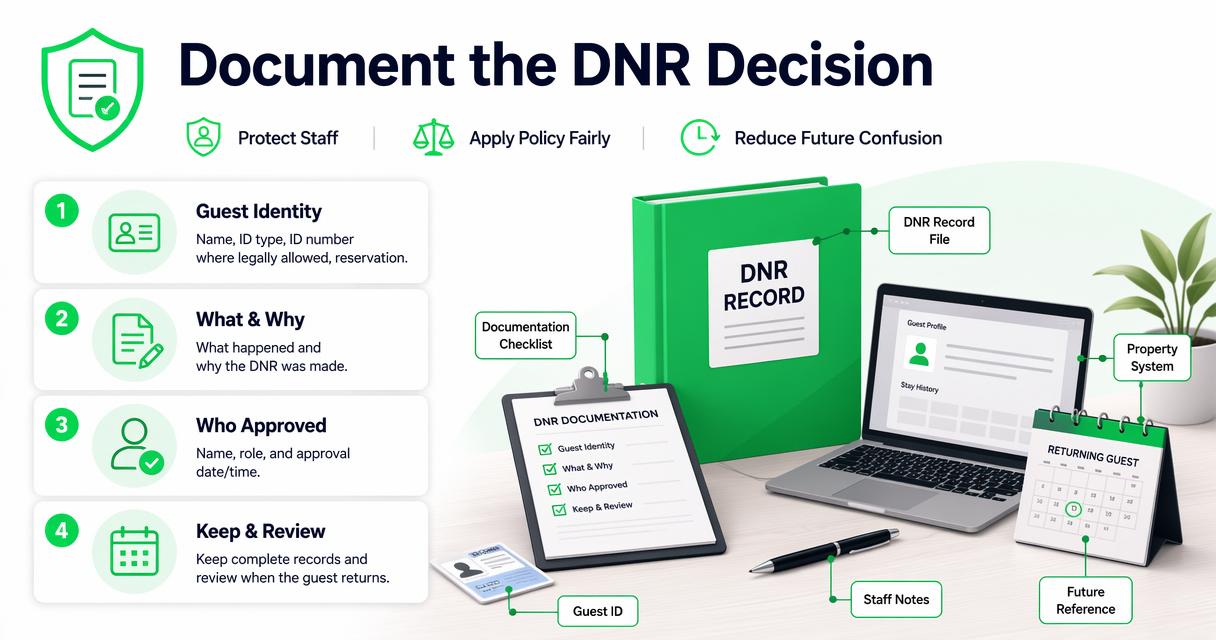
Practical DNR documentation checklist
- Guest identity: Name, ID type, ID number where legally allowed, reservation details, phone, email, and loyalty profile if relevant.
- Incident timeline: Date, time, location, staff involved, warnings given, and guest response.
- Policy basis: The house rule, rental agreement term, payment rule, or safety policy that was violated.
- Evidence: Photos, signed registration card, folio, chargeback notice, repair invoice, video reference, or police case number.
- Witnesses: Employee names, guest statements, security notes, or third-party reports.
- Manager approval: Name, title, date, and whether the restriction is temporary, permanent, or reviewable.
- Future action: What front desk staff should say, whether to call a manager, and whether law enforcement is needed for trespass situations.
Guest identity records matter because many DNR failures happen when the person books under a variation of their name or arrives on another person’s reservation. The workflow in this guide to verifying guest ID at hotel check-in pairs well with a DNR policy because it starts with accurate identity capture.
“Trust, but verify.”, Ronald Reagan, Ronald Reagan Presidential Library and Museum
That quote is overused, but it fits the front desk. A DNR list is only as useful as the identity match behind it.
How should front desk alerts work during check-in?
Front desk alerts should appear early enough in the check-in process to stop a risky rental before keys are issued. The alert should be clear, discreet, and tied to a written procedure.
A useful alert does not need to show a dramatic warning. It needs to tell the agent what to do next. For example: “Manager review required before check-in” is better than a vague note like “bad guest.” Clear language reduces arguments and keeps the agent from improvising.
A safe DNR alert workflow
- Scan or verify the guest ID before assigning a room.
- Match the guest record against property-level or approved group-level DNR entries.
- Display a discreet alert with the action required, not unnecessary personal details.
- Pause the check-in and contact the manager or supervisor on duty.
- Confirm the match using ID data, reservation details, and documented notes.
- Follow the script for denial, escalation, deposit request, or exception approval.
- Record the outcome so the next shift knows what happened.
The GuestBan ID Scanning platform is designed for this kind of workflow: verified identity first, then a clear record staff can act on. That reduces the chance that a returning guest slips through because a new employee did not know the history.
Hotels still need human judgment. A name match alone is not enough when common names, typos, aliases, and third-party reservations are involved. ID-based review, manager approval, and audit trails create a fairer process.
What is the difference between DNR, blacklist, and incident report?
DNR, blacklist, and incident report are related terms, but hotels should use DNR and incident report because they are more specific and operationally useful. The word blacklist can sound vague, informal, and risky in policy documents.
Terminology hotels should use in 2026
| Term | Best meaning in hotel operations | Recommended use |
|---|---|---|
| Do Not Rent, DNR | A guest-level restriction on future rentals | Use in PMS notes, ID scanning alerts, and manager procedures |
| Incident report | The factual record explaining what happened | Use as the evidence behind a DNR decision |
| Trespass notice | A legal or security instruction after serious conduct | Use only when approved by management and local procedure |
| Blacklist | Informal term for excluding someone | Avoid in formal policy because it lacks precision |
| Do Not Reserve | A room inventory status in some systems | Use only for rooms blocked from sale, not guest restrictions |
Language affects behavior. A front desk agent who sees “blacklist” may not know whether to deny the rental, call a manager, or ask for a larger deposit. A DNR alert with a linked incident report gives clearer instructions.
“An Ounce of Prevention is worth a Pound of Cure.”, Benjamin Franklin, Founders Online
For hotels, prevention means making sure the record is accurate before the guest is standing at the desk with bags, a line behind them, and a room already assigned.
How should multi-property hotel groups manage shared DNR alerts?
Multi-property hotel groups should manage shared DNR alerts with local controls, consistent criteria, and clear approval rules. A network-wide flag can prevent repeat issues across properties, but only if the data is accurate and access is limited.
A shared list should answer four questions:
- Scope: Does the restriction apply to one property, a region, a brand, or all locations?
- Authority: Who can create, edit, approve, or remove a record?
- Evidence: What documentation is required before sharing the alert?
- Review: When should the entry expire, be reviewed, or remain permanent?
For hotel groups, the biggest operational gain is consistency. A guest denied at one property should not be automatically accepted at another property because the second team cannot see the record. Still, shared data needs stronger governance than a single-property note.
The 2026 guide to network-wide Do Not Rent lists for hotel groups explains how local control and shared alerts can work together. In my view, regional managers should review shared flags regularly, especially where the original incident was financial rather than safety-related.
GuestBan ID Scanning can support centralized visibility while allowing managers to define who sees what. For operators managing several hotels, that balance is more useful than a spreadsheet passed around by email.
What mistakes should hotels avoid with DNR lists?
Hotels should avoid informal, undocumented, biased, or overexposed DNR practices because they create operational and legal risk. A bad list can cause more trouble than no list at all.
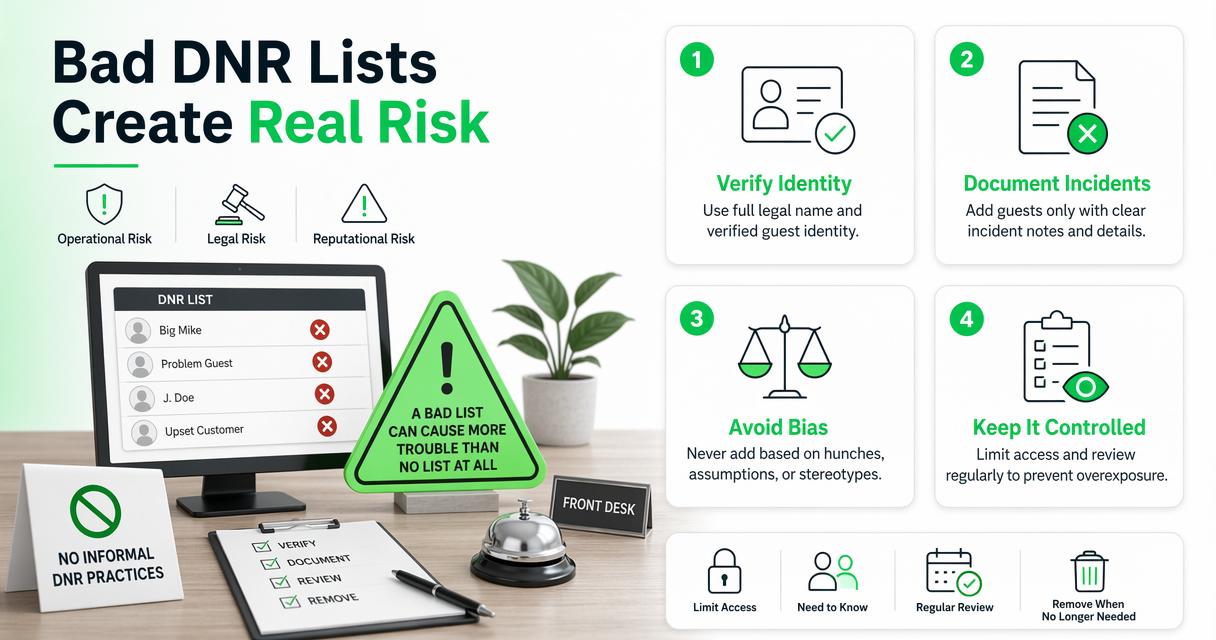
Common mistakes include:
- Using nicknames or vague labels instead of verified guest identity
- Adding guests without incident notes or manager approval
- Letting too many employees view sensitive details
- Keeping records forever without review when the issue was minor
- Failing to train new front desk staff on what to do when an alert appears
- Using emotional wording such as insults, speculation, or unsupported claims
- Ignoring local laws about refusal of service, privacy, trespass, and data retention
The safest wording is factual: “Guest charged back stay dated March 4, 2026, after signed registration and ID match” is better than “guest is a scammer.” Stick to what the hotel can prove.
Privacy also deserves attention. DNR records may include identity documents, payment notes, safety incidents, and law enforcement references. Store that information in a controlled system, not in paper binders, shared inboxes, or unlocked office files.
If your property still photocopies IDs or types details by hand, compare that process with automated hotel ID capture for safer, faster check-ins. Manual work increases inconsistency, especially during shift changes.
How does DNR connect to chargebacks and payment disputes?
DNR records often connect to chargebacks because identity, folio, policy, and incident documentation can help a hotel respond to disputes. A payment dispute may be the reason for a DNR entry, or the DNR file may become supporting evidence later.
Chargeback-related DNR entries should be especially factual. The record should show the reservation source, check-in identity match, signed terms, payment method, stay dates, folio, communication history, and dispute outcome. Avoid writing conclusions the evidence cannot support.
A useful payment-risk file may include:
- Signed registration card or digital acceptance record
- ID scan or verified identity details, where allowed
- Folio showing room, tax, fees, deposits, and incidentals
- House rule acknowledgment, smoking fee notice, or damage policy
- Photos, repair invoices, or staff incident notes
- Payment processor notice and response date
The related guide on why hotels should care about chargebacks gives more context on how disputes affect operations. I would treat repeated payment abuse differently from one confusing billing issue. The first may justify DNR review; the second may call for better communication.
Documentation does not guarantee a hotel wins every dispute. It does make the decision cleaner, the response faster, and the next front desk interaction less dependent on memory.
What should guests know if they are told they are DNR?
A guest told they are DNR should ask for the hotel’s reason, resolve any unpaid balance if applicable, and avoid trying to bypass the restriction through another reservation. The hotel may still refuse service under its policies.
Guests sometimes assume a DNR entry is a public criminal record. Usually, it is not. It is an internal hotel or hotel-group record used for rental decisions. A property may also involve law enforcement if a person has been trespassed, threatens staff, refuses to leave, or tries to enter private areas after being denied service.
A guest who believes the record is wrong can ask for manager review. The strongest arguments are factual: wrong identity, paid balance, reversed chargeback, documented misunderstanding, or proof that the record belongs to someone else with a similar name.
Hotel staff should stay calm and avoid debating the incident at the front desk. A simple script works best: “A manager review is required before we can rent a room. I’m going to contact the manager now.” That keeps the conversation procedural, not personal.
What will change for DNR hotel practices in 2027?
DNR hotel practices will keep moving toward verified identity, tighter permissions, better audit trails, and clearer multi-property rules. The shift is already happening because hotels need faster check-ins and stronger risk controls without exposing sensitive guest data.
In 2027, I expect more hotels to connect DNR workflows with ID scanning, PMS records, incident reporting, and chargeback documentation. The front desk will still make judgment calls, but the system will do more of the matching, logging, and routing.
Three changes are likely:
- More ID-based alerts: Name-only matching will become less acceptable because it creates false positives and missed matches.
- More role-based visibility: Staff will see the action they need, while managers retain full records.
- More review dates: Hotels will separate permanent safety restrictions from temporary financial or conduct flags.
GuestBan ID Scanning fits that direction because it links identity capture with operational alerts. If your team is reviewing DNR procedures this year, head to guestban.com and look at how ID scanning can reduce manual work at check-in.
FAQ about DNR hotel meaning
Does DNR mean Do Not Resuscitate in a hotel?
In hotel operations, DNR usually means Do Not Rent, not Do Not Resuscitate. The medical meaning belongs to healthcare contexts. Hotels use DNR to flag a guest who should not be rented a room again, or who requires manager review before check-in.
Can a hotel legally refuse to rent to someone on a DNR list?
A hotel can often refuse service for documented policy, payment, safety, or property reasons, but it must follow applicable laws. The decision should not be based on protected characteristics. Managers should use written criteria, factual records, and local legal guidance for serious or disputed cases.
How long should a hotel keep someone on DNR?
A hotel should set retention rules based on severity, evidence, and policy. Serious safety incidents may justify a long or permanent restriction, while minor conduct or payment issues may deserve a review date. The record should state whether the DNR is temporary, reviewable, or permanent.
Can a guest bypass DNR by booking through someone else?
A guest should not assume another person’s reservation removes the DNR issue. If the hotel verifies ID at check-in and the guest matches a restriction, staff may deny the stay or require manager approval. Attempting to bypass a restriction can make the situation worse.
Should DNR alerts be stored in the PMS?
DNR alerts can live in a PMS, ID scanning platform, or connected guest record system, but they must be secure and easy for staff to act on. The best setup combines identity matching, role-based permissions, incident notes, audit trails, and a clear check-in workflow.
Conclusion
DNR hotel meaning matters because one small abbreviation can decide whether a risky repeat stay is stopped or missed. Treat Do Not Rent as a documented operational control: verify identity, record facts, limit access, train staff, and review entries on a schedule.
If your hotel still relies on memory, paper notes, or disconnected PMS comments, the next step is practical: map your current DNR workflow from reservation to ID check to manager approval. Then compare it with a safer ID-based process. Visit guestban.com to evaluate GuestBan ID Scanning and build a front desk workflow that helps your team act quickly, fairly, and consistently.

