
TL;DR
Extended-stay hotels need ID scanning because risk builds over weeks, not minutes: renewals, visitors, payment disputes, and incident notes all need clean records. The best workflow scans ID at check-in, validates renewals, ties notes to the guest profile, and reviews DNR status before extending a stay.
Extended-stay guests may be with you for 7, 30, or 90 nights, so one weak check-in record can follow your team for an entire occupancy. ID scanning for extended-stay hotels is the practice of capturing, verifying, and storing guest identity data at check-in and key stay events so operators can support safer decisions, faster renewals, cleaner billing, and better documentation. For hotels that want a purpose-built layer for guest records, alerts, and front desk controls, GuestBan ID Scanning gives teams a practical way to connect ID capture with hotel risk workflows.
Table of Contents
What is ID scanning for extended-stay hotels?
ID scanning for extended-stay hotels is a front desk workflow that captures a guest’s identity document, extracts key fields, compares the record against internal risk rules, and stores usable documentation for the full stay cycle. It is different from a one-night check-in because the record must support renewals, payment changes, incident notes, and future do-not-rent review.
ID scanning: A hotel identity workflow that converts a physical or digital ID into structured guest data, usually including name, date of birth, document type, document number, issuing region, and scan timestamp.
Extended-stay brands operate closer to apartment-style lodging than transient lodging. Wikipedia describes Extended Stay America as an economy apartment hotel chain in the United States and Canada, which reflects the category’s core operating reality: longer occupancy, more routine guest interaction, and more chances for documentation gaps to matter.
Key insight: A normal hotel ID check answers, “Who is checking in tonight?” An extended-stay ID workflow answers, “Who is still in-house, who renewed, who paid, who visited, and what record supports the decision?”
Why does extended-stay create different ID risk?
Extended-stay properties face higher documentation pressure because a guest relationship can change many times during one stay. A clean first scan helps, but the real value comes from tying identity to renewals, card changes, room moves, incident reports, and DNR decisions.
Longer occupancy creates more operational touchpoints. A guest may switch payment cards, add an occupant, extend week by week, receive packages, request new keys, or dispute a charge after checkout. If the front desk relies on handwritten notes or memory, the property loses the timeline.
Risk comparison table
| Risk area | Transient hotel pattern | Extended-stay pattern | ID workflow response |
|---|---|---|---|
| Occupancy length | 1 to 3 nights | Weekly or monthly stays | Recheck identity at renewal milestones |
| Payment disputes | Usually tied to one folio | Multiple authorizations and extensions | Link ID, card, folio, and timestamp |
| Unauthorized occupants | Short detection window | More visitor and key activity | Record approved occupants and key requests |
| Incidents | Often isolated | Can repeat over time | Attach notes to the verified guest profile |
| DNR review | Future booking concern | Same-stay and renewal concern | Review before extending the stay |
A simple scanner is not enough if the system cannot preserve context. I’d rather see a hotel scan fewer fields well than collect a pile of images nobody can retrieve during a dispute.
How should check-in ID scanning work?
A strong check-in workflow scans the ID, confirms the reservation match, verifies payment alignment, records approved occupants, and saves the scan with a timestamp. The front desk should know exactly what to do when the name, card, age, address, or document quality does not match policy.
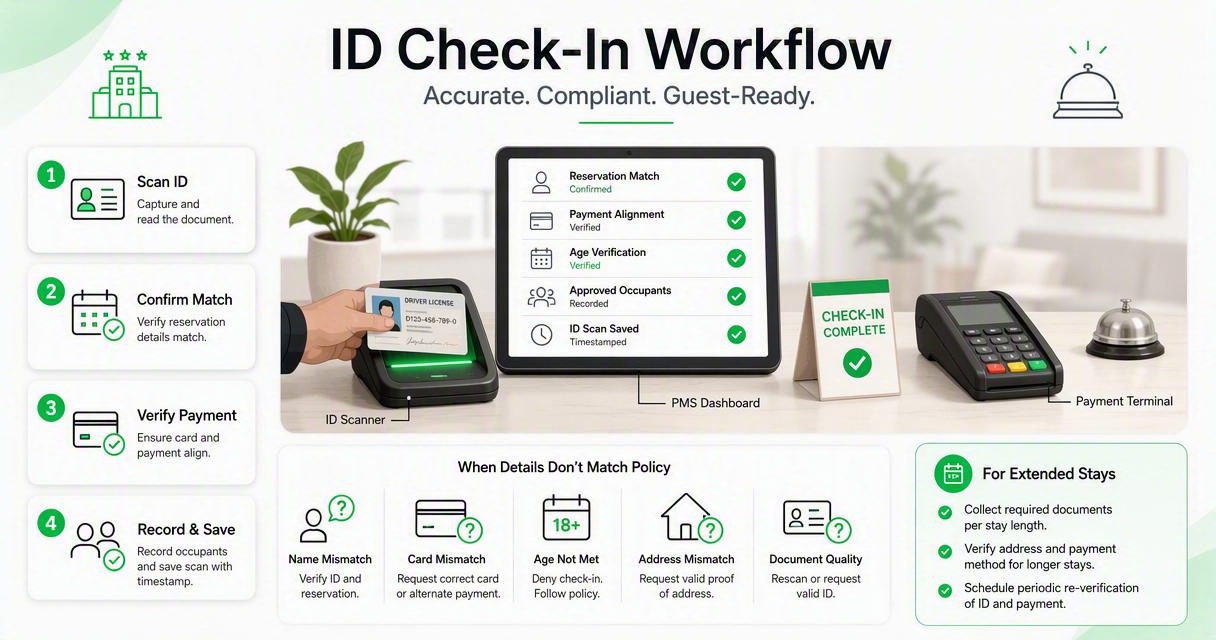
For extended-stay teams, check-in should be written like a control process, not a casual greeting. The record needs to be accurate enough for the PMS, secure enough for privacy review, and fast enough that agents actually use it during rush periods.
Check-in control steps
- Scan the primary guest ID before issuing keys.
- Match the ID name to the reservation and payment method when policy requires it.
- Capture required fields only based on your legal and operational policy.
- Record approved occupants if your property tracks adults in the room.
- Check internal alerts or DNR status before completing registration.
- Transfer verified data to the PMS or attach it to the guest record.
- Document exceptions with manager approval.
For deeper implementation detail, the Hotel Guest Data Capture Automation guide explains how automated ID data capture can reduce manual entry and make guest records easier to audit.
“If you collect it, protect it.”, Federal Trade Commission, Protecting Personal Information: A Guide for Business
That quote is short, but it should shape the entire workflow. A hotel should never scan IDs just because the scanner exists. Collection must have a purpose, access must be limited, and deletion rules must be defined.
How should renewals and room extensions be handled?
Renewals should trigger a short identity and risk review because the hotel is making a new stay decision. The front desk should confirm the guest, payment status, room condition concerns, incident notes, approved occupants, and DNR status before adding more nights.
Weekly extensions are where many extended-stay hotels lose control. A guest who checked in cleanly may later change cards, add unregistered occupants, create noise complaints, or fall behind on payment. If the renewal only asks, “How many more nights?” the team skips the risk review.
Renewal checklist for front desk teams
- Confirm the person requesting renewal is the registered guest or authorized party.
- Review open balances, declined cards, chargeback history, and deposit status.
- Check incident notes from housekeeping, maintenance, security, and night audit.
- Confirm whether additional occupants are approved under property policy.
- Recheck DNR or alert status before extending the folio.
- Save the renewal timestamp and staff member name.
Hotels dealing with payment disputes should connect renewal controls with stronger evidence practices. The Hotel ID Scanning for Chargeback Prevention guide covers how ID, payment, reservation, timestamps, and notes work together when a cardholder challenges a stay.
A renewal workflow should feel routine, not confrontational. The goal is to make every extension consistent, so staff are not improvising under pressure.
How GuestBan ID Scanning supports extended-stay workflows
The GuestBan ID Scanning platform supports extended-stay operations by pairing front desk ID capture with guest records, alerts, and repeat-use documentation. That matters because extended-stay risk is rarely solved at one moment; it is managed through consistent decisions across check-in, renewal, incidents, and DNR review.
Hotels evaluating scanners should ask whether the tool only reads a license or whether it helps staff make a better lodging decision. In my view, extended-stay operators need the second category. The ID scan should become part of an operational record that managers can review later.
Workflow fit by hotel need
| Hotel need | Basic ID scanner | Guest risk workflow layer |
|---|---|---|
| Faster data entry | Yes | Yes |
| PMS-ready guest details | Sometimes | Yes, when configured |
| Repeat incident visibility | Limited | Stronger fit |
| DNR review | Usually separate | Built into the control process |
| Renewal support | Rarely designed for it | Better aligned with weekly stays |
GuestBan ID Scanning is most useful when a property wants ID capture to support safer front desk decisions, not just faster typing. Operators can also read the broader GuestBan perspective on enhancing hotel security with ID scanners for related front desk use cases.
A practical system should reduce guesswork. It should help a new night auditor understand the same guest history that the general manager saw earlier in the week.
What should hotels store, and what should they avoid?
Hotels should store only the ID data they can justify for operations, legal compliance, security, and dispute handling. A strong policy defines accepted documents, required fields, access permissions, retention windows, deletion steps, and how staff handle guest privacy questions.
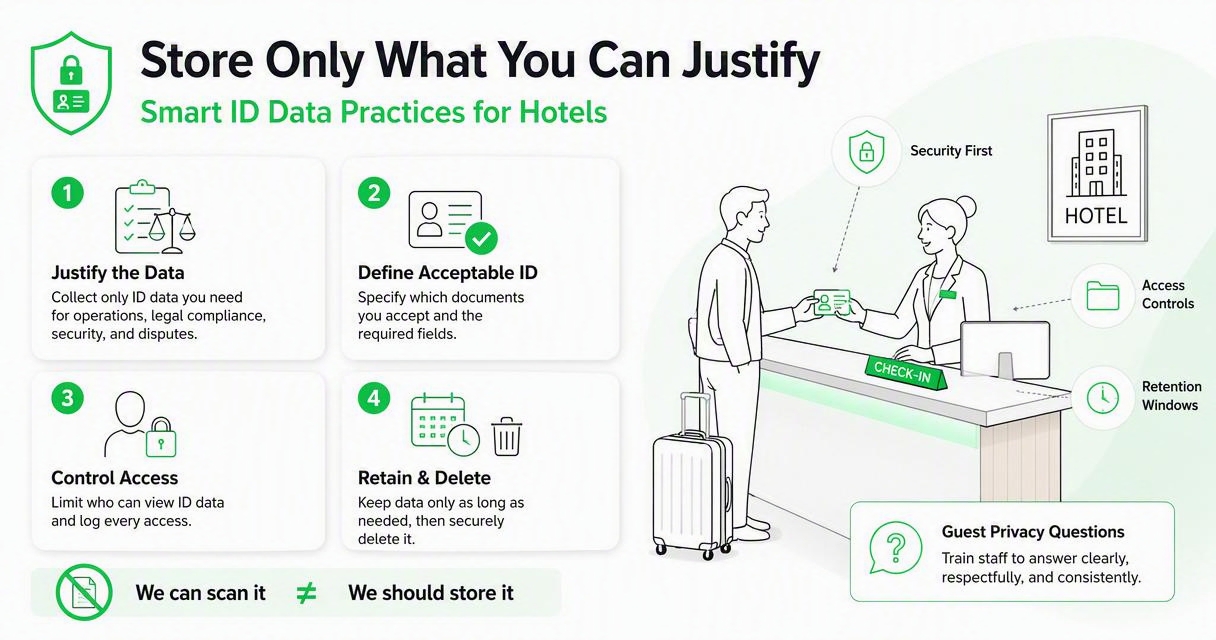
Do not confuse “we can scan it” with “we should keep it forever.” Privacy expectations are rising, and scanned IDs contain sensitive personal data. The right retention period depends on jurisdiction, brand rules, insurance needs, dispute windows, and counsel’s advice.
Data policy essentials
- Purpose: State why the hotel collects ID data.
- Fields: Define which fields are required and which are prohibited.
- Access: Limit visibility to staff with a business need.
- Retention: Set deletion rules by record type.
- Audit: Track who accessed or changed records.
- Escalation: Tell staff what to do when a guest objects.
“Privacy is not an option, and it shouldn’t be the price we accept for just getting on the Internet.”, Gary Kovacs, TED Talk: Tracking the Trackers
The same principle applies at the front desk. Guests may accept identity checks, but they still expect careful handling. For hotels reviewing legal deadlines and ID standards, GuestBan’s article on REAL ID compliance considerations is a useful related resource.
Research on digital technology adoption during public health response, including Wang, Su, and Zhang’s 2021 paper on digital technologies and public health, highlights a broader lesson: digital systems create value only when governance, security, and user trust are addressed together (MDPI).
How do DNR alerts fit extended-stay identity checks?
DNR alerts should be reviewed before check-in and before renewals because extended-stay hotels make repeated rent decisions. A verified ID helps connect a person to prior records, while manager review helps avoid unfair, incomplete, or poorly documented decisions.
A do-not-rent process works best when it separates facts from opinions. “Guest damaged TV on March 4, police report attached” is useful. “Bad attitude” is not. The ID scan helps locate the right record, but the notes determine whether the decision is defensible.
DNR documentation rules
- Record objective behavior, dates, staff names, and supporting evidence.
- Avoid protected-class language or subjective labels.
- Require manager approval for serious restrictions.
- Review DNR status before renewals, not only new reservations.
- Give staff a clear escalation path when a match appears.
For a deeper definition of the term, see DNR Hotel Meaning: What Do Not Rent Means for Hotel Teams. Extended-stay properties should treat DNR as a controlled safety and business process, not an informal blacklist.
Generative AI research also reminds operators to be careful with automated decision support. Dwivedi, Kshetri, Hughes, and coauthors discuss both opportunities and governance challenges in AI-assisted systems in their 2023 paper in the International Journal of Information Management (Elsevier). Human review still matters when a stay decision affects a real guest.
What should operators expect in 2027?
Extended-stay operators should expect identity workflows to become more connected, more privacy-reviewed, and more automated by 2027. The winning systems will not just scan cards; they will connect guest identity, PMS data, payment evidence, alerts, and retention controls in one auditable process.
The market is already moving that way. Search competitors emphasize faster check-in, PMS integration, and ID collection settings. StayNTouch’s ID Collection help content was noted in the research data as updated on Nov. 8, 2023, while IDScan’s hotel content promotes check-in speed, chargeback prevention, and ID law topics. Those are useful pieces, but extended-stay hotels need the pieces connected.
2027 readiness priorities
| Priority | Why it matters | Manager action |
|---|---|---|
| PMS connection | Reduces duplicate entry | Map required fields before rollout |
| Privacy controls | Limits sensitive data exposure | Review access and retention quarterly |
| Renewal alerts | Catches stay changes | Add ID review to weekly extensions |
| Evidence packets | Supports disputes | Link folio, ID, card, and notes |
| Staff training | Prevents uneven enforcement | Use a written front desk checklist |
The next step is not buying the fanciest scanner. The better move is designing the workflow first, then selecting technology that supports it.
FAQ
Do extended-stay hotels have to scan every guest ID?
Requirements vary by jurisdiction, brand, and property policy, so hotels should get legal guidance before setting rules. Operationally, scanning the primary registered guest is common because it supports identity verification, payment review, and recordkeeping. If a property tracks adult occupants, it should define when additional IDs are required.
Should a hotel rescan ID at every weekly renewal?
A full rescan may not be needed every time, but the renewal should trigger an identity and record review. Staff should confirm the registered guest, payment status, incident notes, approved occupants, and DNR alerts. If information changed or the prior scan is missing, a new scan is sensible.
Can ID scanning help with chargebacks?
Yes, ID scanning can help when it is connected to payment, reservation, folio, and timestamp records. The scan alone does not win a dispute. The stronger evidence package shows who checked in, when they stayed, which card was used, and what staff documented during the stay.
How long should hotels keep scanned IDs?
There is no universal retention period for every hotel. The policy should reflect local law, brand standards, insurance needs, dispute windows, and privacy obligations. Many operators separate short-term operational access from longer dispute evidence storage, then delete records when the business reason ends.
Conclusion
ID scanning for extended-stay hotels works best when it is treated as a risk-control workflow, not a gadget at the front desk. Start by mapping four moments: check-in, renewal, incident documentation, and DNR review. Then decide which data you collect, who can see it, how long it stays, and how staff escalate exceptions.
If your team is ready to connect verified guest records with cleaner front desk decisions, evaluate the process with GuestBan ID Scanning and visit guestban.com to see how the workflow can fit your property. Build the checklist first, train every shift, and make the scan part of a consistent operating standard.