

TL;DR
TL;DR: Hotels should choose ID verification software that captures documents, checks risk signals, hands verified data to the PMS, and lets staff review exceptions without slowing arrivals. The best setup balances guest speed with privacy, fraud prevention, and clear escalation rules for failed or suspicious IDs.
Self check-in only works when identity checks are fast enough for guests and reliable enough for operators. Hotel self check-in ID verification software helps hotels confirm that the person arriving matches an accepted identity document before issuing keys, codes, or kiosk access. Check-in: the arrival process where a person announces they have reached a hotel, adapted from the standard check-in definition. Hotel: a paid short-term lodging business, as summarized by Wikipedia. For hotels that want automated capture, staff review, and better guest records, GuestBan ID Scanning is built around that operational gap.
Table of Contents
What is hotel self check-in ID verification software?
Hotel self check-in ID verification software is a digital system that captures a guest's identity document, checks the document and guest data, and passes verified information into the hotel workflow before room access is granted. It replaces slow manual typing with structured capture, review queues, and audit-ready records.
Identity document capture: phone, kiosk, tablet, or scanner capture of a passport, driver's license, state ID, or other accepted document.
Verification: checks that compare extracted document data, image quality, expiration status, age rules, and sometimes fraud signals or face match results.
PMS handoff: transfer of clean guest data into a property management system, registration card, or guest record tool.
Key takeaway: The purpose is not to remove staff judgment. The purpose is to give staff cleaner data earlier, so routine arrivals move faster and risky arrivals get reviewed.
How does ID verification work during self check-in?
ID verification during self check-in works by collecting the guest's document before or during arrival, extracting key fields, checking the result against hotel rules, and sending approved records to staff tools or the PMS. The workflow should be short for normal guests and strict for exceptions.
A practical check-in sequence
- Guest starts check-in: The guest opens a pre-arrival link, kiosk, tablet, or front desk assisted flow.
- Document is captured: The system scans the front and, when needed, the back of the ID.
- Data is extracted: Name, date of birth, document number, expiration date, and address fields are read into structured form.
- Rules are applied: The system checks hotel policy, age thresholds, document expiry, missing fields, and image quality.
- Staff reviews exceptions: A front desk or operations user sees failed, unclear, or policy-sensitive records.
- PMS or record system updates: Verified information moves into the reservation, guest profile, or audit record.
- Access is released: The hotel issues a key, mobile credential, PIN, or room assignment only when policy is satisfied.
For a deeper operational walkthrough, see this guide on how to verify guest ID at hotel check-in.
Which features matter most in 2026?
The best hotel identity tools in 2026 combine fast capture, clear exception handling, PMS-ready data, and privacy controls. Buyers should focus less on flashy self-service screens and more on whether the software improves real front desk work during rushes, late arrivals, and disputes.
Feature comparison for hotel buyers
| Feature | Why it matters | Buyer question |
|---|---|---|
| Mobile and kiosk ID capture | Supports pre-arrival and lobby self-service | Can guests scan without staff help? |
| OCR data extraction | Reduces typing errors and front desk rework | Which fields are captured automatically? |
| Document quality checks | Prevents blurry or incomplete submissions | Does the system flag unusable images? |
| Expiration and age checks | Supports policy enforcement | Can rules vary by property? |
| Staff review queue | Keeps humans in control of exceptions | How are failed IDs routed? |
| PMS or guest record handoff | Avoids duplicate data entry | Is data exported in the right format? |
| Audit trail | Helps with disputes and internal review | Who changed or approved the record? |
| Privacy controls | Limits exposure of sensitive identity data | Can access, retention, and deletion be managed? |
Strong hotel ID workflows also connect to broader guest data processes. If your team is reviewing vendors now, compare the specific capture and review options in hotel ID verification software rather than judging tools only by check-in screen design.
Best software categories for hotel self check-in
Hotels usually choose from four software categories: hotel-specific ID scanning tools, guest experience platforms, kiosk vendors, and remote identity verification providers. Each can work, but the right choice depends on whether the property needs security-first verification, full arrival automation, lobby hardware, or enterprise identity checks.
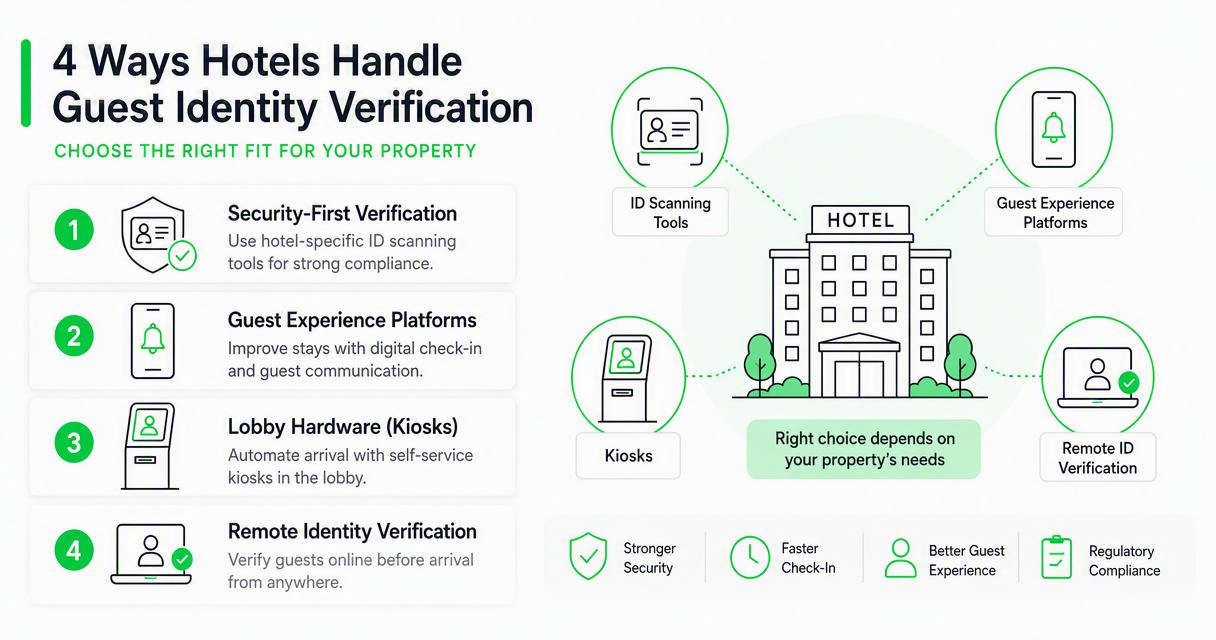
2026 option shortlist
| Option | Best fit | Main strength | Watch point |
|---|---|---|---|
| GuestBan ID Scanning | Hotels that want practical ID capture, staff review, and guest record control | Hotel-focused scanning and verification workflow | Confirm PMS process during setup |
| Chekin-style guest platforms | Hotels seeking online check-in, payments, upsells, and arrival automation | Broad guest experience coverage | ID review may be one module among many |
| Mews-style PMS check-in tools | Properties already using a modern cloud PMS | Tight operational flow inside PMS | Less flexible if using another core system |
| KIOSK-style lobby hardware | Hotels with high walk-in or unattended lobby needs | Physical self-service terminals | Hardware support and placement matter |
| Innovatrics-style remote identity tools | Groups needing advanced identity verification | Strong document and biometric focus | May require integration work for hotel teams |
I prefer starting the vendor conversation with the workflow, not the brand name. A 60-room roadside hotel, a boutique group, and a casino-adjacent property may all need ID verification, but they rarely need the same level of hardware, review staffing, or fraud controls.
How GuestBan ID Scanning handles this
The GuestBan ID Scanning platform focuses on the hotel operations layer: capturing guest ID data, reducing manual entry, and giving staff a clearer record for review. That matters because many hotels do not need a giant guest experience suite just to solve the ID bottleneck at arrival.
With GuestBan ID Scanning, the strongest fit is a property that wants to modernize ID capture while keeping staff in control of approvals. The system is especially relevant when front desk teams need better documentation, cleaner guest records, or faster handling during busy arrival windows.
"Good design is good business.", Thomas J. Watson Jr., IBM
That quote applies to hotel check-in because guests judge the property by small moments. A smooth ID scan feels minor when it works, but it affects line length, staff confidence, and the first impression of the stay. For hotels comparing scanning with older photocopy processes, this 2026 guide to ID scanners vs photocopying IDs at hotel check-in explains the operational tradeoffs.
How should hotels handle failed ID checks?
Hotels should handle failed ID checks with a written escalation path that separates technical problems from risk concerns. A failed scan should not automatically mean a guest is fraudulent, but it should stop automatic room access until the issue is reviewed by trained staff.
Exception rules that keep staff consistent
- Blurry image: Ask the guest to rescan in better lighting or use front desk assisted capture.
- Expired document: Follow the property's ID acceptance policy and local legal requirements.
- Name mismatch: Compare the reservation, payment method, and approved alternate documents.
- Underage guest: Apply the hotel's age policy before keys or access codes are issued.
- Document damage: Request another accepted form of ID or manager review.
- Repeated failed attempts: Move the case to a supervisor queue and document the decision.
The point is to avoid improvising during a line at 9 p.m. Night auditors, new desk agents, and temporary staff all need the same decision tree. For after-hours operations, the related guide on ID scanning for hotel night audit and after-hours check-in covers documentation and escalation in more depth.
What privacy and security controls should hotels require?
Hotels should require privacy and security controls that limit who can view ID data, how long records are retained, and how exceptions are audited. Computer security, as defined in information security, focuses on protecting software, systems, and networks from unauthorized access and related threats, as summarized by Wikipedia.
Security checklist for ID data
- Role-based access: Front desk, managers, auditors, and administrators should have different permissions.
- Retention settings: The hotel should define how long ID images and extracted data are kept.
- Audit logs: The system should show who viewed, edited, approved, or deleted a record.
- Encryption: Sensitive data should be protected in storage and in transit.
- Vendor review: Buyers should ask where data is stored, who supports it, and how incidents are handled.
- AI governance: If automated image or anomaly checks are used, hotels should understand review limits and human override.
"Security is a process, not a product.", Bruce Schneier, Schneier on Security
That process view matters as hotels add automation. Research on anomaly detection by Ruff, Kauffmann, and Vandermeulen reviews how deep and shallow methods detect unusual patterns, but it also shows that anomaly detection is a technical field, not magic hotel judgment (Proceedings of the IEEE, 2021). AI adoption research also warns that new systems create policy, practice, and risk questions, not just efficiency gains (Dwivedi et al., 2023).
How do PMS handoffs reduce front desk friction?
PMS handoffs reduce front desk friction by turning ID scans into usable reservation or guest record data instead of leaving staff to retype names, addresses, dates of birth, and document numbers. The best handoff is predictable, visible, and easy for staff to correct when the source document is unusual.
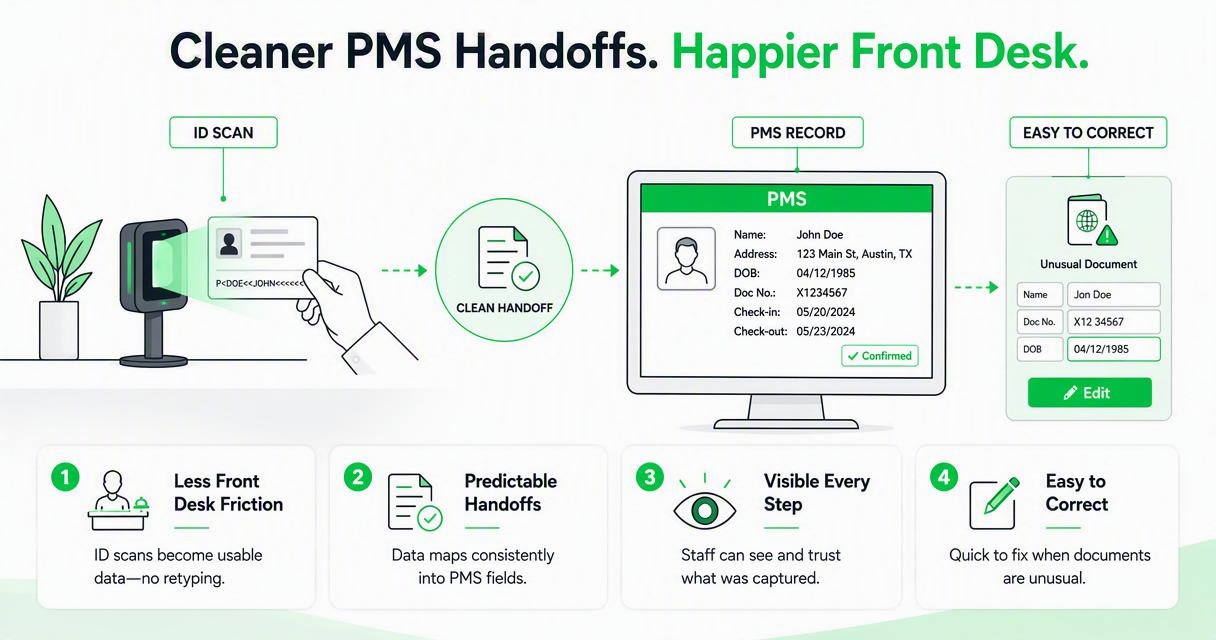
A clean PMS handoff should answer three questions before purchase:
- Where does the data go? Guest profile, reservation notes, registration card, document vault, or an external guest record system.
- Who verifies the transfer? The software, the desk agent, the manager, or a nightly audit process.
- What happens when fields conflict? Staff should see mismatches before checkout, chargeback review, or incident follow-up.
For hotel groups, consistent data matters across properties. A repeat guest, banned guest, chargeback dispute, or damaged-room incident is much harder to manage when every location stores ID details differently. That is why many operators also evaluate guest verification software for hotels alongside PMS integration.
What should buyers ask before signing?
Hotel buyers should ask questions that test real arrival pressure, not just demo screens. A useful trial should include early arrivals, late-night arrivals, weak phone cameras, foreign documents, group reservations, staff overrides, and privacy requests.
Vendor questions to ask:
- Which documents are supported for our guest mix?
- Can the system work on guest phones, kiosks, and staff devices?
- How are failed scans routed to staff?
- Can managers change rules by property?
- What PMS or export options are available?
- What data is stored, for how long, and where?
- Can we download audit records for disputes or internal review?
- What happens if internet access drops during check-in?
I also recommend asking for a live workflow using your actual policy language. A generic demo may look smooth, but the real test is whether your front desk team can explain the process to a tired guest in less than 20 seconds.
What to expect from hotel ID verification in 2027
Hotel ID verification in 2027 will likely become more connected, more policy-driven, and more closely reviewed for privacy. The next phase is not only faster scanning. It is better decision routing across mobile check-in, kiosks, front desk workflows, loyalty profiles, and risk records.
Expect more vendors to add AI-assisted image quality checks, anomaly flags, and document review prompts. Research on generative AI risks by Wach, Duong, and Ejdys shows why organizations must weigh benefits against misuse, bias, and governance concerns when adopting AI systems (2023 paper).
For hotels, the smart move is gradual automation. Let software handle capture, extraction, and routing. Keep humans responsible for edge cases, guest communication, and final approval when a record looks unusual. That balance protects both guest experience and property risk.
FAQ
Is self check-in ID verification legal for hotels?
Self check-in ID verification can be legal when it follows applicable lodging, privacy, and data retention rules. Requirements vary by jurisdiction, document type, and guest category. Hotels should define accepted IDs, consent language, storage limits, and staff access before rollout, then review the policy with legal counsel or compliance advisors.
Does ID verification slow down mobile check-in?
A well-designed ID scan should reduce total check-in time because the guest completes document capture before reaching the desk or kiosk. Poor lighting, unclear instructions, or unsupported documents can create delays, so hotels should test the flow with real guests, staff devices, and common exception cases before expanding.
Can hotels still use staff review with automated ID checks?
Yes. Staff review is often the safest model because software handles routine capture while employees decide exceptions. Hotels can route expired IDs, mismatched names, unclear images, underage guests, or unusual documents to a manager or trained desk agent before issuing keys or digital access.
What is the difference between ID scanning and ID verification?
ID scanning captures and extracts information from a document. ID verification goes further by checking whether the document and guest data meet hotel rules, such as expiration status, age policy, image quality, and review requirements. Many hotels need both because capture alone does not decide whether check-in should proceed.
Conclusion
The right hotel self check-in ID verification software should make arrival faster without making the hotel careless. Start by mapping your current ID process, list the failure cases your staff sees each month, and require any vendor to prove capture, review, PMS handoff, privacy controls, and escalation in one live workflow.
If your priority is hotel-focused ID capture with staff visibility, compare GuestBan ID Scanning with your existing check-in process and document where it can remove manual entry. To see the platform and plan a better verification workflow, head to guestban.com and review how your team handles IDs today before the next peak check-in window.

