

TL;DR
Passport scanning is usually the better hotel workflow when it captures only required data, stores it securely, and connects to the PMS. Photocopying may feel simple, but it creates paper storage risk, slower lookup, and weaker audit trails. Use scanners with clear consent language, access controls, and retention rules.
A copied passport can sit in a desk drawer for months; a properly configured scan can capture the fields a hotel needs in seconds and apply retention rules automatically. That difference is why the debate over passport scanning vs passport photocopying for hotels matters in 2026. Front desks need fast check-in, managers need documentation, and guests increasingly expect privacy-conscious handling of identity documents. Passport scanning: the digital capture of passport data or images through a scanner, camera, or ID verification workflow, usually with structured data extraction. Passport photocopying: the creation of a full paper or image copy of the passport page, often stored manually. For hotels comparing both methods, GuestBan ID Scanning is built around safer guest data capture, cleaner records, and faster front desk workflows.
Table of Contents
What is the difference between passport scanning and photocopying?
Passport scanning extracts or stores passport information in a digital workflow, while photocopying creates a flat copy of the document that staff must file, retrieve, protect, and eventually destroy. The key difference is control: scanning can limit fields, log access, and connect to hotel systems; photocopying often depends on manual discipline.
Key terms for hotel teams:
- MRZ: the machine-readable zone on a passport, usually two lines of coded text that scanners can read quickly.
- OCR: optical character recognition, which converts printed text into digital fields.
- Biometric passport: a passport with an embedded chip that can store identity data used by automated border control systems.
- Retention period: the approved time a hotel keeps identity data before deletion or destruction.
Automated border control systems, also called eGates, use data stored in biometric passport chips with a photo or fingerprint captured at entry. Hotels do not operate like border agencies, but the same guest expectation has crossed into hospitality: identity capture should be fast, accurate, and controlled.
Hotel workflow comparison at a glance
Passport scanning and photocopying solve the same front desk problem in very different ways.
| Factor | Passport scanning | Passport photocopying | Practical impact |
|---|---|---|---|
| Check-in speed | Fast when MRZ or OCR works | Slower if staff leave desk or adjust copier | Shorter lines at peak arrivals |
| Legibility | Structured data and image quality checks | Depends on toner, lighting, copy angle | Fewer manual corrections |
| Storage | Digital with permissions and retention settings | Paper folders, binders, cabinets, or shared drives | Lower operational clutter |
| Guest trust | Easier to explain if data fields are limited | Can feel excessive if full page is copied | Better privacy perception |
| Audit readiness | Searchable logs and timestamps | Manual proof depends on filing accuracy | Faster dispute response |
| PMS fit | Can push fields into PMS workflows | Requires manual entry | Fewer typos and duplicate records |
Key takeaway: Scanning is not automatically safer because it is digital. It is safer when the hotel configures purpose, access, retention, and deletion correctly.
Which option is better for hotel check-in speed?
Passport scanning is usually faster than photocopying because it can read the MRZ, populate guest fields, and reduce manual typing during check-in. Photocopying slows the flow when staff must leave the PMS screen, adjust paper, file copies, or later re-key the same information into the reservation record.
Speed matters most at airport hotels, urban properties with group arrivals, extended-stay desks, and late-night shifts with limited staffing. I've seen the real slowdown come less from the copy itself and more from everything around it: missing paper, unclear folders, unreadable copies, and staff trying to match a passport copy to the right folio later.
A scanner tied to a clear process can shorten the exchange to three steps:
- Ask for the passport and explain the reason for capture.
- Scan the document and confirm the displayed data.
- Return the passport immediately and complete check-in.
For properties choosing hardware, a dedicated passport scanner for hotels is usually a better fit than a general office copier because it is designed for front desk use, document sizing, and identity workflows.
Where photocopying still feels convenient
Photocopying can seem convenient at small properties because it requires little setup and staff already know how to use a copier. That convenience fades when the hotel needs repeatable standards across shifts, audit trails, or multi-property reporting.
Paper copies also create extra work after check-in. Someone must store them, protect them, retrieve them when needed, and destroy them on schedule. If the guest record is digital but the proof is paper, the front desk has split the workflow in two.
Which method creates less privacy and storage risk?
A well-configured passport scanning workflow usually creates less privacy and storage risk than photocopying because it can restrict data capture, control employee access, and apply retention rules. Photocopying often captures the full document by default, then relies on staff to guard, file, and destroy physical copies correctly.
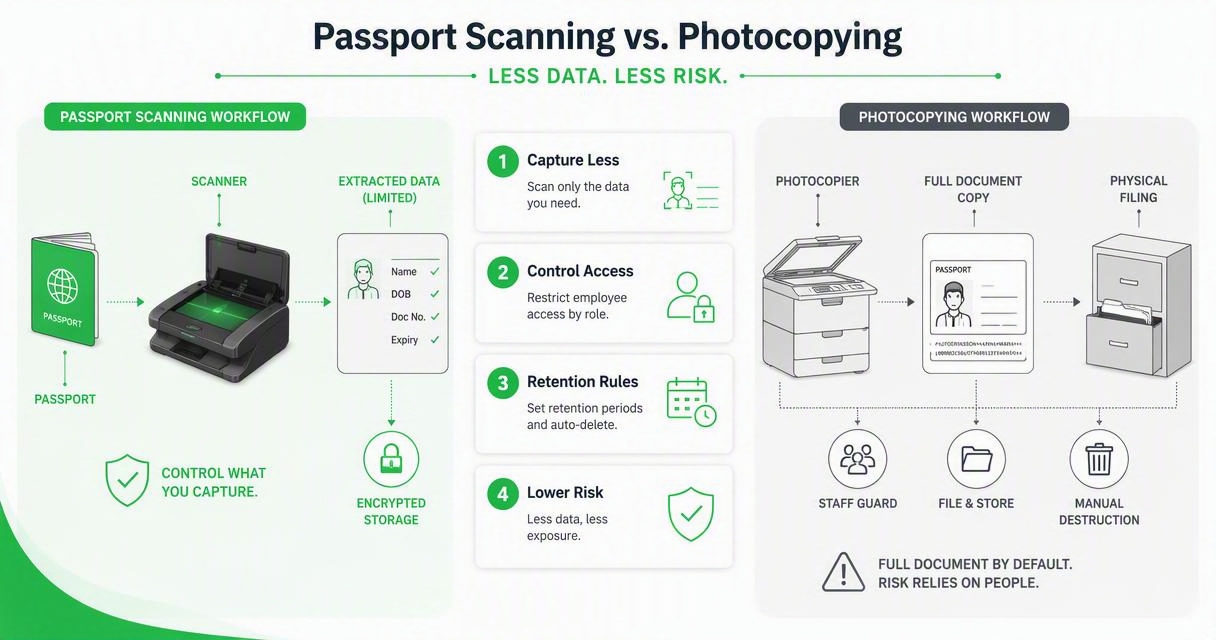
The privacy issue is not simply "digital versus paper." A badly managed scan can be risky, and a locked paper file can be managed responsibly. The stronger standard is data minimization: collect only what the hotel has a valid reason to collect.
"Personal data shall be adequate, relevant and limited to what is necessary in relation to the purposes for which they are processed.", European Parliament and Council, General Data Protection Regulation, Article 5
That principle is especially relevant for international guests. A full passport page can show information the hotel may not need for its own check-in purpose. When local law requires guest reporting, hotels should map the exact required fields by jurisdiction instead of copying the whole document as a default habit.
Common risk controls hotels should require
Hotels comparing capture methods should ask whether the process supports these controls:
- Purpose notice: staff can explain why identity data is collected.
- Field limitation: the system captures only required fields where possible.
- Access control: only approved roles can view stored document data.
- Retention schedule: records are deleted or destroyed after the approved period.
- Audit log: managers can see who accessed or changed a record.
- Secure disposal: paper shredding or digital deletion is documented.
For guest-facing language, a plain-English hotel ID scanning consent form can help staff explain the process without sounding improvised.
How does each method affect guest trust?
Guest trust is stronger when hotels explain what they collect, why they collect it, who can access it, and how long it is kept. Passport scanning can support that explanation with limited capture and visible process controls; photocopying can raise concern because it often looks like the hotel is keeping everything.
Guests rarely object to showing a passport. They object to uncertainty. If a front desk agent says, "We copy everyone's passport," the guest may wonder where the paper goes. If the agent says, "We verify your passport and store only the fields required for registration and security," the interaction feels more controlled.
The FTC gives a simple data handling rule that fits hotel operations:
"If you don't have a legitimate business need for sensitive personally identifying information, don't keep it.", Federal Trade Commission, Start with Security
That line is easy to turn into hotel policy. If your team cannot explain a field's business need, legal need, or safety need, do not capture it by default.
Front desk script for passport capture
Use a short script that names the reason and the limit.
- "May I please see your passport for identity verification?"
- "We capture the required registration details for your stay."
- "Your passport will be returned immediately."
- "Access is limited to authorized hotel staff."
- "If you have questions, I can call the manager on duty."
That script works because it is specific. It avoids legal overpromising while giving the guest enough context to understand the request.
What does audit readiness look like in 2026?
Audit readiness means the hotel can prove what identity information was captured, who captured it, when it was captured, why it was retained, and how exceptions were handled. Passport scanning is typically stronger for audit readiness because it can create searchable timestamps, staff activity logs, and PMS-linked records.
Photocopies can support audits if the hotel has strict filing and destruction procedures. In practice, manual systems break down during busy periods, staff turnover, and night audit handoffs. A misplaced copy is not just an inconvenience; it can weaken incident review, chargeback response, and regulatory confidence.
Research on passport and visa forgery has also moved toward digital verification concepts. Cheman Shaik's 2021 paper, "Detection of Forgery and Fabrication in Passports and Visas using Cryptography and QR Codes", reflects the broader direction of travel document security: structured digital validation is becoming more important than visual inspection alone.
For payment disputes, the same record discipline matters. Hotels that need stronger documentation can review hotel chargeback documentation and ID scanning to connect identity capture with reservation, folio, and incident records.
Audit questions every manager should be able to answer
A hotel should be able to answer these questions without searching through drawers:
- What identity fields do we collect for domestic guests?
- What fields do we collect for international guests?
- Which law, policy, or operational need supports each field?
- Who can view stored passport data?
- How long do we keep it?
- How do we delete or destroy it?
- How do we document guest refusals or exceptions?
If the answers change by shift, the process is not audit-ready.
How GuestBan ID Scanning handles this workflow
GuestBan ID Scanning helps hotels move from manual document copying to a controlled digital identity workflow that supports faster check-in, better records, and clearer staff procedures. The platform is most useful when a property wants to standardize passport and ID capture across employees, shifts, or multiple locations.
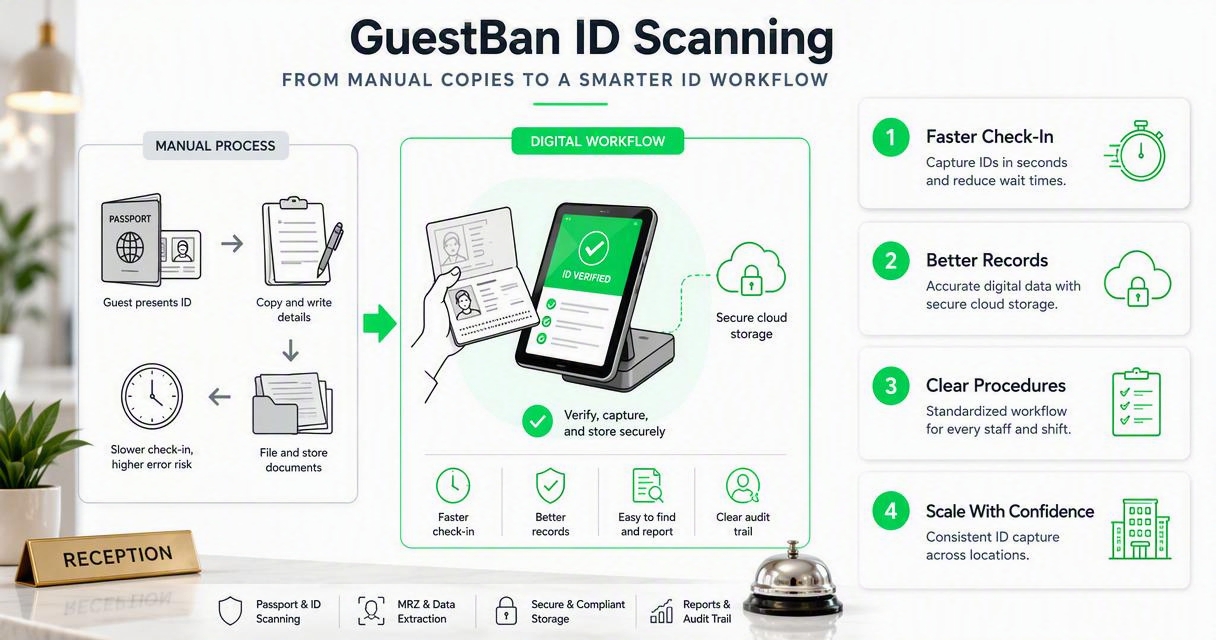
A strong hotel scanning setup should not feel like extra work for the front desk. It should sit inside the check-in process, help confirm identity, reduce retyping, and create a consistent record. That is the practical reason hotels look at tools like the GuestBan ID Scanning platform instead of asking staff to manage paper files.
GuestBan ID Scanning is also relevant for managers who want a unified view of guest identity activity across properties. Multi-property operators can benefit from centralized hotel ID scanning software when they need consistent procedures, shared risk visibility, and fewer local workarounds.
If you are evaluating options, visit guestban.com after mapping your current capture process. Bring your PMS workflow, retention policy, and guest refusal script to the demo conversation so the system can be matched to your operating reality.
Who should pick which approach
Hotels should choose based on risk, volume, staffing, and legal requirements.
| Hotel situation | Better fit | Why |
|---|---|---|
| Small inn with rare passport checks | Controlled manual recording | Low volume may not justify new tools |
| Busy urban or airport hotel | Passport scanning | Faster lines and better searchability |
| Extended-stay property | Passport scanning | More guest history and stronger documentation needs |
| Multi-property group | Centralized scanning | Consistent rules across locations |
| Property under strict local guest reporting rules | Scanning with configured fields | Easier to standardize required data |
| Hotel with no retention policy | Neither, fix policy first | Tool choice cannot replace governance |
A balanced recommendation is simple: use scanning when you can configure it properly; avoid copying entire passports as a routine shortcut.
What should hotels stop doing with passport copies?
Hotels should stop treating a full passport photocopy as a harmless backup. The copy may contain more personal data than the hotel needs, and paper files are easy to misplace, over-retain, or access without a clear log. Better practice starts with purpose, minimization, and documented handling.
Avoid these outdated habits:
- Copying every passport page "just in case."
- Leaving copies near the front desk printer.
- Storing copies in unlocked binders or shared folders.
- Keeping copies indefinitely after checkout.
- Letting each shift decide its own process.
- Taking phone photos of passports on personal devices.
If a law or local police reporting rule requires specific guest information, record the required data in the approved system. If a full copy is required in a certain jurisdiction, restrict access and destroy it on schedule. The goal is not to collect less than the law requires; it is to avoid collecting more than the hotel can justify.
When a guest refuses scanning or copying
A refusal should trigger a calm, documented process, not an argument at the desk. Staff should explain the requirement, offer the manager on duty, and document the outcome according to policy. For a deeper operational playbook, see can a guest refuse hotel ID scanning.
The best properties train employees to separate identity verification from guest conflict. A clear script protects the guest experience and the employee.
What to expect in 2027
Hotel identity capture will keep moving toward structured, limited, and auditable data rather than loose paper copies. Expect more PMS-connected scanning, stronger consent screens, shorter retention windows, and more attention from guests who understand the value of their personal information.
Three changes are likely to shape the next year:
- More pre-arrival identity capture: hotels will ask guests to verify documents before arrival, especially for self-check-in.
- More role-based access: managers will limit who can view passport images or sensitive fields.
- More retention automation: deletion schedules will become part of normal hotel data hygiene.
Hardware will also improve. Compact devices such as the Thales QS2000 passport and ID scanner show where front desk equipment is headed: smaller footprints, faster reads, and purpose-built document capture instead of office copier workarounds.
My advice for 2026 planning is to write the policy before buying tools. Once your required fields, retention period, and escalation steps are clear, the technology decision becomes much easier.
FAQ
These quick answers address the questions hotel managers and front desk teams ask most often when comparing passport capture methods.
Is it legal for hotels to scan passports?
Passport scanning may be legal when a hotel has a valid legal, contractual, security, or operational reason and follows local privacy rules. Requirements vary by country, state, and municipality. Hotels should confirm what fields are required, avoid unnecessary full-document capture, post a clear notice, and apply retention limits.
Is photocopying a passport safer than scanning it?
Photocopying is not automatically safer. Paper avoids some digital risks, but it creates physical access, filing, loss, and destruction risks. Scanning is usually safer when it uses access controls, field limitation, audit logs, encryption, and scheduled deletion. The weaker option is whichever method lacks written controls.
Should hotels keep a full passport image?
Hotels should keep a full passport image only when law, policy, or a specific risk reason supports it. In many cases, the hotel may need selected registration fields rather than the whole image. Managers should document the purpose, limit access, and delete the image when the retention period ends.
How can a hotel make passport scanning feel less intrusive?
Hotels can make scanning feel less intrusive by explaining the reason before capture, returning the passport immediately, showing privacy language in plain English, and training staff to answer questions consistently. Guests respond better when the process is predictable, limited, and tied to safety or registration needs.
Conclusion
Passport scanning vs passport photocopying for hotels comes down to control. Scanning is usually the better 2026 choice when it captures only needed data, supports PMS workflows, limits access, and creates an audit trail. Photocopying still has a place in narrow cases, but it should not be the default habit for busy or risk-aware properties.
Start with a one-page policy: required fields, approved capture method, access roles, retention period, guest script, and exception process. Then test the workflow during a real arrival rush. If your current copier process slows the desk or leaves managers unsure where passport copies live, evaluate GuestBan ID Scanning and head to guestban.com to plan a safer, faster check-in process.

