

TL;DR
Centralized hotel ID scanning software captures guest identity documents at check-in, extracts required data, and routes it into shared hotel systems such as the PMS, CRM, or fraud controls. The best fit depends on document support, PMS integration, retention rules, audit trails, and staff workflow, not scanner speed alone.
Hotel check-in is becoming a data control point, not just a front desk ritual. What Is Centralized Hotel ID Scanning Software? It is a shared system that scans passports, driver’s licenses, and government IDs, extracts guest data, and makes that information available across approved hotel locations and connected systems. For independent hotels and small groups, Innstrata supports the broader move toward connected operating data, where identity, revenue, demand, and guest-risk signals can be managed with more discipline.
Table of Contents
What is centralized hotel ID scanning software?
Centralized hotel ID scanning software is a multi-property or centrally managed system that captures identity documents, reads key fields, validates required data, and stores or routes that information according to hotel policy.
Centralized hotel ID scanning software: A shared hotel technology layer that scans guest IDs, extracts structured identity data, and connects that data to approved systems such as a property management system, payment workflow, guest profile, or risk-management process.
Image scanner: An image scanner optically scans images, printed text, handwriting, or objects and converts them into a digital image, a definition consistent with the general scanner description on Wikipedia.
The “centralized” part matters. A single USB scanner at one front desk may capture a document image. A centralized platform standardizes how every desk, property, and manager handles guest identity data.
Key insight: Centralization turns ID scanning from a device task into an operating policy for speed, compliance, fraud prevention, and auditability.
Core components at a glance
| Component | What it does | Why hotels care |
|---|---|---|
| Scanner or camera capture | Reads passports, licenses, or ID cards | Reduces manual typing at check-in |
| OCR and data parsing | Converts document text into structured fields | Improves profile accuracy |
| PMS integration | Sends selected fields into the property management system | Cuts duplicate entry |
| Central dashboard | Applies rules across one hotel or many properties | Helps managers monitor exceptions |
| Audit trail | Records scans, edits, and access events | Supports chargeback and incident review |
| Retention controls | Deletes or masks data based on policy | Reduces privacy exposure |
Competitor pages often market fast check-in, automated guest registration, PMS automation, and passport scanning. Those features are useful, but the stronger buying question is whether the system creates a reliable identity workflow across every location, shift, and staff member.
How does centralized ID scanning work at check-in?
Centralized ID scanning works by capturing the document, extracting fields, matching the scan to a reservation, and sending approved data into hotel systems.
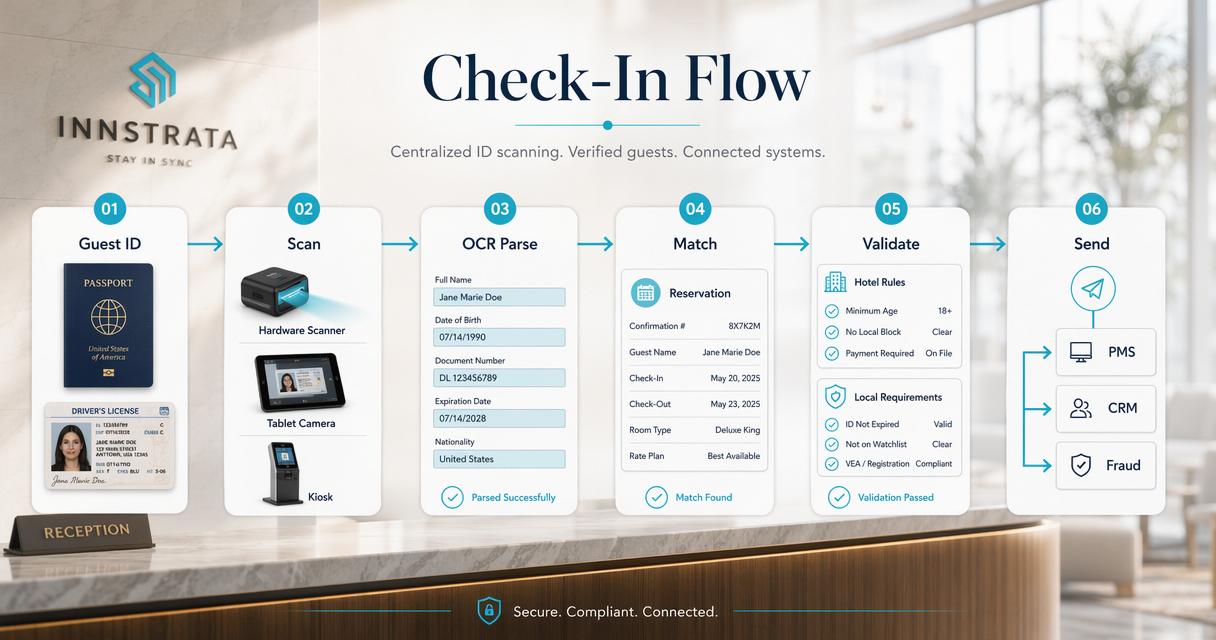
A typical check-in flow has six steps:
- The guest presents a passport, driver’s license, or government-issued ID.
- The front desk scans the document with a hardware scanner, tablet camera, or kiosk.
- OCR and document parsing extract name, address, date of birth, document number, expiration date, and issuing country or state.
- The system checks required fields against hotel rules, local requirements, and reservation data.
- Approved fields populate the PMS or guest profile.
- The platform logs the scan event, retention status, and user access.
A strong workflow avoids making staff decide policy during a busy arrival rush. Managers define the rules once, then the system applies them consistently.
Where PMS automation creates value
PMS automation creates value when it removes repeated typing, not when it stores more data than needed. Many hotels only need selected fields for registration, payment verification, local reporting, or incident review.
The best systems allow field-level control. For example, a property may store a guest name and document type, mask a document number, and delete the image after a defined retention window.
Hotels that already use connected demand and pricing workflows can treat ID scanning as part of the same operating discipline. The same structured thinking used in forecasting room demand for independent hotels applies to identity workflows: clean inputs make later decisions more reliable.
Front desk workflow example
| Check-in moment | Manual process | Centralized scanning process |
|---|---|---|
| Guest arrives | Agent types data from ID | Agent scans document |
| Name match | Agent visually compares reservation | System flags mismatch for review |
| Profile creation | Staff re-enters address and ID fields | Approved fields populate the PMS |
| Incident follow-up | Manager searches paper or local files | Manager reviews permissioned audit trail |
| Multi-property control | Each hotel follows local habits | Group rules apply across properties |
The goal is not to remove human judgment. The goal is to reserve human judgment for exceptions, suspicious mismatches, disputed charges, and guest service.
What features matter most in 2026?
The most important 2026 features are document coverage, PMS integration, data minimization, audit trails, role-based access, and centralized reporting.
Hotel ID scanning has moved beyond a simple “does it read a passport?” checklist. Industry technology research now emphasizes human-centered automation and connected digital systems. A 2023 IEEE survey on Industry 5.0 describes a shift toward technologies that combine automation with human-focused design and operational resilience, themes relevant to hotel front desk systems as well (Tallat, Hawbani, and Wang, 2023).
“The advance of technology is based on making it fit in so that you don’t really even notice it, so it’s part of everyday life.”, Bill Gates, Goodreads, attributed to The Road Ahead
For hotels, that means the best scanning tools feel ordinary to staff. They reduce friction without forcing a new operating burden.
Feature checklist for hotel operators
- Passport, license, and ID card support: International and domestic document coverage matters for airport, resort, urban, and extended-stay properties.
- OCR accuracy controls: Staff need a clear way to confirm or correct extracted fields.
- PMS compatibility: Integration should map fields cleanly into existing registration workflows.
- Role-based access: Front desk, managers, auditors, and owners should not share the same permissions.
- Retention settings: Data should expire or be masked based on policy.
- Exception reporting: Mismatches, expired IDs, repeat incidents, and missing scans should be visible centrally.
- Hardware flexibility: Some hotels need passport readers, while others can use mobile or tablet capture.
Properties evaluating related guest-risk controls can compare scanning workflows with broader hotel fraud prevention tools, especially when chargebacks, no-show disputes, or identity mismatch issues affect operations.
Security examples from connected devices are useful reminders for hotels. Any system that captures personal data should be reviewed for access control, patching, storage, and vendor accountability before rollout.
How should hotels handle privacy, fraud, and compliance?
Hotels should handle ID scans by collecting only necessary data, limiting access, defining retention periods, and keeping audit logs for security and dispute review.
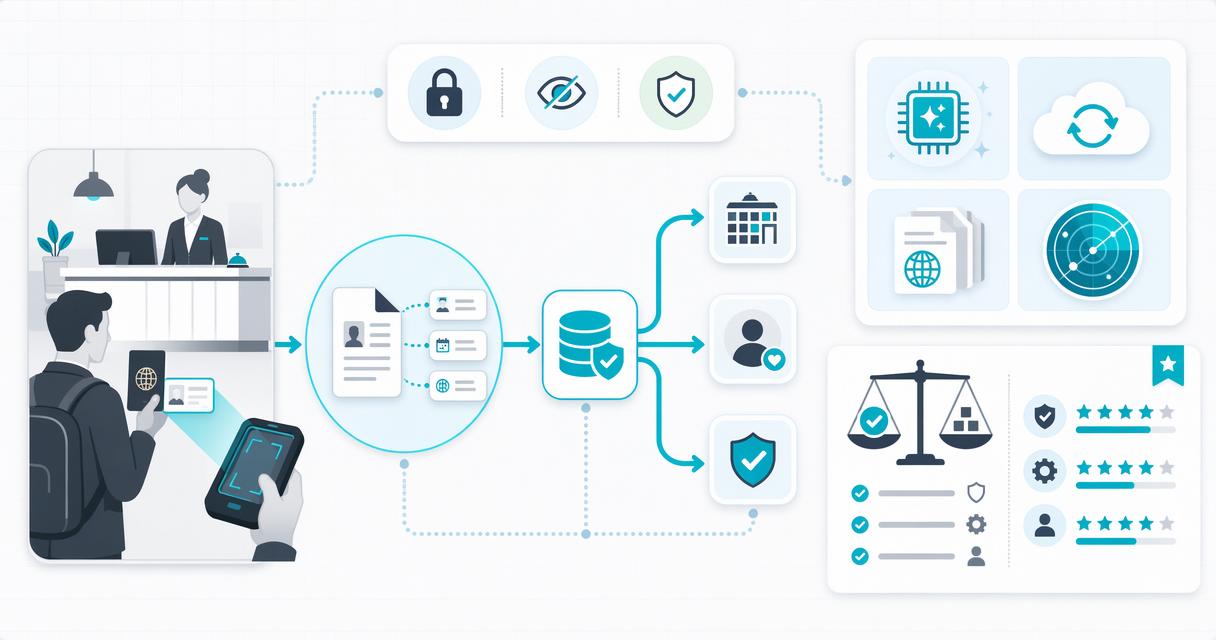
Identity documents contain sensitive personal information. A scanned passport or driver’s license can expose address, date of birth, document number, nationality, and image data. Centralized software can reduce risk when it enforces consistent rules, but it can increase risk if hotels store everything forever.
A 2023 paper on privacy and security in connected smart-city systems warns that data-rich digital systems raise security and governance concerns when information is collected across many sources (Fabrègue and Bogoni, 2023). Hotels face a similar pattern at smaller scale: more connected data requires clearer controls.
“Security is a process, not a product.”, Bruce Schneier, Crypto-Gram Newsletter
Controls that reduce operational risk
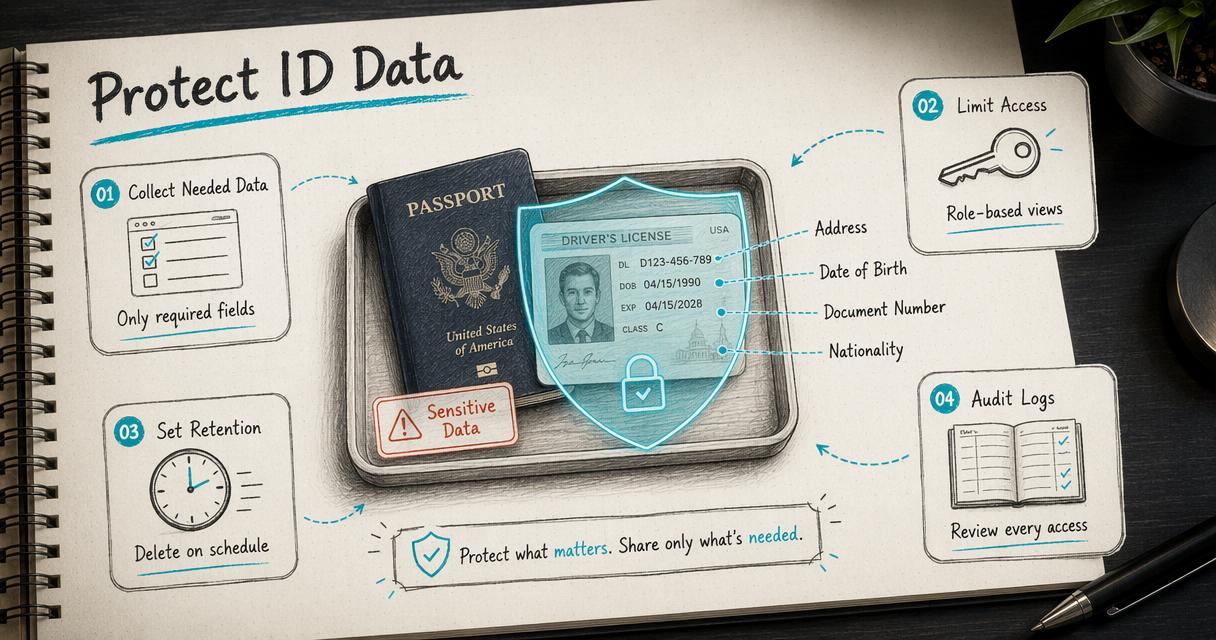 A practical governance model should include:
- Purpose limitation: Define why each field is collected.
- Minimum data capture: Store the least information needed for registration, verification, or local rules.
- Permission tiers: Limit full document access to approved roles.
- Retention schedules: Delete images or mask fields after the business need ends.
- Audit logs: Track who viewed, edited, exported, or deleted data.
- Vendor review: Confirm encryption, support standards, breach processes, and data-location terms.
Centralized scanning can also support guest-risk workflows. For example, properties using a shared do-not-rent list for hotels should separate identity verification from subjective notes, so staff decisions stay consistent, documented, and fair.
Common mistakes to avoid
| Mistake | Why it creates risk | Better practice |
|---|---|---|
| Saving full ID images indefinitely | Expands breach impact | Set retention limits |
| Sharing one staff login | Removes accountability | Use individual credentials |
| Treating scans as proof of payment authorization | ID match and payment proof differ | Keep payment and identity evidence separate |
| Ignoring local rules | Requirements vary by market | Review legal obligations by jurisdiction |
| Buying only for speed | Fast capture can still create bad data | Test accuracy and controls |
Fast check-in is attractive, but a five-second scan is not enough if the wrong data enters the PMS or sensitive data remains exposed for years.
How should hotels choose centralized ID scanning software?
Hotels should choose centralized ID scanning software by testing real documents, confirming PMS field mapping, reviewing privacy controls, and checking how exceptions appear to managers.
A product demo should include actual front desk scenarios, not only a clean vendor sample. The test should cover passports, domestic licenses, address mismatches, expired IDs, group arrivals, walk-ins, and returning guests.
The Innstrata platform fits the broader 2026 push toward connected hotel decision-making, where operational data, pricing awareness, and guest-risk signals are easier to manage when systems do not sit in isolation. More discussion of current operating priorities appears in Innstrata’s guide to hotel industry trends for 2026.
Buyer questions before signing
- Which passports, driver’s licenses, and national IDs are supported?
- Does the system store images, extracted fields, or both?
- Can retention policies differ by property, region, or document type?
- Which PMS fields are written automatically and which require staff confirmation?
- How are failed scans, mismatches, and expired IDs displayed?
- Can managers export audit logs for chargeback or incident review?
- What happens if internet access drops during check-in?
- How does the vendor handle updates, support, and data deletion requests?
A hotel group should also ask whether pricing is based on devices, rooms, properties, scan volume, or users. Total cost can change quickly if each front desk station needs separate hardware and licenses.
Decision table for common hotel types
| Hotel type | Best-fit priority | Scanning setup to consider |
|---|---|---|
| Boutique hotel | Smooth arrival and profile quality | Tablet or compact scanner with PMS sync |
| Extended-stay property | Fraud reduction and documentation | Strong audit trails and repeat-guest matching |
| Airport hotel | Passport volume and speed | Dedicated passport reader with batch-friendly workflow |
| Small portfolio | Central reporting | Multi-property dashboard and standard rules |
| Resort | International guest support | Broad document coverage and manager review queues |
The right choice should make check-in calmer, not just faster. Staff adoption improves when the tool removes typing, flags exceptions clearly, and avoids unnecessary extra steps.
FAQ
Centralized hotel ID scanning software raises practical questions about legality, storage, PMS integration, and guest experience.
Is hotel ID scanning the same as identity verification?
Hotel ID scanning and identity verification overlap, but they are not identical. Scanning captures and extracts data from a document. Verification may include checking whether the document appears valid, comparing it with the reservation, matching payment details, or reviewing fraud-risk signals. Some systems scan only; others support broader verification workflows.
Does every hotel need passport scanning?
Not every hotel needs dedicated passport scanning hardware. Properties with frequent international guests, airport demand, tour groups, or local reporting rules usually benefit most. Domestic-focused properties may only need driver’s license and ID card capture. The buying decision should reflect guest mix, compliance duties, and PMS workflow needs.
Can ID scanning reduce chargebacks?
ID scanning can help with chargeback defense when it creates a reliable audit trail that links a stay to a checked identity document. It does not replace payment authorization, chip-card rules, or card-not-present controls. Strong results require clear procedures for payment, registration, signatures, and incident notes.
What should happen to scanned ID images?
Scanned ID images should be retained only when a defined legal or business reason exists. Many hotels can store extracted fields, mask sensitive data, or delete images after a set period. Retention rules should be documented, enforced by software, and reviewed when local regulations or brand standards change.
Conclusion
Centralized hotel ID scanning software gives hotels a controlled way to capture guest identity data, reduce manual entry, support PMS accuracy, and improve auditability. The best systems combine speed with privacy controls, permission management, retention rules, and practical exception handling.
For hotels evaluating What Is Centralized Hotel ID Scanning Software? as part of a wider operating upgrade, the next step is a workflow audit: list required fields, document retention needs, PMS integration points, and staff exception scenarios. Then compare vendors against that checklist before hardware is purchased. For broader hotel operating intelligence and related resources, visit innstrata.com.