

TL;DR
Automating guest data capture works best when ID scanning, PMS handoff, permissions, and audit logs are designed as one workflow. Hotels should capture only the fields they need, verify exceptions at the desk, and track check-in speed, typo reduction, chargeback support, and documentation quality.
Hotel guest data capture automation turns the slowest part of check-in, reading and typing ID details, into a controlled digital workflow. For hotel owners and front-desk managers, the goal is not replacing hospitality with software. The goal is to remove avoidable typing, standardize records, and give staff a cleaner way to document who checked in. Tools like GuestBan ID Scanning fit this workflow when hotels need ID capture, guest records, and risk documentation in one place.
Table of Contents
What is hotel guest data capture automation?
Hotel guest data capture automation is the use of ID scanning, digital forms, PMS transfer, and audit controls to collect guest information with less manual typing and more consistent documentation.
Hotel guest data capture automation: a front-desk process that extracts required guest details from an ID or digital form, validates the record, and stores or transfers it according to hotel policy.
The best setups do three things well: capture the right fields, show staff what needs review, and leave a record that managers can audit later. I would not treat this as a marketing-only project. It affects operations, safety, compliance, and chargeback response.
Key takeaway: automate the repetitive work, but keep human review for exceptions, unclear scans, mismatched reservations, and guest disputes.
A useful starting point is a written ID capture standard. GuestBan's Hotel Front Desk ID Capture Checklist for 2026 covers accepted IDs, required fields, scan quality, PMS transfer, and escalation steps.
Which guest fields should hotels capture from IDs?
Hotels should capture only the ID fields needed to verify the guest, complete the reservation record, support payment review, and meet local documentation rules.
Field selection matters because over-collection creates privacy risk and under-collection weakens the record. Front-desk teams need a clear standard, not a different rule for every shift.
Core ID fields to standardize
| Field | Why hotels capture it | Front-desk review needed |
|---|---|---|
| Full legal name | Match the reservation and payment record | Yes, especially if nickname or OTA name differs |
| Date of birth | Confirm age rules and adult occupancy policies | Yes, for age-restricted check-ins |
| ID type | Document whether it is a driver license, passport, or other accepted ID | Yes |
| ID number | Support identity review and later documentation | Yes, based on local policy |
| Expiration date | Confirm the document is still valid | Yes |
| Address | Support guest record accuracy where required | Sometimes |
| ID image or scan reference | Preserve evidence of the document presented | Based on retention policy |
Hotels should also decide which fields belong in the PMS and which belong in a secure guest record tool. A PMS does not always need the full ID image. A security or audit system may need scan evidence, permissions, and retention controls.
How does automated ID capture change the front-desk workflow?
Automated ID capture changes check-in from a typing-heavy process into a scan, review, confirm, and handoff workflow.
A strong process keeps the front-desk script simple. Staff should not need to decide where each field goes or how to name files during a rush. The system should guide them through the same steps every time.
Before-and-after workflow diagrams
Before automation
Guest arrives
 -> Agent asks for ID and card
 -> Agent reads ID manually
 -> Agent types name, address, ID notes
 -> Agent checks reservation screen
 -> Agent fixes typos or skips fields under pressure
 -> Paper copy or local file may be stored
 -> Manager reviews only if a dispute happens
After automation
Guest arrives
 -> Agent scans ID
 -> System extracts key fields
 -> Agent reviews highlighted fields
 -> Record is saved with timestamp and staff user
 -> Approved fields move to PMS or guest record
 -> Alerts or exceptions route to manager
 -> Audit trail remains available for review
The most practical benefit is focus. Staff can look at the guest instead of squinting at small print and retyping long numbers. That matters during late-night arrivals, group blocks, and high-volume weekends.
How should PMS handoff work?
PMS handoff should move approved guest fields into the property system while keeping sensitive scan evidence in the correct secure record.
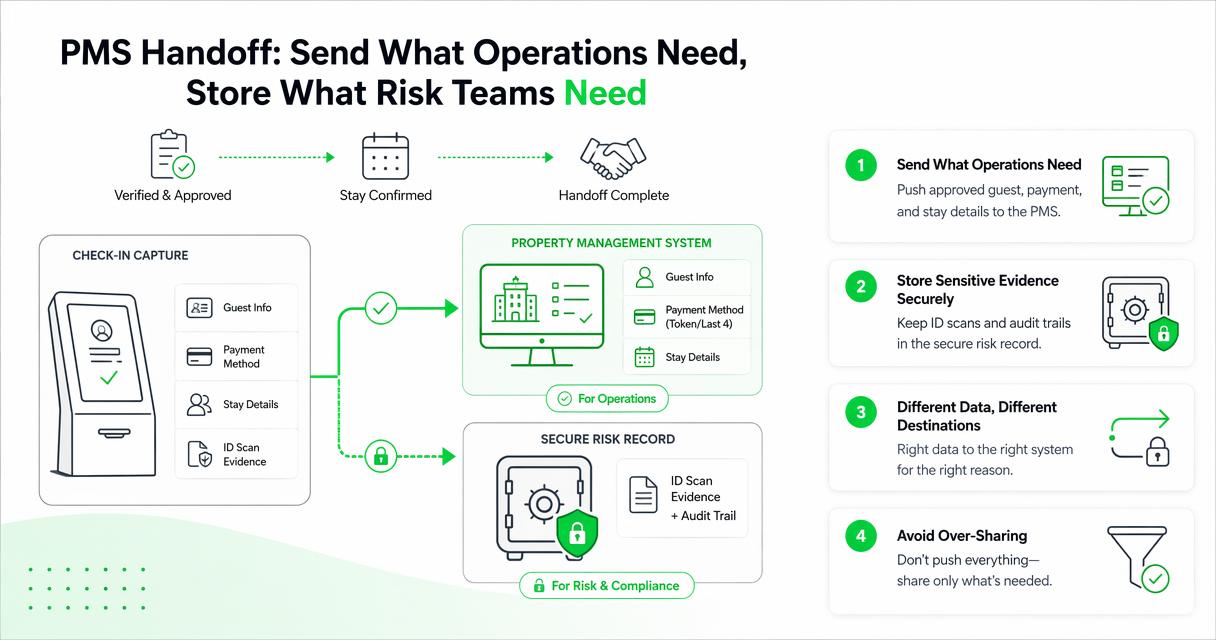
Hotels often assume automation means every captured field must be pushed into the PMS. I prefer a cleaner approach: send what operations need, store what risk teams need, and avoid duplicate sensitive data where possible.
PMS transfer checklist
- Map fields first: decide which ID fields match PMS fields exactly.
- Use staff review: require the agent to approve extracted data before transfer.
- Log the handoff: record time, user, reservation, and changed fields.
- Handle mismatches: flag name, age, ID expiration, or reservation conflicts.
- Limit free-text notes: use structured fields where possible.
- Test edge cases: passports, hyphenated names, non-US addresses, and unreadable scans.
For hotels comparing record systems beyond the PMS, GuestBan's Best Guest Record Management Software for Hotels in 2026 is useful related reading.
How GuestBan ID Scanning handles this
The GuestBan ID Scanning platform is built around ID capture, guest record consistency, and hotel risk documentation rather than generic form collection.
For a front-desk team, that distinction matters. A generic form can collect data, but hotel check-in needs scan quality, staff accountability, repeatable records, and escalation paths. GuestBan ID Scanning supports the workflow hotels actually run at the desk: scan, verify, document, and review.
Capability fit for hotel teams
| Hotel need | Practical requirement | How the workflow should handle it |
|---|---|---|
| Faster check-in | Reduce manual typing | Extract ID fields for agent review |
| Fewer typos | Avoid rekeying names and numbers | Use scanned data as the starting point |
| Better documentation | Keep a usable record | Save timestamped guest records |
| Manager review | Escalate unusual cases | Route exceptions through policy |
| Multi-property control | Keep standards consistent | Apply shared procedures across locations |
Teams evaluating scanners can also review GuestBan's article on enhancing hotel security with an ID scanner for more operational context. For brand details, guestban.com is the place to start.
What benefits can hotels measure?
Hotels should measure automation by check-in speed, data accuracy, documentation quality, staff consistency, and dispute readiness.
Avoid vague claims like better guest experience unless you define the signal. In my view, the strongest business case comes from a simple before-and-after scorecard that managers can review by shift or property.
Metrics worth tracking
- Average check-in handling time: compare manual entry time with scan-and-review time.
- Correction rate: count records edited after check-in because of typos or missing fields.
- Exception volume: track expired IDs, name mismatches, age issues, and unreadable scans.
- Documentation completeness: review whether required fields and scan references are present.
- Chargeback support: confirm whether records include the evidence needed for payment disputes.
- Training consistency: compare completion rates across new and experienced agents.
Chargebacks deserve special attention because a clean guest record can support a faster internal review. GuestBan's guide to chargebacks and fraud in the hotel industry explains why documentation quality matters when a transaction is questioned.
"Without data you're just another person with an opinion.", W. Edwards Deming, Quote Investigator
What privacy and audit controls matter in 2026?
Privacy and audit controls matter because scanned IDs contain sensitive personal information that should be limited, protected, and reviewable.
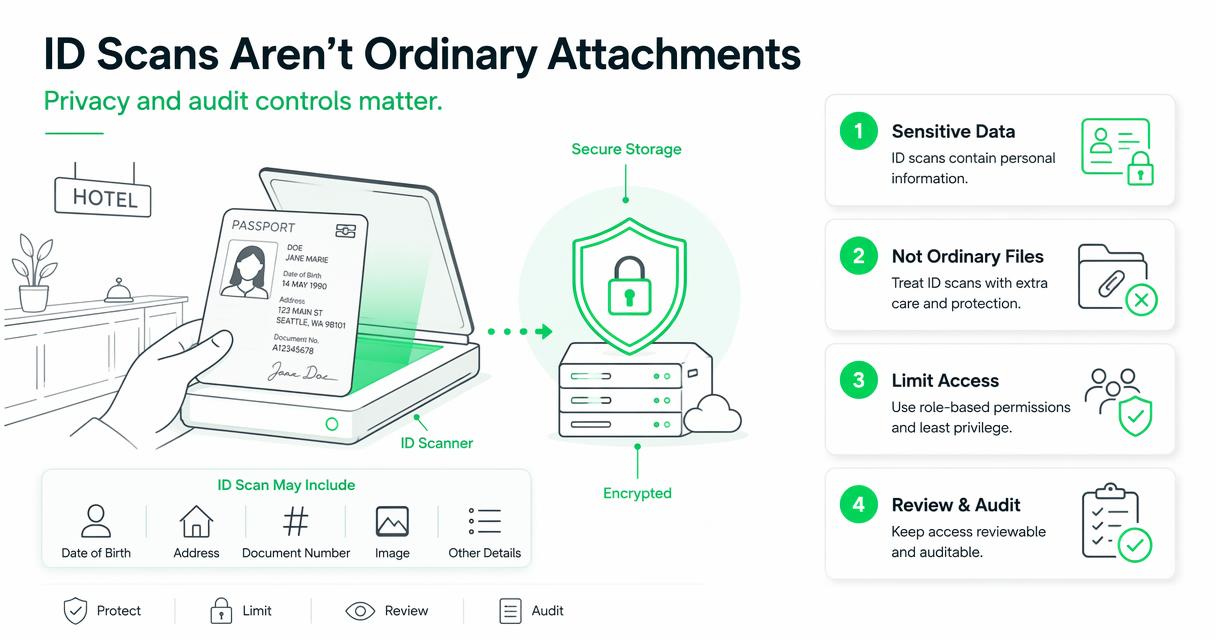
Hotels should avoid treating ID scans like ordinary attachments. A scan may include date of birth, address, document number, image, and other details. That calls for role-based access, retention rules, and a clear reason for each field.
Controls to require before rollout
- Role-based permissions: front-desk agents, managers, owners, and auditors should not all have the same access.
- Retention settings: define how long ID images and related records are kept.
- Audit logs: record who viewed, edited, exported, or deleted guest data.
- Secure storage: avoid local desktop folders, shared inboxes, and unsecured paper copies.
- Incident procedures: document what staff should do if a guest disputes a scan or data entry.
The Cloud Storage for Scanned Guest IDs guide expands on permissions, retention, reports, and secure workflows.
Research on AI and digital systems also supports a cautious rollout. Dwivedi, Kshetri, Hughes, and coauthors discuss opportunities and risks in generative AI for practice and policy in the International Journal of Information Management paper. Blut, Wang, and Wünderlich's service automation meta-analysis in the Journal of the Academy of Marketing Science also shows why technology design affects service interactions source.
"Privacy is not an option, and it shouldn't be the price we accept for just getting on the Internet.", Gary Kovacs, TED
What mistakes should hotels avoid?
Hotels should avoid automating a weak process, storing more data than needed, and giving staff unclear exception rules.
Bad automation makes errors faster. If a hotel has no standard for expired IDs, third-party reservation mismatches, local address rules, or manager escalation, a scanner alone will not fix the process.
Common rollout risks
- No written field policy: agents guess what to capture.
- No PMS mapping: data lands in the wrong field or not at all.
- No exception path: staff improvise during disputes.
- Too much access: sensitive records are visible to people who do not need them.
- No retention rule: old scans remain longer than the hotel intended.
A safer rollout starts with one property or one shift, then expands after managers review scan quality, staff feedback, and exception logs. Keep the pilot boring. Boring usually means the workflow is clear.
What to expect in 2027
By 2027, guest data capture will likely become more connected to digital check-in, fraud review, and property-wide risk controls.
Hotels are already moving away from isolated front-desk tasks. The next step is a cleaner record flow between booking, arrival, payment, ID review, and incident documentation. AI may help flag inconsistencies, but managers will still need explainable rules and human approval for sensitive decisions.
Likely direction for hotel operators
| Trend | What it means for hotels | What to prepare now |
|---|---|---|
| More digital pre-arrival forms | Guests submit some data before arrival | Match pre-arrival data to scanned ID |
| Stronger audit expectations | Owners want clearer records | Standardize logs and permissions |
| Better exception routing | Staff need faster manager decisions | Define escalation categories |
| Multi-property data controls | Groups want consistent policy | Align retention and access by role |
GuestBan ID Scanning fits that direction when hotels want ID capture tied to risk review and guest documentation. If you are planning a 2026 refresh, build the workflow now so 2027 upgrades do not require a full reset.
FAQ
Hotel managers usually ask the same practical questions before they automate ID capture, and the answers should be clear enough for a front-desk SOP.
Can hotels automate guest data capture without slowing check-in?
Yes, hotels can automate guest data capture without slowing check-in if the workflow is scan, review, confirm, and save. The agent should not have to manage files manually or retype extracted fields. A short pilot helps managers confirm that the process works during real arrival pressure.
Should every scanned ID field go into the PMS?
No, every scanned ID field should not automatically go into the PMS. Hotels should map only the fields needed for operations and keep sensitive scan evidence in a secure record system when policy requires it. This reduces duplicate storage and makes audits easier.
Is ID scanning only useful for large hotels?
No, ID scanning can help small hotels, independent motels, and multi-property groups. Smaller properties often benefit because fewer people manage more tasks. Larger groups gain consistency across locations, especially when managers need standard records and shared procedures.
How often should managers audit captured guest records?
Managers should audit captured records regularly, especially after rollout, staff changes, and policy updates. A useful audit checks missing fields, unreadable scans, user activity, exceptions, and PMS transfer accuracy. Monthly reviews work for many properties, while high-risk locations may review more often.
Conclusion
Hotel guest data capture automation works when it is treated as an operations control, not just a faster way to type. Start by defining required ID fields, mapping PMS handoff, setting permissions, and training agents on exceptions. Then measure check-in time, correction rate, record completeness, and dispute readiness.
For the next step, review your current front-desk ID process this week. Pick one shift, document the manual workflow, and compare it with a scan-and-review model. If you want a hotel-focused platform for that process, evaluate GuestBan ID Scanning and visit guestban.com to plan a cleaner rollout.

