

TL;DR
Driver’s license parsing software for hotels converts barcode or OCR data from IDs into structured guest records, reducing manual entry while improving audit readiness. Hotels should evaluate parsing accuracy, PMS workflow fit, consent notices, retention controls, and field validation before rollout.
A front desk can collect a guest's ID in seconds, but the real value comes from turning that scan into a clean, searchable, validated record. Driver's license parsing software for hotels reads data from a license barcode or image, maps it into usable fields, and sends the right details to the property management system, registration card, watchlist workflow, or audit trail. For hotels that want faster check-in and stronger record control, GuestBan ID Scanning gives operators a practical way to capture ID details and connect them to guest verification processes without relying on handwritten notes or retyped names.
Table of Contents
What is driver’s license parsing software for hotels?
Driver's license parsing software for hotels is a tool that reads ID data from a barcode, magnetic stripe, or image and converts it into structured guest fields such as name, address, date of birth, ID number, issue date, and expiration date. Hotels use it to reduce typing, support guest verification, and maintain better records.
Driver's license parsing: the process of extracting raw ID data and mapping it into labeled fields that hotel systems can store, search, validate, and audit.
Parsing is different from simply taking a photo of an ID. A photo is evidence; parsed data is operational. The parsed record can populate a PMS profile, match a previous stay, trigger an age check, or attach to an incident file.
"Without data you're just another person with an opinion.", W. Edwards Deming, The W. Edwards Deming Institute
Hotels should treat ID parsing as a data quality workflow, not just a scanner purchase. The scanner captures; the parser interprets; the PMS stores; the team reviews exceptions.
How does hotel license parsing work?
Hotel license parsing works by capturing machine-readable or visual ID content, decoding it, normalizing the fields, validating key values, and pushing the approved record into the hotel's operating systems.
- Scan the ID barcode or capture the document image.
- Decode the barcode or run OCR on the image.
- Parse raw strings into labeled fields.
- Normalize names, dates, addresses, and document numbers.
- Validate required fields against hotel policy.
- Send approved data to the PMS, guest record, or review queue.
- Store an audit trail showing who scanned, edited, or approved the record.
Simple workflow from scan to audit trail
Guest presents ID
 ↓
Scanner or camera captures barcode/image
 ↓
Parser extracts fields: name, DOB, ID number, address, expiration
 ↓
Validation checks required fields and policy rules
 ↓
Front desk confirms exceptions or mismatches
 ↓
PMS guest profile or registration card is populated
 ↓
Audit trail records scan time, user, edits, and retention status
Barcode parsing is usually faster and cleaner than OCR because the data is already encoded in a machine-readable format. OCR becomes useful when the license lacks a readable barcode, the barcode is damaged, or the hotel also needs a document image for review.
For hotels comparing scanning workflows, a category guide like hotel ID scanning software can help separate basic image capture from parsing, verification, and record management.
Which ID fields should hotels capture and validate?
Hotels should capture only the fields needed for check-in, compliance, risk review, and guest record matching, then validate the fields that affect identity, eligibility, and audit quality.
A good setup does not copy every available field into every system. It maps each field to a purpose. That keeps records useful and lowers privacy risk, especially for multi-property groups with shared guest databases.
Core ID fields and hotel use cases
| Parsed field | Typical hotel use | Validation check |
|---|---|---|
| Full legal name | PMS profile, registration card, guest matching | Compare against booking name and payment name |
| Date of birth | Age-restricted check-in, incident review | Confirm age rule and date format |
| ID number | Guest record, fraud review, audit lookup | Mask or restrict access where possible |
| Expiration date | Valid ID policy | Flag expired documents before check-in |
| Address | Local guest rules, registration records | Normalize state, province, postal code |
| Issuing jurisdiction | Risk review, ID policy | Confirm accepted ID type and region |
| Scan timestamp | Operational audit trail | Tie scan to user, property, and reservation |
I recommend hotels define required, optional, and restricted fields before implementation. Required fields support check-in. Optional fields help investigation or guest matching. Restricted fields need tighter access controls and retention rules.
A hotel that wants a wider identity workflow should connect parsing to guest verification software for hotels, not leave scanned data trapped on a workstation.
Where do parsing errors happen?
Parsing errors happen when the source ID is hard to read, the barcode standard is interpreted incorrectly, the OCR engine misreads text, or the software maps a valid value into the wrong hotel field.
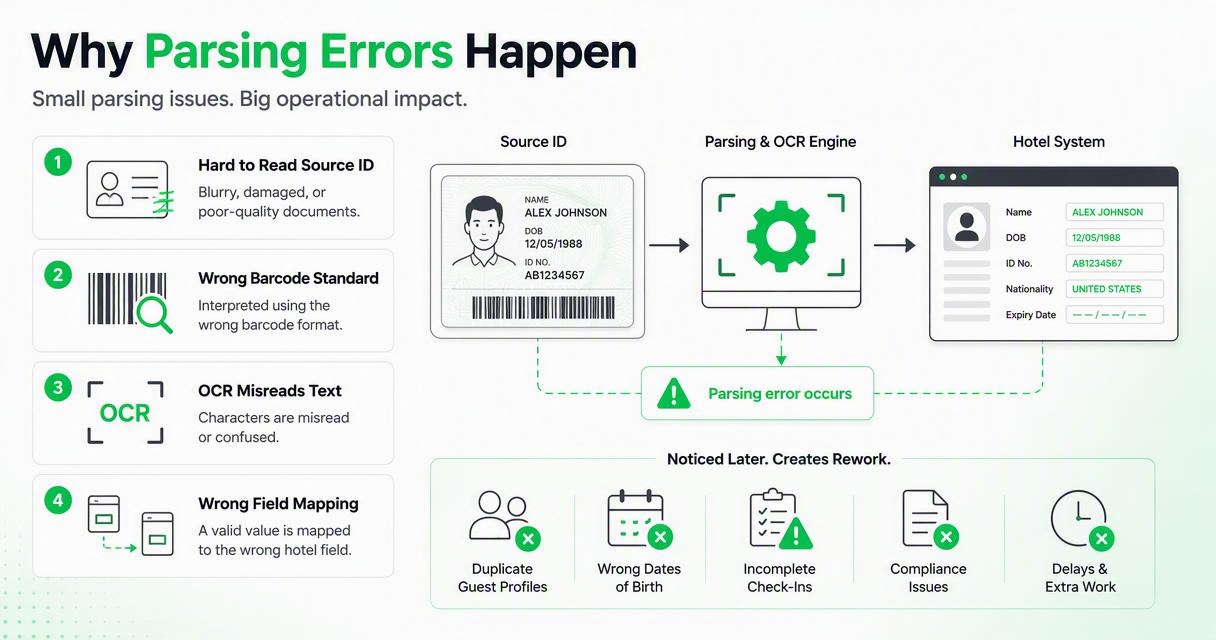
Hotels usually notice bad parsing only after it creates rework: duplicate guest profiles, wrong dates of birth, incomplete addresses, or failed watchlist checks. That is why validation matters as much as extraction.
Academic work on AI failure patterns describes useful categories for hotels. Chanda and Banerjee's 2022 paper on omission and commission errors underlying AI failures distinguishes missing information from incorrect added information. Both show up in ID capture workflows.
Common failure points hotels should test
- Damaged barcode: the scan succeeds visually, but decoded fields are incomplete.
- OCR character confusion:
0andO,1andI, or hyphenated names are read incorrectly. - Date format mismatch: month-day-year and day-month-year values are stored incorrectly.
- Field mapping error: an issuing state becomes an address state, or a middle name joins the last name.
- Expired ID not flagged: the parser captures the date, but no rule checks it.
- Duplicate profile creation: a slightly different name creates a second PMS guest record.
Key takeaway: A fast scan is not the same as a verified guest record. Hotels need field-level checks, not just successful image capture.
Machine learning can help improve recognition, but security research still treats AI systems as tools that need controls, monitoring, and human oversight. A 2024 IEEE Access survey by Ozkan-Okay, Akin, and Aslan reviews AI and machine learning in cybersecurity solutions, which is a useful reminder that automation should strengthen controls rather than replace them outright: IEEE Access paper.
How should hotels validate parsed license data?
Hotels should validate parsed license data with a layered process that checks field completeness, business rules, PMS matches, access permissions, and human exceptions before the record becomes final.
- Require a clear scan result before saving.
- Check required fields such as name, date of birth, expiration date, and ID number.
- Compare the parsed name against the reservation and payment profile.
- Flag expired IDs, underage guests, and unsupported document types.
- Route unclear matches to front desk review.
- Log edits with user, timestamp, field changed, and reason.
- Apply retention rules based on property policy and law.
Validation should be visible to staff. A simple red, yellow, green status can prevent desk agents from ignoring warnings during a rush.
Privacy also belongs in validation. The GDPR states:
"The protection of natural persons in relation to the processing of personal data is a fundamental right.", European Parliament and Council, General Data Protection Regulation, Recital 1
Even outside the European Union, that principle is useful for hotels: collect what you need, protect what you keep, and delete what no longer serves a valid purpose.
How GuestBan ID Scanning handles hotel ID parsing
The GuestBan ID Scanning platform is designed for hotels that need parsed ID data to support guest records, verification steps, and property-level risk workflows.
Instead of treating a scan as a loose image file, GuestBan ID Scanning helps hotels connect ID capture to operational decisions. That matters when a property needs cleaner front desk records, faster lookup across prior stays, or better documentation for managers reviewing guest issues.
For teams evaluating guest history and record quality, pairing ID capture with guest record management software for hotels can make parsed data more useful across shifts and locations. The goal is not to collect more for its own sake; the goal is to make the right record available to the right employee at the right time.
Visit guestban.com when you are ready to compare scanning, verification, and hotel risk workflows in one place.
Feature comparison for hotel operators
| Capability | Basic ID image capture | Barcode or OCR parsing | Hotel-focused platform |
|---|---|---|---|
| Saves ID image | Yes | Usually | Yes |
| Extracts guest fields | No | Yes | Yes |
| Validates key fields | No | Sometimes | Yes, based on workflow |
| Supports PMS-ready records | Manual | Possible | Designed for hotel operations |
| Helps audit staff actions | Limited | Varies | Stronger user and record tracking |
| Fits multi-property review | Weak | Varies | Better for shared hotel teams |
A hotel-focused platform should reduce desk workload without hiding the review process. In my view, the best systems make exceptions obvious, keep managers in control, and avoid turning staff into data entry clerks.
What should hotels ask before buying parsing software?
Hotels should ask buying questions that cover accuracy, integration, privacy, staff workflow, and support because the lowest-cost scanner can become expensive if it creates rework or unmanaged data.
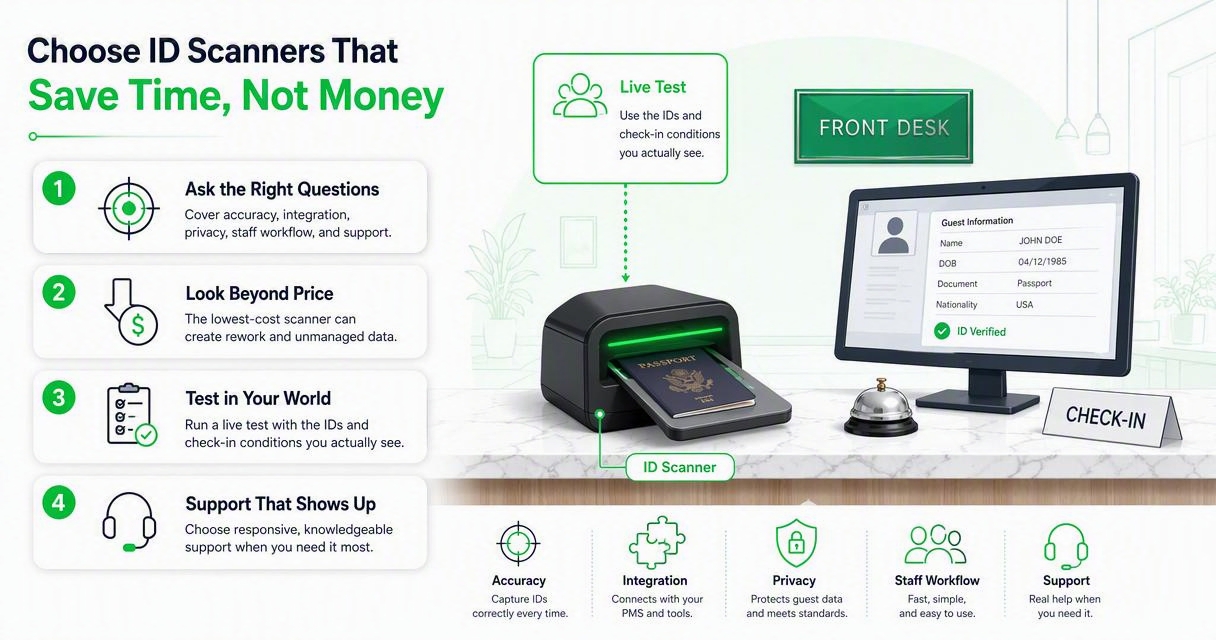
The strongest purchasing process starts with a live test using the IDs and check-in conditions the hotel actually sees. A lobby with glare, worn IDs, night audit staffing, and mixed domestic or international guests is a better test than a vendor demo with perfect samples.
Buyer checklist for hotel managers
- Supported ID types: Which jurisdictions, barcodes, passports, or alternate IDs are supported?
- Capture method: Does the system use barcode parsing, OCR, image capture, or all three?
- PMS workflow: Can parsed fields populate the PMS or registration record without duplicate typing?
- Validation rules: Can managers configure expired ID, age, local guest, and required-field checks?
- Audit trail: Does the software record scans, edits, users, timestamps, and retention actions?
- Access control: Can sensitive fields be masked or limited by role?
- Multi-property use: Can a hospitality group manage standards across locations?
- Support model: Who helps when a scanner, browser, kiosk, or PMS connection fails?
If your property also uses refusal or restricted-rental workflows, connect the purchase discussion to hotel do not rent list software. ID parsing is more valuable when it supports a consistent decision process rather than a pile of disconnected files.
What privacy and retention rules should hotels set?
Hotels should set privacy and retention rules that define why ID data is collected, who can view it, how long it is kept, and when it must be deleted or restricted.
A scanned license can contain sensitive personal data. Over-collection creates risk, especially when images or full ID numbers remain accessible after the business need has passed. The safer approach is data minimization: collect enough to support the stay, the law, and legitimate risk management, then limit exposure.
A 2025 ACM paper on user-led data minimization for LLM-based chatbots focuses on a different technology area, but the principle transfers well: users and organizations benefit when systems reduce unnecessary personal data before it spreads.
Practical retention policy decisions
| Policy decision | Why it matters | Hotel example |
|---|---|---|
| Purpose | Prevents vague collection | Check-in verification, registration, incident review |
| Role access | Limits internal exposure | Front desk sees status, manager sees full record |
| Field masking | Reduces sensitive display | Show last four characters of ID number |
| Retention period | Controls storage risk | Delete or archive after policy deadline |
| Exception handling | Supports investigations | Hold records tied to chargeback or damage claim |
| Export controls | Prevents data leakage | Restrict downloads to approved managers |
Hotels should also train staff not to photograph IDs with personal phones, copy data into unsecured notes, or export guest records casually. Software can enforce part of the policy, but management has to define the rule first.
What will change in 2026 and 2027?
Hotel ID parsing will move toward more connected verification workflows, stronger privacy controls, and better exception handling across multi-property groups.
The near future is not just faster scanning. The bigger change is how parsed identity data connects to risk review, payment checks, digital registration, kiosks, and shared guest records. Hotels will expect systems to explain why a record was flagged, not merely show a warning.
GuestBan ID Scanning fits that direction because hotel teams increasingly need ID capture tied to operational outcomes. A front desk scan should help confirm the guest, populate the record, and support later review if a manager needs to understand what happened.
Expect more attention on:
- Configurable retention: hotels will want different rules by brand, property, region, and record type.
- Exception dashboards: managers will review failed scans, expired IDs, and mismatched names in one queue.
- Kiosk and mobile capture: unattended check-in will need stronger validation before key issuance.
- Shared standards: hospitality groups will push for consistent identity workflows across locations.
- Audit-ready reporting: owners and risk teams will want proof that staff followed policy.
Head to guestban.com if you want a practical look at how ID scanning can fit into hotel operations rather than sit apart from them.
FAQ about hotel driver’s license parsing
Hotel managers usually ask about accuracy, legality, PMS fit, and staff adoption before they choose a parsing workflow.
Is barcode parsing more accurate than OCR for hotel IDs?
Barcode parsing is usually more reliable than OCR because the license data is encoded in a structured format rather than read from a visual image. OCR is still useful for backup capture, document images, or IDs without readable barcodes. Hotels should test both under real front desk lighting and scanner conditions.
Can parsed license data go directly into a PMS?
Parsed license data can populate a PMS when the software supports field mapping, integration, or an approved import workflow. Hotels should confirm exactly which fields transfer, how duplicates are handled, and whether staff can review exceptions before the profile is saved. Direct transfer without validation can create bad records faster.
Should hotels store the full driver's license image?
Hotels should store the full image only when they have a clear business, legal, or risk reason and an approved retention policy. Many properties can operate with parsed fields, masked identifiers, and an audit trail. If images are stored, access controls and deletion schedules should be part of the rollout.
What is the biggest mistake hotels make with ID parsing?
The biggest mistake is treating ID parsing as a hardware project instead of a guest data workflow. A scanner alone does not solve duplicate records, expired IDs, staff edits, or privacy exposure. Hotels need rules for required fields, validation, PMS updates, manager review, and retention before going live.
Conclusion
Driver's license parsing software for hotels works best when it turns a quick scan into a clean, validated, policy-controlled guest record. Start by mapping the fields your property truly needs, test parsing accuracy with real IDs, define exception rules, and connect the workflow to your PMS, guest verification process, and audit trail. If you want a hotel-focused way to move from manual ID entry to structured guest records, evaluate GuestBan ID Scanning as your next step.

