
TL;DR
Use hotel ID scanning only for clear, documented purposes such as identity verification, registration accuracy, chargeback evidence, and safety workflows. The practical checklist is simple: give notice, collect only needed data, control access, set retention rules, review vendors, and train staff before the scanner goes live.
A hotel ID scanner can speed up check-in, but it also turns the front desk into a data collection point that needs rules. A strong hotel ID scanning compliance checklist helps managers verify guests, protect records, and avoid casual over-collection. For properties that want a purpose-built workflow, GuestBan ID Scanning supports ID capture, staff consistency, and operational documentation without making compliance feel like a legal memo.
Table of Contents
What is a hotel ID scanning compliance checklist?
A hotel ID scanning compliance checklist is a written control list that tells staff what ID data to collect, why it is collected, how guests are notified, who can access it, how long it is kept, and when it is deleted. It turns privacy, security, and operational rules into repeatable front-desk actions.
Hotel ID scanning: the process of reading a guest identity document, such as a driver's license or passport, to capture or verify guest information during check-in.
Purpose limitation: collecting and using guest ID data only for specific, documented hotel purposes, not for unrelated profiling or casual recordkeeping.
Key insight: If your team cannot explain why a field is captured, who can see it, and when it disappears, the workflow is not ready for daily use.
A checklist matters because hospitality teams work across shifts, properties, and stress levels. Written controls reduce guesswork during late arrivals, group check-ins, payment disputes, and incidents. The World Health Organization's 2008 surgical checklist is outside hospitality, but it shows the broader value of structured checklists: critical steps are less likely to be missed when teams follow a shared prompt, as summarized in the WHO Surgical Safety Checklist background.
Why does ID scanning compliance matter for hotels in 2026?
ID scanning compliance matters because hotels now balance faster check-in, fraud prevention, guest safety, privacy expectations, and multi-property data governance in one workflow. In 2026, managers should treat scanned IDs as sensitive operational records, not as simple photocopies or throwaway registration details.
Many hotels scan IDs for legitimate reasons: confirming the registered guest, reducing manual typing errors, documenting check-in, supporting age policies, and preserving evidence for disputes. The risk appears when teams collect more than they need, store images indefinitely, or allow broad employee access.
Regulators and public agencies increasingly frame privacy around transparency and limited use. The European Union's General Data Protection Regulation states:
"Personal data shall be: processed lawfully, fairly and in a transparent manner in relation to the data subject.", European Union, GDPR Article 5, EUR-Lex
Even if your property is not directly governed by GDPR, the principle is useful: tell guests what is happening, collect only what you need, and control the record after capture. Business Queensland gives similar practical guidance for venues using networked ID scanners, including obligations around privacy, operation, and maintenance in its ID scanning checklist.
Use this front-desk compliance checklist
The best ID scanning checklist gives each control a business reason and a concrete front-desk action. I recommend turning the table below into a property SOP, then reviewing it with legal counsel, ownership, IT, and operations before rollout.
Checklist table for hotel ID capture
| Checklist item | Why it matters | Example front-desk action |
|---|---|---|
| Notice | Guests should know ID scanning is part of registration before the scan happens. | Post a short notice at check-in and include the same language in digital pre-arrival instructions. |
| Consent or lawful basis | Properties need a documented reason for capture, especially where consent, contract, safety, or legal obligations apply. | Use a script: "We scan ID to verify registration details and protect the reservation record." |
| Purpose limitation | Data should match the hotel's stated use, such as identity verification, registration accuracy, safety, or dispute documentation. | Do not use ID data for unrelated marketing or employee curiosity searches. |
| Data minimization | Capturing fewer fields reduces privacy and breach exposure. | Configure the scanner to store only approved fields, not every visible detail by default. |
| Role-based access | Not every employee needs full ID image access. | Allow front desk agents to confirm identity, while managers handle retrieval for disputes or incidents. |
| Retention | ID records should not remain forever unless a law or defined business need requires it. | Set automatic deletion windows by record type, such as routine stays versus open disputes. |
| Deletion and correction | Guests may ask what was captured or request correction under applicable policy. | Create a manager workflow for privacy requests instead of handling them casually at the desk. |
| Vendor review | The scanner vendor affects security, storage, uptime, and PMS data handling. | Review encryption, access logs, support process, data location, and contract terms before signing. |
| Staff training | Compliance fails when the procedure is unclear during busy periods. | Train agents with approved scripts, refusal escalation steps, and manager handoff rules. |
For a deeper operational template, pair this compliance table with a practical hotel front desk ID capture checklist that covers shift-level execution.
How should hotels give notice and get consent?
Hotels should give notice before scanning and use a plain-language script that explains the purpose, data captured, retention approach, and guest options. Consent language should not feel hidden inside a long registration card, and managers should know when local law requires consent versus another lawful basis.
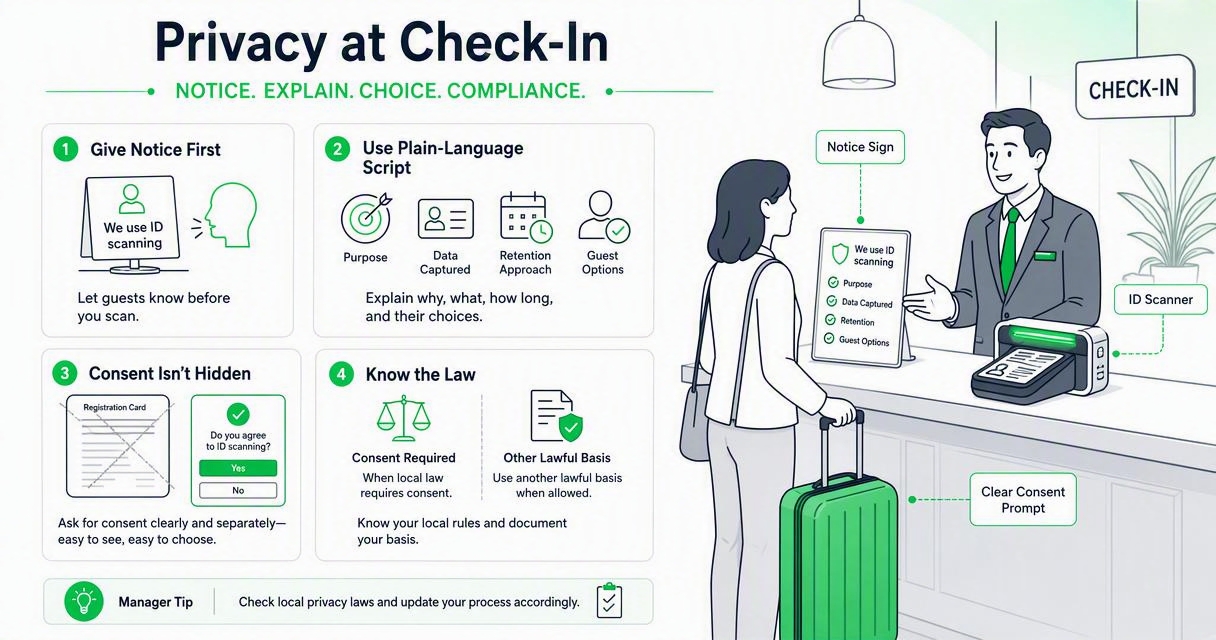
Good notice works in three places:
- Before arrival: booking confirmation, pre-check-in page, or app flow.
- At the desk: a short printed sign near the scanner.
- In policy: a privacy notice that explains ID capture in plain English.
Front-desk example: "For guest safety and registration accuracy, we scan your ID to verify the name on the reservation and retain the record under our hotel policy. A manager can answer questions before we proceed."
The exact handling of refusal depends on your property policy and local rules. If a guest objects, staff should pause, avoid arguing, and follow a manager-approved escalation path. For a guest-facing scenario guide, see can a guest refuse hotel ID scanning?.
What data should a hotel scanner collect?
A hotel scanner should collect only the ID data needed for check-in, security, payment dispute support, and legal or policy obligations. In most workflows, that means the guest name, document type, document number where justified, expiration date, and a secure audit trail, not unrestricted copies for everyone to view.
Use this decision test before enabling a field:
- Name the purpose: Why does the hotel need this field?
- Map the user: Which employee role needs to see it?
- Set the clock: How long should the field be retained?
- Document the exception: What event justifies longer storage?
- Review annually: Does the field still serve a current purpose?
Passport and license images can create higher storage risk than structured fields. Many hotels are moving away from photocopy habits because paper copies are easy to misplace, hard to audit, and difficult to delete consistently. A structured scan with access logs and retention settings is usually easier to govern than a drawer of copies.
If your property handles many international travelers, compare scanning and copy workflows in this passport scanning vs passport photocopying guide.
How should access, retention, and deletion work?
Hotels should restrict ID records by role, keep them only as long as needed, and delete them through a documented process. A manager should be able to answer three questions at any time: who accessed the record, why it was accessed, and when it will be removed.
Role-based access is the control I see hotels overlook most. A front desk agent may need to confirm a guest's identity during check-in, but that does not mean every agent needs bulk export rights or historical image access.
Retention should be event-based where possible. Routine stays can follow a standard deletion window. Records tied to chargebacks, safety incidents, law enforcement requests, or property damage may need a documented hold. For payment disputes, ID records should connect to the reservation, folio, signed authorization, and communication history. The guide on hotel chargeback documentation and ID scanning explains that evidence bundle in more detail.
Deletion needs ownership. Assign one role, usually GM, operations manager, compliance lead, or IT administrator, to confirm deletion rules, approve exceptions, and review audit logs.
How should hotels review ID scanning vendors?
Hotels should review ID scanning vendors for security, PMS compatibility, auditability, support, contract terms, and operational fit before collecting live guest data. A low-cost scanner can become expensive if it stores too much data, lacks access controls, or creates manual work during peak arrival times.
Ask vendors these questions before approval:
- Security: Is data encrypted in transit and at rest?
- Access: Can permissions be limited by role, property, and user?
- Logs: Can managers see who viewed, changed, exported, or deleted records?
- Retention: Can deletion rules be automated by record type?
- PMS workflow: Does the system reduce typing without pushing unnecessary data?
- Support: Who responds when the scanner fails during a sold-out night?
- Contract: What happens to data at termination?
The Transportation Security Administration, defined as a U.S. Department of Homeland Security agency responsible for transportation security systems in the TSA overview, is a reminder that identity verification can be operationally sensitive. Hotels are not airports, but guests still expect careful handling when an official document is scanned.
The GuestBan ID Scanning platform is built for hotel workflows where front desk speed, incident documentation, and controlled capture need to work together. If you are comparing platforms for a broader buying decision, start with this guide to hotel ID scanning software and then test your final choice against the checklist above.
How should staff be trained before rollout?
Staff should be trained on the guest script, approved purposes, refusal escalation, access limits, retention basics, and incident documentation before ID scanning becomes mandatory. Training should be short, repeated, and tied to real check-in scenarios rather than buried in a policy binder.
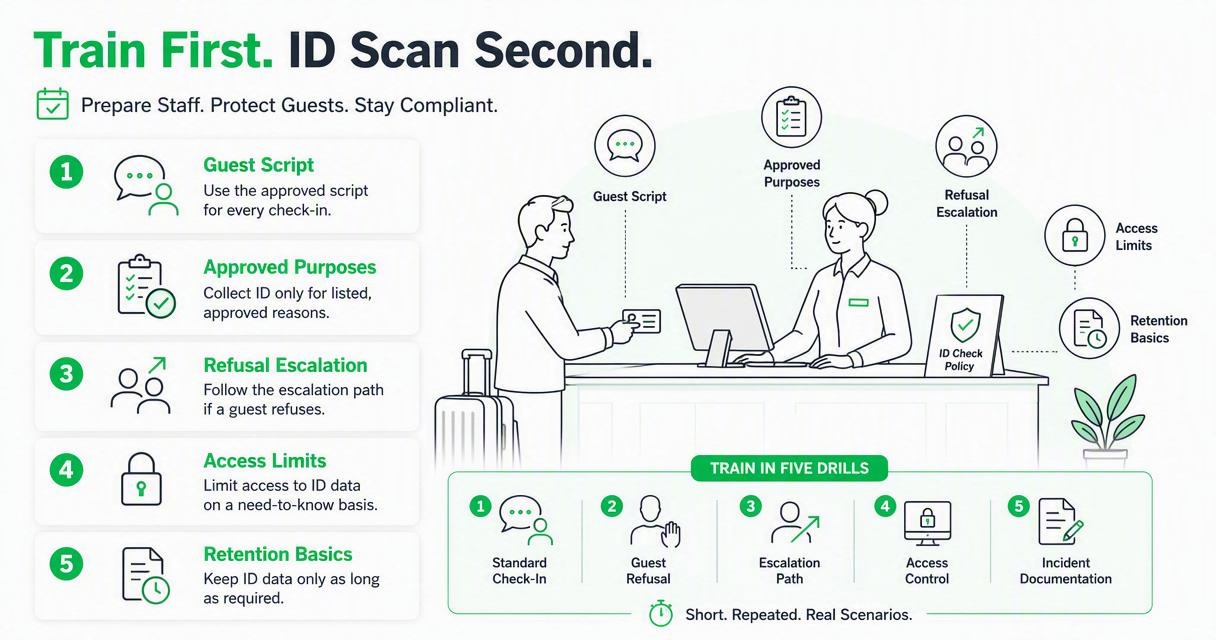
I would train in five drills:
- Routine check-in: scan, verify, confirm PMS data, finish registration.
- Guest asks why: explain purpose and point to the privacy notice.
- Guest refuses: pause, call manager, follow property policy.
- Name mismatch: verify reservation details and document the exception.
- Incident follow-up: manager retrieves only the needed record and logs the reason.
Use one approved script across shifts. Variation creates risk because one agent may overexplain, while another may say something inaccurate. Keep the script friendly and direct.
"Quality is never an accident; it is always the result of intelligent effort.", John Ruskin, The Quote Investigator citation history
That line fits hotel compliance. Good outcomes come from design, not from hoping every employee improvises well under pressure.
How GuestBan ID Scanning handles this
GuestBan ID Scanning helps hotels turn ID capture into a repeatable front-desk workflow rather than a loose mix of photocopies, screenshots, and manual notes. The strongest use case is operational consistency: agents follow the same capture process, managers can standardize documentation, and multi-property teams can reduce policy drift.
A practical rollout with GuestBan ID Scanning should include:
- A written notice and staff script approved by management.
- Scanner settings aligned to the fields the hotel actually needs.
- Manager-level rules for access, exceptions, and retrieval.
- A retention schedule that separates routine stays from documented disputes.
- Refresher training during staff turnover and seasonal demand.
For properties evaluating automated front-desk operations more broadly, the KioTel automated hotel front desk can sit alongside ID capture planning as part of a larger check-in modernization effort. You can also visit guestban.com when you are ready to compare workflows with your current process.
What should hotels expect in 2027?
Hotels should expect ID scanning expectations to move toward clearer notices, shorter retention, better access logs, and tighter vendor due diligence in 2027. The technology will likely become more automated, but the compliance burden will still sit with the property that collects and uses the guest record.
Three changes are worth planning for now:
- More guest questions: travelers are more aware of data collection and may ask what is stored.
- More centralized oversight: hotel groups will want standard controls across properties.
- More audit demand: owners, insurers, brands, and payment partners may ask for documented procedures.
The safest move is to design for explainability. A GM should be able to show the notice, the script, the access roles, the vendor review, and the deletion rule without hunting through emails. That is the difference between a useful operational control and a risky data habit.
FAQ
Do hotels legally have to scan guest IDs?
Some jurisdictions or property types require hotels to collect guest identity information, but the exact rule varies by location. Scanning is often a hotel policy choice used to verify registration, reduce errors, and support safety. Managers should confirm local lodging laws, brand standards, and counsel guidance before making scanning mandatory.
Can a hotel keep a scanned copy of a passport?
A hotel may have a legal or operational reason to record passport details, especially for international guests, but keeping a full image raises privacy and storage risk. The safer approach is to collect only required fields, restrict image access where images are retained, and set a clear deletion schedule.
Who should have access to scanned ID records?
Access should be limited to employees with a real operational need. Front desk staff may need verification rights during check-in, while managers, loss prevention, or accounting may need controlled access for incidents or disputes. Bulk export, historical lookup, and deletion permissions should be limited to trusted roles.
How often should a hotel review its ID scanning policy?
Review the policy at least annually and whenever your PMS, scanner vendor, privacy notice, ownership, brand standard, or local law changes. I also recommend a quick review after any incident involving guest records, because real events reveal gaps that a desk review may miss.
Conclusion
A practical hotel ID scanning compliance checklist is not a legal decoration; it is a daily operating tool for notice, consent, purpose limitation, access, retention, deletion, vendor review, and training. Start by auditing what you collect today, remove fields you cannot justify, assign access by role, and write the front-desk script your team will actually use. If you want a hotel-focused capture workflow, schedule a review of your current process with GuestBan ID Scanning and use the checklist above as your rollout scorecard.

