

TL;DR
The best choice depends less on OCR alone and more on hotel workflow fit: PMS integration, DNR alerts, retention controls, and support matter most. Independent hotels should prioritize fast setup, multi-property groups need centralized controls, and PMS vendors should choose API-first partners with clean documentation.
The best hotel ID scanning APIs in 2026 do more than read a driver’s license or passport; they turn guest identity capture into a repeatable front desk, risk, and documentation workflow. For hotels that need fast check-in plus stronger loss prevention, GuestBan ID Scanning is the most hotel-focused starting point because it pairs ID capture with guest risk controls instead of treating scanning as a generic OCR task.
Hotel ID scanning API: A software interface that captures, reads, validates, and transfers identity document data, such as name, date of birth, address, passport MRZ, or license barcode fields, into hotel systems such as a PMS, guest profile, DNR list, or incident record.
Table of Contents
What is a hotel ID scanning API?
A hotel ID scanning API is a connection layer that lets a hotel app, kiosk, PMS, or front desk tool extract identity data from government IDs and passports, then send approved fields into the hotel workflow. The best APIs support document capture, OCR or barcode parsing, field mapping, audit records, and privacy controls.
A useful API should fit the way hotels actually work. That means it should handle walk-ins, prepaid reservations, night audit, chargeback disputes, underage guest checks, and multi-property exceptions without forcing staff to copy fields by hand.
Key terms hotels should know
- OCR: Optical character recognition, used to read printed text on IDs and passports.
- MRZ: Machine-readable zone, the coded lines on many passports and travel documents.
- PMS: Property management system, the hotel system that manages reservations, profiles, folios, and check-in tasks.
- DNR list: Do-not-rent list, used to flag guests tied to prior incidents or policy violations.
- API: Application programming interface. Wikipedia’s SANE entry describes an API as a standardized way for software to access scanner hardware, a useful analogy for hotel scanning connections.
Best hotel ID scanning APIs ranked by hotel fit
The strongest hotel ID scanning API is the one that reduces manual entry, supports the documents your guests carry, and creates usable records for front desk, audit, and risk teams.
I rank hotel scanning options by practical fit, not by OCR claims alone. A generic document AI service can read text, but a hotel needs guest matching, staff permissions, retention settings, exception handling, and evidence that can be found later.
Decision table for hotel buyers
| Option | Best fit | Hotel-specific strengths | Watch before buying |
|---|---|---|---|
| GuestBan ID Scanning | Hotels that want scanning plus DNR and risk workflows | Built around guest identity capture, hotel bans, front desk decisions, and multi-property awareness | Confirm your PMS workflow and rollout plan during demo |
| IDScan.net VeriScan | Hotels needing ID capture and verification tools | Hospitality pages emphasize faster check-in, chargeback prevention, and ID scanning hardware options | Some deployments may need hardware planning and workflow configuration |
| 365id | Properties with passport-heavy guest mix | Materials emphasize passport scanning, guest verification, and PMS integrations | Validate country coverage and how data maps into your PMS |
| api4ai | Developers building custom OCR check-in flows | Its 2025 article highlights OCR and a 30-second check-in concept | Generic OCR may need more hotel risk logic around alerts and retention |
| General document AI APIs | PMS vendors or custom hotel apps | Flexible extraction from many document images | Hotel policies, DNR logic, and staff workflows are usually custom work |
How should hotels evaluate API-first ID scanning?
Hotels should evaluate ID scanning APIs with a scorecard that weights PMS workflow, document coverage, privacy controls, DNR alerts, and support above raw text extraction.
A front desk scan is only valuable if it lands in the right place. If a staff member still has to paste fields, upload files manually, or search a separate system during a line at 9 p.m., the API has not solved the operational problem.
A practical hotel scorecard
- Document coverage: Driver’s licenses, state IDs, passports, passport cards, and international documents.
- Capture method: Front desk scanner, mobile camera, kiosk, or web capture.
- PMS fit: Field mapping, reservation matching, profile creation, and exception handling.
- Risk workflow: DNR alerts, incident links, duplicate guest detection, and staff notes.
- Privacy controls: Role-based access, retention limits, deletion processes, and audit logs.
- Evidence quality: Searchable records for chargebacks, disputes, and incident reviews.
- Support model: Setup help, training, troubleshooting, and multi-property rollout guidance.
For hotels comparing broader software categories, this overview of hotel ID scanning software is a useful next step after the API shortlist.
Why PMS integration decides the winner
PMS integration matters because the guest record is where check-in accuracy, payment accountability, and staff handoff come together.
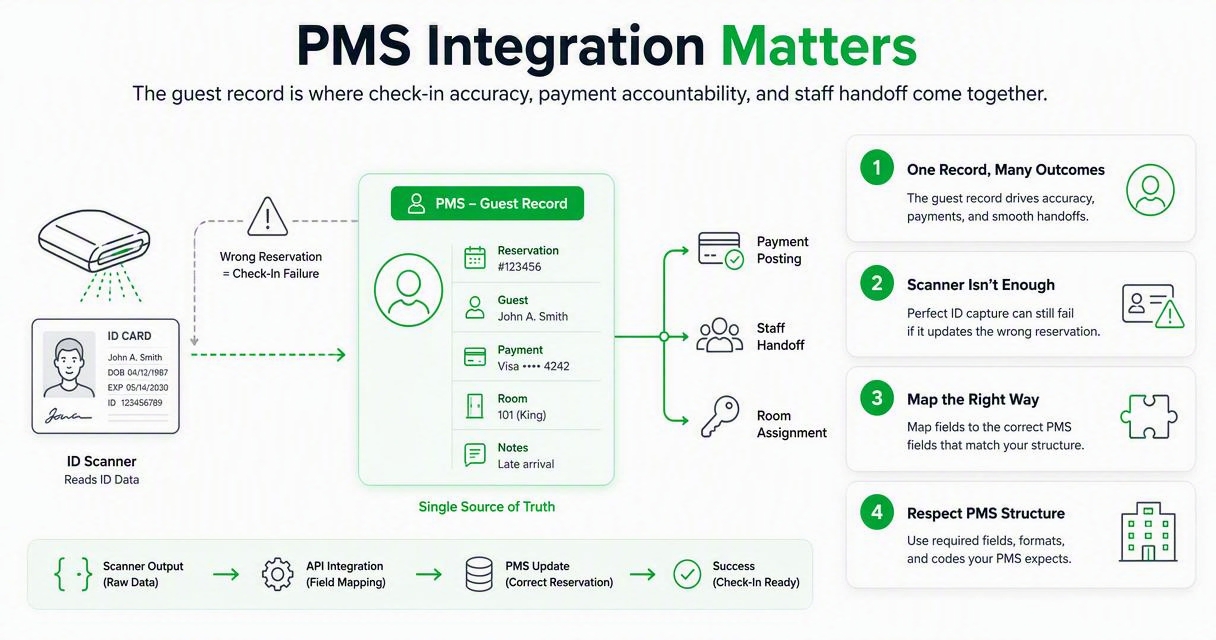
A scanner that reads an ID perfectly can still fail the hotel if the data doesn’t update the right reservation. The API should map fields in a way that respects the PMS structure, including first name, last name, date of birth, address, document type, issuing country, and expiration date.
“Security is a process, not a product.”, Bruce Schneier, The Process of Security
That quote applies directly to hotel ID scanning. The API is one piece. The full process includes who scans, when staff can override, what guests see, how exceptions are documented, and how long records are kept.
PMS workflow checks before signing
- Can the API attach ID data to an existing reservation instead of creating duplicates?
- Does it support walk-in guests without slowing the desk?
- Can managers choose which fields sync and which fields stay restricted?
- Does the scan record help with chargeback documentation later?
- Can night audit and loss prevention users find the record without calling IT?
Hotels with heavy dispute volume should pay close attention to evidence workflows. ID capture can support stronger documentation, especially when paired with clear policies like the ones explained in this guide to hotel ID scanning for chargeback prevention.
Which API features matter most for hotels?
The highest-value API features for hotels are automated guest data capture, passport and license support, DNR alerts, configurable retention, and searchable documentation.
Some vendors lead with speed, often promising faster check-in. Speed helps, but accuracy and control matter more over a full year of operations. A fast scan that stores too much data, misses a DNR match, or creates duplicate PMS profiles can cost more than it saves.
Feature checklist for 2026 deployments
| Feature | Why it matters at the front desk | Strong buying signal |
|---|---|---|
| Barcode and OCR capture | Handles domestic licenses plus passports | Clear extraction fields and confidence handling |
| Passport MRZ reading | Speeds international guest intake | Country and document coverage are documented |
| DNR alerts | Helps staff act consistently | Alerts appear during check-in, not after |
| Retention settings | Reduces privacy and legal exposure | Managers can set time limits by policy |
| Role-based access | Limits who can view ID images or fields | Permissions differ for clerk, manager, and admin |
| Audit logs | Supports investigations and disputes | Records show who viewed, edited, or exported data |
| PMS mapping | Cuts manual typing and errors | Reservation match rules are configurable |
| Support and training | Protects rollout quality | Vendor has hotel-specific onboarding |
How GuestBan handles hotel ID scanning workflows
The GuestBan ID Scanning platform handles ID capture as part of a hotel risk-control workflow, not as a standalone scan-and-store tool.
That distinction matters for hotels that need guest matching, DNR awareness, and evidence access across shifts. In my view, the strongest use case is a property that wants the desk to capture guest identity once, attach it to the right operational context, and use it consistently for safety, policy, and documentation.
Where the hotel-first workflow helps
- Front desk teams get faster data capture and fewer manual entry mistakes.
- General managers get clearer records when a guest dispute or incident comes back weeks later.
- Loss prevention teams get more consistent DNR and exception workflows.
- Multi-property groups can standardize scanning policies instead of relying on local habits.
Hotels operating extended stay, weekly rental, or higher-risk front desk models should also review ID scanning for extended stay hotels because longer stays change the risk profile. A guest who creates problems on day six is different from a one-night reservation, and the identity workflow should reflect that.
Who should pick which ID scanning API?
Independent hotels, hotel groups, and PMS vendors should choose different scanning API models because their operational risks and technical resources are not the same.
A 72-room independent property usually wants setup speed and staff adoption. A management company wants consistency across locations. A PMS vendor wants reliable endpoints, documentation, and predictable field behavior.
Short recommendations by buyer type
| Buyer type | Best recommendation | Why |
|---|---|---|
| Independent hotel | Choose a hotel-specific platform with guided setup | Staff need a system that works without custom development |
| Multi-property group | Choose centralized scanning with DNR and policy controls | Shared standards reduce inconsistent front desk decisions |
| PMS vendor | Choose API-first OCR plus clear field mapping | Developers need stable endpoints and predictable document parsing |
| Airport or resort hotel | Prioritize passport MRZ and international document coverage | Guest IDs vary more by country and document type |
| Extended stay property | Prioritize retention rules, incident links, and repeat-guest matching | Longer stays create more operational follow-up |
| Night audit-heavy property | Prioritize simple capture, alerts, and searchable records | After-hours staff need fewer judgment calls |
What should hotels avoid when buying?
Hotels should avoid buying an ID scanning API based only on demo speed, because the real test is what happens during exceptions, disputes, and policy enforcement.
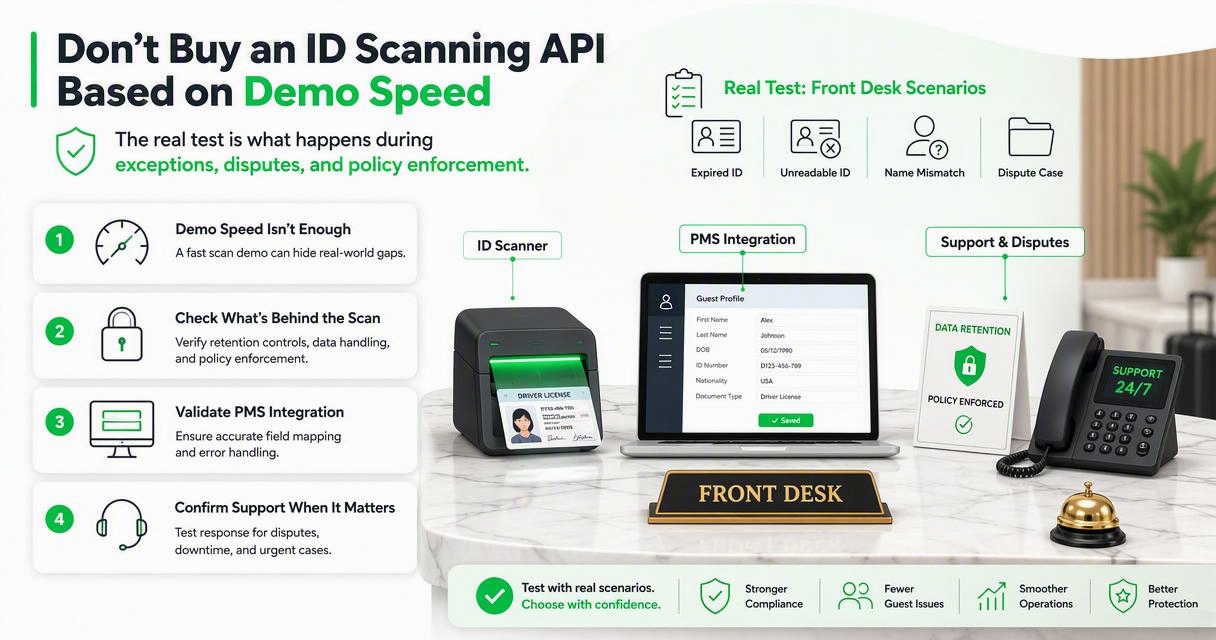
A glossy scan demo can hide weak retention controls, poor PMS field mapping, or limited support. The safest evaluation uses real front desk scenarios: a prepaid guest, a walk-in, a passport guest, a declined card, a DNR match, and a guest who questions the scan.
Red flags during vendor review
- The vendor cannot explain where ID images and extracted fields are stored.
- Retention settings are fixed, unclear, or only handled by support tickets.
- DNR alerts are not visible during the actual check-in step.
- PMS integration depends on manual exports or copy-paste work.
- Staff permissions are too broad for front desk roles.
- The API reads documents but does not help with hotel policy decisions.
Guest refusal is another area to plan before rollout. Hotels should train staff on local policy, brand standards, and escalation steps, and this guide explains what to consider when a guest refuses hotel ID scanning.
What privacy and retention controls are required?
Hotels need ID scanning privacy controls that limit data collection, define retention periods, restrict staff access, and document guest-facing policies.
ID documents contain sensitive personal information. A hotel should not collect more than it needs, keep it longer than policy requires, or let every user see full images when extracted fields would be enough.
“Personal data shall be processed lawfully, fairly and in a transparent manner in relation to the data subject.”, European Union, General Data Protection Regulation, Article 5
That GDPR principle is a strong operating standard even for hotels outside the European Union. It pushes teams to explain why ID data is captured, who can access it, and when it is removed.
Privacy controls to require in the API design
- Capture only approved fields needed for check-in, security, or legal compliance.
- Separate ID image access from basic profile field access.
- Set retention periods by property, brand, or jurisdiction.
- Log access, edits, exports, and deletion events.
- Publish a plain-English notice for guests.
- Review vendor security and outage planning before rollout.
The 2024 CrowdStrike-related IT outages showed how dependent hotels and other businesses are on connected Windows systems. ID scanning plans should include local fallback steps, support contacts, and a manual policy for temporary outages.
What to expect in 2027
Hotel ID scanning APIs in 2027 will likely move toward more automation, more privacy controls, and tighter connections between identity capture and operational decisioning.
AI will help read messy images, classify document types, and flag mismatches, but hotels should stay cautious about opaque risk scores. Research by Dwivedi, N. Kshetri, L. Hughes, and coauthors on generative AI highlights broad opportunities and governance challenges in practice and policy, which applies to hotel automation decisions too: International Journal of Information Management paper.
Hotels should also expect more interest in structured operational data. Work such as Ligthart, Catal, and Tekinerdoğan’s 2021 tertiary study on sentiment analysis shows how much AI quality depends on reviewable methods and clear inputs: Artificial Intelligence Review paper.
Likely buying questions in 2027
- Can the API explain why a document was flagged?
- Can guests complete pre-arrival ID capture without exposing excess data?
- Can multi-property groups apply one retention policy across all hotels?
- Can PMS vendors test scanning workflows in sandboxes before release?
- Can managers separate identity evidence from general guest notes?
For hotels ready to standardize the process, GuestBan ID Scanning gives teams a practical path from ID capture to repeatable front desk risk controls. Visit guestban.com when you are ready to compare workflows against your current check-in process.
Frequently asked questions
Hotel teams usually ask the same practical questions before choosing an ID scanning API: what it reads, how it connects to the PMS, how private it is, and whether staff will actually use it.
The answers below are written for owners, general managers, operations managers, and PMS users planning a 2026 rollout.
What is the best hotel ID scanning API for small hotels?
The best option for a small hotel is usually a hotel-specific scanning platform with fast setup, clear support, and minimal custom development. Small properties should prioritize PMS fit, staff training, guest refusal procedures, and searchable documentation over advanced developer features that require internal technical resources.
Do hotels need passport scanning as well as driver’s license scanning?
Hotels with international guests, airport demand, tour groups, or resort traffic should require passport MRZ support. Domestic-only properties may start with driver’s license and state ID scanning, but passport support is still useful for walk-ins, foreign guests, and staff consistency during busy check-in periods.
Can ID scanning help reduce chargebacks?
ID scanning can help with chargeback documentation when the scan is tied to the reservation, payment timeline, and guest stay record. It does not guarantee a win, but it can provide evidence that the guest was present and that staff followed a documented verification process.
How long should hotels keep scanned ID data?
Retention depends on local law, brand policy, risk tolerance, and the reason for collection. A good API should let managers set retention limits, restrict image access, and delete records according to policy instead of keeping ID images indefinitely by default.
Should PMS vendors build ID scanning themselves?
PMS vendors should build scanning themselves only if they can maintain document parsing, privacy controls, integrations, support, and ongoing compliance work. Many vendors are better served by partnering with an API-first scanning provider and focusing their own work on guest workflow, field mapping, and user experience.
Conclusion
The best hotel ID scanning APIs are not just document readers; they are workflow tools for faster check-in, cleaner PMS records, stronger DNR awareness, and better documentation. Start your evaluation with real hotel scenarios, then score each vendor on PMS integration, document support, retention controls, risk alerts, and support quality.
If you want a hotel-first option to compare against generic OCR tools, review GuestBan ID Scanning and map it against your current front desk process. Your next step is simple: list your top five check-in pain points, gather two weeks of front desk exceptions, then request a demo that uses those exact scenarios instead of a perfect sample ID.

