

TL;DR
Hotels usually capture your name, date of birth, address, ID number, expiration date, document type, and sometimes an image of the ID. Guests should ask what is stored and for how long, while hotels should collect only the fields needed for identity, compliance, payment protection, and safety.
A hotel ID scan can capture far more than a front desk agent would type by hand, so the right question is not only why hotels scan IDs, but what data do hotels get when they scan your ID and what happens next. Hotel ID scanning: the process of reading a driver’s license, passport, national ID, or other identity document to verify a guest and fill check-in records. Modern tools, including GuestBan ID Scanning, help hotels capture guest data consistently while reducing manual entry at the desk.
Table of Contents
What data do hotels get when they scan your ID?
Hotels commonly get the personal data printed on the ID and, depending on the scanner, data encoded in the barcode, magnetic stripe, machine-readable zone, or document image. That usually includes name, date of birth, address, ID number, document type, issuing jurisdiction, expiration date, and a time-stamped check-in record.
Most hotel scanners do not magically pull financial accounts, criminal records, immigration files, or private government databases. They read the document presented by the guest, then pass selected fields into the property management system, registration card, security workflow, or fraud review process.
Key takeaway: The scan is usually a structured capture of ID fields, not a background check. The bigger privacy question is which fields the hotel stores, who can access them, and how long they keep them.
Common ID scan fields at hotel check-in
| Data field | Common source on ID | Why hotels use it |
|---|---|---|
| Full legal name | Printed text, barcode, passport MRZ | Match reservation, payment card, and registration record |
| Date of birth | Printed text, barcode, MRZ | Confirm age for room rental, alcohol, casino, or resort rules |
| Address | Printed text or barcode on many IDs | Guest record, local compliance, incident follow-up |
| ID number | License, passport, or national ID field | Document traceability and fraud prevention |
| Expiration date | Printed text, barcode, MRZ | Confirm the ID is currently valid |
| Issuing state or country | Printed text, barcode, MRZ | Support compliance and identify document type |
| Document image | Scanner image or camera capture | Audit trail, dispute support, manual review |
| Check-in timestamp | Hotel system record | Show when ID verification occurred |
What information is usually not pulled from an ID scan?
A standard hotel ID scan usually does not pull hidden personal records from government systems. The scanner reads what is on the card or passport, then the hotel software decides which values to save, display, redact, or send to the PMS.
Guests often assume the scan gives the hotel access to sensitive external databases. In normal hotel check-in workflows, that is not how it works. A driver’s license barcode, for example, may hold structured versions of visible fields, but it does not give the hotel direct access to DMV history.
Hotels should avoid implying that an ID scan is more powerful than it is. Clear wording at the desk prevents distrust and helps staff explain the process in plain English.
Fields that are often misunderstood
- Credit history: not stored on a driver’s license or passport scan.
- Bank account data: not read from a government ID.
- Criminal record: not returned by a basic ID scanner.
- Travel history: not visible from a normal passport scan alone.
- Immigration status: not automatically checked unless a separate regulated system is involved.
- Social Security number: not normally present on modern hotel-accepted IDs.
Some jurisdictions and hotel categories have added rules for guest registers, police reporting, or age-restricted services. Operators should treat those as legal workflows, not as a reason to collect every possible field by default.
Why do hotels scan IDs at check-in?
Hotels scan IDs to verify identity, reduce typing errors, confirm age, protect against payment disputes, and create a reliable guest record.
Front desk teams also need speed. During busy arrival windows, manual typing creates misspellings, duplicate profiles, wrong addresses, and weak evidence if a chargeback or incident occurs. Automated capture can turn a slow, inconsistent task into a repeatable workflow.
For a deeper operational view of the business case, see why hotels scan your ID at check-in.
Main operational reasons for scanning
- Confirm the guest is the booked person: the name on the ID can be matched against the reservation.
- Validate age: properties may need age checks for room rental rules, minibars, bars, casinos, or local ordinances.
- Reduce payment fraud: an ID record can support card-present procedures and post-stay investigations.
- Improve PMS data quality: clean data reduces duplicate profiles and bad contact records.
- Support safety procedures: hotels may need accurate identity records after property damage, disturbances, or banned-guest incidents.
- Speed up arrivals: scanning can reduce desk typing, especially during group arrivals and peak check-in times.
What changes by ID type?
The data a hotel can capture depends heavily on the document type. A driver’s license, passport, national ID, military ID, and digital ID do not expose identical fields, and not every scanner can read every format.
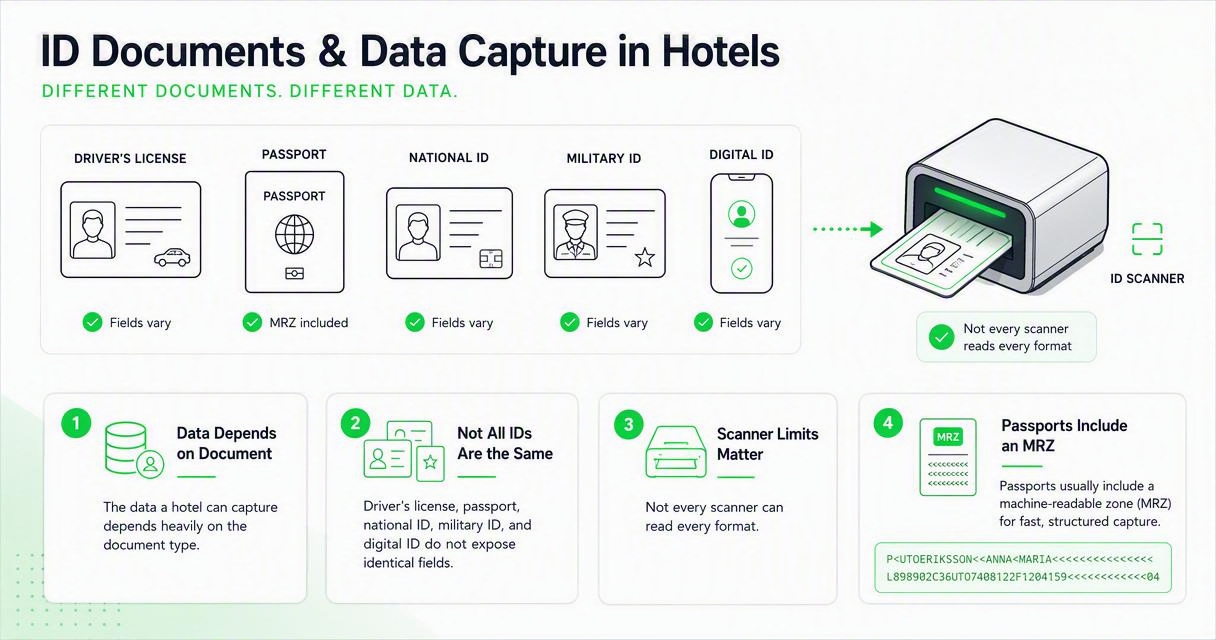
Passports usually include a machine-readable zone, often called the MRZ, which is designed for fast structured reading. Many driver’s licenses include a barcode that stores text fields in a machine-readable format. Some IDs may only be scanned as an image if the system cannot parse structured data.
Document types and likely hotel data
| ID type | Likely captured fields | Hotel note |
|---|---|---|
| Driver’s license | Name, DOB, address, license number, expiration, issuing state | Common for domestic guests in the United States |
| Passport | Name, DOB, passport number, nationality, expiration, country code | Common for international travelers and passport-required markets |
| National ID card | Name, DOB, ID number, expiration, nationality or issuing country | Varies widely by country and card design |
| Military or government ID | Often manually reviewed, sometimes not scanned | Hotels should be careful with restricted or sensitive IDs |
| Digital ID | Depends on wallet rules and hotel technology | Expected to grow, but adoption is uneven in 2026 |
If a hotel accepts many document types, the workflow should define which fields are required for each. Otherwise, staff may store more information than the property actually needs.
Do hotels keep a copy of your ID?
Some hotels keep only extracted fields, while others store a front-and-back image, passport image, or registration attachment. The answer depends on the property, brand policy, jurisdiction, PMS setup, and whether the scanner has redaction or retention controls.
From a privacy standpoint, the difference is large. A stored image may contain extra details that are not needed for check-in, while extracted fields can be limited to the minimum business purpose. I recommend hotels separate “read the ID” from “store the ID image” in policy and staff training.
“the right to be let alone”, Samuel D. Warren and Louis D. Brandeis, The Right to Privacy
That old privacy phrase still fits hotel check-in. Guests expect verification, but they do not expect unlimited retention of sensitive identity images.
Stored fields versus stored images
| Storage choice | Privacy risk | Practical use |
|---|---|---|
| View only, no storage | Lowest | Fast identity check, weak audit trail |
| Store selected text fields | Moderate | Strong guest record without keeping the full image |
| Store redacted ID image | Moderate | Useful proof while masking unneeded details |
| Store full ID image | Highest | Strong evidence, but more sensitive if breached |
Hotels that need document evidence should consider redaction. A practical next step is reviewing PII redaction for hotel ID scans, especially if your property stores images today.
What should guests ask before an ID scan?
Guests can ask direct, reasonable questions before handing over a document. A hotel may still require valid ID as a condition of check-in, but staff should be able to explain the purpose, fields captured, retention period, and available alternatives.
Good questions are short and specific. They reduce friction because the front desk can answer without sounding defensive.
Guest questions that get clear answers
- Are you only verifying my ID, or are you storing a copy?
- Which fields are saved in the hotel system?
- How long do you keep the scan or ID image?
- Who can access it after check-in?
- Can unneeded details be redacted?
- Is scanning required by law, brand policy, or hotel policy?
- What happens if I prefer a manual visual check?
A hotel that can answer these questions calmly usually has a healthier data process. A hotel that cannot answer may still be acting in good faith, but the policy likely needs work.
How should hotels minimize scanned ID data?
Hotels should collect only the ID data needed for identity verification, legal compliance, payment protection, safety, and PMS accuracy. The best 2026 workflow uses field selection, redaction, access controls, retention rules, and guest-facing consent language instead of saving every possible field forever.
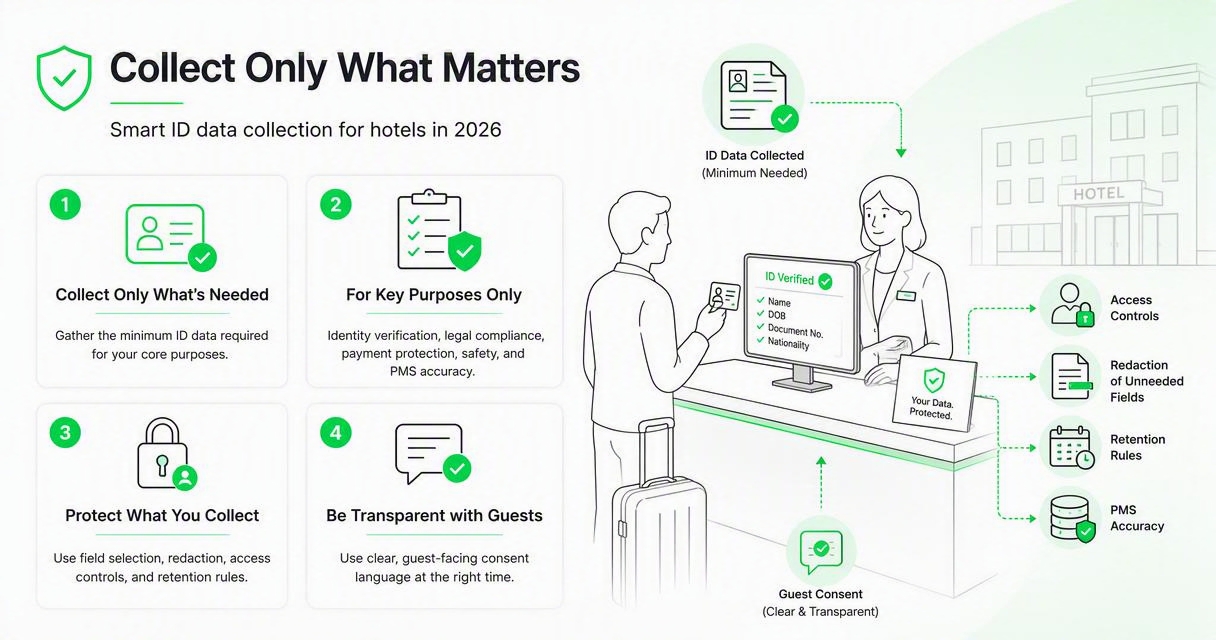
A practical minimization workflow
- Define the purpose: decide whether the scan is for verification, compliance, fraud prevention, or all three.
- Choose required fields: map each field to a business or legal need.
- Redact what is not needed: mask extra document areas before storage when possible.
- Limit access: restrict ID records to trained roles, not every staff login.
- Set retention rules: delete or archive ID data based on a documented schedule.
- Log activity: track who viewed, edited, exported, or deleted records.
- Train the desk team: give staff a short script for guest questions.
This is where hotel operators should be precise. A scanned ID can be useful, but over-collection creates avoidable risk.
Guest-facing explanation template
Suggested front desk script: “We scan your ID to verify the reservation holder, confirm age where required, and complete the registration record. Our system stores only the fields our property needs for check-in and security, and access is limited to authorized hotel staff.”
For properties that want a formal notice, a hotel ID scanning consent form can explain purpose, captured fields, retention, access, and guest rights in language staff can actually use.
How GuestBan ID Scanning handles this
GuestBan ID Scanning is built for hotels that want accurate guest capture without turning the front desk into a manual data-entry bottleneck. The goal is simple: read the document, capture the fields the property needs, and support a cleaner operational record.
The GuestBan ID Scanning platform fits best when a property wants a purpose-built hospitality workflow rather than a generic office scanner. For hotel groups, the value is consistency across teams, shifts, and locations. You can learn more at guestban.com.
Where a purpose-built hotel workflow helps
| Need | Generic scanner workflow | Hotel-focused ID scanning workflow |
|---|---|---|
| Guest profile accuracy | Staff may type or attach files manually | Fields can be captured in a structured format |
| Front desk speed | Slower during arrival peaks | Designed for repeat check-in use |
| Policy consistency | Varies by agent and shift | Standard process across the property |
| Guest explanation | Often ad hoc | Easier to train around a fixed workflow |
| Multi-property control | Harder to standardize | Better fit for hotel groups |
Operators evaluating automation can also review hotel guest data capture automation to connect ID scanning with PMS data quality and front desk efficiency.
What changes in 2026 and 2027?
Hotel ID scanning is moving toward more selective capture, stronger redaction, shorter retention, and clearer guest disclosure. In 2026, the best systems are not judged only by scan speed; they are judged by how well they control sensitive guest data after the scan.
Digital IDs will keep growing, but hotels should expect mixed adoption for years. Travelers still carry passports, driver’s licenses, and national IDs, while regulations and wallet standards vary by country and state.
AI will also influence document review, fraud flags, and data matching. The scholarly debate around generative AI and governance, including Dwivedi, Kshetri, Hughes, and co-authors in the International Journal of Information Management in 2023, shows why organizations need clear policy when new automation touches sensitive information source.
2027 expectations for hotel operators
- More selective storage: hotels will keep fewer full images and more purpose-limited fields.
- Better redaction: masking unneeded ID details will become a standard buying requirement.
- Clearer notices: guests will expect plain-language explanations before scanning.
- More PMS integration: duplicate profile cleanup and automated registration will matter more.
- Stronger audit trails: managers will want logs for access, exports, and deletions.
The properties that prepare now will have fewer awkward desk conversations later.
FAQ
These are the most common guest and operator questions about scanned IDs at hotels.
Can a hotel scan my ID without asking?
A hotel should tell you why it needs your ID and what it does with the scan, especially if it stores a copy. Rules vary by location, property type, and brand policy. In practice, many hotels require valid ID for check-in, but good operators explain the process before scanning.
Can I refuse hotel ID scanning?
You can ask whether the hotel offers a manual visual check instead of a stored scan. The hotel may decline check-in if valid ID verification is required by policy, payment rules, age rules, or local law. The best approach is to ask what is stored and whether unneeded fields can be redacted.
Is a passport scan different from a driver’s license scan?
Yes. A passport commonly includes a machine-readable zone with structured identity fields, while a driver’s license often has a barcode and printed text. The hotel may capture similar basics, such as name, date of birth, document number, and expiration, but nationality and issuing country are more relevant with passports.
How long should a hotel keep scanned ID data?
Retention should match the reason for collection, such as legal guest-register duties, chargeback evidence, or incident documentation. Hotels should not keep full ID images indefinitely without a clear purpose. Operators should set a written retention schedule and train staff on when records are deleted, archived, or redacted.
Does ID scanning make hotel check-in safer?
ID scanning can make check-in safer when it improves identity verification, reduces manual errors, supports age checks, and creates a consistent audit trail. It is not automatically safer if the hotel stores too much data or lacks access controls. The protection comes from a well-designed process, not the scanner alone.
Conclusion
Hotels usually get the same identity fields you see on the document, plus structured data from a barcode or passport MRZ and a check-in record. The smartest approach in 2026 is not to avoid ID verification; it is to make scanned data limited, explainable, protected, and useful.
For hotel owners and operations managers, review your current check-in workflow this week: list every ID field captured, mark which ones are truly needed, set a retention rule, and train staff on a short guest explanation. If you want a hotel-focused way to answer what data do hotels get when they scan your ID while improving data capture at the desk, evaluate GuestBan ID Scanning and head to guestban.com to plan a cleaner workflow.

