TL;DR
TL;DR: GuestBan is the better fit when a hotel wants ID scanning tied to DNR alerts, incident records, chargeback evidence, and multi-property guest risk workflows. IDScan.net is a broader identity and visitor management vendor, so it can fit organizations that need general ID parsing, visitor logs, and scanner hardware across many industries.
Hotel ID scanning is no longer just a faster way to copy a driver's license, it's becoming part of front desk risk control, guest documentation, and chargeback defense. In an IDScan.net vs GuestBan evaluation, the practical question is simple: do you need a general identity scanning tool, or a hotel-specific guest screening workflow? Hotel ID scanning: the process of scanning a guest's identity document to capture verified identity data, support check-in records, and trigger operational workflows such as DNR checks, incident notes, or PMS transfer. For hotel teams that want a hospitality-first system, GuestBan ID Scanning is built around guest records, front desk alerts, and property-level decisioning rather than generic visitor intake.
Table of Contents
IDScan.net vs GuestBan at a glance
GuestBan is best for hotels that want ID capture connected to DNR workflows, while IDScan.net is best understood as a broader ID scanning and visitor management platform.
IDScan.net describes its visitor management product as a way to scan IDs and passports, create visitor profiles, track visits, and capture information at the point of entry through an integrated scanner workflow, according to its visitor management system page. That positioning is useful for many sectors, including offices, logistics sites, age-restricted venues, and security desks.
For a hotel owner or general manager, the difference shows up after the scan. A hotel does not only need parsed name, date of birth, and document data. It needs the front desk to know whether the guest has a prior incident, whether a DNR alert applies, whether documentation can support a dispute, and whether the record can be shared across approved properties.
"It takes 20 years to build a reputation and five minutes to ruin it.", Warren Buffett, CNBC
That quote fits hotel operations because one poor front desk decision can create safety, liability, review, and revenue damage.
Side-by-side summary for hotel operators
| Category | GuestBan ID Scanning | IDScan.net |
|---|---|---|
| Best fit | Hotels needing ID scans, DNR alerts, incident records, and guest risk controls | Organizations needing general ID scanning, visitor logs, and identity data capture |
| Hospitality focus | Built around hotel guest workflows | Serves broader visitor management and ID verification use cases |
| DNR workflow | Strong fit for do not rent decisions and alerts | May require configuration around hotel-specific policies |
| PMS workflow | Best evaluated around front desk transfer and guest record needs | Best evaluated around data export, API, and integration options |
| Multi-property use | Suited to shared risk visibility across hotel groups | Suited to centralized visitor data where configured |
| Buyer priority | Reduce manual entry and improve guest documentation | Standardize ID capture across different entry points |
| Shop scanners | Hardware choice should match front desk speed, document types, and desk space | IDScan.net markets scanner-supported visitor management workflows |
What is IDScan.net for hotels?
IDScan.net is a general ID scanning and identity verification provider that hotels may evaluate when they need document scanning, visitor profile creation, and identity data capture at check-in.
The clearest hotel use case is front desk intake. A clerk scans a license, passport, or other supported document, and the system reads the information that would otherwise be typed manually. That can reduce spelling errors, speed registration, and create a cleaner record.
The limitation for hotels is not the scan itself. The buyer should ask what happens next: does the platform support hotel DNR policies, incident notes, photos, chargeback documentation, staff permissions, and chain-level visibility?
Information captured during a scan usually matters in four ways:
- Registration accuracy: fewer manual typing errors in guest name and address fields.
- Security review: clearer identity records when a situation escalates.
- Operational consistency: front desk agents follow the same intake process.
- Evidence support: management can retrieve records when disputes or incidents arise.
For a broader buyer guide on ID capture requirements, the Hotel Front Desk ID Capture Checklist for 2026 is a useful companion when building a vendor scorecard.
How GuestBan handles hotel workflows
GuestBan connects the ID scan to the hotel decisions that usually happen after check-in, including DNR review, incident documentation, and risk visibility across staff or properties.
That matters because most front desk problems do not start as technology problems. They start as inconsistent documentation. One agent remembers a bad stay. Another cannot find the note. A third property has no idea the same guest caused damage last month.
The GuestBan ID Scanning platform is designed for those hotel-specific moments. A scanned ID can become part of a guest record that supports alerts, staff review, and property procedures. If your group is standardizing risk controls, read the guide to a network-wide do not rent list for hotel groups before choosing any platform.
Key takeaway: A hotel ID scanner should not stop at OCR. It should help the front desk make a faster, better-documented decision while keeping access controlled.
I'd score a hotel-focused product higher when it helps managers answer three questions quickly: Who is checking in, what do we know about them, and what action should the front desk take next?
Workflow fit checklist
- Confirm which IDs and passports your property accepts.
- Define which fields must transfer into the guest record.
- Decide who can see DNR alerts and incident notes.
- Set documentation rules for damage, fraud, police calls, and chargebacks.
- Test the workflow during a real check-in rush, not only in a demo.
- Review privacy, retention, and audit controls before rollout.
Which platform fits PMS transfer better?
The better PMS fit depends on whether your hotel mainly needs parsed ID data transfer or a fuller guest risk record connected to check-in.
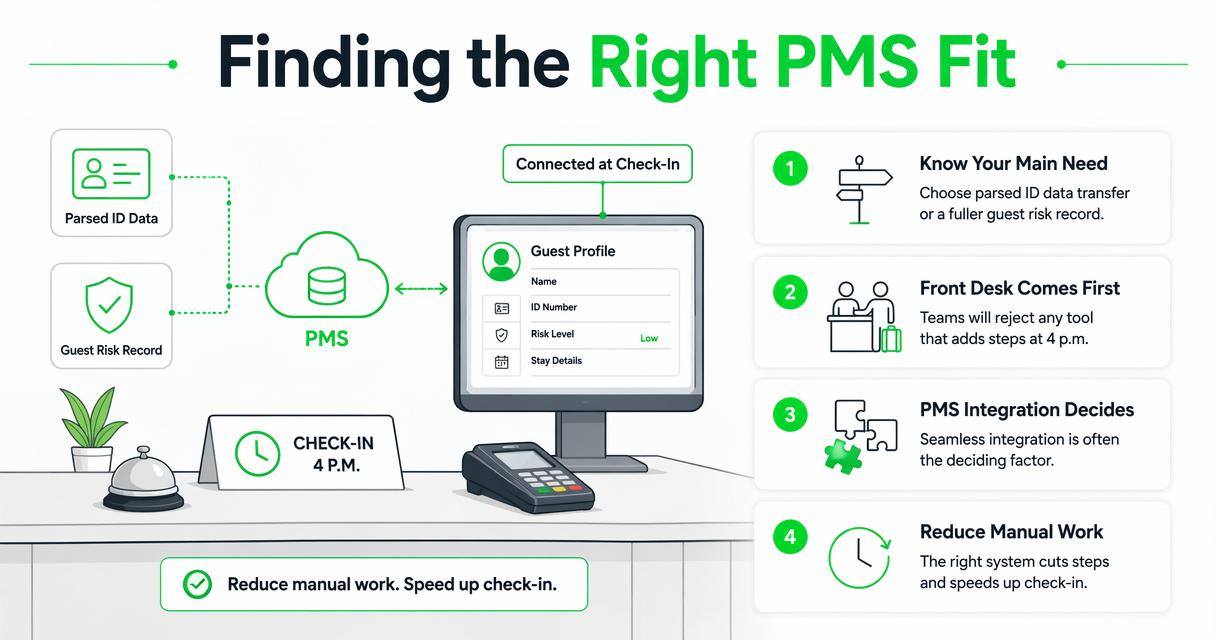
For many properties, PMS integration is the deciding factor because front desk teams will reject any tool that adds steps during a line at 4 p.m. The right system should reduce manual entry, not force agents to copy information from one screen into another.
IDScan.net should be evaluated for the specific PMS, middleware, API, or export path your property uses. Ask whether the scanned data can populate the right fields, whether passport records behave differently from domestic IDs, and whether the system preserves a usable audit trail.
Hotels evaluating GuestBan should focus on how ID records, DNR alerts, and incident documentation align with PMS habits. In my view, the strongest workflow is one where the scan supports registration while the risk record remains easy for managers to review.
PMS questions to ask every vendor:
- Which PMS products have proven workflows today?
- Is the connection real-time, batch, export-based, or manual?
- Which fields transfer, and which stay in the ID scanning system?
- Can staff correct bad reads without breaking the audit trail?
- What happens when the PMS is down or the scanner fails?
- Does the system support multi-property reporting without exposing too much data?
Which option is easier for the front desk?
The easier platform is the one that gives the front desk fewer screens, clearer alerts, and faster escalation steps during actual guest interactions.
Front desk usability is not about a pretty dashboard. It is about speed, confidence, and consistency under pressure. A clerk should know where to scan, what was captured, whether an alert appeared, and who to call if the guest challenges the decision.
A hotel tool should also fit training reality. Properties deal with turnover, night audit handoffs, seasonal staffing, and managers who cover multiple duties. A process that only works when the most experienced agent is on duty is not a process.
Front desk usability scorecard:
| Test | What good looks like | Why it matters |
|---|---|---|
| Scan speed | ID capture works in seconds | Prevents check-in bottlenecks |
| Alert clarity | Staff see plain-language action prompts | Reduces hesitation and conflict |
| Record lookup | Managers can find guest history quickly | Supports consistent decisions |
| Permissions | Agents see only what they need | Limits privacy exposure |
| Training | New staff can learn the workflow fast | Helps high-turnover properties |
| Support | Help & support is reachable during operating hours that match the hotel | Reduces downtime risk |
Hotels should also document the situations that trigger escalation. The article on enhancing security with an ID scanner for hotels gives useful context for turning ID capture into a practical safety process.
How do DNR workflows differ?
DNR workflows differ because hotel teams need guest-specific risk controls, not just identity capture or visitor history.
A DNR list, short for do not rent list, is a controlled internal record of guests a property may decline based on documented policy reasons. Those reasons can include prior damage, threats, fraud, chargebacks, illegal activity, or serious rule violations.
IDScan.net can support identity capture that may feed visitor or security workflows. A hotel buyer should ask how DNR records are created, who approves them, how long they are retained, and how alerts appear during check-in.
GuestBan ID Scanning is a stronger fit when the DNR process is central to the purchase. The workflow should connect the scanned ID to a guest profile, documentation, and staff-facing alerts that help prevent repeat problems.
Key takeaway: A DNR alert is only as reliable as the documentation behind it and the permissions around it.
For policy language and staff training, the plain-English guide to DNR meaning in hotels can help managers standardize terminology before software rollout.
What privacy controls should hotels compare?
Hotels should compare privacy controls by reviewing data minimization, user permissions, retention settings, audit logs, encryption, and guest record access across properties.
Privacy risk rises when scanned IDs are stored without clear rules. A front desk system may collect sensitive personal information, including full legal name, address, date of birth, document number, and sometimes an image of the document.
NIST defines digital identity in a way that is useful for hotel buyers because it reminds teams that identity data is not just text on a screen.
"Digital identity is the unique representation of a subject engaged in an online transaction.", National Institute of Standards and Technology, Digital Identity Guidelines
Hotels should decide what they truly need to store. Some properties need image retention for disputes or law enforcement requests. Others may only need selected fields and an audit trail. The best answer depends on state law, brand standards, insurance guidance, and legal counsel.
Privacy review points:
- Access controls: limit records by role, property, and manager approval.
- Retention: define when records expire or require review.
- Audit logs: track who viewed, edited, exported, or deleted records.
- Incident separation: keep sensitive notes controlled, not visible to every user.
- Vendor review: request security documentation before signing.
For deeper planning, the guide to cloud storage for scanned guest IDs explains retention, permissions, reports, and audit logs in hotel terms.
Which tool works better for multi-property groups?
Multi-property hotel groups should choose the tool that supports shared guest risk visibility without turning every location into an uncontrolled data silo.
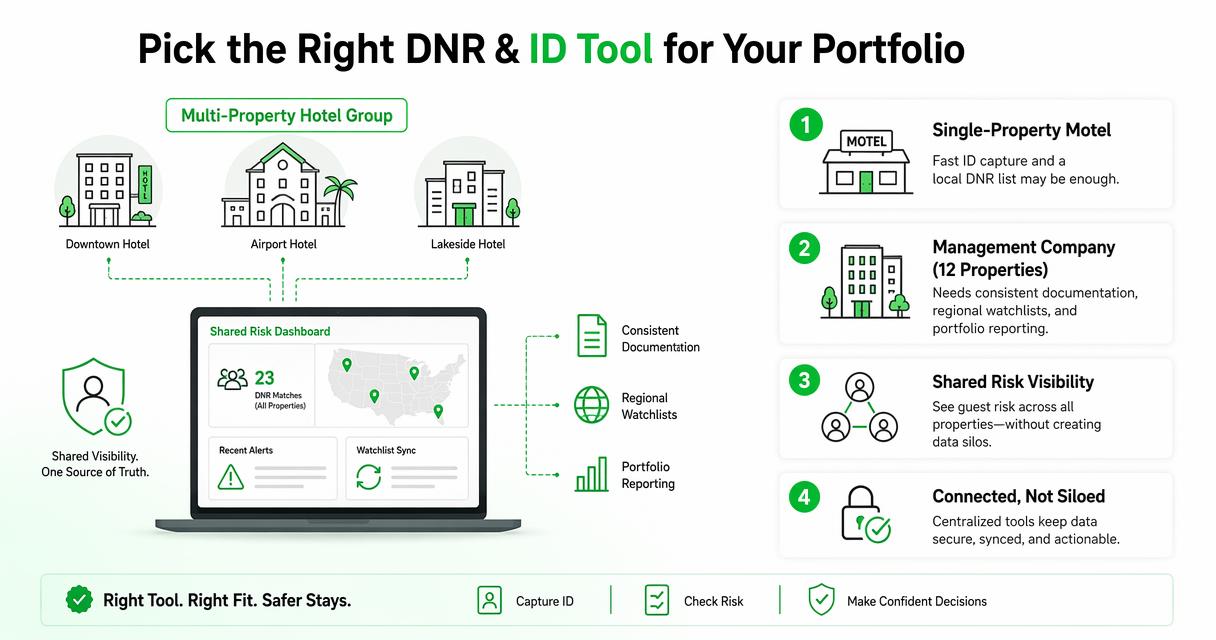
A single-property motel may only need fast ID capture and a local DNR list. A management company with 12 properties needs more: consistent documentation, regional controls, property-specific permissions, and reporting that shows patterns across locations.
IDScan.net can fit organizations that want centralized ID scanning and visitor management across different facility types. That may appeal to companies that manage offices, controlled entrances, and security desks along with hospitality assets.
Hotel groups, however, should test the workflow around guest-specific repeat risk. If a guest damages a room at one property, the next property needs enough information to act, but not so much that sensitive details are overexposed.
Multi-property buying criteria:
- Shared alerts with property-level controls.
- Standard incident categories across every hotel.
- Manager approval before a guest is added to a chain-wide list.
- Search tools that reduce duplicate guest records.
- Reporting by property, region, and incident type.
- Privacy settings that prevent casual browsing by unauthorized staff.
In practical terms, the best system is the one your least technical night auditor can use correctly at 1 a.m.
Pricing, scanners, support, and buying signals
Hotels should compare pricing, scanner hardware, support, and contract terms only after confirming that the workflow fits front desk operations.
Pricing pages rarely tell the full story. A low monthly fee can become expensive if it requires extra hardware, custom integration, staff workarounds, or manual reporting. A higher software cost may be justified if it reduces disputes, improves documentation, and saves manager time.
Scanner choice also matters. A compact front desk with limited counter space may need different hardware than a casino hotel, extended-stay property, or resort with international guests. Ask vendors which scanners they support, how replacements work, and whether mobile or tablet capture is available.
Buying signals that deserve attention:
| Signal | Why it matters |
|---|---|
| Transparent pricing discussion | Helps compare total cost, not just subscription cost |
| Hardware guidance | Prevents scanner mismatch at the front desk |
| Hospitality references | Shows the vendor understands hotel pressure points |
| Help & support availability | Matters during nights, weekends, and peak arrival times |
| Blog and education quality | Reveals whether the vendor understands current hotel risk issues |
| Contact us process | Shows how fast sales and support teams respond before you buy |
I recommend asking both vendors for a live hotel workflow demo, not a generic product tour. Give them a test case with a passport scan, a returning DNR guest, a chargeback dispute, and a manager permission change.
Who should pick which platform?
Hotels should pick GuestBan when hotel risk control is the main goal, and IDScan.net when broad ID scanning or visitor management is the main goal.
Choose the hospitality-first route if your recurring problems involve repeat bad guests, room damage, staff safety, chargeback documentation, or inconsistent notes between shifts. That kind of operation needs a system shaped around guest decisions, not only identity capture.
Choose the broader identity platform if your organization needs a general visitor management system across several non-hotel use cases. IDScan.net's visitor management positioning may fit a security department that wants one identity capture process across entrances, contractors, visitors, and facilities.
Best-fit decision guide:
- Pick GuestBan if your hotel wants DNR alerts, guest records, and incident documentation tied to ID scans.
- Pick IDScan.net if your organization needs general visitor profiles and broad ID capture workflows.
- Shortlist both if your property has complex compliance, PMS, or hardware requirements.
- Run a front desk pilot before signing a long agreement.
For hotel operators, GuestBan ID Scanning deserves the first demo when the buying committee includes ownership, operations, risk management, and front desk leadership. If you want to compare workflows directly, visit guestban.com and request a practical hotel scenario, not a slide deck.
FAQ
Hotels comparing these systems usually ask about DNR lists, PMS fit, privacy, and whether a general scanner is enough for front desk risk control.
Is IDScan.net a hotel-specific product?
IDScan.net is better described as a broad ID scanning and visitor management provider rather than a hotel-only system. Hotels can evaluate it for ID capture, visitor profiles, and document scanning. The key due diligence step is testing whether it supports hotel-specific DNR workflows, incident notes, PMS habits, and guest record permissions.
Does a hotel need DNR software if it already scans IDs?
Yes, if the property wants consistent guest risk decisions. ID scanning captures identity data, but DNR software helps document why a guest should not be rented to again, who approved the decision, and how staff should respond. The scan is the starting point; the workflow determines whether the record becomes useful.
What should a hotel ask during a demo?
Ask the vendor to show a real check-in flow with a domestic ID, a passport, a returning DNR guest, a manager override, and a chargeback documentation request. Also ask how permissions, retention, scanner replacement, support, and PMS transfer work. A polished dashboard matters less than a realistic front desk test.
Can multi-property hotel groups share DNR alerts safely?
They can, but the setup needs controls. Shared DNR alerts should include clear approval rules, limited staff access, audit logs, consistent incident categories, and privacy review. A group should avoid casual, undocumented sharing and instead use a controlled workflow that supports safety while limiting unnecessary exposure of guest data.
Conclusion
The smartest next step in an IDScan.net vs GuestBan decision is to map your current check-in workflow before watching any demo. List your accepted IDs, required PMS fields, DNR approval rules, incident categories, privacy requirements, and support hours. Then ask each vendor to run that exact scenario live.
If your hotel mainly needs general ID parsing, IDScan.net belongs on the shortlist. If your priority is hotel-specific guest risk control, DNR alerts, and front desk documentation, start with GuestBan ID Scanning. Bring ownership, operations, and front desk leadership into the demo, then pilot the winning workflow at one property before rolling it out across the group.