

TL;DR
Hotels should scan IDs only when they have a clear operational reason, then mask or avoid storing fields they do not need. The safest 2026 approach is data minimization: capture identity proof, booking match details, and risk signals, while redacting document images, ID numbers, birth dates, and addresses where possible.
A hotel ID scan can speed up check-in, reduce fraud, and support chargeback disputes, but it can also create a concentrated privacy risk if the property stores full document images without a retention plan. PII redaction for hotel ID scans means capturing only the data needed for operations, then masking, excluding, or deleting sensitive fields that do not need to remain visible. For hotels building a safer front desk process, GuestBan ID Scanning gives teams a practical way to connect identity capture with guest screening and operational workflows. PII: personally identifiable information, meaning data that can identify, contact, locate, or distinguish a person, such as name, address, date of birth, document number, or ID image.
Table of Contents
What is PII redaction for hotel ID scans?
PII redaction for hotel ID scans is the process of hiding, removing, or limiting sensitive information from a guest identity document after the hotel has captured the data needed for check-in, compliance, fraud prevention, or dispute support. The goal is simple: prove the guest's identity without keeping unnecessary personal data.
In hotel operations, redaction can happen at three points:
- Before storage: the scanner extracts fields and never saves the full image.
- After validation: the system keeps required fields, then masks the document photo or barcode data.
- At export: reports, alerts, and PMS notes show only the fields staff need.
Key takeaway: Redaction is not the same as deleting the whole scan. It is a controlled way to keep operational value while reducing exposure.
A hotel may still need a visible name, expiration date, and face match indicator, but it usually does not need every field visible to every employee. That distinction matters in 2026 because ID scanning is no longer just a front desk speed tool. It is part of privacy governance, fraud prevention, and guest trust.
Why should hotels redact ID scan data?
Hotels should redact ID scan data because full identity documents contain more personal information than most properties need after check-in. A scan may include a home address, date of birth, license number, passport number, photo, signature, barcode payload, and machine-readable zone data.
The privacy principle behind this is data minimization. The EU General Data Protection Regulation says personal data must be:
"adequate, relevant and limited to what is necessary in relation to the purposes for which they are processed.", European Parliament and Council of the European Union, GDPR Article 5
That standard is useful even outside Europe because it gives hotel teams a plain test: if a field does not serve a defined purpose, do not keep it visible.
The U.S. Federal Trade Commission gives similar practical advice:
"If you don't have a legitimate business need for sensitive personally identifying information, don't keep it.", Federal Trade Commission, Start with Security
For general context on why properties ask for identification, see this guide on why hotels scan ID at check-in. The key point is that scanning and over-retaining are different decisions.
Common hotel reasons to scan an ID
- Match the guest to the reservation and payment card.
- Confirm legal name, age, and document expiration.
- Reduce manual typing errors in the PMS.
- Support chargeback evidence when a guest disputes a stay.
- Flag guests with prior property damage, nonpayment, or safety concerns.
- Meet local lodging, police registration, or tax reporting rules where applicable.
Which ID fields should hotels keep, mask, or avoid?
Hotels should keep fields that directly support check-in, payment verification, and safety workflows, while masking or avoiding fields that create high privacy risk without clear operational value. I recommend starting with a field-by-field policy instead of treating the whole ID image as one record.
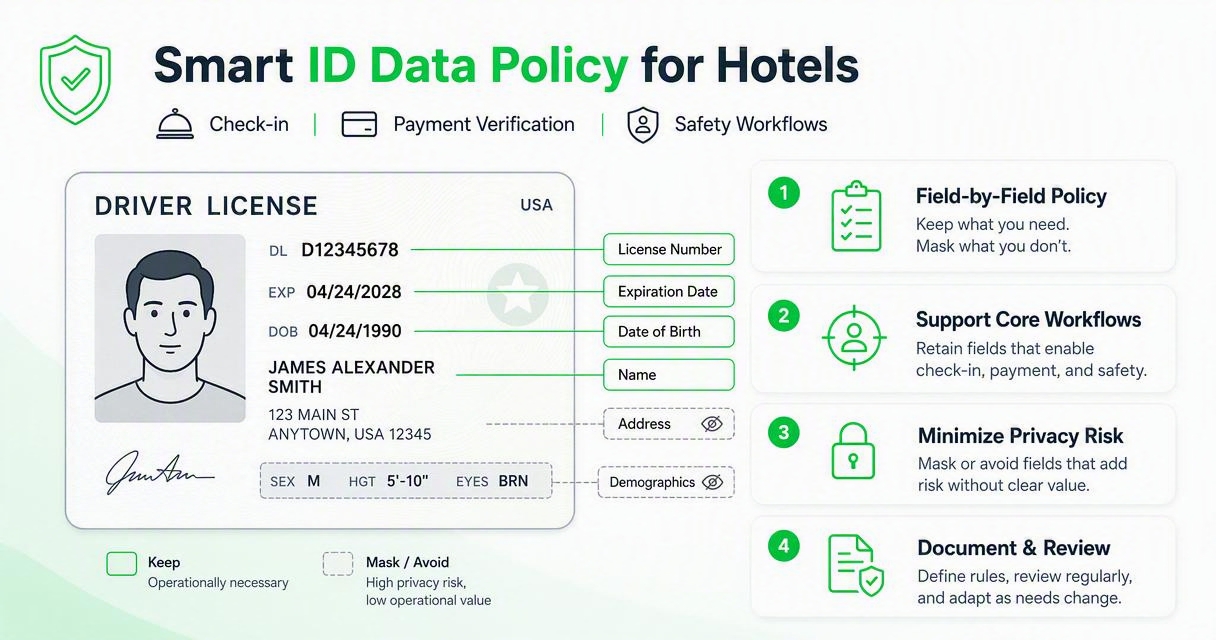
Field-by-field handling table for hotel ID scans
| ID field | Common operational use | Risk level | Recommended handling |
|---|---|---|---|
| Full legal name | Match reservation, folio, payment card | Medium | Keep while booking record is active |
| ID photo | Confirm person at desk matches document | High | Verify at check-in, then mask or restrict access |
| Date of birth | Age verification, adult-only policies | High | Store age result or year only when possible |
| Home address | Local rules, incident follow-up | High | Avoid unless required, or mask after stay |
| License or passport number | Dispute evidence, legal reporting | High | Store only if required, mask most digits |
| Expiration date | Confirm document validity | Low | Keep validation result and date if useful |
| Signature image | Rarely needed for hotel operations | High | Avoid storing or redact |
| Barcode or MRZ data | Fast extraction, document validation | High | Parse required fields, do not expose raw payload |
| Document image front | Audit trail, chargeback support | High | Restrict, redact, or delete after retention period |
| Document image back | Barcode parsing | High | Avoid long-term storage unless required |
| Nationality | Legal reporting in some markets | Medium | Keep only where required |
| Room number link | Operations and incident records | Medium | Keep in PMS with access controls |
Practical rule for front desk teams
If a field would not help your team check in the guest, meet a specific rule, recover payment, or investigate a serious incident, it should not be broadly visible. A masked document number, for example, can still help staff confirm a prior scan without exposing the full value.
How should a hotel build a redacted ID workflow?
A hotel should build a redacted ID workflow by defining the purpose of scanning, mapping required fields, configuring role-based visibility, and setting retention rules before the first scan is stored. The workflow should be simple enough for busy staff to follow during a lobby rush.
A 7-step workflow for safer ID capture
- Define the purpose: check-in match, age check, chargeback support, screening, or legal reporting.
- Select required fields: document exactly which fields support each purpose.
- Configure capture: extract text with OCR or barcode parsing, but avoid saving raw images when not needed.
- Apply redaction rules: mask full ID numbers, addresses, signatures, and birth dates where possible.
- Limit staff access: show full details only to managers or authorized roles.
- Set retention periods: delete or further mask scans after the operational need ends.
- Audit activity: log who viewed, exported, changed, or deleted ID records.
Hotels that want a broader automation plan can pair this with hotel guest data capture automation so ID data moves into the right systems without extra copying.
Key takeaway: The best redaction workflow is boring by design. Staff should not need to decide which private fields to hide during each check-in.
How GuestBan ID Scanning handles safer guest identity capture
GuestBan ID Scanning helps hotels connect ID capture to operational risk management, so the property can verify guests without turning every scan into an unrestricted identity file. The strongest use case is combining fast front desk capture with clear rules about what staff need to see.
With GuestBan ID Scanning, a hotel can treat identity data as part of a controlled workflow rather than a loose image saved on a shared computer. That matters for properties dealing with chargebacks, repeat problem guests, extended-stay risk, and front desk turnover.
I like this approach because it keeps the operational reason visible. The scan is not collected "just in case." It supports specific actions, such as matching a guest, checking the stay against internal risk records, and documenting front desk decisions.
For properties comparing identity capture with broader desk automation, Kiotel automated hotel front desk is a natural next step when the goal is to reduce manual work across check-in. You can also visit guestban.com to review how GuestBan ID Scanning fits into a safer guest management process.
What mistakes increase privacy risk?
The biggest privacy mistakes come from storing too much, keeping it too long, and giving too many people access. These problems usually happen because the hotel buys a scanner before writing a data policy.
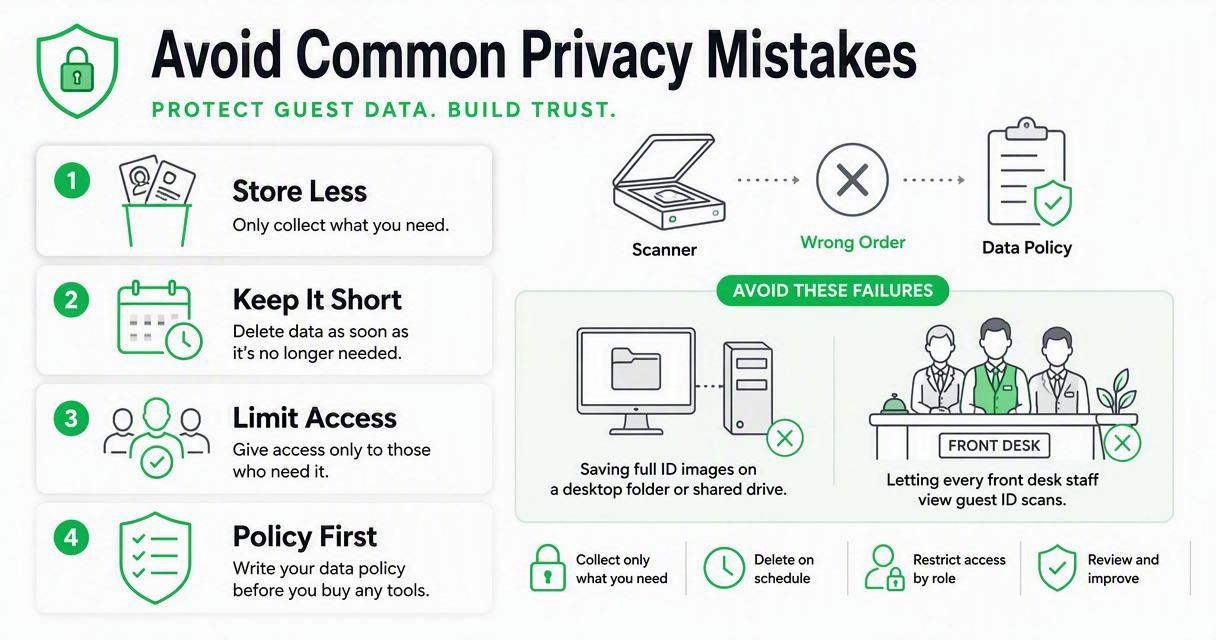
Avoid these common failures:
- Saving full ID images on a desktop folder or shared drive.
- Letting every front desk user view full document numbers.
- Keeping scans forever because no one owns deletion.
- Exporting ID data into spreadsheets for convenience.
- Using guest notes to store sensitive fields in plain text.
- Capturing the back of the ID when the barcode data is not needed.
- Failing to train night audit and temporary staff on access limits.
A redaction policy also needs a refusal path. Some guests will ask why the hotel scans IDs or whether a copy is required. Your team should know the property's reason, the fields collected, and the alternative process when allowed. This guide on whether a guest can refuse hotel ID scanning is useful for shaping that conversation.
The legal research field has also been paying more attention to responsible data filtering. Henderson, Krass, and Zheng's 2022 arXiv paper, Pile of Law: Learning Responsible Data Filtering from the Law and a 256GB Open-Source Legal Dataset, is not hotel-specific, but it reinforces a broader point: filtering sensitive data is a design problem, not an afterthought.
How long should hotels keep redacted ID records?
Hotels should keep redacted ID records only as long as they serve the purpose that justified collection, then delete, anonymize, or further mask them. Retention periods should vary by purpose because a one-size-fits-all rule usually keeps too much data.
A practical hotel retention policy might separate records like this:
- Active stay: keep the fields needed for check-in, payment, and guest service.
- Post-stay dispute window: keep limited evidence needed for chargebacks or incident review.
- Legal reporting period: keep only fields required by local lodging rules.
- Long-term risk history: keep internal incident indicators without full document images when possible.
If your property is unsure where to start, build the policy backward from real use cases. Ask managers which ID fields they have used in the past 90 days and why. Fields with no clear use should be candidates for masking or deletion.
For a deeper operational breakdown, read how long hotels should keep scanned IDs. Retention is where many privacy programs either become practical or fail quietly.
What should hotels expect in 2027?
Hotels should expect more pressure in 2027 to prove that identity capture is necessary, limited, and auditable. Guests are becoming more sensitive to document copying, and regulators continue to focus on data minimization, access controls, and retention discipline.
Three changes are likely to shape the next wave of hotel ID workflows:
- More field-level controls: systems will increasingly let hotels store a validation result instead of the underlying sensitive field.
- More guest-facing disclosure: check-in flows will explain why ID data is captured and how long it is kept.
- More integration with risk tools: ID capture, chargeback prevention, incident logs, and guest screening will become connected workflows.
Extended-stay operators should pay close attention because longer stays can increase payment, property damage, and safety exposure. A dedicated workflow for ID scanning in extended-stay hotels can help teams balance stronger verification with tighter privacy controls.
GuestBan ID Scanning is well aligned with this direction because it treats identity capture as part of hotel risk management, not just faster data entry. For multi-property groups, that consistency may become the difference between a defensible process and a patchwork of front desk habits.
FAQ
Do hotels need to keep a full copy of a guest ID?
Hotels do not always need to keep a full copy of a guest ID. The answer depends on local law, brand policy, payment risk, and operational needs. Many properties can verify the document at check-in, store selected fields, and mask or delete the image after the needed period.
Is redacting an ID scan better than not scanning at all?
Redacting an ID scan is better when the hotel has a valid reason to scan but does not need every field afterward. Not scanning may reduce privacy risk, but it can also weaken guest verification, chargeback evidence, or safety screening. The right answer depends on the property's risk profile.
Which ID fields are most sensitive for hotels?
The most sensitive fields are document numbers, full date of birth, home address, ID photo, signature, barcode data, and full document images. These fields can expose guests to identity risk if accessed improperly, so hotels should restrict, mask, or avoid them unless they serve a clear purpose.
Can redaction help with chargeback prevention?
Yes, redaction can support chargeback prevention if the hotel keeps enough evidence to show that the guest presented valid identification and matched the reservation. The property may not need a full unrestricted ID image for every dispute. A controlled record can preserve proof while reducing unnecessary exposure.
Who should be allowed to view unredacted ID data?
Unredacted ID data should be limited to trained employees with a specific operational need, such as managers, loss prevention staff, or authorized compliance users. Front desk agents may only need confirmation results, partial fields, or masked values. Access should be logged and reviewed regularly.
Conclusion
PII redaction for hotel ID scans is now a practical operating standard, not a legal luxury. Start by listing every ID field your hotel captures, matching each one to a business reason, and masking anything that does not need to stay visible. Then set role-based access, retention rules, and a staff script for guest questions.
If you want identity capture that supports safer check-ins without unnecessary data exposure, evaluate GuestBan ID Scanning as part of your front desk and risk management process. Head to guestban.com and review whether your current ID workflow captures only what your team truly needs.

