
TL;DR
The best hotel front desk scanner is not a general office scanner, it is an ID and passport capture workflow that reads documents quickly, extracts guest data, and fits your PMS process. For most hotels, start with GuestBan ID Scanning plus a hotel-grade ID or passport scanner, then choose hardware based on international guest volume, desk space, and check-in speed.
A hotel scanner has one job that matters more than image quality: getting the right guest data into the right place before the lobby line grows. The best document scanners for hotel front desks in 2026 are purpose-built for IDs, passports, and operational follow-through, not stacks of office paperwork. Hotel document scanner: a front desk device or workflow that captures IDs, passports, registration cards, and supporting documents, then turns them into usable digital guest records. For teams that want the scanner to support verification, alerts, and recordkeeping, GuestBan ID Scanning is the strongest place to start because it connects capture to hotel risk and operations rather than treating scanning as a standalone task.
Table of Contents
What is a hotel front desk document scanner?
A hotel front desk document scanner is a device or software-assisted workflow that captures guest IDs, passports, and documents during check-in, then converts them into digital images or structured data for hotel operations. Unlike an office scanner, it must support speed, identity document handling, staff usability, and secure guest record capture.
Wikipedia defines an image scanner as a device that optically scans images, printed text, handwriting, or an object and converts it to a digital image. In a hotel, that broad definition narrows fast. The scanner sits in the front office, the guest-facing part of the business, which Wikipedia describes as the area that comes into contact with clients.
Key front desk terms:
- ID scanner: captures a driver’s license, national ID card, or other identity credential.
- Passport scanner: captures the passport image page, and in stronger models, machine-readable zones or RFID data.
- Flatbed scanner: captures paper or documents placed on glass, useful for forms but slower for check-in.
- ADF scanner: uses an automatic document feeder for paper stacks, usually not ideal for passports.
- PMS workflow: the process of moving guest data into a property management system or connected hotel tool.
Key insight: A good hotel scanner is judged by check-in flow, not by office-scanner specs alone.
Quick picks for 2026
The best pick depends on whether your front desk mainly scans domestic IDs, passports, paper forms, or high-volume arrivals. I’d separate hotel scanners by workflow first, then by brand or hardware model, because a fast device still fails if staff must retype the same data afterward.
Scanner categories compared for hotel use
| Best fit | Recommended option | Why it works at the desk | Watch for |
|---|---|---|---|
| Overall hotel ID workflow | GuestBan ID Scanning plus compatible ID/passport hardware | Connects guest data capture with hotel risk, records, and front desk follow-up | Confirm device fit for your document mix |
| Passport-heavy hotels | Plustek X-Mini 2000 or Thales QS2000 class passport scanners | Built for travel documents and front desk identity capture | Higher cost than basic ID devices |
| Compact desk setups | Plustek X-Mini 2000 or Plustek X-Cube 1000 class devices | Smaller footprint for tight reception counters | X-Cube Supports ID Cards only and does UV Scanning While the X-Mini does Passport and ID Cards and does not have UV feature. |
| Mixed IDs and passports | Plustek X-150 class scanners | Practical balance for hotels that see multiple ID formats and offer UV Scanning | Validate PMS or software connection |
| Back-office paperwork | Ricoh, Canon, Fujitsu, Epson, or ScanSnap document scanners | Strong for invoices, HR files, registration-card batches | Not purpose-built for guest ID verification |
The table reflects the gap I see in many scanner roundups: general office scanners are often excellent products, but hotels need guest-facing capture. PC scanner reviews tend to rank devices by scan quality, speed, and paper handling, while hospitality vendors such as TTI’s Scan2PMS focus more directly on ID and passport scanning for PMS-connected check-in.
If your priority is front desk automation beyond scanning alone, compare scanners alongside kiosks, payments, digital registration, and staff workflows in this guide to hotel front desk automation tools.
How should hotels choose a scanner?
Hotels should choose a scanner by mapping the check-in process before comparing hardware specifications. The right process is: identify document types, measure lobby volume, check PMS needs, confirm data extraction, test staff handling, review privacy controls, then pilot the scanner during a real arrival rush.
Seven-step buying checklist
- List the documents you actually scan. Domestic IDs, passports, visas, registration cards, and incident documents may need different hardware.
- Separate front desk capture from back-office scanning. ADF office scanners are useful, but they are not a direct substitute for passport and ID capture.
- Check counter space. A compact ID device usually fits better than a flatbed scanner beside payment terminals, key encoders, and tablets.
- Test guest-facing speed. Ask a front desk agent to scan 20 real-world sample documents, not one clean demo card.
- Confirm extraction and export. Image capture is only step one. Hotels often need names, dates, document numbers, and images routed correctly.
- Review data handling. Guest identity documents need clear access controls, retention rules, and audit practices.
- Pilot during a busy shift. The only reliable test is a live desk with phone calls, walk-ins, early arrivals, and staff interruptions.
The academic paper Updates in service standards in hotels: how COVID-19 changed operations studied how hotel service standards changed after COVID-19. One lesson still applies in 2026: guest-facing operations keep changing, so tools at the desk must reduce friction instead of adding another screen for staff to manage.
“You’ve got to start with the customer experience and work back toward the technology, not the other way around.”, Steve Jobs, WWDC 1997
Best overall: GuestBan ID Scanning plus hotel-grade hardware
GuestBan ID Scanning is the best overall choice when a hotel wants document capture tied to front desk decisions, not just a saved image. The platform is especially relevant for properties that care about speed, guest records, chargeback context, banned-guest awareness, and reducing manual entry during check-in.
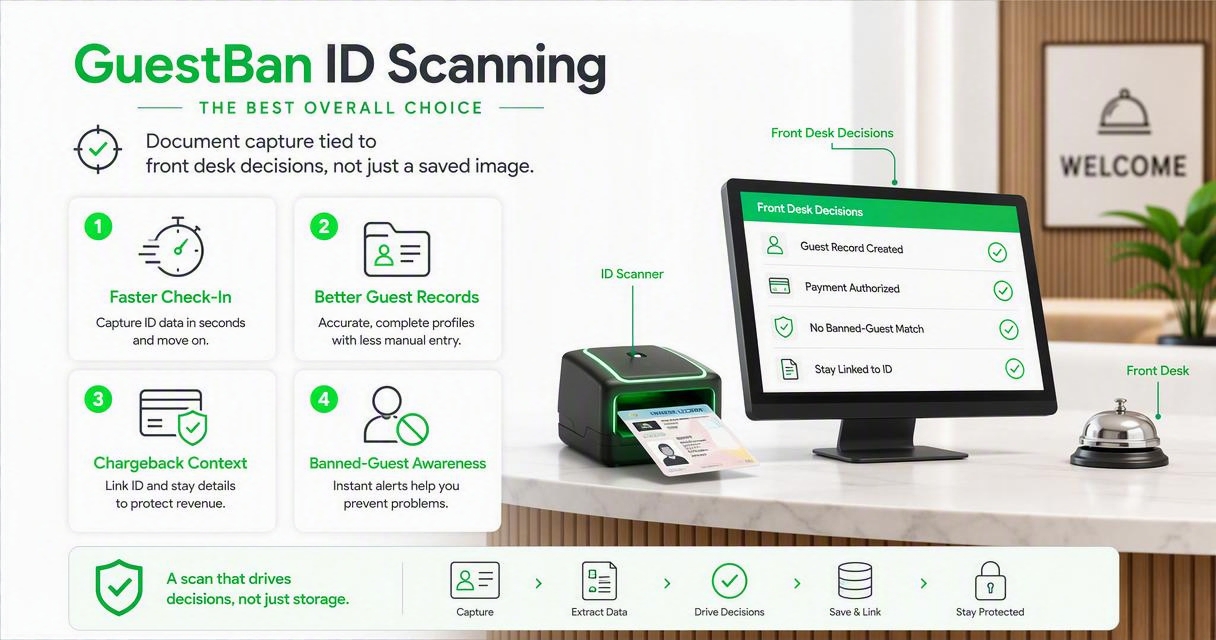
A scanner by itself captures a document. The GuestBan ID Scanning platform helps the hotel turn that capture into an operational record that staff can use. That difference matters when the front desk is understaffed, a guest disputes a stay, or management needs consistent records across shifts.
Strong fit:
- Hotels that want ID capture connected to front desk risk controls.
- Properties trying to reduce typing errors from manual ID entry.
- Multi-property groups that need more consistent guest records.
- Teams that want a clear front desk process for every arrival.
For a practical next step, pair the platform decision with a written workflow. GuestBan’s hotel front desk ID capture checklist is useful because it focuses on what staff should capture, when they should capture it, and how the process should stay consistent.
Recommendation: If the scanner will affect guest screening, records, and dispute response, buy the workflow first and the device second.
Best passport scanners for international properties
Passport scanners are the better choice for airport hotels, resorts, urban properties, and any hotel with frequent international arrivals. These devices are designed around travel documents, which makes them a better fit than flatbeds or paper-feed office scanners for passport-heavy check-in counters.
Passport-focused models to evaluate
The Thales AT10K 550 class of passport scanner is a strong fit for hotels that want a serious travel-document station at reception. It is especially relevant where passports are common, staff turnover is high, and consistency matters more than finding the cheapest device.
The Thales QS2000 class is also worth evaluating for front desk identity capture. Hotels comparing Thales models should focus on supported document types, connection method, desk placement, and how data moves into the hotel’s software workflow.
For a lower-profile passport capture option, look at the Plustek X-150 passport and ID scanner. A device in this category can make sense for properties that need dedicated ID and passport capture without building a large scanning station.
Best for:
- Airport and convention hotels.
- Resorts with many overseas guests.
- Properties that copy passports for compliance or guest records.
- Groups standardizing check-in hardware across several locations.
Avoid choosing a passport scanner based only on brand recognition. Ask for a live hotel workflow demo that includes a worn passport, a laminated ID, glare from the front desk, and the PMS or guest-record destination your staff actually uses.
Best compact scanners for small front desks
Compact ID scanners are best for limited reception counters where staff need fast document capture without giving up space for a flatbed or large office scanner. Smaller hotels should prioritize footprint, cable management, durability, and a simple staff habit over maximum paper capacity.
Small-footprint options for tight counters
The Plustek X-Mini 2000 class works well when the scanner needs to live beside a keyboard, card terminal, key encoder, phone, and monitor. The best compact setup is visible enough for staff to use every time, but not so large that it disrupts payment or key-making.
The Plustek X-Cube 1000 ID scanner is another practical category to evaluate for ID-first hotels. It suits properties that mainly need driver’s license or ID card capture, with occasional supporting document workflows handled elsewhere.
Use compact scanners when:
- The front desk has one or two workstations.
- Agents already feel crowded by devices.
- Most guests present ID cards rather than passports.
- Management wants a consistent scan on every check-in.
Do not overbuy paper-handling features for a desk that rarely scans paper batches. A large ADF scanner can be useful in accounting or HR, but the front desk needs a device that agents will actually reach for during the guest interaction.
Best general office scanners for hotel back offices
General office scanners are best for hotel paperwork, not primary guest ID capture. Brands often seen in document-scanner rankings, including Ricoh, Fujitsu, Canon, Epson, and ScanSnap, can be excellent for invoices, HR files, registration-card batches, vendor forms, and archival work.
When a document scanner belongs behind the desk
Office scanners are useful when the task involves paper stacks. An automatic document feeder can process batches far better than a passport reader or compact ID scanner. That makes them a good match for accounting, sales packets, group contracts, and historical files.
Front desk use is different. Guests do not arrive as neat paper batches. They hand over a driver’s license, passport, phone confirmation, credit card, or printed authorization while asking about parking and room readiness.
Good back-office scanner traits:
- ADF capacity for stacked paperwork.
- Duplex scanning for two-sided forms.
- Reliable paper handling for daily administration.
- OCR software for searchable PDFs.
- Network scanning for shared department access.
“Without data you’re just another person with an opinion.”, W. Edwards Deming, The Deming Institute
That quote fits scanner buying surprisingly well. If your pain is slow check-in, measure front desk scanning time. If your pain is lost paperwork, measure back-office document retrieval. Those are different problems, and they deserve different tools.
Common mistakes to avoid
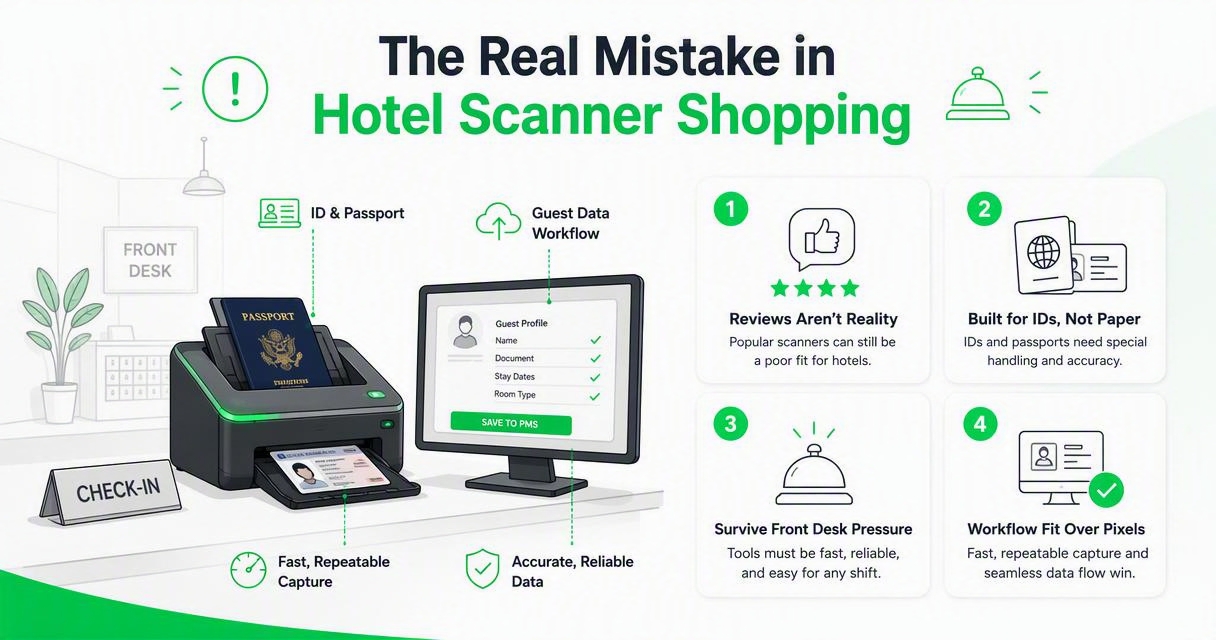
The biggest mistake is buying a popular office scanner and expecting it to solve hotel check-in. A scanner can have strong reviews and still be a poor fit for IDs, passports, front desk pressure, and guest-data workflows.
Red flags before purchasing
- Choosing scan quality over workflow fit: high-resolution scans matter less than fast, repeatable capture.
- Ignoring PMS handoff: if staff scan and then retype, the process still carries error risk.
- Buying one device for every job: passport capture, ID capture, and paper batching are different use cases.
- Skipping staff testing: managers may like a demo that front desk agents find awkward.
- Forgetting retention rules: identity documents should not sit in random folders without clear access control.
- Underestimating peak arrivals: a device that feels fine at 2 p.m. may fail the 6 p.m. rush.
Manual entry remains the hidden competitor to every scanner. It costs time, adds transcription errors, and creates inconsistent records across shifts. If your team is comparing scanning with typing, this guide to ID scanner vs manual ID entry at hotel check-in gives a useful framework for evaluating the operational tradeoff.
A simple rule helps: if the device does not make the agent’s next action easier, it probably won’t become a reliable front desk habit.
How GuestBan handles front desk capture
GuestBan ID Scanning handles front desk capture by treating the scan as the start of a hotel record, not the end of a document task. That means the value comes from the combination of capture, guest context, staff consistency, and operational follow-through.
With GuestBan ID Scanning, hotels can build a more consistent process around identity capture and front desk awareness. The scanner supports the moment of capture, while the platform supports what the team does with that captured guest information.
Use this approach when you want:
- Faster guest intake with less repeated typing.
- More consistent records across agents and shifts.
- Better front desk visibility when a returning guest needs review.
- A cleaner process for managers who oversee multiple properties.
- A practical path from ID capture to operational action.
Hotel groups comparing scanners should ask two questions: “Can staff scan correctly every time?” and “What happens after the scan?” The second question is where a hotel-focused platform can add more value than hardware alone. To see how the workflow can fit your property, visit guestban.com and review the available scanner and front desk options.
What to expect in 2027
Hotel scanning will move further from image capture toward automated identity workflows in 2027. Expect more AI-assisted extraction, more passport and ID validation features, tighter PMS connectivity, and more attention to privacy, retention, and audit trails.
Likely changes for hotel operators
The direction is clear: fewer standalone devices, more connected workflows. Front desks will still need physical scanners because guests still present physical IDs and passports, but the buying decision will focus more on software outcomes.
Watch these trends:
- AI-assisted field capture for names, dates, document numbers, and addresses.
- Better exception handling when documents are worn, foreign, or poorly lit.
- More kiosk and mobile check-in combinations for hybrid arrival flows.
- Stronger audit trails for who captured, viewed, or changed guest identity data.
- Multi-property consistency for hotel groups standardizing operations.
If your property is already planning kiosk or hybrid check-in, compare document capture with the broader front desk flow. The KioTel automated hotel front desk is one example of how hotels can think beyond the scanner and design a more complete arrival process.
My advice for 2026 purchases is simple: buy hardware that solves today’s desk problem, but avoid any scanner workflow that traps guest data in a dead-end folder.
FAQ
Hotel managers usually ask the same scanner questions once they separate office paperwork from guest-facing identity capture. The answers below focus on practical front desk choices, not generic office scanning.
What is the best scanner type for hotel check-in?
The best scanner type for hotel check-in is an ID or passport scanner connected to a hotel-focused workflow. A compact ID scanner fits domestic-heavy properties, while a passport scanner is better for international guests. General office scanners are better for back-office paperwork than live guest identity capture.
Do hotels need a passport scanner or an ID scanner?
Hotels need the scanner type that matches their guest mix. Airport hotels, resorts, and city hotels with international travelers should evaluate passport scanners first. Roadside, extended-stay, and domestic-heavy hotels may get more value from compact ID scanners, especially when paired with software that reduces manual entry.
Can a regular office scanner scan guest IDs?
A regular office scanner can capture an image of a guest ID, but it is usually not the best front desk tool. Office scanners are built for paper handling, not fast guest-facing identity workflows. They may still be useful for registration cards, accounting documents, and other hotel back-office records.
What should hotels test before buying a scanner?
Hotels should test real documents, real staff behavior, and the full data handoff. Use worn IDs, passports from different countries, busy check-in timing, and the software destination your team uses daily. A scanner that performs well in a vendor demo can still slow agents down in live operations.
Is scanner software as important as the hardware?
Yes. Scanner software is often more important than the hardware because it determines what happens after capture. Hotels need structured guest records, consistent workflows, access control, and follow-up actions. A fast scanner with weak software may still leave staff retyping data or searching through folders.
Conclusion
The best document scanners for hotel front desks are the ones that fit your arrival process, not the ones with the longest office-scanner spec sheet. Start by deciding whether your desk needs ID capture, passport capture, back-office paper scanning, or a complete guest-data workflow. Then run a live front desk pilot before you standardize across shifts or properties.
If your goal is faster capture, cleaner records, and better operational follow-through, put GuestBan ID Scanning on your shortlist first, then match it with the right hotel-grade scanner for your document mix. For next steps, document your current check-in flow, test three real arrival scenarios, and head to guestban.com when you’re ready to compare front desk scanning options with a hotel-specific workflow.

