
TL;DR
TTitel is best for hotels that want a broader hospitality technology vendor for business centers, concierge tech, and ID scanner hardware. GuestBan is the stronger fit for hotels that want ID scanning tied to front desk automation, PMS workflows, chargeback evidence, and DNR risk alerts.
A hotel ID scanner now affects check-in speed, fraud control, data quality, and guest safety, not just document capture. This TTitel vs GuestBan comparison looks at how TTI Technologies and GuestBan ID Scanning fit real hotel workflows in 2026, especially for front desk teams that need fewer manual entries, clearer guest records, and faster risk checks.
Table of Contents
What does TTitel vs GuestBan compare?
TTitel vs GuestBan compares a broader hospitality technology vendor, TTI Technologies, with a hotel-focused ID scanning and risk-control platform built around guest identity capture, PMS workflows, and DNR alerts.
TTitel: In this article, TTitel refers to TTI Technologies, hotel business center and ID scanner content.
GuestBan: GuestBan is a hospitality ID scanning platform focused on guest data capture, front desk verification, chargeback support, and connected do-not-rent workflows.
Quick comparison for hotel operators
GuestBan fits hotels that want ID scanning tied to guest risk workflows, while TTitel fits properties that want a hospitality technology provider with scanner options among a wider service mix.
The most useful buying question is not “Which scanner reads an ID?” A better question is: “Which system improves the check-in decision before the guest receives a key?”
Feature-by-feature buyer table
| Category | GuestBan | TTitel, TTI Technologies | Practical takeaway |
|---|---|---|---|
| Main focus | Hotel ID scanning, DNR alerts, guest records, chargeback documentation | Hospitality technology, business centers, concierge centers, passport and ID scanner services | Pick based on whether you need risk workflows or a broader tech vendor |
| Front desk workflow | Built around scanning IDs during check-in and reducing manual guest data gaps | Appears positioned as part of a wider hotel technology service offering | GuestBan is more purpose-built for daily desk verification |
| PMS compatibility | Marketed for PMS-connected hotel workflows, including common hotel systems | Some | Ask both vendors for your exact PMS workflow before buying |
| DNR and alerts | Stronger fit for networked do-not-rent and risk review use cases | No central message | Risk teams should prioritize alert behavior and audit trails |
| Reporting | Guest records, scan history, and retrieval for disputes | Likely depends on the scanner package and service model | Reporting matters most when chargebacks or incidents occur |
| Support positioning | Product-led hotel operations support | Yes | Both should be evaluated through implementation references |
| Best fit | Hotels that want safer, faster check-ins with guest-risk context | Hotels wanting vendor support across multiple guest-facing tech areas | The better choice depends on scope, not brand name alone |
How GuestBan handles front desk verification
GuestBan ID Scanning handles front desk verification by combining ID capture, guest record storage, alert review, and hotel-specific workflows in one check-in process.
The strongest use case is a busy front desk where agents need consistent steps. Instead of typing guest details by hand, staff scan the ID, verify the guest, attach the record to the stay, and review any risk flags before issuing keys.
For hotels comparing scanner models, the deeper buyer issue is workflow discipline. A scanner can capture a driver license or passport image, but hotel value comes from what happens next: matching the reservation, documenting identity, saving retrievable evidence, and applying property rules.
For a deeper product view, see GuestBan’s guide to hotel ID scanning software. It explains how front desk teams use scanning to capture guest details and reduce manual data entry gaps.
Key insight: The best driver license scanner for hotel front desks is not always the device with the longest spec sheet. It is the system that helps staff make the right check-in decision quickly and consistently.
A practical check-in sequence
- Scan the driver’s license, passport, or accepted government ID.
- Review the extracted guest details for name and document consistency.
- Match the guest to the reservation and payment record.
- Check for alerts, DNR notes, or prior internal risk records.
- Save the scan, timestamp, user action, and stay context.
- Escalate only when policy requires manager review.
That sequence matters because front desk mistakes often happen during rush periods, shift changes, and late-night arrivals. I like systems that reduce judgment calls for agents without removing manager control.
Where TTitel may fit better
TTI Technologies may fit better when a hotel wants one vendor for multiple hospitality technology needs, not only ID scanning.
The tradeoff is focus. A broader vendor can be convenient, but hotel operators should confirm exactly how the ID scanner works at the desk, how data flows to the PMS, what records are stored, and whether DNR-style risk review is native or separate.
Ask for a live demo using your actual front desk process. A polished product page is not enough. The demo should show what an agent sees at 11:30 p.m. with a line in the lobby, a mismatched reservation name, and a manager who needs audit-ready notes the next morning.
Questions to ask TTitel before signing
- Which hotel PMS platforms are supported directly?
- Does the scanner populate guest fields or only store an image?
- Can staff search prior guest records by name, ID, date, or room?
- Are DNR notes available during check-in, before key issuance?
- What hardware is required, and who supports it after deployment?
- What reports are available for chargebacks, police requests, and incidents?
- How are retention, deletion, and access permissions configured?
These questions keep the conversation grounded. I would not evaluate any hotel scanner without seeing the exact agent workflow, manager dashboard, and support process.
PMS compatibility and data capture
PMS compatibility matters because hotel ID scanning only saves time when captured data moves cleanly into the systems your staff already uses.
A hotel can buy excellent hardware and still lose value if agents must scan an ID, then retype the same information into the PMS. In practice, the front desk needs reliable data capture, fast lookup, and a record that stays useful after checkout.
Property management system users should focus on these outcomes:
- Field transfer: Name, address, date of birth where allowed, document type, and ID number should be captured consistently.
- Record matching: The scan should connect to the reservation, folio, or guest profile where the PMS workflow allows it.
- Audit retrieval: Managers should be able to find the record later for chargebacks, disputes, or incident review.
- Permission control: Not every desk user should have the same access to sensitive ID data.
For hotels building a wider automation plan, GuestBan’s related guide on hotel guest data capture automation is a useful companion because it focuses on reducing retyping and keeping records auditable.
The cleanest implementation is usually the least dramatic one. Agents should scan, verify, and move on without needing a separate technical ritual for every guest.
DNR, risk alerts, and incident prevention
DNR and risk-alert features are the clearest difference between a basic ID scanner and a hotel risk-control workflow.
Hotels do not use do-not-rent processes casually. They use them to document serious issues, reduce repeat incidents, and help managers apply consistent property rules. The front desk needs alerts early enough to act, not after the guest has already checked in.
“An ounce of prevention is worth a pound of cure.”, Benjamin Franklin, Founders Online, National Archives
That idea applies directly to guest screening. Preventing a repeat problem is usually easier than handling room damage, unpaid balances, safety concerns, or chargeback disputes after checkout.
A connected DNR workflow should include:
- A clear guest identity record tied to the incident.
- Notes that explain the reason for the restriction.
- Manager permissions for adding, editing, and approving entries.
- Alerts that appear before check-in completion.
- Reporting that shows who reviewed the alert and what action was taken.
Hotels evaluating this area should review GuestBan’s page on do-not-rent list software for hotels, especially if they manage multiple properties and need consistent visibility across locations.
Privacy, retention, and compliance basics
Hotel ID scanning should be governed by a written policy that explains collection, access, retention, deletion, and guest-facing disclosures.
A scanner vendor cannot replace legal counsel, and local rules can vary. Still, hotel operators can reduce confusion by setting a plain-English policy before rollout. That policy should tell staff which IDs are accepted, when scanning is required, what to do if a guest refuses, and who may access stored records.
Good privacy practice is operational, not just legal. If agents do not understand why ID data is collected, they may over-collect, under-document, or create inconsistent guest experiences.
Use this basic policy checklist:
- Define the business purpose for ID scanning.
- List accepted identity documents.
- State what data is captured and stored.
- Set role-based access permissions.
- Create a retention and deletion schedule.
- Document guest refusal handling.
- Train staff on escalation and manager approval.
For a practical starting point, read the hotel ID scanning privacy policy template for 2026. It helps operators explain ID capture in language guests and staff can understand.
The misconception I hear most often is that privacy and security are opposites. They are not. A controlled system with permissions, retention rules, and audit trails is usually safer than photocopies, unsecured folders, or inconsistent manual notes.
Pricing, scanners, setup, and support
Pricing should be evaluated as a total operating decision, including hardware, setup, PMS workflow, staff training, storage, support, and reporting access.
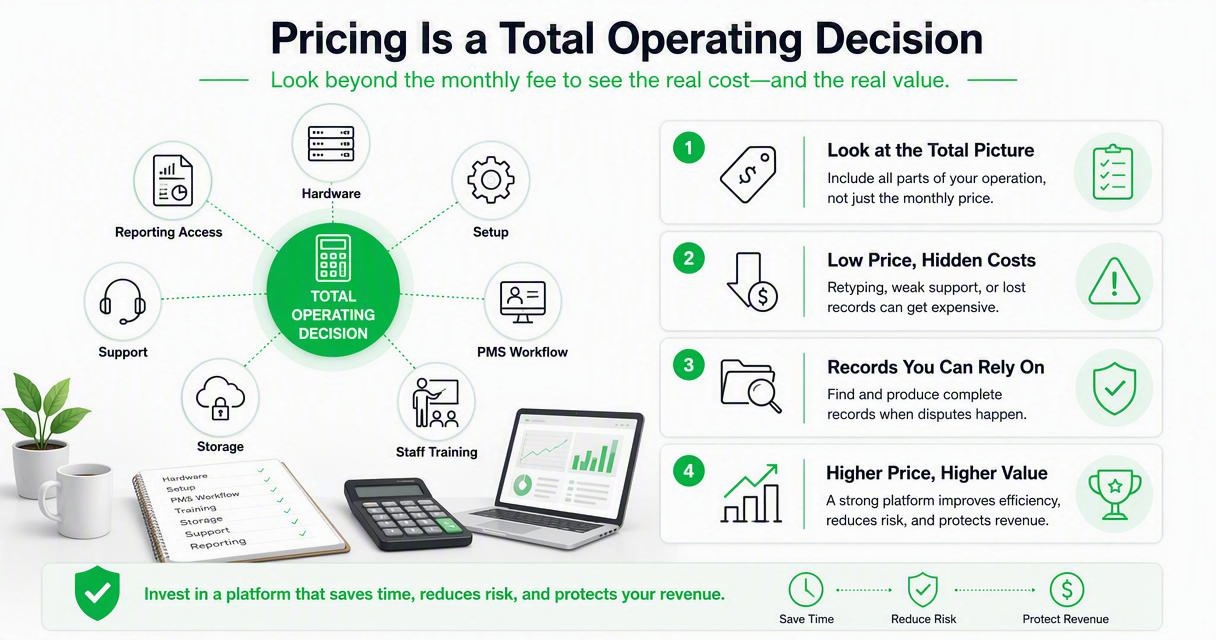
A low monthly price can become expensive if it creates retyping, weak support, or records that cannot be retrieved during a dispute. A higher-priced platform can be worth it if it shortens check-in, improves data quality, and reduces preventable losses.
Before buying, ask each vendor for a written scope that includes:
- Scanner hardware options and replacement process.
- Software subscription costs and contract length.
- PMS setup or integration fees.
- Training format for front desk and managers.
- Support hours, escalation path, and response expectations.
- Data export, storage, and deletion options.
- Multi-property management features, if needed.
Ask vendors to price the workflow, not just the scanner. If the quote does not explain implementation, support, and reporting, it is incomplete.
Best-fit recommendations
GuestBan is the best fit for hotels prioritizing identity-driven front desk control, while TTitel is a better fit for properties wanting a broader hospitality technology provider.
Choose the GuestBan ID Scanning platform if your main pain points are manual data entry, uncertain guest verification, chargeback documentation, DNR visibility, or multi-property risk consistency. I would especially consider it for limited-service hotels, extended-stay properties, and groups that need standardized front desk behavior across locations.
Choose TTitel if your hotel wants a vendor relationship that includes ID scanner services alongside business centers, concierge technology, or other guest-facing tech support. That can make sense for properties that value bundled technology service over a specialized risk workflow.
Use this decision shortcut:
- Pick GuestBan when check-in risk, DNR alerts, and retrievable guest records drive the purchase.
- Pick TTitel when scanner hardware is part of a broader technology service package.
- Run a pilot when your PMS workflow is complex or your brand has strict data rules.
- Involve managers early when the decision affects refusals, incident notes, or retention policy.
The fairest conclusion is simple: both options may scan IDs, but they are not trying to solve the exact same buyer problem.
What to expect in 2027
Hotel ID scanning in 2027 will likely move further from hardware selection toward automated risk context, policy controls, and auditable guest data workflows.
Front desk teams are already under pressure to check guests in faster while documenting more. That tension will push operators toward systems that reduce manual typing, apply policies consistently, and help managers review exceptions without slowing every arrival.
Expect hotel buyers to ask harder questions about:
- AI-assisted review: Not replacing managers, but surfacing mismatches and missing fields faster.
- Multi-property visibility: Shared risk context across hotel groups without messy spreadsheets.
- Retention automation: Automatic deletion rules tied to policy and legal review.
- Chargeback packets: Faster retrieval of ID, reservation, payment, timestamp, and notes.
- Guest transparency: Clearer notices about why ID data is captured and how it is protected.
Hotels that still treat scanning as a hardware purchase may fall behind. The stronger 2027 approach is to view ID capture as part of front desk automation, loss prevention, and guest data governance.
FAQ
These are the questions I would expect from a hotel owner, general manager, or operations lead comparing both options.
Is GuestBan or TTitel better for a small hotel?
GuestBan is usually the better fit if the small hotel wants ID scanning, guest record capture, DNR review, and dispute documentation in one focused workflow. TTitel may fit better if the hotel wants a broader vendor for several technology services. The right answer depends on whether risk control or vendor consolidation matters more.
Do both platforms work with hotel PMS systems?
Both should be evaluated against your exact PMS, not a generic compatibility claim. Ask for a live demo using your property management system, reservation flow, and front desk permissions. The key test is whether staff can scan, verify, and store guest data without retyping the same information into multiple places.
What is the biggest mistake when choosing a hotel ID scanner?
The biggest mistake is buying for hardware alone. A scanner that reads a license is only part of the job. Hotels need policies, staff training, storage controls, reporting, PMS workflow, and a plan for alerts or refusals. The workflow around the scan determines the real value.
Should hotels scan passports as well as driver licenses?
Many hotels need passport scanning for international guests, but the requirement depends on location, brand policy, and operating model. The system should support the documents your property accepts and store them according to your privacy policy. Ask vendors to demonstrate passport capture, search, and retrieval before rollout.
Conclusion
TTitel vs GuestBan comes down to buying scope: TTitel, through TTI Technologies, appears stronger as a broader hospitality technology relationship, while GuestBan ID Scanning is the more direct fit for hotels that want check-in verification, guest data capture, DNR alerts, and retrievable records.
Your next step should be practical. Map your front desk workflow, list your PMS requirements, define your ID retention policy, then request demos using real check-in scenarios. If your priority is a hotel-focused ID scanning workflow tied to guest risk control, head to guestban.com and ask to see the platform with your property’s check-in process.

