
TL;DR
Use one standard ID capture workflow for every arrival: confirm the ID type, scan or record the required fields, check image quality, transfer clean data into the PMS, and escalate mismatches or alerts. The best checklist reduces manual typing, supports privacy rules, and gives managers a clear record when disputes, DNR alerts, or chargebacks appear.
A slow or inconsistent ID check can turn a normal arrival into a bad record, a billing dispute, or a missed safety alert. A strong hotel front desk ID capture checklist gives agents a repeatable way to collect identity data without guessing what to scan, what to type, what to skip, or when to call a manager. ID capture: the front desk process of collecting, validating, storing, and transferring guest identity details from an approved document into hotel systems. Tools like GuestBan ID Scanning help hotels standardize that process by scanning IDs, organizing guest records, and supporting alert workflows without making agents build records by hand.
Table of Contents
What is a hotel front desk ID capture checklist?
A hotel front desk ID capture checklist is a step-by-step operating standard for collecting guest identity data at check-in, including accepted ID types, required fields, scan quality, PMS entry, privacy handling, alerts, and escalation rules. It keeps agents consistent across shifts, properties, and reservation types.
The front desk is the part of the hotel that has direct guest contact, which matches the broader definition of a front office as the client-facing part of a company in Wikipedia's front office entry. A receptionist or front desk agent performs administrative support in a lobby or front office setting, consistent with Wikipedia's receptionist definition.
"The front office is the part of a company that comes in contact with clients.", Wikipedia contributors, Front office
For hotels, the checklist should not become a generic security script. It should answer practical questions agents face at the counter: Is this ID acceptable? Which fields go into the PMS? Is the image readable? Did the scan trigger a DNR or internal alert? Should I proceed, pause, or call the manager?
Which IDs should the front desk accept?
Hotels should accept only government-issued or policy-approved identity documents that show the guest's legal name, photograph, and expiration status, then document exceptions in a manager-approved note. The exact list should reflect local law, brand standards, and property risk policy.
A practical policy separates normal acceptance from manager review. I recommend posting the approved list inside the SOP, not asking agents to remember it during a sold-out night.
Accepted ID decision table
| ID type | Accept for check-in? | Capture notes | Escalate when |
|---|---|---|---|
| State driver's license | Yes | Scan front and barcode when allowed | Name mismatch, expired ID, damaged card |
| State ID card | Yes | Capture legal name, DOB if policy allows, ID number if permitted | Photo does not match guest |
| Passport | Yes | Capture passport number only if policy and law allow | Visa or age concern requires review |
| Military ID | Usually manual review | Follow strict privacy and copying limits | Agent is unsure what may be copied |
| Temporary paper ID | Manager review | Pair with secondary proof if allowed | No photo or unclear issuing authority |
| Student or work badge | Usually no | Treat as supporting document only | Guest has no government ID |
Local rules matter. Before finalizing fields, review your state's rules and retention limits using a current resource such as GuestBan's ID scanning laws guide. If your property operates in California or serves California residents, align record handling with your privacy notice and the hotel's CCPA compliance obligations.
What guest data should agents capture?
Agents should capture the minimum identity data needed to confirm the guest, complete registration, support hotel policy, and maintain a defensible record. Common fields include full legal name, ID type, ID expiration status, issuing jurisdiction, reservation match status, scan timestamp, agent ID, and any approved alert result.
The safest approach is data minimization. Do not collect extra fields just because the scanner can read them. Privacy rules often focus on purpose, notice, access, retention, and secure handling.
"The protection of natural persons in relation to the processing of personal data is a fundamental right.", European Parliament and Council, General Data Protection Regulation
Required and optional fields
- Required for most properties: legal name, ID type, issuing state or country, expiration status, reservation number, room number after assignment, check-in timestamp, staff user.
- Conditional fields: date of birth for age-restricted stays, ID number where permitted, passport details for international registration requirements.
- Never casual fields: sensitive ID details that have no operational purpose, unrelated notes about appearance, or payment card data stored in the wrong system.
- Audit fields: scan method, edit history, alert result, manager override, and reason code.
If your team needs a broader workflow beyond capture, compare this checklist with a full hotel guest verification software buyer guide, especially if you manage multiple properties or want standardized audit trails.
How should agents capture a readable ID image?
Agents should capture ID images by placing the document flat, using even light, avoiding glare, confirming all corners are visible, checking that text and the photo are sharp, and rescanning immediately when the image would not support review. A bad scan is nearly the same as no scan.
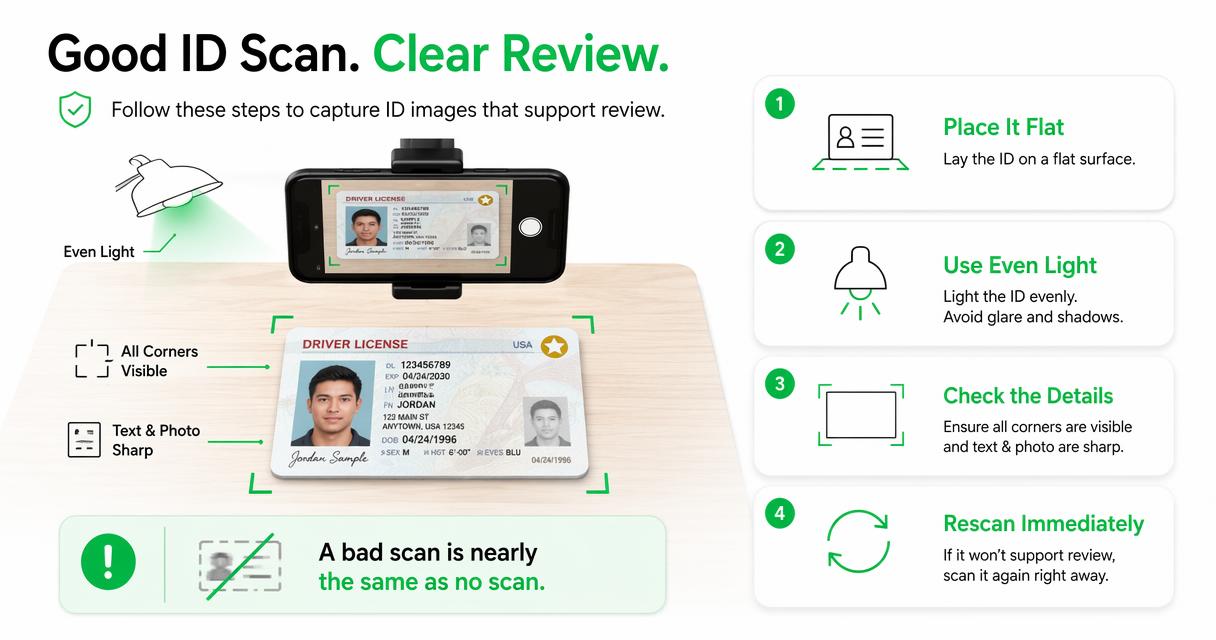
I like to train agents with a simple rule: if a manager could not read it tomorrow, the guest record is not finished today. That rule removes debate and keeps quality control at the counter.
Image quality checklist
- Place the ID on a clean, dark, flat surface.
- Keep fingers, wallets, sleeves, and lanyards out of the frame.
- Confirm the photo, name, expiration, and ID type are visible.
- Check glare from lobby lights before saving.
- Retake blurred, cropped, shadowed, or sideways images.
- Save the scan only to the approved hotel system.
- Add a note when a passport, temporary ID, or manual entry requires a different workflow.
Image quality is not about photography skill. It is about record usability. Hotels need a capture that supports guest lookup, incident documentation, DNR review, and chargeback evidence if the stay later becomes disputed.
How should ID data move into the PMS?
ID data should move into the PMS through a controlled transfer that maps each captured field to the correct guest profile, reservation, and stay record. The front desk should verify the imported data before issuing keys, especially when names, dates, or document formats differ.
Manual typing creates avoidable errors. OCR and barcode scans can reduce keystrokes, but agents still need a confirmation step because hotel systems, ID formats, and guest names do not always match perfectly.
PMS transfer controls
| Transfer point | Front desk check | Manager or admin control |
|---|---|---|
| Name | Match ID to reservation and payment holder policy | Define alias and corporate booking rules |
| Address | Confirm import format if required by PMS | Decide whether address is mandatory |
| DOB or age flag | Use only when policy requires it | Limit visibility by role |
| ID number | Capture only where permitted | Set retention and masking rules |
| Notes | Use approved reason codes | Audit free-text entries |
| Attachments | Confirm scan saved to correct guest | Restrict download and deletion rights |
GuestBan ID Scanning is most useful here when the property wants structured capture plus cleaner records before the agent moves on to keys, deposits, and room instructions. For a deeper check-in sequence, see this 2026 guide on how to verify guest ID at hotel check-in.
When should the front desk escalate an ID issue?
The front desk should escalate when the ID is expired, unreadable, inconsistent with the reservation, inconsistent with the guest's appearance, connected to a DNR or risk alert, or outside the approved ID policy. Escalation protects the agent from making a judgment call alone.
The point is not to embarrass the guest. The point is to slow the process enough for a supervisor to review facts, policy, and documentation.
Escalation triggers agents should memorize
- Identity mismatch: ID name does not match the reservation and no approved alias rule applies.
- Payment conflict: cardholder, ID holder, and reservation holder conflict with property policy.
- Document concern: ID appears altered, expired, unreadable, or unsupported.
- Age concern: guest may not meet minimum age rules.
- Alert hit: internal DNR, incident, chargeback, or property-risk alert appears.
- Behavior concern: guest becomes aggressive, evasive, or refuses standard registration steps.
- Privacy concern: guest asks why data is collected or requests deletion or access information.
A 2022 systematic review in BMC Public Health examined work environment risk factors that contribute to day-to-day occupational stress, a useful reminder that unclear procedures can add pressure to frontline work (Lukan, Bolliger, and Pauwels, 2022). Clear escalation rules lower that burden because agents know exactly when to stop and call for support.
How GuestBan ID Scanning handles this
The GuestBan ID Scanning platform helps hotels turn ID capture into a repeatable front desk workflow by combining scan capture, guest records, alerts, and documentation steps in one operating process. That matters most when a hotel wants consistency across agents, shifts, and properties.
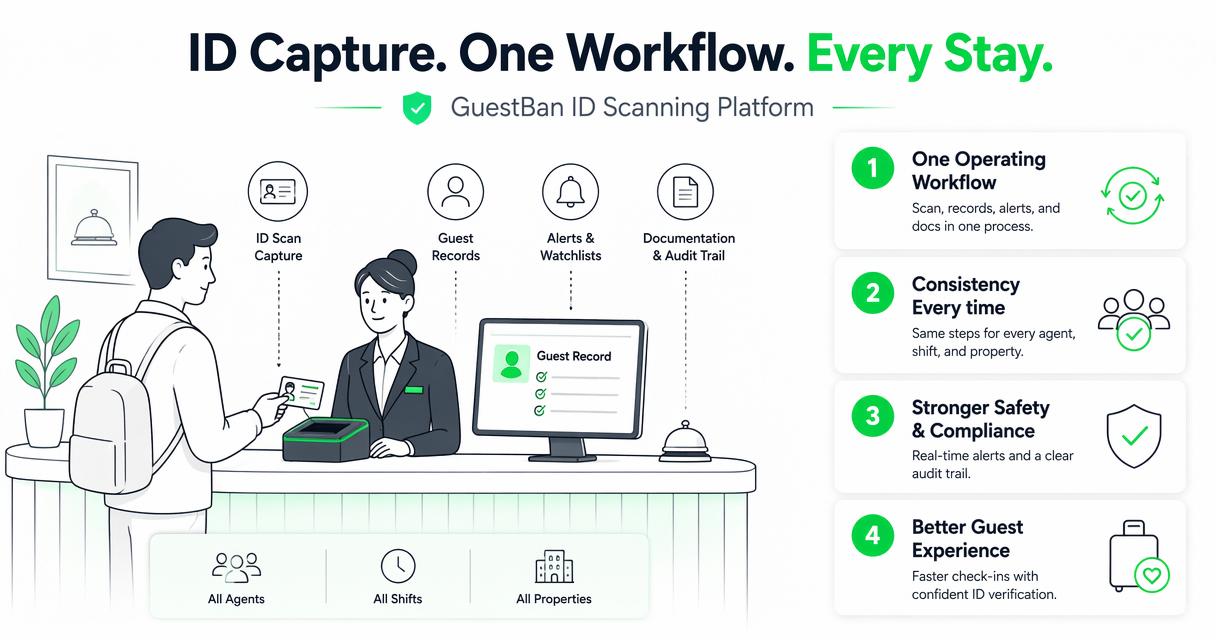
Rather than asking staff to rely on memory, a system-based workflow can prompt the agent to capture the right record, review alert results, and keep documentation tied to the guest. That makes the front desk faster without removing manager oversight.
GuestBan workflow fit
| Checklist need | Manual process | With GuestBan ID Scanning |
|---|---|---|
| Capture ID | Agent types details and may attach image | Scan supports structured guest record creation |
| Review alerts | Agent searches notes or old binders | Alert workflow can surface known guest concerns |
| Document incident link | Notes may sit outside the guest record | Records can connect ID details and incident history |
| Multi-property visibility | Each hotel may keep separate lists | Groups can support shared controls where appropriate |
| Staff accountability | Hard to know who edited what | User-based records support review and training |
Hotels that already maintain Do Not Rent procedures should also define how ID capture connects to DNR decisions. This DNR hotel meaning guide explains the operational difference between a guest record, an incident note, and a Do Not Rent decision.
What should managers audit weekly?
Managers should audit a sample of ID records each week for scan readability, required fields, PMS match accuracy, alert handling, retention compliance, and proper escalation notes. A short weekly review finds training gaps before they become repeated property-wide habits.
Do not audit only the problem stays. Randomly select normal check-ins too, because everyday records show whether the checklist is actually being followed.
Weekly audit list
- Review 10 to 20 recent check-ins from different shifts.
- Confirm the ID image is readable and saved to the correct profile.
- Compare scanned name to PMS name and reservation name.
- Check that expired or unusual IDs were escalated.
- Review alert hits for manager notes and outcome.
- Confirm agents are not storing sensitive data in free-text fields.
- Note recurring errors by shift, agent, or ID type.
- Update training examples using real but privacy-safe scenarios.
The goal is coaching, not blame. I have seen front desk teams improve quickly when managers show two clear examples: one excellent record and one record that would fail a later review.
What should hotels expect in 2027?
Hotels should expect more automated ID capture, tighter privacy expectations, and wider use of connected guest-risk records in 2027. The winning front desk workflow will combine faster scanning with stricter controls over who can view, export, edit, or retain guest identity data.
AI will help with extraction, document classification, and alert routing, but hotels should keep humans in charge of final decisions. A scan should inform the check-in decision, not replace the manager's judgment.
2027 readiness moves
- Review state ID scanning rules at least once per year.
- Replace shared logins with role-based staff access.
- Set retention rules before expanding scan volume.
- Connect ID capture with incident reporting and chargeback documentation.
- Train agents on guest privacy questions, not just scanner buttons.
- Standardize workflows across properties before adding network-wide alerts.
If you are comparing scanner options, evaluate AI features through operational outcomes: fewer manual keystrokes, cleaner guest records, better audit trails, and faster manager review. The buyer checklist for an artificial intelligence scanner for hotel ID verification is a useful next read.
FAQ
Should hotels scan every guest ID?
Many hotels scan or record the primary registered guest's ID, but the exact rule depends on local law, brand policy, and risk tolerance. Some properties also capture additional adult occupants for safety or incident documentation. The key is consistency: define who must be captured, train every shift, and avoid ad hoc exceptions.
Can a hotel keep a copy of a guest ID?
A hotel may be allowed to keep an ID copy in some places, but permission, purpose, retention, and security rules vary by jurisdiction. Managers should confirm local ID scanning and privacy laws, publish the retention policy, and restrict staff access. Never keep copies longer than your policy or legal need requires.
What if the guest refuses ID capture?
If a guest refuses ID capture, the agent should pause check-in and follow the property's escalation policy. A manager can explain why the information is requested, offer the privacy notice, and decide whether manual verification is allowed. Agents should not argue, improvise, or bypass required registration rules.
What makes an ID scan unacceptable?
An ID scan is unacceptable when the image is blurred, cropped, blocked by glare, missing key details, attached to the wrong guest, or inconsistent with the PMS record. Unreadable scans should be retaken immediately. If the document itself appears altered, expired, or unsupported, the agent should escalate to a manager.
How often should a hotel update its ID capture checklist?
Hotels should review the checklist at least annually and whenever laws, PMS workflows, scanner tools, brand standards, or incident patterns change. Multi-property groups should also review it after acquisitions or system migrations. A short quarterly audit can identify smaller updates before the annual policy review.
Conclusion
A useful hotel front desk ID capture checklist does three things: it tells agents exactly what to accept, it creates a clean guest record, and it defines when a manager must step in. Start by updating your accepted ID list, field map, image quality rules, PMS transfer checks, and escalation triggers. Then test the process on real arrivals from different shifts.
If your current process still relies on typing, binders, or memory, review GuestBan ID Scanning as part of your 2026 front desk upgrade plan and head to guestban.com when you are ready to compare workflows. Your next action should be simple: print the checklist, audit 20 recent records, and fix the first three gaps before the next sold-out night.