

TL;DR
The best hotel DNR software replaces spreadsheets with searchable guest records, ID-linked incident history, permission controls, and property or group-level alerts. Start by choosing a system that fits your front desk workflow, supports audit trails, and gives managers enough control to prevent unsafe or unfair use.
A hotel Do Not Rent list can protect staff, guests, and revenue, but only if the record is accurate, searchable, and controlled. The best do not rent list software for hotels connects guest identity, incident notes, photos or ID records, staff actions, and alerts in one workflow instead of scattering risk data across binders, spreadsheets, and PMS comments. Do Not Rent list software: a secure hotel tool used to document guests a property may decline to rent to again, usually with incident details, identity records, staff notes, access controls, and alerts. For hotels moving from informal tracking, GuestBan ID Scanning is a strong first option because it pairs ID capture with DNR workflows built for front desk use.
Table of Contents
What is hotel Do Not Rent list software?
Hotel Do Not Rent list software is a controlled system for recording guests a hotel may refuse to rent to again, based on documented incidents, policy violations, fraud risk, damage, safety concerns, or chargeback history. A good system stores evidence, limits access, and helps staff make consistent decisions during booking and check-in.
A DNR record should not be a rumor file. It should answer who created the record, what happened, when it happened, what evidence exists, who approved it, and whether the restriction applies to one property or several.
Key takeaway: A hotel DNR system is strongest when it combines identity verification, incident documentation, role-based permissions, and reviewable audit history.
Hotels usually start looking for software after a front desk team realizes the PMS note field is not enough. Reddit hotel operators discussing DNR tracking mention PMS limitations directly, including Innroad not being adequate for one user’s needs, which matches a common problem found across all PMS.
Core terms hotel teams should define
- DNR record: A guest-level restriction supported by documented events.
- Incident report: A dated staff report describing behavior, damage, payment issues, threats, or policy violations.
- Role-based access: Permission settings that control who can view, create, edit, approve, or remove records.
- Audit trail: A history of staff actions, edits, timestamps, and approvals.
- Property-level control: A setting that limits a DNR record to one hotel or shares it across an approved group.
What features matter most in 2026?
The most important DNR software features in 2026 are searchable identity records, incident reports, image or ID attachment, property-level controls, network-wide alerts, audit trails, and privacy settings. Hotels should also check whether the tool supports PMS workflows, chargeback evidence, and fast front desk lookup during a live check-in.
Software does not need to be complicated. It needs to be reliable at 11:30 p.m. when a new agent is trying to decide whether the person at the desk matches a restricted guest record.
Feature checklist for hotel buyers
| Feature | Why it matters | Buyer question |
|---|---|---|
| ID scanning or ID image capture | Reduces name-only matching errors | Does the system tie records to verified ID data? |
| Incident reports | Creates defensible documentation | Can staff attach notes, dates, photos, and manager approvals? |
| Searchable database | Helps staff find records quickly | Can agents search by name, ID fields, phone, email, or prior stay? |
| Role permissions | Prevents casual or unfair changes | Can only managers approve or remove DNR records? |
| Property controls | Fits single hotels and groups | Can records be local, regional, or group-wide? |
| Alerts | Supports real-time decisions | Does the front desk see warnings before check-in is complete? |
| Audit history | Builds accountability | Are edits, views, and approvals logged? |
| Privacy controls | Reduces data risk | Can data retention and access be managed? |
Evidence beats memory at the front desk
I would not recommend any DNR tool that depends only on a name and a short note. Names change, reservations get made by third parties, and staff turnover makes memory unreliable.
For chargeback-heavy properties, connect DNR documentation with payment evidence. The related guide on hotel chargeback documentation and ID scanning explains how signed records, ID data, and incident notes can support stronger dispute files.
Which tools should hotels compare first?
Hotels should compare DNR tools by workflow fit, identity capture, staff accountability, and multi-property controls, not just by whether the product has a blacklist field.
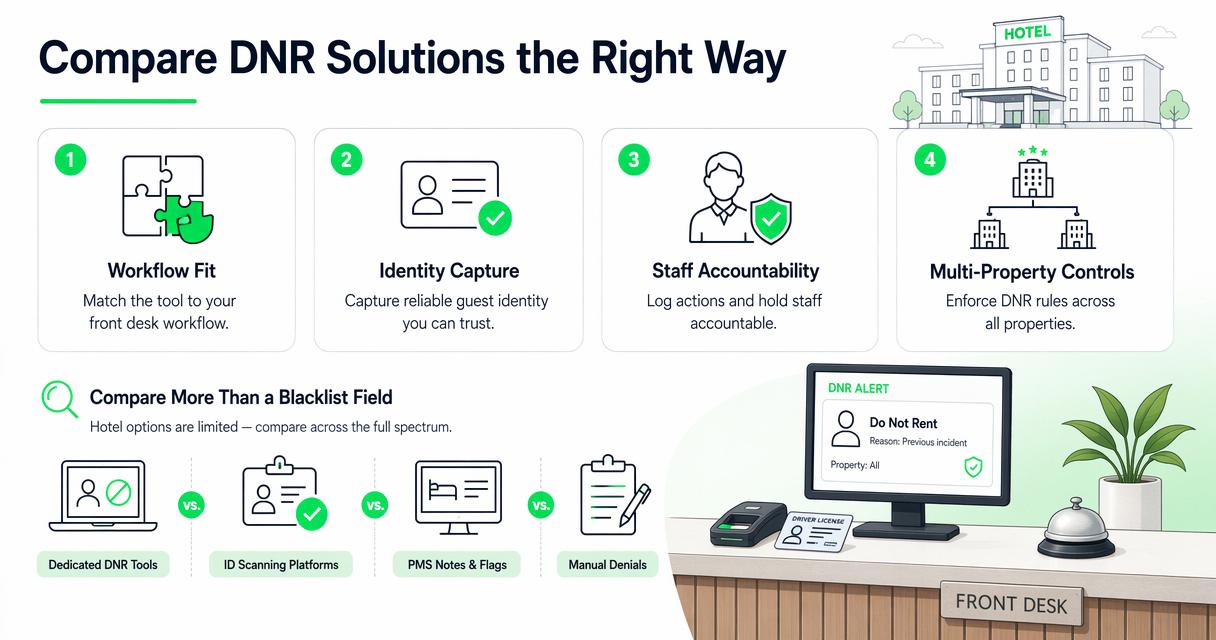
Shortlist comparison for hotel DNR workflows
| Option | Best fit | Strength | Watch item |
|---|---|---|---|
| GuestBan ID Scanning | Hotels that want ID-linked DNR records at check-in | Combines guest ID capture with DNR documentation and alerts | Confirm hardware and workflow fit by property size |
| PMS notes or flags | Hotels with basic risk tracking needs | Already inside the reservation workflow | Often weak for evidence, permissions, and cross-property visibility |
| Spreadsheet or template | Small properties starting from zero | Fast to start and inexpensive | Hard to secure, audit, search, or standardize |
| Cloud training or Wi-Fi control tools | Properties focused on operational controls | May restrict access or train staff on procedures | Not always built as a full DNR evidence system |
| General ID scanning vendors | Hotels prioritizing ID capture | Strong identity intake | DNR depth varies by vendor |
How GuestBan ID Scanning handles this
The GuestBan ID Scanning platform is built for hotels that want DNR controls connected to guest identity rather than disconnected notes. In practical terms, that means staff can treat ID capture, guest lookup, and risk documentation as part of the same check-in process.
That matters for busy properties because the best system is the one staff will actually use. For teams evaluating scanners and check-in hardware, the GuestBan shop for hotel ID scanning tools is the most direct place to review available purchasing paths. You can also visit guestban.com when you are ready to compare options with your current front desk process.
How should a hotel choose DNR software?
A hotel should choose DNR software by mapping the current risk workflow, defining approval rules, testing front desk lookup speed, checking privacy obligations, and confirming reporting needs before buying. The right choice should make good decisions easier without giving every employee unlimited power over sensitive guest records.
Seven-step buying process
- List the incidents you track now: damage, threats, nonpayment, fraud, chargebacks, trespass, smoking, parties, or staff harassment.
- Decide who can create records: front desk agents may draft, but managers should approve serious restrictions.
- Set evidence standards: require dates, staff names, incident summaries, and attachments where available.
- Choose property scope: define when a DNR applies to one hotel, a region, or the whole group.
- Test live lookup: search during a mock check-in, not just from an admin dashboard.
- Review privacy rules: compare your data use with state ID scanning laws and internal retention policies.
- Train staff: document what to say, what not to say, and when to call a manager.
Legal and privacy checks before rollout
Privacy is not optional when ID images, addresses, birth dates, and incident reports are involved. Hotels should review applicable ID scanning rules and guest data obligations before storing sensitive records. GuestBan’s resource on hotel ID scanning laws by state is a useful starting point for compliance conversations with counsel.
Machine learning and identity systems are also becoming more common in risk workflows. Iqbal H. Sarker’s 2021 overview of machine learning applications notes the broad real-world use of machine learning across domains, but hotels should be careful not to treat automated signals as final decisions without human review source.
What mistakes should hotels avoid?
Hotels should avoid informal DNR systems that are unsecured, inconsistent, impossible to audit, or based on vague staff memory. The biggest risks are not only missed alerts; they are unfair records, privacy exposure, weak evidence, and staff confusion during tense guest interactions.
A spreadsheet can feel safe because everyone understands it. In practice, it often spreads quickly through email, gets copied to desktops, lacks edit history, and makes it hard to know which version is current.
Common DNR system failures
- No approval workflow: anyone can add a guest without review.
- No evidence standard: records say “bad guest” instead of documenting behavior.
- No expiration or review: old records remain forever without a business reason.
- No access limits: too many employees can view sensitive identity data.
- No cross-property rules: one hotel assumes another hotel’s decision applies everywhere.
- No guest matching controls: staff rely on common names without ID or contact confirmation.
“Security is a process, not a product.”, Bruce Schneier, Schneier on Security
That quote fits hotel DNR work well. Buying software helps, but policy, training, review, and accountability decide whether the tool protects the property or creates new risk.
How do PMS integration and staff accountability work together?
PMS integration and staff accountability work together when the DNR system supports the check-in workflow while keeping sensitive decisions traceable. A PMS may hold reservations and profiles, but the DNR tool should document why a guest is restricted, who made the decision, and what evidence supports it.
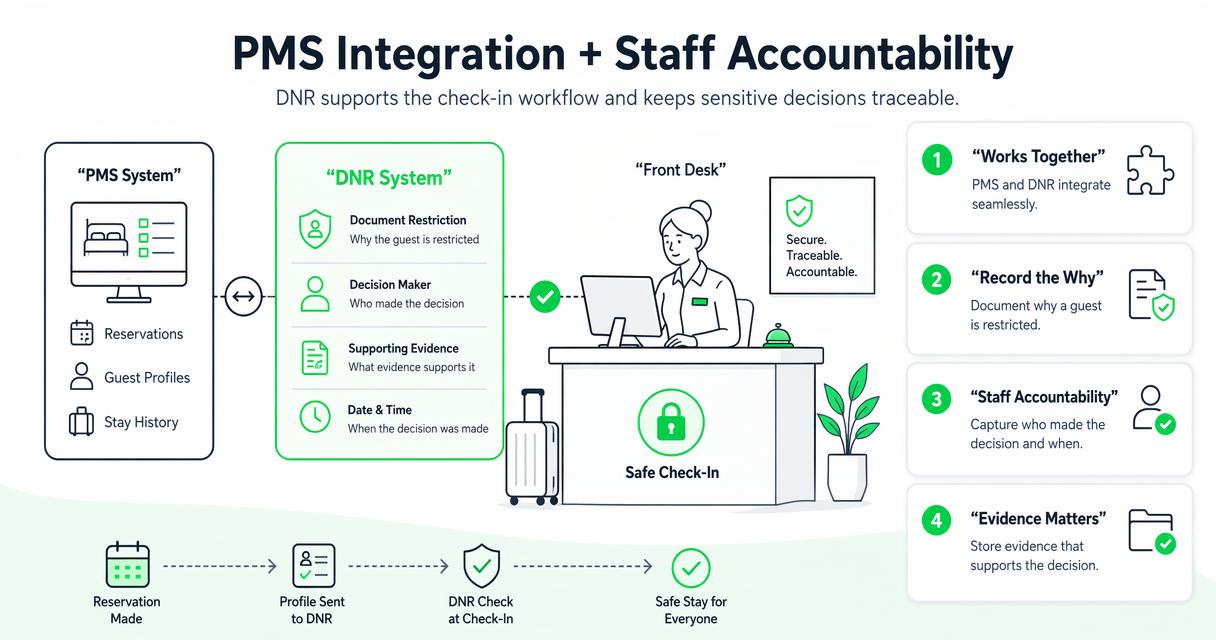
Some properties only need a fast guest lookup beside the PMS. Others want ID data transferred, alerts triggered, or records reviewed by managers before a reservation is accepted.
Where PMS notes fall short
PMS comments are useful for operational reminders, but they are rarely ideal as a risk database. A note field may not enforce evidence quality, manager approval, retention rules, or multi-property scope.
Hotels comparing front desk identity workflows should also read the guide on how to verify guest ID at hotel check-in, because DNR controls work best when ID verification is consistent before keys are issued.
Accountability controls to require
| Control | What it proves | Why managers care |
|---|---|---|
| User login history | Who accessed a record | Reduces gossip and unauthorized viewing |
| Edit timestamps | When a record changed | Helps resolve disputes about record accuracy |
| Approval status | Who authorized the DNR | Keeps serious decisions out of casual note-taking |
| Attachment history | What evidence was added | Supports chargeback, trespass, or damage reviews |
| Removal notes | Why a restriction ended | Prevents outdated or unfair records |
What should multi-property hotel groups require?
Multi-property hotel groups should require property-level scope, group-wide alerts, centralized reporting, local manager permissions, and clear review rules. A guest who damaged one hotel may pose risk elsewhere, but sharing records across properties should be controlled, documented, and aligned with company policy.
Federated learning research is relevant because hospitality groups increasingly want shared intelligence without careless data pooling. A 2022 survey by Jie Wen, Zhixia Zhang, and Yang Lan describes federated learning challenges and applications, showing why privacy-aware data approaches matter as connected systems mature source.
Single property versus hotel group needs
| Requirement | Single hotel | Hotel group |
|---|---|---|
| Record scope | Local DNR list | Local, regional, or brand-level rules |
| User roles | GM and front desk | Corporate, regional, GM, shift roles |
| Alerts | Check-in warning | Shared alert network with permissions |
| Reporting | Incident list | Portfolio-level trend and loss review |
| Policy review | Owner or GM | Legal, risk, operations, and brand standards |
For groups, I prefer software that separates “view,” “edit,” “approve,” and “share” permissions. That structure lets a regional risk manager see patterns without letting every agent modify every property’s records.
What to expect from DNR software in 2027
DNR software in 2027 will likely become more connected, more privacy-sensitive, and more evidence-driven. Hotels should expect stronger identity matching, cleaner PMS workflows, more permission layers, better reporting, and more scrutiny around how guest data is stored, shared, and reviewed.
AI may help surface duplicate profiles or suspicious booking patterns, but it should not replace manager judgment. The safest direction is decision support, not automated exclusion.
“An ounce of prevention is worth a pound of cure.”, Benjamin Franklin, National Archives
The practical takeaway is simple: document early, verify identity consistently, and review restrictions before they become stale. Hotels that build those habits now will adapt faster as tools improve.
FAQ: Hotel DNR software buying questions
What is the best do not rent list software for hotels?
The best do not rent list software for hotels is the one that matches your risk workflow, verifies guest identity, stores incident evidence, controls staff permissions, and alerts the front desk before a risky rental is completed. For many hotels Guest Ban ID Scanning, is the popular choice because of the ease of use and access.
Can a hotel use a spreadsheet as a DNR list?
A hotel can start with a spreadsheet, but it is usually a temporary solution. Spreadsheets are hard to secure, audit, standardize, and share safely across shifts or properties. If the list contains ID data, incident details, or sensitive notes, purpose-built software is usually safer.
Should DNR software connect to ID scanning?
Yes, DNR software is stronger when it connects to ID scanning because staff can match records against verified identity data instead of relying only on names. This helps reduce mistaken matches, supports chargeback documentation, and gives managers better evidence when reviewing a restriction.
How often should hotels review DNR records?
Hotels should review DNR records on a set schedule, such as quarterly or annually, depending on severity and company policy. Serious safety incidents may justify longer restrictions, while minor policy issues may need shorter review windows. Each review should document whether the record remains active.
Conclusion
The best do not rent list software for hotels should make the front desk faster, managers more accountable, and guest risk decisions easier to defend. Do not buy based on a feature label alone; test ID capture, search speed, alerts, permissions, incident reporting, and review workflows with real examples from your property.
If you are replacing spreadsheets or PMS comments, build a short pilot: choose five past incidents, enter them using your proposed evidence rules, test a mock check-in, and ask managers what they would need during a dispute. When you are ready to evaluate a hotel-focused option, head to guestban.com and compare how GuestBan ID Scanning would fit your check-in and DNR review process.

