
TL;DR
Minor Decliner is mainly an age-verification and access-control workflow, while GuestBan is built around hotel guest verification, DNR alerts, incident records, and multi-property risk controls. Hotels that only need underage detection may prefer a simple scanner, but hotels managing chargebacks, safety incidents, and repeat problem guests need a guest record system.
A hotel front desk does not have the same ID problem as a bar door or liquor counter. The real Minor Decliner vs Guest Ban decision is whether your team needs age-focused ID checks or a hotel-focused guest verification workflow that connects IDs, DNR notes, incidents, and staff access. GuestBan ID Scanning is designed for hotel operators who need more than a quick birthdate check, especially when a denied guest, chargeback, or safety report comes back weeks later.
Table of Contents
What is the difference between Minor Decliner and Guest Ban?
Minor Decliner vs Guest Ban compares two different ID scanning use cases: Minor Decliner focuses on age verification and access decisions, while Guest Ban focuses on hotel guest verification, Do Not Rent alerts, incident documentation, and shared operational records. The right choice depends on whether your risk is underage access or hotel guest accountability.
Minor Decliner: an ID scanning workflow commonly positioned for age-restricted sales, venue entry, fake ID detection, and quick accept-or-decline decisions.
Guest Ban: a hotel risk-control workflow that ties scanned ID data to guest records, DNR status, front desk alerts, notes, and incident history.
For hotels, the distinction matters because a valid adult ID can still belong to a guest your property should not rent to. Age is one field. Hotel risk is a record.
Quick comparison for hotel operators
A hotel should compare these tools by workflow, not just scanner hardware.
| Category | Minor Decliner style workflow | Guest Ban style workflow | Hotel impact |
|---|---|---|---|
| Primary purpose | Age verification and access control | Guest verification and risk history | Different front desk decisions |
| Main trigger | Date of birth, ID validity, fake ID signals | Guest match, DNR alert, ID Validity, UV Fake ID, incident notes | Better repeat-guest recognition |
| Best fit | Bars, clubs, dispensaries, age-restricted retail | Hotels, motels, extended stay, multi-property groups | Built around lodging risk |
| Record depth | Often transaction or scan centered | Guest profile, ID scan, notes, incidents | Stronger audit trail |
| Staff use | Door, cashier, security | Front desk, manager, owner, security | Multi-role access matters |
| Multi-property value | Network ban lists may vary by tool | Shared DNR and guest records by property group | Helps hotel groups act consistently |
Key insight: If the front desk question is “Is this person old enough?”, an age scanner may be enough. If the question is “Should we rent to this guest again?”, hotels need DNR context, documentation, and controlled access.
When is age verification enough?
Age verification is enough when the business decision depends mainly on whether an ID holder meets a legal age threshold and the scan does not need to become a long-term hotel guest record. That fits age-restricted retail, venue entry, alcohol service, tobacco, cannabis, and some entertainment access points.
A Minor Decliner style workflow makes sense when staff need a fast answer at a point of sale or entrance. The record may support compliance, but it usually does not need room history, folio context, DNR reason codes, or manager follow-up.
Use a simple age-focused workflow when your team needs to:
- Confirm date of birth quickly.
- Detect obvious fake or expired IDs.
- Reduce manual math and cashier mistakes.
- Support age-restricted access policies.
- Make a pass-or-fail decision in seconds.
Hotels sometimes have age policies too, such as minimum check-in age. Still, I would not treat that as the whole verification process. A 30-year-old guest can create more risk than a 19-year-old guest if prior incidents, unpaid balances, property damage, or police calls are attached to the name.
Where age-only systems fall short in hotels
Age-only tools can miss the operational context that hotel teams rely on during check-in.
A hotel needs to know whether the ID matches the reservation, whether the guest has stayed before, whether a manager added notes, and whether another property in the group flagged the guest. Those questions are not solved by date-of-birth validation alone.
“Security is a process, not a product.”, Bruce Schneier, Schneier on Security
That quote fits hotel ID scanning well. The scanner starts the process, but the workflow around alerts, permissions, retention, and documentation determines whether the front desk can act safely.
When do hotels need guest ban workflows?
Hotels need guest ban workflows when repeat guest risk, incident history, chargeback evidence, staff safety, or multi-property consistency matters more than a simple age check. A DNR workflow should connect identity, reason, documentation, staff permissions, and escalation steps in one usable record.
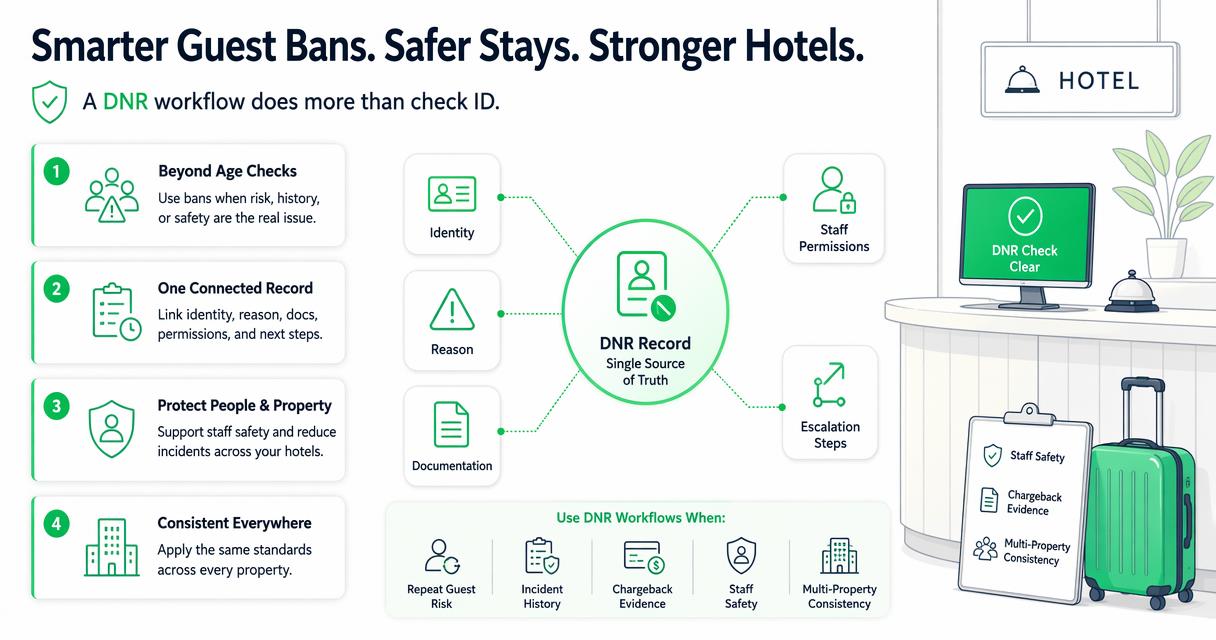
The hospitality term DNR, or Do Not Rent, means a guest should not be rented a room because of prior behavior, unpaid charges, safety issues, policy violations, or management decision. For a deeper definition, see this guide to what DNR means in hotels.
A strong hotel guest ban process usually includes:
- Scan or capture the guest ID.
- Match the guest against local and approved shared records.
- Show a clear alert before room assignment.
- Display reason codes and manager notes.
- Let staff document the current interaction.
- Preserve evidence for later review.
- Limit access based on staff role.
Front desk agents need speed, but managers need defensible records. Those needs can conflict if the system only shows a red flag without context.
DNR records need evidence, not rumors
A guest ban should never be a vague label. The record should explain who added it, when it was added, what happened, and what evidence supports the decision.
Useful DNR documentation may include:
- Scanned ID details.
- Reservation and stay dates.
- Incident notes.
- Photos of damage, when policy allows.
- Police report numbers, if applicable.
- Witness names or staff initials.
- Refund, chargeback, or payment history.
Hotels can use a structured Do Not Rent incident report template to keep notes consistent across shifts. Consistency is what turns a tense front desk moment into a reviewable management decision.
How GuestBan ID Scanning handles this
GuestBan ID Scanning handles hotel verification by connecting ID capture with guest records, DNR alerts, incident notes, and multi-user access instead of stopping at an age result. That makes it a better fit when the property needs an operational record that front desk, managers, and ownership can use.
The GuestBan ID Scanning platform is built for lodging teams that need to recognize guests, not just read IDs. In practice, that means a scan can support check-in accuracy, risk alerts, and later documentation.
A hotel-focused setup should answer four questions before the key card is issued:
- Does the ID match the person and reservation?
- Has this guest stayed here before?
- Is there a DNR or watchlist alert?
- What should the agent do next?
For a broader buying framework, compare features in this 2026 hotel guest verification software guide. I recommend using that kind of checklist before buying any scanner because hardware alone rarely fixes poor front desk process.
Hotel workflow features to verify before buying
A hotel should test the full shift workflow, not only the scan screen.
| Feature | Why it matters at check-in | What to ask the vendor |
|---|---|---|
| ID capture | Reduces manual entry and typo risk | Which fields are captured and stored? |
| DNR alerts | Helps staff avoid renting to flagged guests | Are alerts local, shared, or both? |
| Incident notes | Adds context to management decisions | Can staff attach notes after check-in? |
| Role permissions | Limits sensitive data access | Can agents, managers, and owners have different views? |
| Audit history | Shows who viewed or changed a record | Are changes logged by user and time? |
| PMS workflow | Reduces duplicate typing | Can data support your check-in process? |
| Privacy controls | Supports lawful and limited retention | Can records be reviewed, exported, or deleted by policy? |
GuestBan ID Scanning is strongest where these hotel-specific needs overlap. If your team has ever said, “I know we had trouble with this guest, but I can’t find the note,” the missing piece is usually record design.
What should hotels compare beyond the scanner?
Hotels should compare ID scanning tools by policy fit, data handling, alert quality, staff permissions, and documentation quality rather than by scan speed alone. A fast scanner that creates weak records can still leave managers exposed during disputes, repeat incidents, or privacy reviews.
Privacy deserves special attention because scanned IDs contain sensitive personal information. The Federal Trade Commission gives a simple rule that applies well to hotel records:
“If you don’t have a legitimate business need for sensitive personally identifying information, don’t keep it.”, Federal Trade Commission, Start with Security
Hotels should define what they collect, why they collect it, who can see it, and how long they keep it. State rules can differ, so operators should review current hotel ID scanning laws before setting a retention policy.
Comparison checklist for 2026 buying teams
A practical review should include operations, legal, and front desk leadership.
- Map the decision: decide whether the scan supports age, identity, DNR, payment evidence, or all four.
- Test a real check-in: scan an ID, search a guest, trigger an alert, and add notes.
- Review permissions: confirm agents cannot see more data than they need.
- Check retention settings: match storage periods to policy and state requirements.
- Validate reporting: confirm managers can export or review records for disputes.
- Train escalation steps: tell agents exactly what to do when an alert appears.
For properties storing scanned IDs, this cloud storage guide for guest IDs is a useful companion because storage controls are part of the buying decision, not an afterthought.
Who should pick which option?
Businesses should pick an age-verification-first tool when the main risk is underage access, and hotels should pick a guest-ban-first tool when the main risk is repeat guest behavior, DNR enforcement, or documentation. The decision becomes clear when you define the front desk outcome.
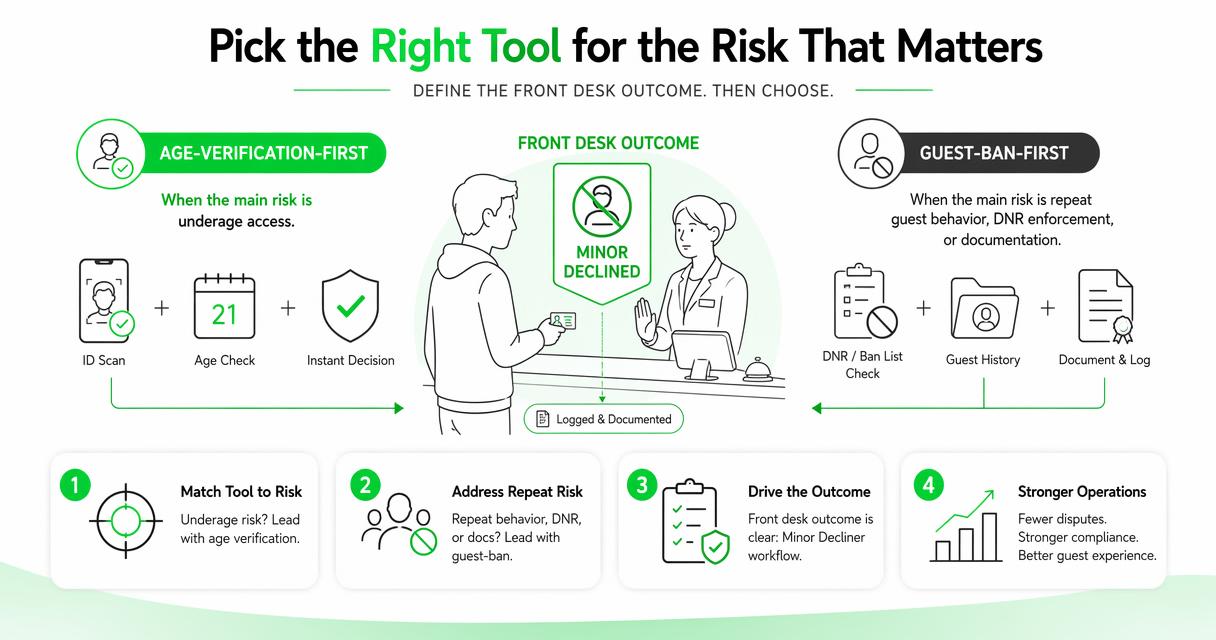
Pick a Minor Decliner style workflow if your business is mainly checking age at a door, counter, or restricted-access point. That is a focused use case, and a simpler system can be easier to train.
Pick a hotel guest ban workflow if your team needs to identify guests over time, manage property-specific or group-wide DNR records, and document why a rental was denied. Multi-property groups should also consider shared controls, especially if problem guests move between nearby locations.
With GuestBan ID Scanning, hotels can frame ID scanning as part of risk control instead of a standalone device purchase. For product details, licensing, and deployment options, visit guestban.com.
Decision matrix by property type
The best fit changes by operating model.
| Property or business type | Better fit | Reason |
|---|---|---|
| Bar or nightclub | Age verification workflow | Entry depends on age and ID validity |
| Liquor or tobacco retailer | Age verification workflow | Compliance is tied to restricted sales |
| Independent hotel | Guest ban workflow | Staff need local DNR and incident records |
| Extended stay hotel | Guest ban workflow | Longer stays increase documentation needs |
| Multi-property hotel group | Guest ban workflow | Shared alerts reduce repeat risk across locations |
| Mixed-use resort with bars | Both may apply | Age control and lodging risk are separate decisions |
Do not force one tool to solve every problem. I prefer separating age-restricted service checks from lodging eligibility when the operation has both.
What to expect in 2027
Hotel ID verification in 2027 will likely move toward tighter privacy controls, better audit trails, and smarter risk alerts rather than simple scan-and-store workflows. The direction is clear: hotels want faster check-in, but regulators and guests expect limited, explainable data use.
Generative AI research is already pushing business software toward better decision support, although hotels should avoid black-box denial decisions. A 2024 article on generative artificial intelligence in new idea management by Marcello M. Mariani and Yogesh K. Dwivedi highlights how AI will shape future research and management systems, but hotel operators still need human review for sensitive guest decisions (Journal of Business Research).
Expect buying teams to ask sharper questions:
- Can the system explain why an alert appeared?
- Can managers correct or remove outdated records?
- Can guests’ data be limited by policy?
- Can multiple properties share alerts without overexposing details?
The winning hotel tools will not be the ones that store the most data. They will be the ones that show the right information to the right person at the right time.
FAQ
Is Minor Decliner the same as a hotel DNR system?
No. Minor Decliner style ID scanning is mainly associated with age verification, fake ID detection, and access decisions. A hotel DNR system tracks whether a guest should be rented to again, why that decision was made, and what evidence supports it. Hotels usually need guest history, notes, permissions, and incident records.
Can a hotel use age verification and guest ban software together?
Yes. A hotel with bars, clubs, or age-restricted amenities may use age verification for those areas and a guest ban workflow for lodging decisions. The key is to keep the purposes clear. Checking whether someone can enter a bar is different from deciding whether the property should rent a room.
What information should a hotel DNR alert show?
A useful DNR alert should show the guest match, the reason for the alert, the date added, the property or manager responsible, and the next action for staff. It should avoid unnecessary sensitive details on the first screen. Managers can review deeper notes when needed.
Do hotels need legal review before scanning IDs?
Hotels should review state law, brand standards, and privacy policy before scanning and storing IDs. Rules can vary by location, and storage practices matter as much as collection. At minimum, hotels should define the business purpose, access rules, retention period, and process for deleting records.
Conclusion
The Minor Decliner vs Guest Ban choice comes down to the decision your staff must make. If the job is only to confirm legal age, an age-verification scanner may be enough. If the job is to protect the property, identify repeat guests, enforce DNR decisions, and preserve incident history, choose a hotel-focused workflow.
My recommended next step is simple: write down your current front desk risk events from the last 90 days, then test whether your scanner workflow would have helped staff recognize, document, and escalate each one. If the answer is no, evaluate GuestBan ID Scanning and head to guestban.com to see how a hotel-specific guest verification process can support safer check-ins.