
TL;DR
TL;DR: Hotel guest screening alerts work best when they combine ID scans, DNR checks, PMS records, payment signals, and documented escalation rules. Use alerts to support staff judgment, not replace it, and train managers to review evidence before denying service or adding a guest to a DNR record.
A front desk alert is only useful if staff know what it means, what evidence supports it, and what to do next. In 2026, hotel guest screening alerts are becoming a practical risk-control layer for properties that need faster check-ins, stronger documentation, and safer decisions at the desk. For hotels building this workflow, GuestBan ID Scanning helps connect ID capture, guest records, and alert review in one operational process. A strong program does not turn clerks into investigators; it gives trained staff a consistent way to verify identity, flag risk, and escalate concerns before keys are issued.
Table of Contents
What are hotel guest screening alerts?
Hotel guest screening alerts: digital or procedural flags that notify hotel staff when a check-in record needs extra review before room access is granted.
Hotel guest screening alerts can relate to identity, age, payment, prior incidents, Do Not Rent records, fraud concerns, safety notes, or property-specific rules. The goal is not automatic rejection; the goal is a documented pause so staff can verify facts, involve a manager, and apply policy consistently.
Key takeaway: Alerts should slow down high-risk decisions, not slow down every guest.
Competitor research shows many pages discuss screening in broad terms, but fewer explain the operating workflow. That gap matters because a vague flag like "watch list" is less useful than a clear alert that says who matched, why it matched, what evidence exists, and who must approve the next step.
Core terms front desk teams should use consistently
- ID scan: A digital capture of a government ID or passport used to populate and verify guest records.
- DNR record: A Do Not Rent entry that tells staff a guest should not be rented to based on documented policy grounds.
- Screening alert: A flag that requires review before check-in continues.
- Escalation: The process of moving a decision from a front desk agent to a supervisor, manager, security lead, or ownership group.
- Audit trail: A record showing who reviewed an alert, what action was taken, and when.
What should screening alerts cover?
Screening alerts should cover identity accuracy, age rules, internal DNR records, payment risk, incident history, safety concerns, and documentation gaps.
A good alert set matches the property's actual risk profile. A select-service hotel near a highway may care most about chargebacks, unauthorized parties, and prior damages. A resort may need stronger rules for registered occupants, incident notes, and group reservations. A multi-property group may need network-level visibility without exposing more data than staff need.
For ID intake standards, the Hotel Front Desk ID Capture Checklist for 2026 is a useful companion because most alerts are only as reliable as the guest data collected at check-in.
Alert categories hotels can configure
| Alert category | What it flags | Typical staff action |
|---|---|---|
| Identity mismatch | Name, date of birth, or document details do not match reservation data | Recheck ID, confirm booking source, ask manager to review |
| Age restriction | Guest appears below minimum check-in age | Verify date of birth and apply written age policy |
| DNR match | Guest matches a prior Do Not Rent record | Pause check-in and escalate to manager |
| Payment concern | Cardholder mismatch, prior chargeback, or suspicious payment pattern | Request approved payment or supervisor review |
| Incident history | Prior damage, disturbance, theft, assault, or policy violation notes | Review evidence and decide under property policy |
| Safety concern | Possible trafficking, abuse, threats, or welfare concerns | Follow safety protocol and contact authorities if required |
| Documentation gap | Missing ID scan, missing signature, or incomplete guest profile | Complete required fields before issuing keys |
Human trafficking awareness deserves special handling because staff must focus on safety, not assumptions. Hotels that train teams on warning signs can pair alerts with clear reporting paths; GuestBan's related resource on taking a stand against human trafficking gives helpful context for that policy area.
How should front desk staff review an alert?
Front desk staff should review an alert by confirming the guest record, checking the evidence behind the flag, pausing the transaction, escalating when policy requires it, and documenting the final decision.
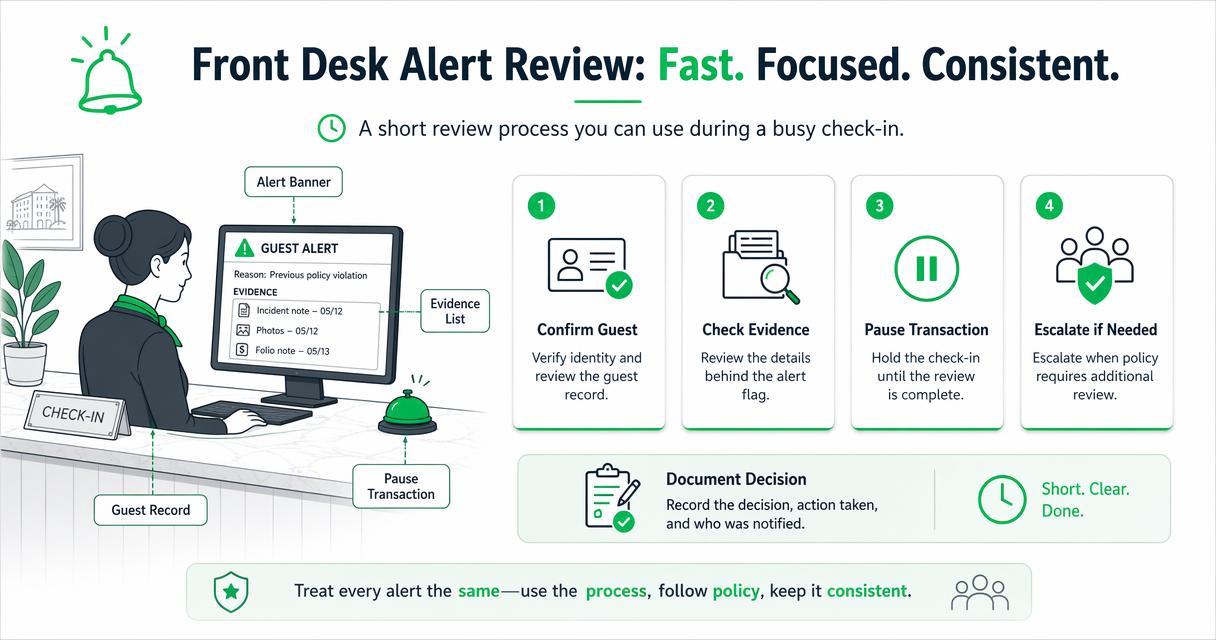
The best review process is short enough to use during a busy check-in rush. I recommend training staff to treat alerts as prompts, not verdicts. If the alert is unclear, the employee should not improvise a denial, argue with the guest, or add a new DNR note without approval.
"Security is a process, not a product.", Bruce Schneier, The Process of Security
A five-step escalation workflow for managers
- Pause politely: Tell the guest the reservation needs a quick verification review.
- Confirm the match: Compare the ID scan, reservation name, date of birth, payment method, and any prior guest record.
- Review evidence: Look for incident reports, photos, signed forms, police report numbers, chargeback notes, or staff statements.
- Apply policy: Use written rules for age, payment, behavior, trespass, safety, or prior damage.
- Document the outcome: Record who approved check-in, denied service, requested more information, or created a follow-up task.
Managers should also define time limits. For example, a low-level documentation gap may be resolved by the agent in two minutes, while a DNR match should require manager approval before any room key is issued.
How do ID scans, PMS records, and DNR lists work together?
ID scans, PMS records, and DNR lists work together by turning a guest's check-in into a verified record that can be searched, reviewed, and audited later.
The ID scan supplies structured identity data. The PMS confirms the reservation and stay details. The DNR list adds prior risk information when a guest has already been documented under hotel policy. When these three pieces stay disconnected, staff may miss a repeat problem guest or rely on memory during a stressful shift.
The meaning and limits of DNR records are explained in more depth in DNR Hotel Meaning: What Do Not Rent Means for Hotel Teams. The short version is simple: DNR should be documented, permission-controlled, and tied to specific behavior or business risk.
The practical data flow at check-in
- Scan the ID: Capture name, date of birth, document number, and image where legally permitted.
- Match the reservation: Compare scanned data with the PMS profile and booking source.
- Run internal checks: Search local or group-level DNR records and incident notes.
- Display the alert: Show the reason, confidence basis, and required next action.
- Record the review: Save the decision, staff user, timestamp, and manager approval when needed.
With GuestBan ID Scanning, this workflow is designed around front desk reality: fast guest intake, searchable records, and clear alert review. For multi-property groups, the GuestBan ID Scanning platform can also support more consistent handling across locations while keeping decisions tied to documented records.
What compliance safeguards should hotels build in?
Hotels should build compliance safeguards around consent notices, data minimization, access controls, retention rules, anti-discrimination training, and documented manager review.
Screening can create legal exposure when staff use vague labels, keep records too long, share data too widely, or treat similar guests differently. A professional alert program uses neutral categories and evidence. It also gives employees a script so they do not disclose private internal notes at the counter.
"Privacy is not an option, and it shouldn't be the price we accept for just getting on the Internet.", Gary Kovacs, Tracking Our Online Trackers
Academic work on AI and automation also supports cautious governance. Dwivedi, Kshetri, Hughes, and coauthors discuss opportunities and risks of generative AI in research, practice, and policy in the International Journal of Information Management 2023 paper. Hotels using automated tools should keep humans accountable for guest-facing decisions.
Policy controls that reduce risk
- Limit access by role: Front desk agents may need alert status, while managers need full evidence.
- Use neutral labels: Prefer "payment verification required" over subjective wording.
- Set retention windows: Keep ID scans and incident records only as long as policy and law allow.
- Require manager approval: Denials, trespass notes, and DNR entries should not be casual desk decisions.
- Train for disability and civil rights issues: Screening policies must not conflict with guest accommodation duties. For related risk context, see GuestBan's article on hoteliers and ADA lawsuits.
How GuestBan ID Scanning handles this
GuestBan ID Scanning handles guest screening by connecting ID capture, guest records, DNR checks, and reviewable alerts into a front desk workflow.
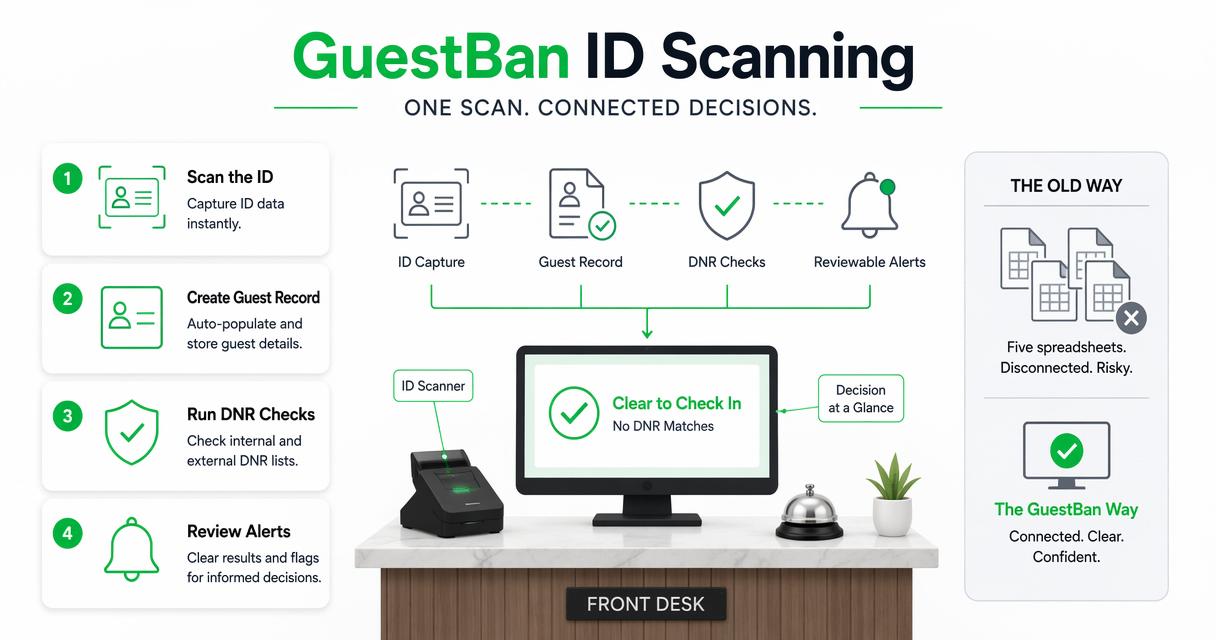
A property should not need five disconnected spreadsheets to decide whether a guest requires review. GuestBan ID Scanning supports a cleaner operating model: scan the ID, confirm the record, surface relevant alerts, and preserve the audit trail for managers. That structure is especially useful when ownership wants consistency across shifts or across several properties.
At guestban.com, hotel teams can evaluate how ID scanning fits with their current check-in flow, PMS process, and risk procedures.
Where the platform fits in daily operations
| Workflow need | Manual approach | GuestBan ID Scanning approach |
|---|---|---|
| ID capture | Photocopy, handwritten notes, or manual typing | Digital ID scan with structured guest data |
| DNR review | Staff memory or local spreadsheet | Searchable records and alerts |
| Manager escalation | Phone call with limited context | Reviewable guest profile and documented reason |
| Chargeback evidence | Scattered files and screenshots | Organized guest record and supporting notes |
| Multi-shift consistency | Different habits by employee | Standardized check-in and alert handling |
For payment disputes, alerts are most useful when paired with complete records. GuestBan's guide to chargebacks and fraud in the hotel industry explains why clear documentation matters after the guest has already checked out.
What should hotels expect in 2027?
Hotels should expect guest screening to become more automated, more privacy-sensitive, and more closely connected to PMS, payment, and incident management systems.
The next phase is not just faster scanning. Expect more AI-assisted data extraction, better duplicate detection, tighter audit logs, and stronger controls over who can see sensitive records. Research on touchless travel by Gaur, Afaq, and Singh in the International Journal of Contemporary Hospitality Management 2021 review shows why hospitality technology continues moving toward lower-friction guest interactions.
Trust will remain a limiting factor. Pitardi and Marriott's work on trust in voice-based AI in Psychology and Marketing 2021 is not hotel-specific, but it reinforces a useful lesson: users accept automation more readily when they understand what it is doing and why.
2027 planning priorities for hotel operators
- Make alerts explainable: Staff should see the reason behind a flag, not just a red warning box.
- Improve interoperability: PMS, ID scanning, incident reports, and payments should share clean data.
- Tighten privacy controls: Retention, role permissions, and export logs will matter more.
- Standardize group policies: Multi-property brands should define when local managers can override shared alerts.
- Train for judgment: Automation can help find records, but managers still own the service decision.
FAQ
Are screening alerts the same as background checks?
No. Hotel screening alerts usually review information connected to the hotel's own check-in process, such as ID data, reservation details, payment concerns, DNR records, and prior documented incidents. Background checks may involve external databases and stricter legal requirements. Most hotels should treat screening alerts as operational risk controls, not broad investigations.
Can a hotel deny a guest because of an alert?
A hotel may deny service when the decision follows lawful, written policy and is based on documented facts, such as age rules, payment failure, prior damage, safety threats, or a valid DNR record. Staff should escalate denials to a manager, avoid subjective reasoning, and document the decision carefully.
Who should be allowed to see DNR alert details?
Access should be role-based. Front desk staff may only need to know that manager review is required, while supervisors may need incident notes, photos, or payment history. Owners and risk managers should define permissions, review logs, and retention rules so sensitive guest data is not overexposed.
Do alerts slow down check-in?
Well-designed alerts should only slow down check-ins that need extra review. Most guests should move through the normal workflow quickly after ID capture and reservation matching. Delays usually come from unclear policies, incomplete records, or staff uncertainty, which can be fixed with training and better system design.
What should be documented after an alert is reviewed?
Hotels should record the alert reason, the evidence reviewed, the staff member involved, the manager decision, the time of review, and any follow-up action. If a guest is added to a DNR list, attach the incident report and supporting materials. The Hotel Do Not Rent Incident Report Template for 2026 can help standardize that process.
Conclusion
Hotel guest screening alerts work best when they are specific, evidence-based, and tied to a clear escalation workflow. Start by standardizing ID capture, then define alert categories, manager approval rules, DNR documentation standards, and data retention controls. If your team is still relying on memory, paper copies, or scattered spreadsheets, map your current check-in process this week and identify where an alert should pause the transaction. Then visit guestban.com to see how GuestBan ID Scanning can support a safer, more consistent front desk workflow.

