
TL;DR
IDGuru can be suitable for a small, owner-operated hotel that needs basic ID or passport scanning on one computer. However, its locally installed model and limited centralized access controls make it a less secure and less manageable option for most staffed or multi-property hotels. Guest Ban provides cloud-based records, controlled staff access, manager oversight, DNR governance, remote administration, and true multi-property support.
Hotel ID scanning is no longer only about reducing manual typing. The system may hold sensitive identity data, DNR records, incident details, and evidence used in chargeback disputes. Hotels should therefore evaluate who can access the information, who can change it, where it is stored, how it is backed up, and whether management can supervise activity without being physically present at the front desk.
In an IDGuru vs Guest Ban comparison, the most important difference is the way each platform handles security, access, storage, and management after an ID is scanned. Guest Ban ID Scanning is designed as a centrally managed hotel security platform, while IDGuru is better suited to a smaller, owner-operated property that only needs a basic local scanning workflow.
Table of Contents
The key difference between IDGuru and Guest Ban
IDGuru focuses primarily on scanning an ID or passport and transferring guest information into the hotel’s registration workflow. Guest Ban includes ID scanning and PMS transfer, but it also provides the controls required to manage sensitive guest records across employees, shifts, computers, and properties.
The difference becomes important once multiple front desk agents use the system. A hotel does not only need to capture guest information. Management must also be able to control who can view records, who can add or remove a person from the DNR list, who can review incidents, and who can change important information.
Key takeaway: IDGuru is mainly a local scanning tool. Guest Ban is a centrally managed guest security and record-management platform.
IDGuru security and management limitations
IDGuru may be sufficient when the hotel owner personally operates the front desk and controls the computer. For most hotels with several employees, managers, shifts, or locations, its local software model can create meaningful security and operational limitations.
1. Limited control over employee access
When guest information is available through a shared front desk computer without granular, centrally managed permissions, any employee who can use that workstation may be able to access sensitive guest records. Management has less control over which team members may view, add, edit, or remove information.
This is especially important for DNR records. Front desk agents should not have unrestricted authority to add or remove guests without appropriate oversight. Hotels need role-based permissions and a clear audit trail so managers can review important actions and maintain accountability.
2. Guest records depend on the local computer
IDGuru software and its data operate locally on the hotel’s PC. If that computer is damaged, compromised, replaced, or becomes unavailable, the hotel may lose access to its records. Without a properly maintained backup, locally stored data can also be permanently lost.
A local data store concentrates sensitive guest information on a front desk workstation, which is often shared by multiple employees and used throughout the day. If the computer is infected or accessed by an unauthorized person, the locally stored records may be exposed.
3. No practical remote back-office management
Because the system is tied to the local front desk computer, an owner or manager generally cannot securely manage scanned records from a back-office computer or another location. That makes it difficult to review guest information, investigate an incident, manage a DNR record, or support employees when the manager is away from the property.
4. Not designed for centralized multi-property management
A hotel group needs a unified view of its properties while still controlling what each employee and location can access. Separate local installations do not provide the same centralized oversight. Managers may need to check individual computers, maintain separate records, and depend on staff at each property to make changes.
These limitations help explain why hotels that outgrow a basic local scanning setup move to Guest Ban. As staffing and property count increase, access control, centralized records, manager oversight, and remote availability become essential.
Front desk workflow and ease of use
Security and management are not the only differences. Hotels should also compare how many steps each system adds to every check-in and how much additional software employees must learn.
The IDGuru workflow adds another application
With IDGuru, the employee must open and work inside a separate application, scan the guest’s ID, verify the captured information, and then transfer it to the PMS. Moving between the scanner application and the PMS adds steps to the check-in process and can increase the time required to assist each guest.
The application also becomes another system that every front desk employee must learn. Hotel staff already work with the PMS, payment terminals, phone systems, key-card software, booking channels, and other operational tools. Adding a separate scanning application to that mix increases training requirements and gives employees another screen and process to manage during a busy shift.
Guest Ban is designed around the hotel check-in process
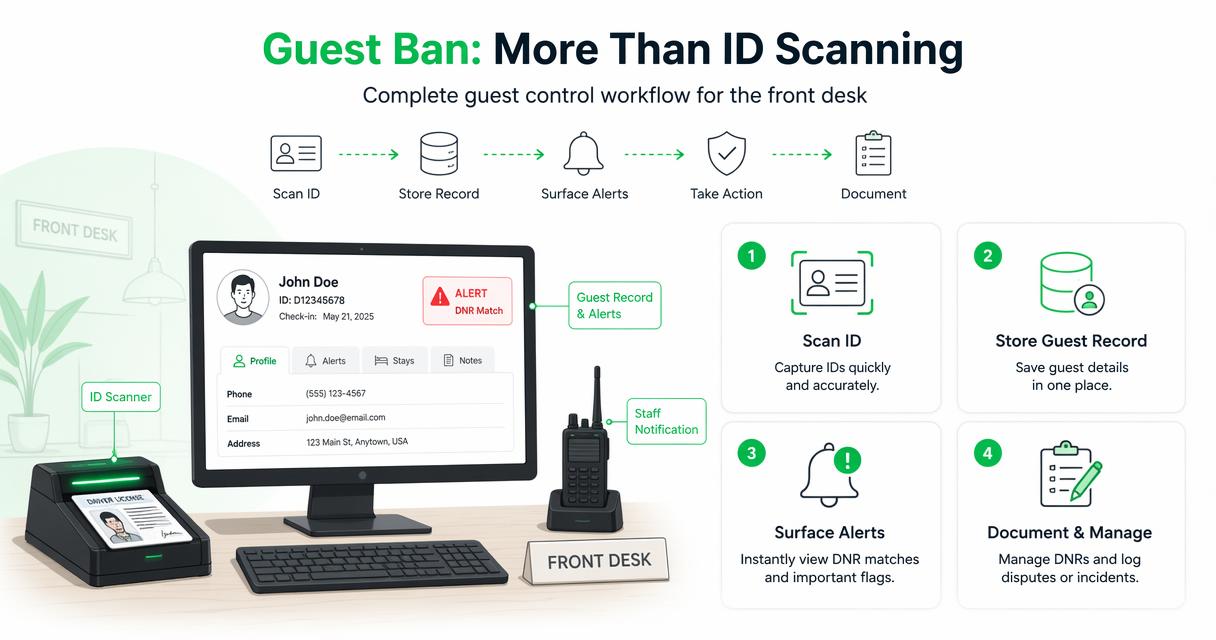
Guest Ban was developed specifically for hotel operations, so the scanning flow is designed to require as little employee interaction as possible:
- Place the ID on the scanner: the scan starts automatically without the employee pressing a button.
- Review the popup: once the scan is complete, a popup displays any guest alerts and the captured ID images for a quick preview.
- Transfer the details: the employee clicks one button to send the guest information to the supported PMS workflow.
This streamlined flow keeps the front desk focused on the guest instead of requiring employees to navigate a separate management application. It reduces the number of steps, makes training easier, and helps new employees follow a consistent process.
Administrative work is kept separate from the check-in flow. Authorized managers can use the Guest Ban web portal to review and manage ID records, users, permissions, DNR activity, incidents, and properties without adding complexity to the employee’s front desk experience.
Guest Ban keeps the employee workflow simple: place the ID on the scanner, review the alert and image preview, and click once to transfer the guest details.
How Guest Ban solves these problems
Guest Ban combines hotel ID scanning with a secure, cloud-based management platform. Authorized users can access the information they need without depending on a particular front desk computer, while management retains control over users, permissions, properties, and records.
Role-based access and accountability
Guest Ban allows management to control access based on an employee’s responsibilities. This helps prevent every front desk agent from having unrestricted access to sensitive guest data or administrative actions. Managers can oversee DNR activity and maintain greater accountability for changes made within the system.
Secure cloud-based records
Guest records are not limited to a single front desk computer. If a workstation stops working or needs to be replaced, authorized users can continue accessing the hotel’s records through Guest Ban. Centralized storage also makes it easier to apply consistent retention and record-management practices.
Management from anywhere
Authorized owners and managers can review scans, manage issues, investigate incidents, and administer access from a back-office computer or another location. This provides oversight even when management is not physically present at the hotel.
True multi-property support
Guest Ban allows hotel groups to manage multiple properties through one platform. Ownership and authorized leadership can oversee activity across the portfolio, while access can be limited according to an employee’s role and assigned property.
More than data entry
Guest Ban connects the scanned ID to operational tools that can help the hotel before and after check-in, including:
- DNR alerts and management: identify known problem guests and maintain more consistent DNR decisions.
- Incident documentation: retain records that managers can review and use for follow-up.
- Chargeback support: preserve guest information and evidence that may help respond to payment disputes.
- Reporting: give authorized managers visibility into scanning and risk activity.
- PMS transfer: reduce manual typing by transferring captured guest information into supported hotel workflows.
Hotels should still establish appropriate privacy, retention, and access policies based on their jurisdiction. The hotel-focused guide to ID scanning laws by state can provide a useful starting point, but hotels should confirm their specific requirements with qualified legal counsel.
IDGuru vs Guest Ban feature comparison
| Category | IDGuru | Guest Ban |
|---|---|---|
| Primary purpose | Local ID and passport scanning with registration or PMS autofill | ID scanning, PMS transfer, guest records, alerts, DNR controls, and hotel risk management |
| Front desk workflow | Open the separate application, scan, verify the information, and then transfer it to the PMS | Place the ID on the scanner to start automatically, review the alert and image popup, and click once to transfer |
| Employee training | Employees must learn and navigate an additional application alongside the hotel’s other systems | Minimal front desk steps, with administrative functions handled separately through the management portal |
| Data location | Stored and managed on the local hotel computer | Secure cloud-based platform available to authorized users |
| Employee access control | Limited centralized control when employees share the local workstation | Managed user access and permissions based on role and responsibility |
| DNR governance | Local access can make it harder to control and review additions or removals | Centralized DNR management with greater manager oversight and accountability |
| Remote management | Tied to the computer where the software and records are located | Authorized managers can access and manage records from approved locations |
| Computer failure | Record availability depends on the local computer and the hotel’s backup practices | Records remain available through the cloud platform when a workstation is replaced |
| Multi-property support | Separate local installations do not provide unified portfolio oversight | True multi-property management with centralized visibility and property-level access |
| Chargeback and incident support | Primarily focused on scanning and registration | Guest records and documentation designed to support incident review and chargeback responses |
| Best fit | Small, owner-operated property with a single controlled workstation and basic scanning needs | Hotels with employees, multiple shifts, remote managers, security requirements, or multiple properties |
Which option fits your hotel?
When IDGuru may be enough
IDGuru may be appropriate for a small hotel where the owner personally operates the property, directly controls the front desk computer, and only needs ID or passport scanning with registration autofill. In this limited operating model, the owner may accept local storage and may not need remote administration, detailed employee permissions, or multi-property oversight.
When Guest Ban is the stronger choice
Guest Ban is the stronger choice when a hotel has multiple front desk agents, changing shifts, remote ownership, a general manager who needs oversight, a need to control DNR changes, recurring incidents, chargeback concerns, or more than one property.
| Hotel scenario | Recommended fit | Reason |
|---|---|---|
| Owner-operated hotel with one controlled computer | IDGuru may be sufficient | Basic local scanning may meet a limited single-user workflow |
| Hotel with several front desk agents or shifts | Guest Ban | User permissions and manager oversight reduce unrestricted access |
| Owner or manager works remotely | Guest Ban | Authorized users can manage records without using the front desk PC |
| Hotel needs controlled DNR management | Guest Ban | Centralized controls help prevent unreviewed additions and removals |
| Hotel group with multiple properties | Guest Ban | One platform provides portfolio oversight and property-based access |
| Hotel needs incident or chargeback records | Guest Ban | Stored records remain available to authorized managers for review |
Questions to ask before choosing a hotel ID scanning system
A scanning demonstration should cover more than how quickly the system reads an ID. Ask each vendor to demonstrate the complete workflow and answer the following questions:
- Where are guest records stored?
- What happens to the records if the front desk computer fails, is replaced, or is compromised?
- Can management decide which employees may view, edit, add, or remove information?
- Is there a record of important user actions?
- Can an owner or manager securely access records from a back-office computer or another location?
- Can management oversee multiple hotels through one account?
- Can access be restricted by property and employee role?
- How are DNR additions and removals controlled?
- How does the system support incident investigations and chargeback responses?
- Which PMS platforms and document types are supported?
Do not choose a hotel ID scanning system based only on scan speed. The more important question is whether the hotel can securely control, protect, and manage the information after it is captured.
Frequently asked questions about IDGuru vs Guest Ban
Is IDGuru a good option for a small hotel?
It can be suitable for a small, owner-operated hotel with one controlled front desk computer and basic ID or passport scanning needs. The owner should still maintain appropriate computer security and reliable backups. Once multiple employees or properties require access, a centrally managed platform is generally the better operational choice.
Why is IDGuru considered the less secure option?
Its local PC model can provide less centralized control over sensitive guest data. On a shared workstation, management may have limited ability to restrict which employees can view records or change DNR information. Local records may also be exposed or become unavailable if the computer is compromised or fails. The hotel’s exact risk depends on how the workstation, user accounts, and backups are configured.
Can IDGuru records be managed from a back-office computer?
A locally installed system is tied to the workstation where its software and records reside, so it does not provide the same anywhere-access management model as Guest Ban. Hotels should ask for a live demonstration of any claimed remote-access or centralized-management capability before making a decision.
What happens if the IDGuru computer fails?
Access to local records may be interrupted, and records may be lost if the hotel does not have a current, recoverable backup. Hotels considering any locally stored system should ask the vendor to demonstrate backup, restoration, recovery time, encryption, and incident-response procedures.
How does Guest Ban protect DNR management?
Guest Ban provides centrally managed access and manager oversight so DNR information does not need to be controlled by every person who uses the front desk computer. This gives hotels a more accountable way to manage who can access or change sensitive records.
Does Guest Ban support multiple properties?
Yes. Guest Ban provides true multi-property support, allowing authorized owners and managers to oversee properties through one platform while controlling access by user responsibility and property assignment.
Can Guest Ban be used when the front desk computer is replaced?
Yes. Because authorized records are managed through the Guest Ban cloud platform rather than being limited to one local workstation, replacing a front desk computer does not remove the hotel’s centrally stored record history.
Conclusion
IDGuru can meet the needs of a small, owner-operated property seeking a basic local ID or passport scanning tool. For most hotels, however, the additional application steps, employee training requirements, unrestricted workstation access, dependence on local data, limited remote management, and the absence of centralized multi-property control create unnecessary operational and security concerns.
Guest Ban addresses these concerns with an automatic scan process, a clear alert and image preview, one-button PMS transfer, managed user access, cloud-based records, manager oversight, controlled DNR workflows, remote administration, incident and chargeback documentation, and true multi-property support. This is why hotels that have outgrown IDGuru’s local model are switching to Guest Ban.
To compare Guest Ban with your current scanning workflow, visit guestban.com or request a demonstration using your hotel’s PMS, staff roles, DNR process, and property structure.

