

TL;DR
Use a do-not-rent incident report to record the guest, verified ID details, incident facts, evidence, staff notes, witnesses, police involvement, and follow-up decisions in one standard format. The strongest process pairs a written report with secure ID capture, role-based access, and clear review rules before adding a guest to a DNR list.
A hotel do not rent incident report template turns a tense front desk event into a consistent record your managers can review, defend, and act on. Do-not-rent incident report: a structured hotel form used to document a guest-related incident, connect it to an identity record, and support a decision to warn, monitor, or refuse future stays. Hotels using GuestBan ID Scanning can pair the report with verified guest ID data, which is useful when the same person returns under a slightly different name or reservation.
Table of Contents
What is a hotel do not rent incident report template?
A hotel do not rent incident report template is a standardized document that records why a guest may be restricted from future stays, including identity details, incident facts, evidence, witnesses, staff notes, police involvement, and manager follow-up. It gives hotels a repeatable way to separate documented risk from rumor, memory, or shift-to-shift confusion.
The form should not be treated as a punishment tool. It is a risk record. I recommend using it only when the hotel can document a specific behavior, policy breach, safety issue, payment dispute, property damage, or credible threat.
Public template libraries often focus on general guest incidents, such as injury, theft, vandalism, or medical events. For example, a SafetyCulture hotel security incident template records professional security incident details. A DNR-specific version goes further by connecting the event to future booking controls.
Core DNR report terms
- DNR: Do not rent, meaning the hotel may refuse future accommodation based on documented risk.
- Incident record: The factual summary of what happened, when, where, and who observed it.
- ID record: The verified identity details used to distinguish one guest from another.
- Evidence file: Photos, video references, receipts, police report numbers, chargeback files, and written statements.
- Review status: The manager decision showing whether the guest is pending review, restricted, warned, or cleared.
When should a hotel create a DNR incident report?
A hotel should create a DNR incident report when guest behavior creates a documented safety, financial, legal, property, or operational risk that may affect future rental decisions. The report should be completed as soon as possible after the event, while staff memories, camera references, receipts, and witness details are still fresh.
Use the form for incidents that may justify a future alert, not for minor complaints that were resolved without risk. A late checkout dispute, for example, may not need a DNR record unless it involved threats, nonpayment, damage, or repeated abuse of staff.
"Trust, but verify.", Ronald Reagan, Remarks on signing the INF Treaty
That principle fits hotel documentation well. Staff should record what they saw, what was said, what policy was involved, and what evidence supports the decision.
Incidents that usually justify documentation
- Violence, threats, or harassment toward staff, guests, vendors, or security.
- Property damage in rooms, public areas, parking lots, or hotel equipment.
- Payment risk, including chargebacks, no-pay departures, stolen card concerns, or repeated declined payment behavior.
- Illegal activity or police response, including suspected trafficking, drug activity, weapons, or trespass issues.
- Policy violations with material risk, such as smoking damage, party rooms, animal damage, or repeated noise events after warnings.
- Identity mismatch, including suspected false identity, mismatched reservation and ID, or use of aliases across stays.
What fields should the template include?
A strong DNR template should include enough information for a manager, auditor, owner, or law enforcement officer to understand the event without interviewing the original employee. The best format captures the guest, the ID record, the incident, the evidence, the decision, and the follow-up owner.
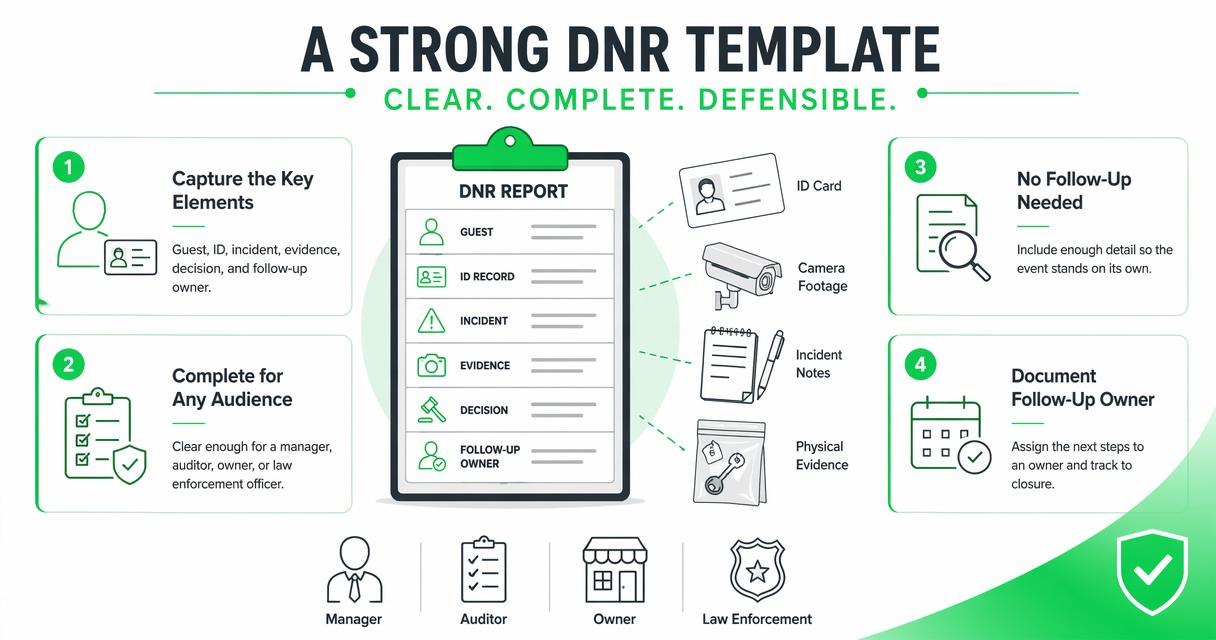
Avoid vague labels like "bad guest" or "problem room." Those phrases do not help a hotel defend its decision. Use observable facts: "Guest threatened front desk agent by name after being denied a cash refund," or "Room 214 had smoke odor, broken TV screen, and photos attached."
Recommended DNR incident report fields
| Field | What to capture | Why it matters |
|---|---|---|
| Report number | Unique ID, property code, date | Helps multi-property teams track records |
| Guest name | Full name as shown on ID | Reduces alias confusion |
| ID details | ID type, issuing state or country, last 4 or permitted reference | Supports identity matching while limiting data exposure |
| Reservation details | Confirmation number, room, stay dates, rate type | Connects the incident to PMS activity |
| Incident date and time | Start time, end time, discovery time | Helps compare staff notes, locks, and cameras |
| Location | Room, lobby, bar, parking lot, hallway | Shows where the risk occurred |
| Incident summary | Factual narrative, no speculation | Creates a defensible record |
| Staff involved | Names, roles, shift, actions taken | Supports accountability |
| Witnesses | Guest, employee, vendor, police, contact details if appropriate | Adds corroboration |
| Evidence | Photos, video timestamp, receipts, signed forms | Strengthens later review |
| Police involvement | Agency, officer name, case number | Documents external response |
| DNR decision | Pending, warning, property-only DNR, group-wide DNR | Prevents overbroad action |
| Follow-up | Manager owner, review date, guest communication | Keeps the process closed-loop |
Copy-and-paste hotel DNR incident report template
This copy-and-paste template gives hotel teams a practical starting point for standardizing reports across shifts and properties. Edit it with counsel, ownership, and brand policy before use, especially if your hotel operates in several states or countries.
Hotel Do-Not-Rent Incident Report
Property:
Report number:
Prepared by:
Role and shift:
Date prepared:
Manager reviewer:
Review date:
Guest information
- Guest full name:
- Other names used, if known:
- Phone or email on reservation:
- Reservation number:
- Room number:
- Stay dates:
- Payment method reference, if allowed by policy:
ID record
- ID type:
- Issuing state or country:
- Name on ID matched reservation: Yes / No
- ID reviewed by:
- ID scan or image stored according to policy: Yes / No / Not applicable
- Notes on mismatch or concern:
Incident summary
- Date and time of incident:
- Location:
- Policy involved:
- Factual description of what happened:
- Exact words used, if threats or abusive language occurred:
- Immediate action taken by staff:
- Guest response:
Evidence and witnesses
- Staff witnesses:
- Non-staff witnesses:
- Photos attached: Yes / No
- Video camera location and timestamp:
- Receipts, folio, or chargeback documents attached:
- Police called: Yes / No
- Agency, officer, and case number:
Follow-up decision
- Status: Pending review / Warning only / Property DNR / Group DNR / Cleared
- Reason for decision:
- Guest notified: Yes / No / Not applicable
- Review date:
- Authorized by:
- Notes for future front desk staff:
Manager review checklist
Before a record becomes active, a manager should confirm:
- The incident description is factual and specific.
- The guest identity record is complete enough to avoid mistaken matches.
- Evidence files are stored where authorized staff can find them.
- The DNR scope is proportional: property-only or group-wide.
- The review date, manager approval, and staff-facing instructions are clear.
How should hotels handle ID records and privacy?
Hotels should handle ID records by collecting only what policy and law allow, storing it securely, limiting staff access, and retaining it only as long as needed for legitimate business purposes. Because ID scanning laws vary, hotels should review state-specific rules before designing a DNR workflow.
For a deeper compliance starting point, review GuestBan's guide to hotel ID scanning laws and its page on hotel CCPA compliance if your property handles California guest data.
Privacy is not just a legal box. It affects guest trust, employee behavior, and how defensible your DNR process looks if challenged.
"the right to be let alone", Samuel D. Warren and Louis D. Brandeis, The Right to Privacy
Practical privacy controls for DNR files
- Limit access: Give DNR permissions only to staff who need them, such as general managers, front office managers, security, and approved auditors.
- Avoid full ID exposure: Store only the fields your policy allows, especially when a reference number or token is enough.
- Use audit trails: Track who created, edited, viewed, or cleared a record.
- Separate facts from opinions: Keep personal insults, assumptions, and unsupported labels out of the file.
- Set review dates: Old records should not live forever without manager review.
How GuestBan handles this workflow
GuestBan ID Scanning helps hotels connect verified ID capture with DNR alerts, guest records, and incident documentation so front desk teams can act consistently. The value is not just scanning an ID. The stronger value is linking the identity record to the reason a staff member should slow down, verify, escalate, or refuse service.
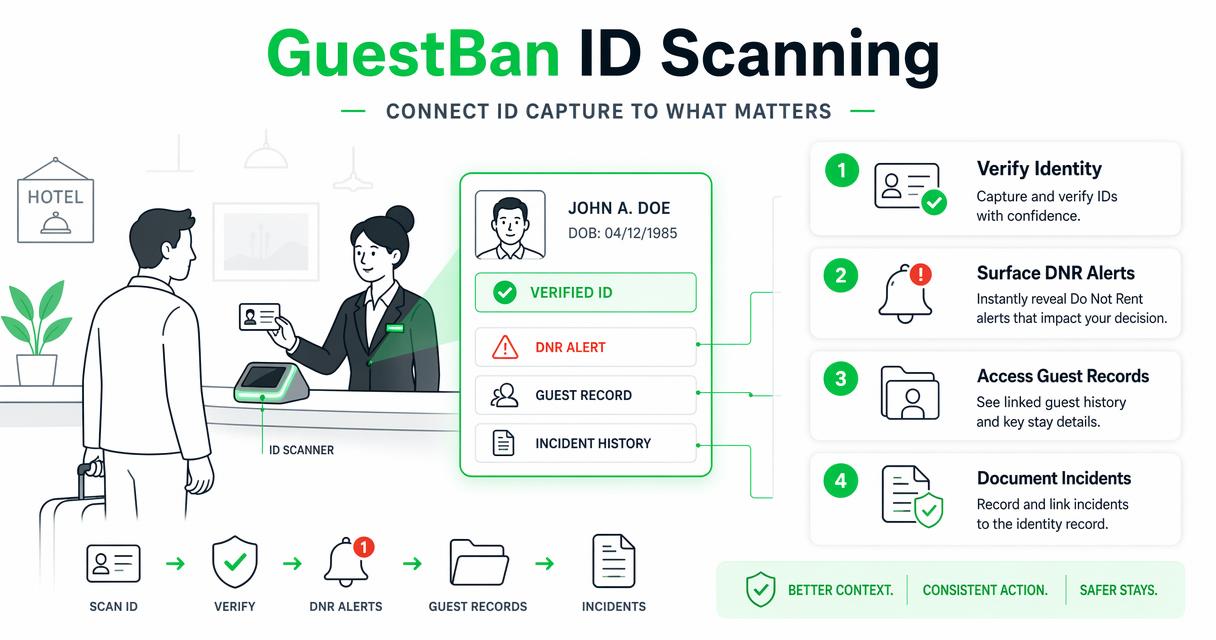
For managers comparing systems, the related guide to hotel do not rent list software explains how secure records, permissions, alerts, and multi-property controls fit together. I like this approach because a DNR process fails when it lives in a binder, a spreadsheet, or one manager's memory.
The GuestBan ID Scanning platform is also useful for hotels that want cleaner evidence trails for disputes. If an incident leads to a payment issue, signed notes and verified identity details can support a stronger file, alongside the steps outlined in this hotel chargeback documentation guide.
Template process versus software-backed process
| Workflow area | Paper or spreadsheet template | Software-backed DNR workflow |
|---|---|---|
| Identity matching | Staff manually compare names | ID data can support stronger matching |
| Shift handoff | Notes may be missed | Alerts can appear during check-in workflow |
| Evidence access | Files may sit in email or folders | Records can be tied to guest profiles |
| Manager review | Approval may be informal | Status and permissions can be structured |
| Multi-property use | Hard to standardize | Group rules can be applied more consistently |
What mistakes weaken a DNR report?
Weak DNR reports usually fail because they are vague, emotional, incomplete, or disconnected from proof. A hotel can have a legitimate safety concern and still create a poor record if the report does not show what happened, who observed it, and why the final restriction was reasonable.
The most common error I see is writing conclusions instead of facts. "Guest was dangerous" is not enough. "Guest punched the lobby wall, shouted at the night auditor, and police case number 24-1187 was issued" is a record a manager can evaluate.
Another mistake is over-sharing sensitive information. A front desk alert should tell staff what to do, not expose every private detail in the file. Keep detailed evidence available to authorized reviewers, then give line staff clear instructions.
Red flags to remove before approval
- Unsupported labels, such as "scammer," "crazy," or "criminal," unless tied to documented facts or official records.
- Missing identity details that could cause the wrong person to be flagged.
- No manager approval or review date.
- Evidence mentioned in the narrative but not attached or locatable.
- DNR scope that is broader than the documented event supports.
- Staff instructions that are unclear, such as "watch this guest," instead of "call manager before check-in."
What will change for DNR documentation in 2027?
DNR documentation will likely become more digital, more privacy-controlled, and more connected to check-in automation by 2027. Hotels are already moving away from isolated spreadsheets because they need faster verification, better audit trails, and clearer rules for who can view sensitive guest data.
The OECD's Framework for the Classification of AI Systems is not a hotel policy manual, but it is relevant because it encourages structured thinking about automated systems, context, data, and human oversight. DNR decisions should keep humans in the loop, especially when the result affects access to lodging.
The OECD paper on digitalisation for a resource efficient and circular economy also reflects a broader business shift: organizations are replacing paper-heavy processes with digital records and controls. Hotels should expect the same pressure from owners, insurers, card networks, and privacy regulators.
2027-ready DNR policy upgrades
- Move from free-text notes to structured incident fields.
- Require manager approval before a DNR record becomes active.
- Add automatic review dates for old restrictions.
- Separate guest-facing data, staff-facing alerts, and manager-only evidence.
- Train staff to document facts, not assumptions.
- Test whether alerts work across properties, shifts, and PMS workflows.
Frequently asked questions
These answers cover the operational questions hotel managers usually ask before standardizing a DNR incident form.
Can a hotel refuse to rent to a guest on a DNR list?
A hotel may be able to refuse service for legitimate, non-discriminatory reasons such as safety risk, property damage, nonpayment, or serious policy violations. The decision should be based on documented behavior, not protected characteristics or personal dislike. Because rules vary by jurisdiction, hotels should have counsel review their DNR policy before staff rely on it.
Should the guest be told they are on the DNR list?
The answer depends on hotel policy, local law, safety concerns, and brand standards. Some hotels notify the guest in writing after manager review, while others document the restriction internally and instruct staff to escalate future booking attempts. If notice is given, keep it factual, brief, and tied to the documented incident.
How long should a hotel keep a DNR incident report?
Retention should follow your legal, insurance, privacy, and brand requirements. A practical policy sets review periods, such as annual manager review, rather than leaving every record active forever. Keep evidence long enough to support chargebacks, claims, law enforcement requests, and repeat-risk decisions, but avoid indefinite storage without a business reason.
Who should be allowed to edit DNR records?
Editing rights should be limited to managers, security leaders, owners, or approved corporate users. Front desk staff may need to view alerts or add factual notes, but final restriction status should require approval. This protects staff from pressure during a heated incident and helps the hotel maintain a cleaner audit trail.
Do small independent hotels need a formal template?
Yes, small hotels often need it most because they have fewer layers of review and more shift-to-shift reliance on memory. A simple template helps the owner, general manager, and front desk team make consistent decisions. It also creates a better record if the guest disputes charges, returns later, or complains online.
Conclusion
A hotel do not rent incident report template should give your team one clear way to document identity, facts, evidence, witnesses, police involvement, and follow-up action. Start with the copy-and-paste fields above, review the form with counsel, train every shift on factual language, and decide who can approve, edit, or clear records.
If your hotel is ready to move beyond binders and spreadsheets, evaluate GuestBan ID Scanning as part of a safer check-in and DNR workflow. You can also visit guestban.com to compare how verified ID capture, alerts, and incident notes fit into your front desk process.

