

TL;DR
Hotels should verify guest ID by checking a government-issued document, matching the name and face to the reservation and payment method, capturing required records, and escalating mismatches before issuing keys. ID scanning software can reduce manual entry, support PMS transfer, and create stronger records for Do-Not-Rent alerts, chargebacks, and compliance reviews.
A hotel ID check is not a formality; it controls room access, payment risk, guest safety, and the quality of the property record. For teams asking how to verify guest ID at hotel check-in, the best process is a repeatable workflow that combines human review, document capture, PMS matching, and clear escalation rules. Guest ID verification: the process of confirming that a person arriving at a hotel matches a valid identity document, the reservation record, and the property's check-in requirements. Hotels that want a hotel-focused scanner can evaluate GuestBan ID Scanning for ID capture, PMS data transfer, and Do-Not-Rent alert workflows.
Table of Contents
What is guest ID verification at hotel check-in?
Guest ID verification at hotel check-in is the process of confirming that the arriving guest is the person named on the reservation and has presented an acceptable identity document. It usually includes inspecting the document, matching the photo and biographic details, confirming payment authorization, capturing required data, and recording exceptions.
A check-in is the point where a person announces arrival at a hotel, airport, office, hospital, seaport, or event. In lodging operations, that moment also creates a legal, billing, and safety record.
Key insight: Strong ID verification protects the room key decision. If the identity record is weak, every later dispute becomes harder to investigate.
Core terms:
- Primary guest: The person responsible for the reservation, payment, and room occupancy record.
- Government-issued ID: A document issued by a public authority, such as a driver license, passport, passport card, visa, green card, or state ID.
- PMS match: The comparison between ID details and the property management system reservation.
- Exception: A mismatch, expired document, missing authorization, risk alert, or unclear identity record that requires supervisor review.
How to verify guest ID at hotel check-in
To verify guest ID at hotel check-in, front desk teams should follow the same steps for every arrival: request an accepted ID, inspect security features, match the photo and name, compare the reservation and payment details, scan or record required fields, check risk alerts, resolve exceptions, and then issue keys.
- Request the ID before key creation. Ask for an accepted government-issued document and keep the reservation open in the PMS.
- Confirm the document type. Check that the property accepts the ID type for the guest profile and stay purpose.
- Inspect basic authenticity signals. Review the photo, expiration date, date of birth, document condition, barcode, magnetic stripe, MRZ, or visible security features when available.
- Match the person to the photo. Compare facial appearance, age range, and obvious differences without relying on one feature alone.
- Match ID data to the reservation. Compare legal name, address if required, loyalty profile, arrival date, room type, and authorized occupants.
- Match payment and authorization. Confirm the cardholder, deposit method, corporate authorization, virtual card rules, or third-party booking notes.
- Capture the record. Scan the ID or enter the required fields, then attach notes only when they are relevant to the stay.
- Review alerts before issuing keys. Check Do-Not-Rent, chargeback, incident, and screening alerts according to property policy.
Standard front desk workflow table
| Step | Front desk action | Record created | Escalate when |
|---|---|---|---|
| ID request | Collect accepted ID | ID type and name | No ID or unacceptable ID |
| Document review | Check photo, expiration, visible security features | Verification status | Altered, damaged, expired, or suspicious ID |
| Reservation match | Compare ID to PMS booking | Matched guest profile | Name or age does not match |
| Payment match | Confirm card or authorization | Payment verification note | Cardholder mismatch or missing authorization |
| Risk check | Review DNR and incident alerts | Alert outcome | Active alert or unresolved incident |
| Final decision | Issue key or deny check-in under policy | Audit trail | Supervisor approval needed |
A written version of this workflow helps new agents make the same decision as senior staff. For a deeper comparison of manual entry and scanning, see this 2026 guide to ID scanner vs manual ID entry for hotel check-in.
Which ID documents should hotels accept?
Hotels should accept identity documents that can reasonably prove the guest's identity, age, and legal name under the property's policy and local rules. Common options include driver licenses, state IDs, passports, passport cards, permanent resident cards, visas, and selected international identity cards.
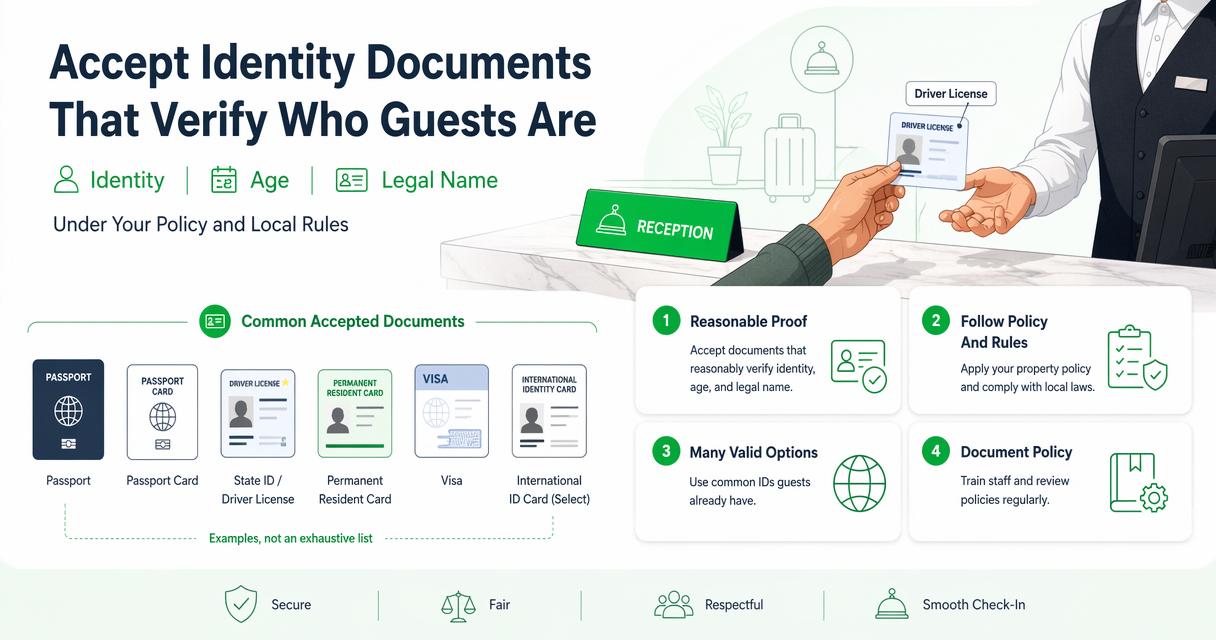
Document policy should be written before the lobby gets busy. A vague rule such as valid ID can create inconsistent decisions, especially with international travelers, extended-stay guests, and third-party reservations.
Accepted ID document reference
| ID type | Common use at hotels | Front desk verification focus |
|---|---|---|
| U.S. or Canadian driver license | Domestic and regional travelers | Expiration date, photo, name, address, barcode or magnetic stripe |
| State or provincial ID | Non-driving guests | Photo, age, name, issuing authority |
| Passport | International and domestic travelers | Photo page, name, date of birth, passport number, expiration |
| Passport card | Land and sea travel, U.S. travelers | Photo, name, expiration, issuing country |
| Visa or green card | Immigration status support when required by policy | Name, photo, document validity, accompanying passport when needed |
| Select international ID card | International guests | Latin-character name, date of birth, photo, issuing country |
A hotel should avoid improvising rules for minors, local residents, cash-paying guests, and reservations made by another person. Written policy keeps the check-in decision tied to identity and payment risk, not personal judgment.
Properties operating across several states should also review local rules before scanning and storing identity data. GuestBan maintains state-level resources such as hotel ID scanning laws that can support policy review with counsel.
What should staff compare before issuing room keys?
Front desk staff should compare the guest's face, ID document, reservation, payment authorization, age requirement, and internal risk records before issuing room keys. The goal is not to collect the most data possible; the goal is to confirm the right person is receiving access to the right room.
Check-in comparison checklist
- Face to ID photo: Confirm a reasonable match while considering age, hairstyle, facial hair, and medical changes.
- ID name to PMS name: Match legal name first, then handle preferred names or shortened names through notes.
- ID age to policy: Confirm minimum age for booking, alcohol packages, local rules, or property restrictions.
- Reservation source: Review direct, OTA, corporate, group, and prepaid booking notes.
- Payment name to guest name: Confirm cardholder rules, direct bill accounts, virtual cards, or third-party authorization.
- Address and phone: Match or update contact details when the property collects them.
- Occupant count: Confirm registered guests, vehicles, pets, and special access needs if relevant.
- Internal alerts: Review Do-Not-Rent records, prior chargebacks, incident notes, or watchlist matches.
Mismatches are not always fraud. A spouse may have booked the room, a company may have paid with a central card, or a traveler may use a passport with a longer legal name than the OTA profile.
Key insight: The best check-in teams separate ordinary mismatches from risk signals. A name variation needs clarification; a false payment authorization needs escalation.
Clear notes matter. A short entry such as corporate virtual card verified by booking message is more useful than a vague comment such as all good.
How should hotels scan, store, and use ID data?
Hotels should scan and store ID data only under a defined business purpose, retention rule, access policy, and applicable privacy requirement. A scanner can improve accuracy and speed, but the property still needs consent practices, role-based access, retention limits, and a documented reason for collection.
Manual typing creates common operational problems: misspelled names, wrong birth dates, incomplete addresses, and weak evidence during a chargeback. Scanning reduces those errors by reading machine-readable fields or capturing document images, depending on the system and document type.
Manual entry, ID scanning, and biometric verification
| Method | Best fit | Strength | Policy consideration |
|---|---|---|---|
| Manual entry | Small properties with low volume | Low equipment cost | More typing errors and weaker audit trail |
| ID scanning | Hotels needing faster, cleaner records | Captures fields and images for verification | Requires privacy, consent, and retention controls |
| Biometric matching | Contactless or remote identity flows | Compares live face to ID image | Higher sensitivity and stronger privacy review needed |
The GuestBan ID Scanning platform supports driver licenses, passports, passport cards, visas, green cards, Puerto Rico IDs, select Mexico ID cards, and select international ID cards. It can capture guest details for PMS transfer, store records in a secure web portal, and support role-based access.
Privacy review belongs in the rollout plan, not after a guest complaint. Properties subject to California privacy obligations can review hotel CCPA compliance considerations and align notices, access controls, and retention procedures with legal guidance.
Research on AI and tourism has also warned that guest-facing automation creates benefits and risks. A 2023 Tourism Review article by Carvalho and Ivanov examined ChatGPT applications, benefits, and risks in tourism, which is relevant as hotels add more automated identity and service tools.
How should hotels handle mismatches and risk alerts?
Hotels should handle mismatches and risk alerts through a calm escalation path that protects the property record and avoids inconsistent guest treatment. Staff should pause key issuance, verify the source of the mismatch, involve a supervisor, document the outcome, and follow the property's denial or approval policy.
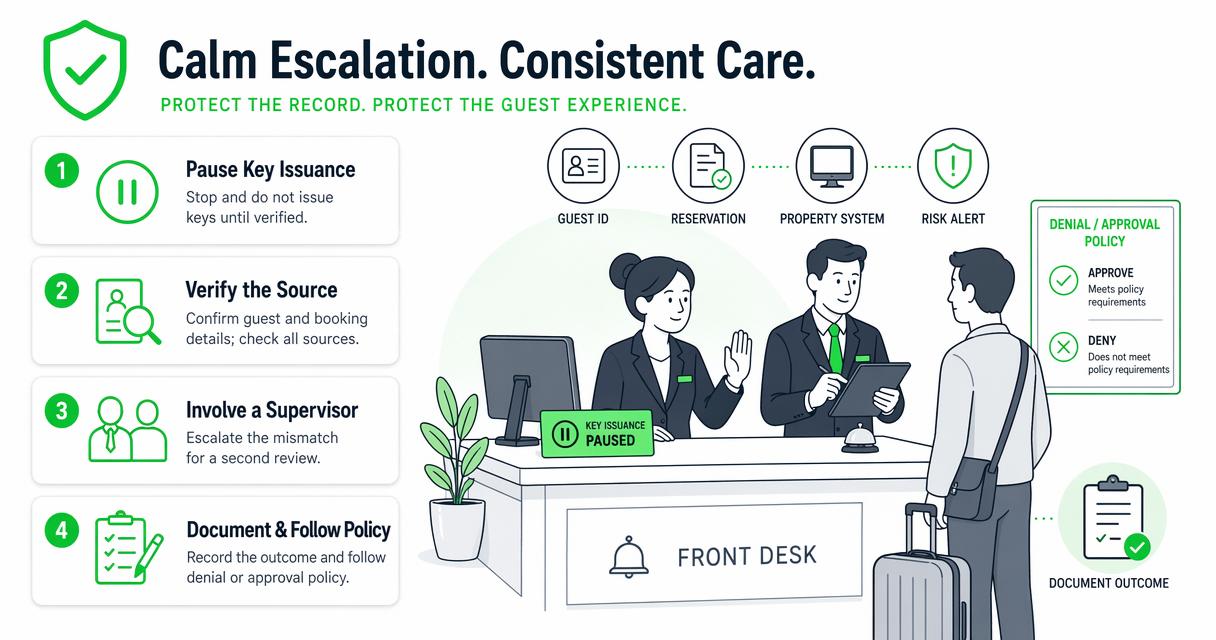
Escalation rules for common check-in issues
- Name mismatch: Ask for supporting booking confirmation, company authorization, or corrected reservation details.
- Expired ID: Follow property policy and local requirements; supervisor approval should be required before any exception.
- Payment mismatch: Request cardholder authorization, direct bill approval, or a valid replacement payment method.
- DNR alert: Confirm the match using name, date of birth, ID image, address, and incident record before denial.
- Chargeback history: Review documented evidence and deposit policy before approving the stay.
- Possible fake ID: Do not accuse the guest at the desk; pause check-in and escalate under safety protocol.
Do-Not-Rent records are most useful when they include the identity record, incident summary, date, property, staff role, and supporting documents. A name-only list creates false positives and weak enforcement.
With GuestBan ID Scanning, hotels can manage property-level and network-wide Do-Not-Rent lists with instant front desk alerts. Related operational guidance appears in this 2026 guide to hotel Do Not Rent list software.
Key insight: A DNR alert should be treated as a verification task, not a reflex. The decision should rely on matched identity data and documented incident history.
How will guest ID verification change in 2026 and 2027?
Guest ID verification is moving toward faster scanning, stronger audit trails, remote pre-arrival checks, and more careful privacy controls. Hotels are likely to combine front desk review with PMS integrations, mobile check-in, risk alerts, and selective biometric tools where law and guest expectations allow.
AI will affect the workflow around identity more than the basic duty to verify identity. Systems may help classify documents, detect incomplete records, summarize incident history, and route exceptions to supervisors.
What to expect next
- More PMS-connected ID capture: Guest data will move from scanners into reservation records with less manual typing.
- Pre-arrival verification: Some properties will ask guests to verify documents before arrival for late-night or contact-light check-in.
- Stronger privacy controls: Retention periods, role permissions, and audit logs will become part of vendor evaluation.
- Better DNR matching: Multi-property groups will rely on structured identity records rather than name-only bans.
- Selective biometrics: Face matching may grow in regulated, consent-based flows, especially for remote verification.
A 2023 paper in the International Journal of Information Management by Dwivedi, Kshetri, Hughes, and coauthors examined opportunities, challenges, and policy implications of generative conversational AI. The relevance for hotels is practical: automation can help staff, but governance, accuracy, and accountability still matter.
For property groups choosing technology in 2026, the buyer checklist should include ID support, PMS transfer, DNR controls, reporting, cloud access, permissions, and security settings. A vendor-focused overview is available in the hotel ID scanning software buyer guide.
FAQ about hotel guest ID checks
Can a hotel check in a guest without ID?
A hotel may refuse check-in when the arriving person cannot provide an accepted identity document under property policy or local requirements. Some properties allow limited exceptions for verified corporate accounts, emergency situations, or returning guests, but those exceptions should require supervisor approval and written documentation before keys are issued.
Does a hotel need to scan an ID instead of viewing it?
A hotel does not always need to scan an ID, but scanning can create a cleaner record than manual entry. The property should confirm applicable state law, consent requirements, privacy notices, retention limits, and data security controls before scanning and storing document images or extracted fields.
What details should be recorded from a guest ID?
Hotels commonly record the guest's legal name, document type, expiration status, address when required, and date of birth when age rules apply. The exact fields should reflect operational need, legal requirements, payment risk, and privacy policy. Sensitive data should not be collected without a defined purpose.
How can hotels verify international guests?
Hotels should verify international guests by reviewing a passport or accepted national ID, matching the photo and name to the reservation, confirming payment authorization, and recording fields required by policy or local law. Staff should be trained on passport name order, transliteration differences, and documents that use non-Latin characters.
Why do hotels connect ID checks to Do-Not-Rent lists?
Hotels connect ID checks to Do-Not-Rent lists because name-only records can be unreliable. A scanned or structured identity record helps confirm whether an arriving guest matches a prior incident, chargeback, safety concern, or policy violation. Better matching reduces false positives and supports more consistent enforcement.
Conclusion
The safest answer to how to verify guest ID at hotel check-in is a repeatable process: inspect the document, match the person and reservation, confirm payment authority, capture the right record, review risk alerts, and escalate exceptions before key issuance. Manual review still matters, but scanning and structured records make the decision faster and easier to defend.
GuestBan ID Scanning is built for hotels that need ID capture, PMS transfer, Do-Not-Rent alerts, chargeback documentation, and secure web access in one workflow. For teams ready to replace inconsistent front desk habits with a documented verification process, visit guestban.com and map the current check-in steps against the workflow above.

