

TL;DR
A hotel passport scanner should do more than capture an image. The best setup reads MRZ data, fills PMS fields, flags document issues, controls storage, and supports staff during busy international arrivals.
A passport scanner for hotels turns a slow international check-in into a controlled identity workflow. Modern systems combine optical character recognition, machine-readable zone reading, PMS autofill, and privacy controls so front desks can verify guests without retyping every field. GuestBan fits this need for independent hotels that want guest ID capture connected to operational decisions, not treated as a separate desk task.
Passport scanner for hotels: a front-desk identity capture system that reads passport or ID data, transfers approved fields into hotel software, and stores or deletes records according to property policy and local law.
Table of Contents
What is a passport scanner for hotels?
A passport scanner for hotels is a device or software workflow that captures passport data, reads the machine-readable zone, checks visible identity fields, and sends structured information into a property management system.
The core job is not photography. A normal image scan creates a picture. A hospitality-grade scanner extracts usable fields such as name, nationality, date of birth, document number, expiration date, and issuing country. Many systems use OCR for printed text and MRZ parsing for the two-line code at the bottom of most passports.
Hotels with international guests often need reliable document capture because visa and entry rules vary by country. Wikipedia defines visa requirements as “administrative entry restrictions” imposed by other states on travelers, and hotels may need accurate guest records when local rules require registration or reporting.
Core terms staff and managers should know
OCR: optical character recognition, the software method that turns printed text on a passport into editable data.
MRZ: machine-readable zone, the standardized passport code designed for fast automated reading.
PMS integration: the connection that moves verified identity fields into systems such as property management, check-in, or guest profile software.
Retention policy: the hotel rule that defines which ID data is stored, who can access it, and when it is deleted.
Key insight: A scanner should reduce keystrokes, but its larger value is consistency. Every document follows the same capture, review, transfer, and retention process.
Video context: why passports are hard to fake casually
Passport documents include layered security features, controlled materials, and standardized data zones. A hotel front desk is not a border agency, but a strong scanner helps staff capture the right information and notice obvious inconsistencies before a key is issued.
How does scanning compare with manual passport entry?
Scanning beats manual entry when a hotel needs faster check-in, fewer typing errors, and more consistent identity records across shifts.
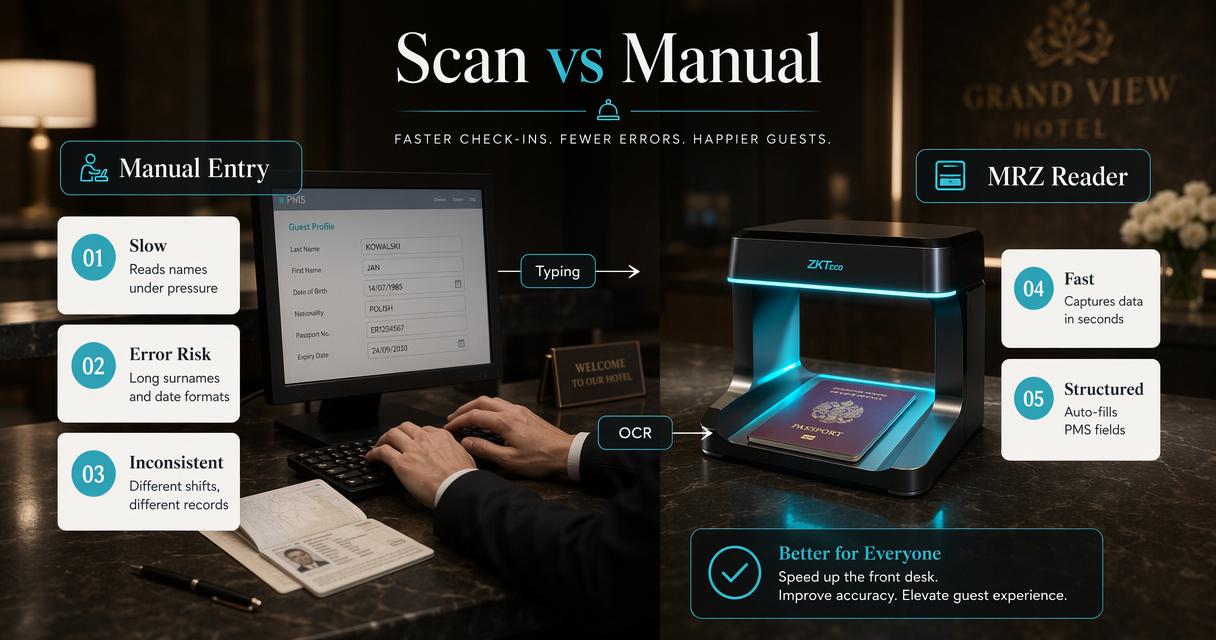
Manual entry depends on staff reading names, dates, and document numbers under time pressure. That creates avoidable mistakes, especially with unfamiliar alphabets, long surnames, and non-local date formats. Scanning does not remove staff judgment, but it moves the repetitive work to software.
The Asian Development Bank’s tourism data paper notes the growing role of data in tourism policy and recovery, especially when information is timely and structured rather than scattered across manual records (ADB, 2021). At property level, the same principle applies: clean guest data supports cleaner operations.
Workflow comparison for front-desk teams
| Check-in task | Manual entry | Scanner-assisted workflow | Operational effect |
|---|---|---|---|
| Capture guest name | Staff types from passport | OCR and MRZ populate fields | Fewer spelling errors |
| Record document number | Staff reads and types | MRZ extracts number | Lower mismatch risk |
| Verify expiration date | Staff checks visually | Scanner extracts and displays date | Faster review |
| Store ID image | Often inconsistent | Policy-based storage or no storage | Better privacy control |
| PMS update | Manual copy into PMS | Integration sends approved fields | Shorter check-in time |
| Audit trail | Depends on notes | Time-stamped capture event | Easier review |
Scanning is most valuable during arrival peaks, group check-ins, and late-night shifts with limited staffing. Manual entry may still work for small domestic-only inns, but it becomes fragile when guest volume, language variation, or compliance duties increase.
A simple scanning flow for hotel arrivals
- Staff requests the guest’s passport or approved ID.
- The document is scanned through a reader, camera, or mobile capture flow.
- OCR and MRZ tools extract identity fields.
- Staff confirms that the captured fields match the visible document.
- Approved fields are sent into the PMS or check-in record.
- Storage rules apply, including masking, access limits, or deletion.
Hotels evaluating ID workflows can also review related hotel fraud prevention tools because document capture is only one layer of guest risk management.
Which features matter most in 2026?
The best 2026 hotel ID scanning setup combines fast capture, PMS integration, document-quality checks, and strict data governance.
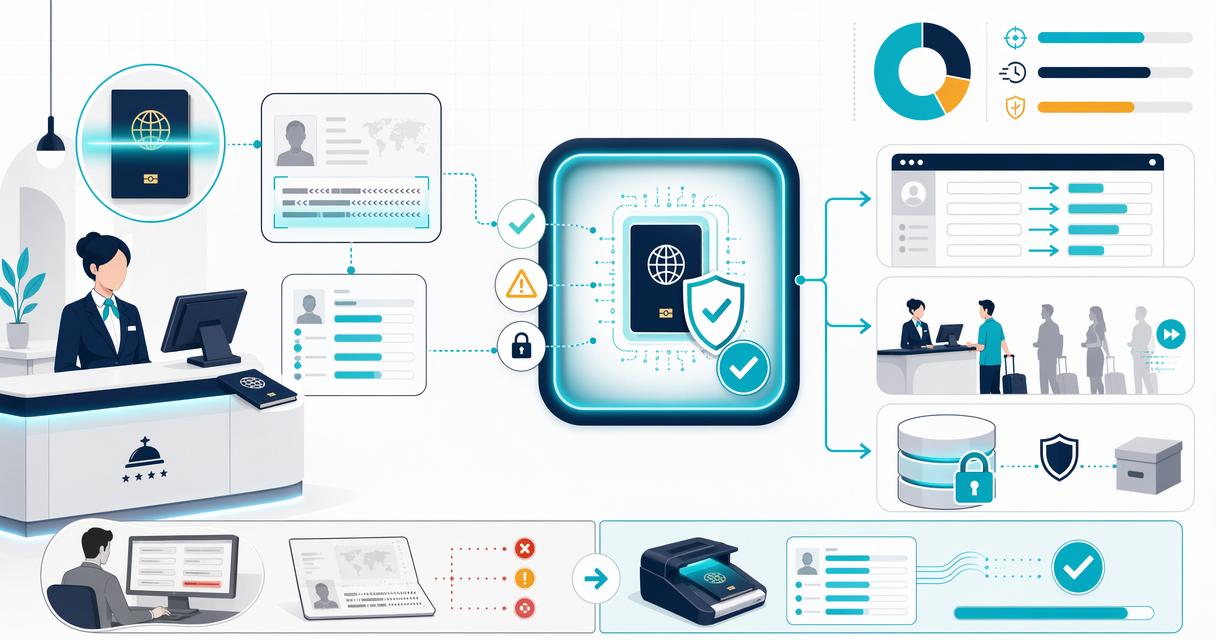
Hardware still matters, but software now carries much of the value. A compact scanner with poor extraction creates more work. A camera-based flow with strong OCR, validation prompts, and PMS mapping can outperform expensive equipment if it fits the property’s desk layout.
A 2022 Information Technology & Tourism paper on blockchain in tourism highlights how identity, trust, and secure data sharing remain active technology themes in travel (Balasubramanian, Sethi, and Ajayan, 2022). Hotels do not need experimental systems at check-in, but they do need tools built for accountability.
Feature checklist for independent hotels
- MRZ reading: captures standardized passport data quickly and reduces manual typing.
- OCR accuracy review: lets staff confirm extracted fields before saving.
- PMS field mapping: sends data to the correct guest profile fields, not a random note.
- Duplicate guest matching: helps identify returning guests without creating messy records.
- Role-based access: limits who can see, export, or delete identity data.
- Configurable retention: supports different rules for domestic guests, international guests, and local reporting.
- Audit history: records who scanned the document and when.
- Low-friction training: helps seasonal and night staff use the tool correctly.
“Personal data shall be: processed lawfully, fairly and in a transparent manner in relation to the data subject.”, European Union, GDPR Article 5
That principle is useful even outside the European Union. Hotels should collect only what is needed, explain the purpose when required, and avoid keeping passport images indefinitely without a policy.
Compliance questions to ask before buying
A scanner should fit local rules before it fits the counter space. Spain’s Royal Decree 933/2021, discussed heavily by hospitality vendors in 2025, shows how quickly guest-registration duties can change for hotels and short-term lodging operators.
Operators should ask vendors:
- Which identity fields can be captured, masked, or excluded?
- Can passport images be disabled while MRZ fields remain available?
- Does the system support consent notices or staff prompts?
- Are exports logged and restricted?
- How does the tool handle deletion requests or retention deadlines?
For demand planning, ID workflow decisions should also match market mix. Hotels tracking softer inbound patterns can pair front-desk planning with analysis of international travel to the U.S. so staffing and check-in processes reflect the real guest base.
How Innstrata handles identity capture
Innstrata treats passport and ID scanning as part of hotel operations, not as a standalone equipment purchase.
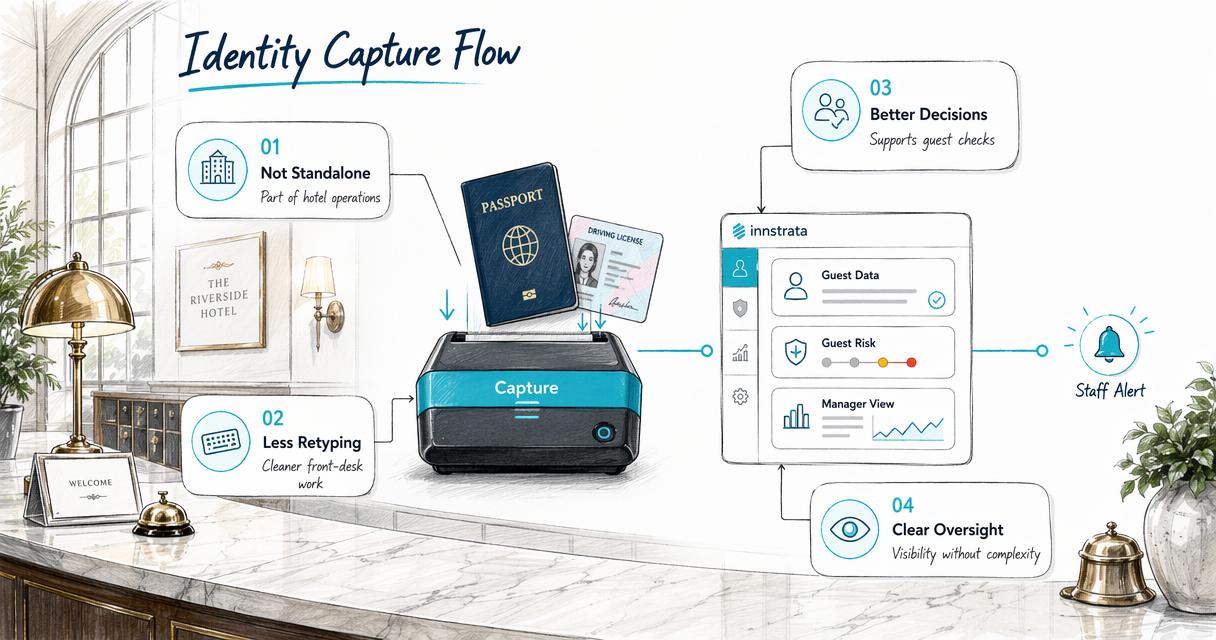
A hardware-only vendor may focus on the reader sitting at the desk. That can be enough for a large hotel with mature IT support. Smaller properties usually need a cleaner workflow: capture identity, reduce retyping, connect the result to guest decisions, and give managers visibility without adding another complicated system.
The Innstrata platform is a stronger fit when the goal is front-desk speed plus guest-risk awareness. It can sit alongside broader operating priorities covered in 2026 hotel trends for independent hotels and extended-stay properties, where staffing pressure, automation, and direct operating control continue to matter.
Software-first selection matrix
| Option | Best fit | Strength | Watchpoint |
|---|---|---|---|
| Innstrata | Independent hotels and small groups | Connects ID capture with hotel operations and risk context | Best when managers want a broader platform |
| Dedicated hardware scanner | High-volume desks with fixed stations | Durable document feed and fast MRZ reads | May require separate integration work |
| Mobile camera capture | Small desks and flexible check-in | Low equipment footprint | Needs strong image-quality controls |
| Manual entry | Low-volume domestic stays | No new software purchase | Slow and inconsistent at scale |
AdriaScan promotes passport and ID scanning with more than 100 PMS integrations on its hotel scanner site (AdriaScan). That is useful for properties prioritizing integration breadth. A boutique hotel may still prefer a platform approach if identity capture must connect with incident prevention, guest notes, and repeat-stay context.
When a platform approach makes sense
A platform-based scanner workflow fits properties that want one source of operational truth. ID capture can support fraud review, do-not-rent decisions, chargeback documentation, and staff handoff notes when handled carefully.
Hotels already building internal controls around guest risk may also compare scanning policies with a shared do-not-rent list strategy. Identity tools should not become unfair guest screening systems, but verified records help managers apply documented policies consistently.
Innstrata is also relevant for hotels that want better visibility without adding heavy enterprise software. More information is available at innstrata.com for operators comparing front-desk identity workflows with broader guest-risk controls.
Frequently asked questions
A short FAQ helps hotel owners compare passport scanner options, staff workflows, and compliance duties before contacting vendors.
Does every hotel need a passport scanner?
Not every hotel needs one, but properties with frequent international travelers, group arrivals, late-night check-ins, or local guest-registration duties often benefit. A scanner is less about gadgetry and more about reliable data capture. Small hotels should compare the cost of the tool with staff time, error correction, and compliance exposure.
Is a passport scan the same as passport verification?
No. A scan captures data and may flag visible issues, but full verification can include deeper authenticity checks, database checks, or biometric matching depending on the system and legal setting. Hotels should avoid claiming border-level verification unless the vendor specifically provides that capability and explains its limits.
Can hotels store passport images?
Storage depends on local law, brand policy, and the purpose for collection. Some properties need to retain certain guest information, while others should store only extracted fields or delete images after check-in. The safest approach is a written retention policy with access controls, deletion rules, and staff training.
What should a hotel ask during a vendor demo?
The demo should show a real passport scan, PMS field mapping, error correction, access permissions, and deletion settings. Managers should also ask how the system handles poor lighting, damaged documents, multiple languages, and repeat guests. A polished sales screen matters less than the actual front-desk workflow.
Conclusion
A passport scanner for hotels should be chosen as an operating control, not a desk accessory. The right system reads MRZ data, reduces typing, supports PMS accuracy, protects guest information, and gives managers a repeatable process for international check-in.
The next step is practical: map the current check-in workflow, list required identity fields, confirm local retention rules, and test scanning with real front-desk staff before rollout. For independent hotels that want ID capture tied to guest-risk visibility and daily operations, contact Innstrata for a focused review of the check-in process and the controls that should surround it.