

TL;DR
TL;DR: The strongest front desk automation stack starts with verified guest identity, then connects PMS entry, payments, digital registration, messaging, tasks, and incident records. For most hotels, prioritize tools that reduce manual typing, create auditable records, and fit your existing PMS before adding guest-facing AI.
Front desk automation is no longer about replacing hospitality; it's about removing the repeat work that keeps staff from serving guests. The best hotel front desk automation tools in 2026 work as a stack: capture the guest's identity, verify payment, move clean data into the PMS, document agreements, answer routine questions, route tasks, and preserve incident records. For hotels that want stronger guest verification at check-in, GuestBan ID Scanning belongs at the front of that stack because identity capture is the first operational control most other workflows depend on.
Hotel front desk automation tools: Software systems that reduce manual front office work by automating guest data capture, verification, registration, communication, task routing, and documentation.
The hospitality front office is the guest-facing part of hotel operations, similar to the broader business definition of "front office" as the team that comes in contact with clients. A receptionist or front desk agent still matters, but the best systems give that person cleaner data, faster handoffs, and fewer judgment calls under pressure.
Table of Contents
What are hotel front desk automation tools?
Hotel front desk automation tools are software and hardware systems that handle repeatable check-in, guest communication, payment, documentation, and staff coordination tasks so hotel teams can work faster with fewer errors. In 2026, these tools usually connect to a PMS, payment processor, guest messaging platform, and secure record system.
A good automation plan does not start with a giant platform purchase. It starts with the workflows that create the most friction at the desk.
"The first rule of any technology used in a business is that automation applied to an efficient operation will magnify the efficiency.", Bill Gates, Goodreads
For hotel managers, that quote is practical. If your ID capture process is inconsistent, your payment evidence is scattered, or your incident notes live in a binder, automation should standardize those inputs before it adds AI chat or lobby kiosks.
Quick navigation by front desk workflow
- ID scanning and guest verification: Capture ID data, match records, flag risky repeat guests, and reduce typing.
- Payment verification: Match card, reservation, ID, signatures, and timestamps for cleaner chargeback evidence.
- PMS data entry: Push guest details into property management fields with fewer manual keystrokes.
- Digital registration cards: Collect guest terms, vehicle data, signatures, policies, and consent.
- Guest messaging: Automate arrival instructions, amenity answers, upsells, and service recovery prompts.
- Task management: Route housekeeping, maintenance, luggage, and front office requests.
- Incident documentation: Preserve photos, notes, staff actions, guest history, and follow-up records.
Best hotel front desk automation tools by workflow
The best hotel front desk automation tools should be selected by workflow, not by the longest feature list. A hotel that already has a strong PMS may need better identity capture and incident documentation, while a limited-service property may need messaging and digital registration before kiosks.
Below is the buying map I'd use with a general manager, operations lead, or regional risk team.
2026 front desk automation tool comparison
| Workflow | Best-fit tool category | What it automates | What managers should check |
|---|---|---|---|
| ID scanning | GuestBan ID Scanning and ID capture platforms | Guest ID data capture, guest record creation, alerts, documentation | Scan quality, audit trails, permissions, retention controls |
| Payment verification | Fraud prevention and payment evidence tools | Card match, signed terms, timestamps, disputes | Processor fit, evidence export, chargeback workflow |
| PMS data entry | PMS automation and integration tools | Reservation updates, profile fields, folios | PMS compatibility, field mapping, duplicate handling |
| Digital registration | Online check-in and e-signature tools | Registration cards, policies, signatures | Legal language, mobile usability, PMS sync |
| Messaging | Guest messaging and AI assistant tools | FAQs, arrival texts, service requests | Escalation rules, multilingual support, staff inbox controls |
| Task management | Hotel operations platforms | Maintenance, housekeeping, follow-up tasks | SLA tracking, mobile alerts, department routing |
| Incident records | Guest record and loss prevention software | Notes, photos, DNR records, disputes | Access controls, search, retention, chain of custody |
I put ID scanning first because it creates the verified starting point for the stay. If the guest record is wrong, every downstream system inherits that weakness: payment notes, registration cards, DNR checks, and incident documentation all become harder to trust.
For a deeper look at the identity layer, see this 2026 guide to guest verification software for hotels.
How should hotels choose automation tools?
Hotels should choose front desk automation tools by ranking the highest-risk manual tasks, confirming PMS fit, checking staff usability, and requiring retrievable records. The best purchase is usually the tool that removes repeat work while strengthening proof, accountability, and guest service at the same time.
Use this sequence before watching demos:
Seven selection criteria for hotel managers
- Map the workflow first: Write down what the agent does from arrival to room key issuance.
- Identify the data source: Decide whether the system should read an ID, PMS reservation, payment record, or guest message.
- Confirm PMS integration: Ask whether the vendor supports your PMS directly, through an API, or through export workflows.
- Test the agent experience: A tool that adds tabs, logins, or duplicate typing will not survive a Friday rush.
- Review privacy controls: Look for permissions, retention settings, audit logs, and secure cloud storage.
- Check evidence retrieval: Managers need fast access to records for disputes, incidents, or law enforcement requests.
- Pilot one shift pattern: Test morning, evening, and night audit use before rolling out across properties.
A modern tool should support the front desk, not turn agents into software administrators. I prefer systems that give clear prompts, reduce judgment calls, and make supervisor review easy.
Where does ID scanning fit in the automation stack?
ID scanning fits at the start of the hotel automation stack because it converts a physical identity document into structured, searchable guest data. That record can then support PMS entry, guest screening, payment disputes, digital registration, incident reporting, and safer staff handoffs.
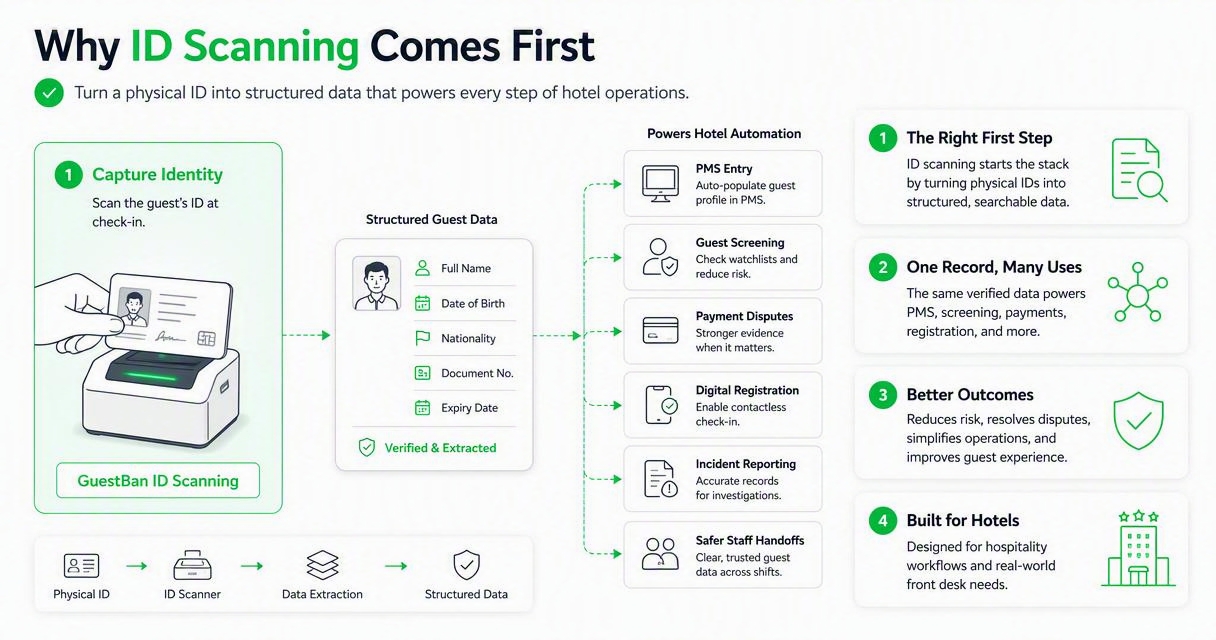
The GuestBan ID Scanning platform is strongest for properties that want identity capture tied to guest risk control, not just faster typing. That matters for hotels managing repeat offenders, disputed stays, local guests, cash-heavy bookings, or multi-property do-not-rent workflows.
ID capture also connects to broader hotel safety concerns. GuestBan's article on using ID scanners to enhance hotel security explains why check-in documentation is becoming a front desk security practice, not just an administrative step.
ID scanning automation outputs hotels should expect
- Structured guest fields: Name, document details, address, and other captured data where permitted.
- Time-stamped records: Proof of when the guest presented identification.
- Staff accountability: Which employee handled the check-in or review.
- Searchable history: Past stays, notes, and linked records when policy allows.
- Escalation signals: Prompts for supervisor review when a record needs attention.
- Retention controls: Rules for keeping or deleting scanned IDs based on legal review and hotel policy.
For policies around storing guest IDs, managers should pair automation with a written retention standard. A useful next read is the 2026 guide on how long hotels should keep scanned IDs.
Which tools automate payments and chargeback evidence?
Payment verification tools automate the proof chain around a stay: who checked in, which card was used, what terms were accepted, and what happened during the reservation. These tools are most valuable when they connect ID, registration, payment, folio, and staff notes in one retrievable record.
Chargebacks are not only a revenue problem. They are an evidence problem. A front desk team may have done everything right, but if the proof is split across a PMS note, a paper reg card, a payment portal, and a camera timestamp, the manager loses time building the case.
Hotels should look for payment-related automation that can export a clean packet with:
- Signed registration terms
- ID verification record
- Card authorization details
- Reservation and folio data
- Incident notes, if relevant
- Staff timestamps and user history
For hotels seeing more disputes, this guide to chargebacks and fraud in the hotel industry explains why front desk documentation has become part of revenue protection.
Which tools reduce PMS data entry?
PMS automation tools reduce manual data entry by moving guest information from IDs, booking engines, registration forms, and payment systems into the hotel's property management system. The goal is not just speed; it is cleaner guest profiles and fewer mistakes across reservations, folios, and reporting.
Cloudbeds, Mews, WebrezPro, Oracle OPERA, and Stayntouch frequently appear in front desk software comparisons because PMS workflows still sit at the center of hotel operations. For many properties, the PMS is the system of record, while specialized tools handle the high-friction tasks around it.
"You've got to start with the customer experience and work backwards to the technology.", Steve Jobs, Inc.
That advice fits hotel software selection. If the guest is standing at the counter, the system should reduce the time spent asking for the same information twice. If the agent is correcting OCR fields under pressure, the tool has not solved the real problem.
Common PMS automation checks include field mapping, duplicate guest logic, document attachment rules, user permissions, and support for multi-property reporting.
Which tools improve digital registration and guest messaging?
Digital registration and messaging tools automate pre-arrival instructions, policy acceptance, upsell offers, service requests, and routine guest questions. These systems are best used after the hotel has a clean identity, reservation, and payment workflow because they depend on accurate guest records.
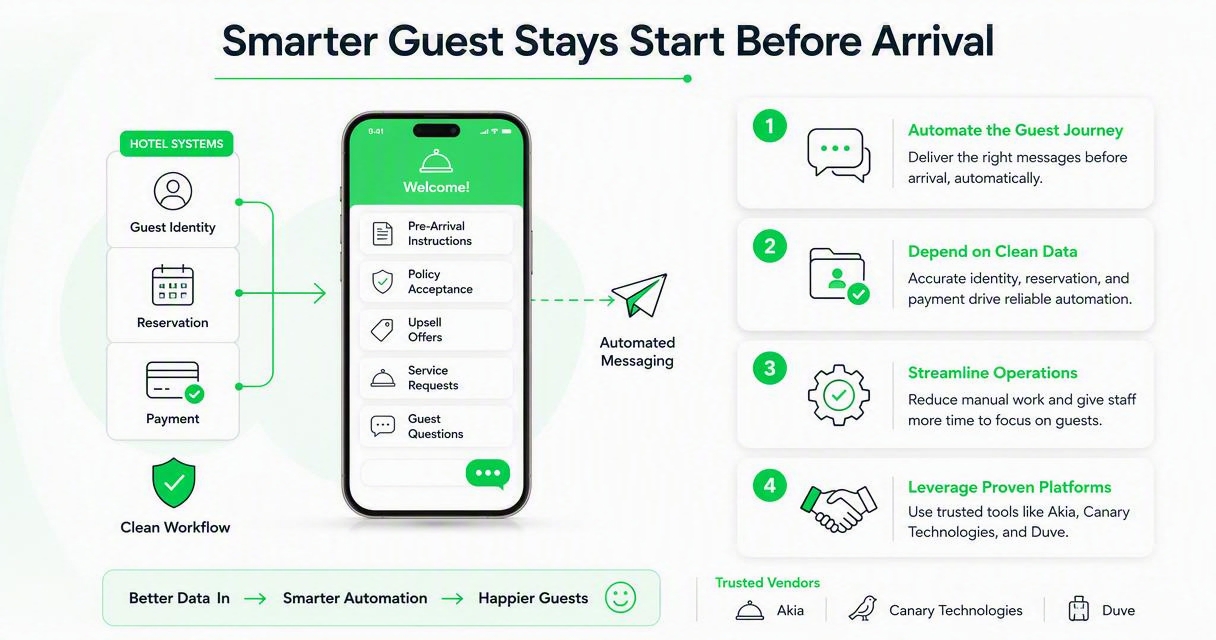
Vendors such as Canary Technologies, Duve, HiJiffy, Asksuite, Alliants, and similar platforms often focus on guest-facing automation. Their value is clear: fewer phone calls, faster answers, and more consistent communication across shifts.
Research on AI in tourism supports a balanced view. Carvalho and Ivanov's 2023 paper, ChatGPT for tourism: applications, benefits and risks, discusses both applications and risks of generative AI in tourism. Dwivedi, Kshetri, Hughes, and coauthors also examined opportunities and implications of generative conversational AI in a 2023 International Journal of Information Management paper.
The lesson for operators is simple: automate predictable communication, but keep escalation paths human. A late-arriving guest asking for parking instructions is a good automation use case. A guest dispute, suspected fraud issue, accessibility complaint, or safety concern needs staff judgment.
Which tools handle tasks and incident documentation?
Task management and incident documentation tools automate the handoff between the front desk, housekeeping, maintenance, security, and management. They are most useful when every request or event becomes a time-stamped record instead of a sticky note, radio call, or forgotten shift handoff.
Task tools should track who received the request, when it was completed, and what follow-up is needed. Incident tools should preserve facts: guest name, room, staff involved, photos, damage notes, police report numbers, payment details, and manager decisions.
Hotels with recurring property damage, noise issues, card disputes, or banned guests need searchable history. That is where automation becomes risk management. GuestBan ID Scanning can support this workflow by tying the guest identity record to future review, escalation, and documentation practices.
The human side still matters. Liu-Thompkins, Okazaki, and Li's 2022 research on artificial empathy in customer experience is a reminder that AI can support service interactions, but emotional and social judgment remain sensitive areas. Hotels should automate documentation, not empathy.
What should hotels expect in 2027?
In 2027, hotel front desk automation will likely become more identity-aware, evidence-driven, and AI-assisted. The strongest systems will not be isolated apps; they will connect verified guest data, PMS workflows, payment evidence, staff tasks, messaging history, and retention policies.
I expect three changes to matter most for hotel operators:
Automation trends to plan for now
- More AI inside existing systems: PMS, messaging, and task platforms will add copilots for summaries, replies, and staff prompts.
- Higher documentation expectations: Managers will need fast proof for disputes, guest complaints, insurance claims, and safety incidents.
- Tighter privacy governance: ID scans, payment records, and guest notes will require clearer retention rules and role-based access.
Hotels should prepare by cleaning their current workflows before adding more AI. Standardize what agents capture, where records live, who can see them, and when they are deleted. Then automation has something reliable to improve.
FAQ
What is the best first automation tool for a hotel front desk?
The best first tool is usually the one that fixes the highest-risk manual step. For many hotels, that means ID scanning and guest data capture because check-in identity affects PMS accuracy, payment evidence, guest screening, and incident records. After that, digital registration and messaging often deliver quick operational gains.
Do small hotels need front desk automation?
Small hotels often benefit the most because one agent may handle check-in, calls, disputes, housekeeping requests, and night audit tasks. Automation can reduce typing, preserve records, and make shift handoffs cleaner. The key is choosing focused tools instead of buying an oversized platform built for large brands.
Can automation replace front desk agents?
Automation should not replace front desk agents in most hotels. It should remove repeat work so agents can handle judgment-based service, exceptions, safety concerns, and guest recovery. Kiosks, AI messaging, and digital registration work best when staff can step in quickly for complex or sensitive situations.
How do I compare vendors during a demo?
Ask each vendor to run your exact check-in workflow, including ID capture, PMS update, payment verification, registration terms, and an incident note. Watch how many screens, clicks, and manual corrections are required. Also ask about permissions, retention, export formats, support hours, and multi-property reporting.
Conclusion
The best hotel front desk automation tools are the ones that make your real check-in workflow faster, safer, and easier to audit. Start with the record that anchors the stay: the guest's verified identity. Then connect payment evidence, PMS fields, digital registration, guest messaging, staff tasks, and incident documentation around that record.
If you are reviewing tools this quarter, build a one-page workflow map, choose two friction points, and run demos against those exact scenarios. To see how GuestBan ID Scanning can support faster guest capture and stronger front desk records, head to guestban.com and request a practical walkthrough.

