

TL;DR
A network-wide do not rent list helps hotel groups flag repeat risk across properties, but it only works when alerts, evidence, permissions, and review rules are standardized. Use shared visibility for safety, keep final rental decisions at the property level, and document every ban with clear incident records.
A guest removed from one property on Friday can try another hotel in the same group on Saturday, which is why network-wide do not rent list hotel groups need more than a spreadsheet. A shared DNR process gives front desk teams fast visibility, while role-based controls protect local judgment, guest privacy, and legal documentation. For hotel operators moving from paper notes to verified ID records, GuestBan ID Scanning gives teams a practical way to connect identity capture with safer risk alerts.
Table of Contents
What is a network-wide do not rent list for hotel groups?
A network-wide do not rent list for hotels is a shared guest risk system that lets authorized properties see documented DNR alerts across all brands, ownership group, management company, or regional portfolio.
Network-wide do not rent list: a controlled internal record of guests a hotel group has decided may be ineligible to rent rooms at one or more properties because of documented incidents, chargebacks, fraud concerns, safety issues, or policy violations.
Unlike a single-property binder, a portfolio DNR list connects guest identity, incident history, and permissions. The goal is not to punish guests broadly; the goal is to prevent repeat incidents while keeping every decision documented and reviewable.
Related terms hotel teams should define clearly:
- DNR alert: a notice shown to staff when a guest identity matches a documented risk record.
- Property-level ban: a restriction that applies only to one hotel.
- Group-level alert: a shared warning visible across selected properties.
- Final rental decision: the local manager’s decision to accept, refuse, or escalate a reservation.
- Audit trail: a record of who created, viewed, edited, approved, or removed an alert.
Why do hotels share DNR alerts?
Hotels share DNR alerts to stop preventable repeat incidents, give staff better context at check-in, and apply guest ban decisions more consistently across properties.
A single hotel can only see what happened inside its own walls. A group with five, twenty, or one hundred properties has a different problem: risk can move faster than staff communication. Shared alerts help close that gap.
“In God we trust; all others must bring data.”, W. Edwards Deming, The Deming Institute
Good DNR decisions depend on evidence, not memory. If a night auditor remembers a name but cannot find the incident report, the hotel is exposed to inconsistent treatment and weak documentation.
Operational value for multi-property teams:
- Repeat-incident prevention: staff can see documented prior issues before check-in.
- Faster escalation: front desk agents know when to call a manager instead of improvising.
- Consistent standards: groups can define when a property-only alert becomes a group alert.
- Better chargeback evidence: ID records and incident notes support later disputes.
- Cleaner handoffs: management companies can train every property on one process.
I’ve seen the biggest gains come from simple visibility. When a front desk team can see a clear, approved alert, they spend less time guessing and more time following policy.
How should hotels separate shared visibility from local control?
Hotel groups should share verified risk alerts across the network while keeping permissions, final decisions, and documentation ownership tied to each property.
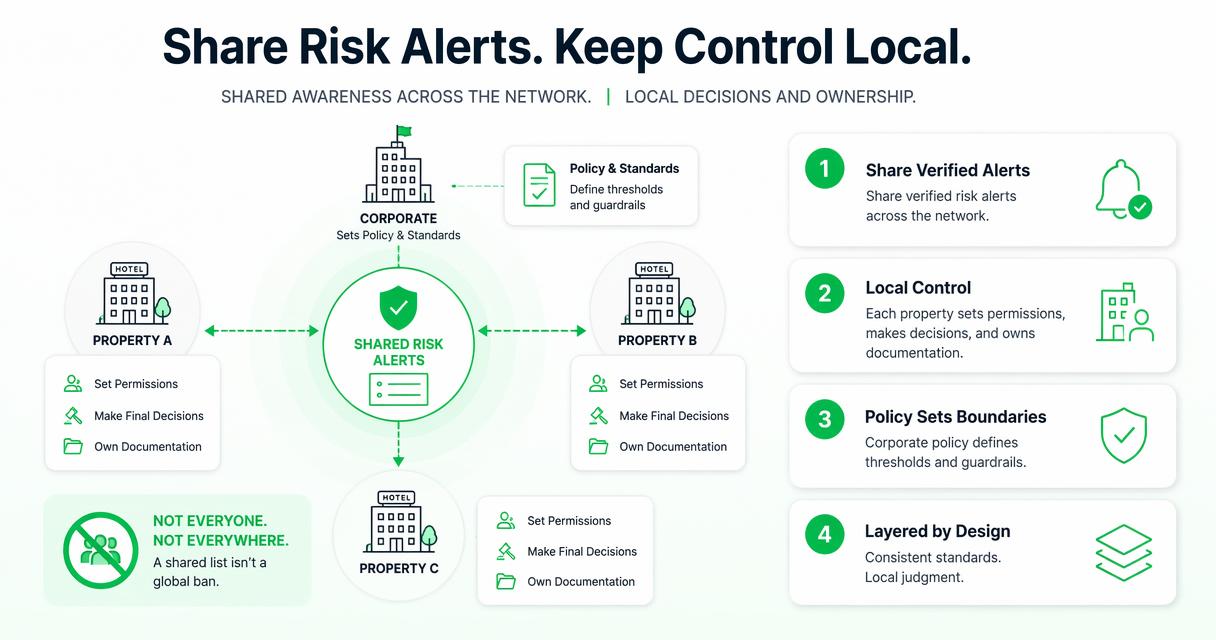
A shared list should not mean every employee can see everything or ban anyone everywhere. Multi-property operators need a layered model: corporate policy sets standards, regional leadership reviews serious cases, and property managers control day-to-day decisions.
This separation matters for fairness. A guest who damaged a room at one property may need a property-level restriction, while a guest tied to fraud, threats, or repeated police calls may require a wider alert.
Permission model for group DNR records
| Role | What they can see | What they can do | Best use case |
|---|---|---|---|
| Front desk agent | Active alert summary and escalation instructions | View, acknowledge, notify manager | Safe check-in handling |
| Front desk manager | Alert summary, incident notes, local history | Add notes, recommend action | Shift-level decision support |
| General manager | Full property record and shared alerts | Approve property ban, request group review | Local accountability |
| Regional manager | Cross-property records for assigned hotels | Approve wider visibility, audit decisions | Portfolio risk control |
| Corporate admin | Policy, permissions, audit logs | Configure rules, retain records, remove stale access | Governance and compliance |
The strongest model is limited sharing with clear escalation. Front desk agents do not need every sensitive note. They need enough information to pause, verify identity, and involve the right manager.
What documentation belongs in a shared DNR decision?
A shared DNR decision should include guest identity, incident facts, evidence, witnesses, manager approval, scope, duration, and the reason the alert is visible beyond one property.
Thin records create operational and legal risk. “Bad guest” is not documentation. A useful record explains what happened, when it happened, who observed it, what evidence exists, and what action the property took.
For teams standardizing forms, the hotel do not rent incident report template is a practical starting point for collecting consistent guest details, photos, witnesses, police references, and follow-up notes.
Minimum documentation checklist:
- Guest name, ID details, reservation number, and contact data collected under policy.
- Date, time, room number, property name, and staff involved.
- Incident category, such as damage, threats, fraud, chargeback, nonpayment, or safety issue.
- Objective narrative written in plain language.
- Supporting evidence, such as signed forms, photos, folio records, or police report numbers.
- Manager approval and restriction scope.
- Review date, removal criteria, and audit history.
“If you collect it, protect it.”, Federal Trade Commission, Start with Security
Privacy planning belongs inside the workflow, not after deployment. Hotel groups handling California guest data should review hotel CCPA compliance considerations before expanding shared records.
How should front desk teams handle a DNR alert at check-in?
Front desk teams should handle a DNR alert by verifying identity, pausing the transaction, escalating to an authorized manager, documenting the outcome, and communicating the decision calmly.
A good alert is not a script for confrontation. It is a prompt to slow down and follow procedure. Staff should never argue about confidential records in the lobby or disclose details that create privacy or safety concerns.
Check-in workflow for a possible DNR match
- Verify identity: compare the presented ID, reservation details, and guest profile.
- Check match confidence: confirm whether the alert is exact, partial, or uncertain.
- Pause politely: avoid accusations and keep the guest interaction neutral.
- Escalate: contact the manager or designated decision-maker.
- Review the record: confirm scope, date, evidence, and property instructions.
- Decide locally: rent, refuse, request deposit, cancel, or involve security according to policy.
- Document the result: record who reviewed the alert and what action was taken.
ID scanning can help reduce false matches caused by nicknames, typos, or duplicate profiles. Before changing your workflow, review state rules using GuestBan’s hotel ID scanning laws resource so staff understand what data can be collected and how it should be handled.
How GuestBan ID Scanning supports network-wide controls
GuestBan ID Scanning supports network-wide controls by connecting ID capture, DNR alerts, incident records, and multi-property visibility in one hotel-focused workflow.
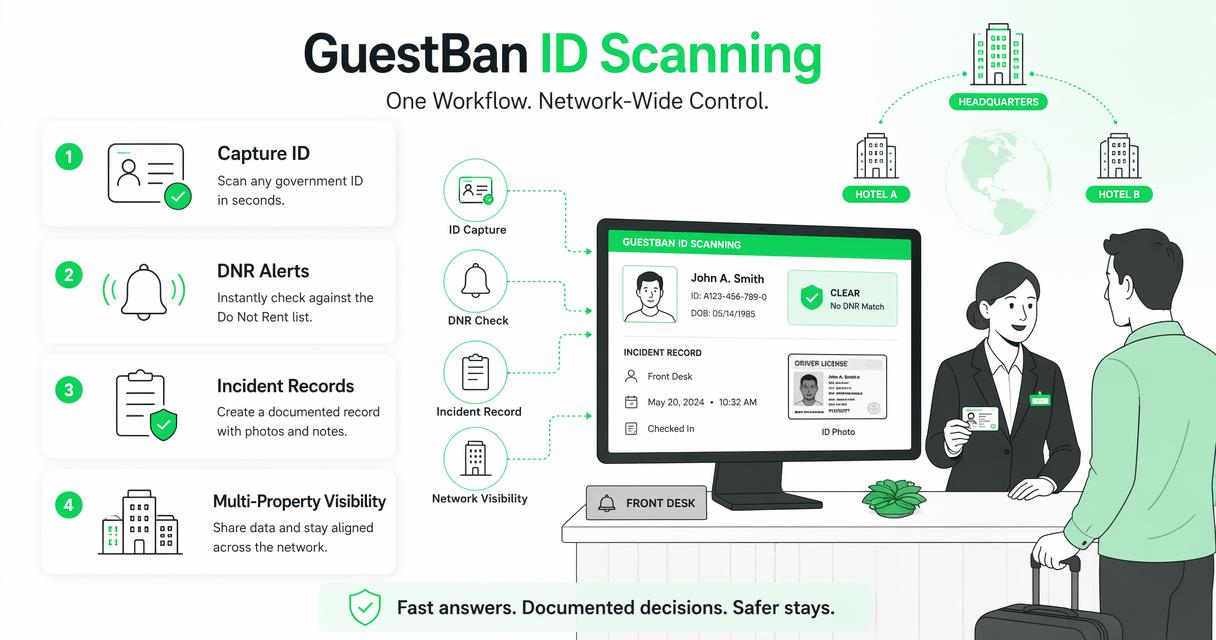
The GuestBan ID Scanning platform is built for the practical moment when a guest is standing at the desk and staff need a fast, documented answer. It helps hotels move from informal memory to controlled records that managers can review.
For buyers comparing requirements, the 2026 do not rent list software guide covers ID records, PMS workflows, permissions, incident reports, privacy, and multi-property controls in more detail.
Capabilities to look for in a group DNR system
| Capability | Why it matters for hotel groups | Operational result |
|---|---|---|
| ID-based guest matching | Reduces reliance on spelling, memory, or manual notes | Fewer missed alerts |
| Property-level permissions | Limits sensitive data to the right roles | Better privacy control |
| Network alert visibility | Warns sister properties about documented risk | Fewer repeat incidents |
| Incident attachments | Keeps photos, notes, and forms tied to the decision | Stronger evidence package |
| Audit trails | Shows who viewed or changed a record | Better accountability |
| Review dates | Prevents stale bans from living forever | Cleaner governance |
With GuestBan ID Scanning, hotel groups can standardize the alert process without removing the manager’s judgment. That balance matters because the best systems guide decisions; they don’t replace responsible operators.
What should not be centralized across the Guest Ban Network DNR?
Hotels should not centralize unrestricted access, vague accusations, permanent bans without review, or sensitive guest data that staff do not need for their role.
The easiest mistake is treating a shared DNR list like a group chat. That creates risk fast. A single angry note can follow a guest across properties without context, review, or expiration.
Controls that prevent overreach:
- Avoid free-text insults, assumptions, or labels that are not tied to observed facts.
- Do not let every employee create network-wide bans.
- Require manager approval before an alert becomes visible beyond one property.
- Set review dates for older records.
- Keep sensitive evidence limited to authorized roles.
- Separate a warning from an automatic refusal.
A network policy should also include a guest inquiry process. Staff may not be able to disclose all details, but the organization should know who can review disputes, correct errors, and remove records when policy requires it.
Hotels also need to distinguish security records from marketing records. Guest risk data should not be copied into broad customer systems unless there is a clear operational reason and a lawful basis under the hotel’s privacy program.
What will change for hotel group DNR programs in 2027?
Hotel group DNR programs will likely shift toward better identity matching, stricter privacy reviews, stronger audit trails, and more human oversight of automated alerts.
Machine learning may help detect duplicate identities, suspicious patterns, and inconsistent records, but it should not become the sole basis for refusing a room. Iqbal H. Sarker’s 2021 review of machine learning notes its broad real-world applications and continuing research directions, which is useful context for hotels evaluating automation carefully (SN Computer Science).
The next phase will be less about building bigger lists and more about building cleaner decision systems. Owners will ask who approved the alert, what evidence supports it, whether the restriction is still valid, and whether staff followed the same process at every property.
Expect these changes by 2027:
- More permission templates for ownership groups and management companies.
- Better identity confidence scoring, with manual review for uncertain matches.
- Shorter data retention windows for low-severity events.
- Stronger links between incident records, chargeback files, and ID verification.
- More staff training on privacy, escalation, and nondiscrimination.
A hotel group that builds these habits now will be in a better position as guest data rules and security expectations tighten.
FAQ
These answers address the common operational questions hotel groups ask before expanding DNR visibility across multiple properties.
Can a hotel group share a do not rent list across properties?
A hotel group can share internal risk alerts across properties when it has a lawful business purpose, proper access controls, accurate documentation, and privacy safeguards. The safer approach is to share only what each role needs, require manager approval for broad visibility, and keep audit trails showing who created, reviewed, and acted on each record.
Should a DNR alert automatically block a reservation?
A DNR alert should not always block a reservation automatically. It should trigger verification, manager review, and a decision based on the alert scope and current facts. Automatic refusal may be appropriate for severe, approved cases, but many alerts should function as escalation prompts rather than final decisions.
How long should hotel groups keep DNR records?
Retention should depend on incident severity, legal requirements, brand policy, and privacy obligations. A minor disturbance may need a shorter review period than fraud, threats, or major property damage. Every record should have a review date so the group can remove stale, unsupported, or no-longer-needed alerts.
What data should front desk agents see in a shared alert?
Front desk agents should see the guest match, alert status, basic reason category, and escalation instructions. They usually do not need full evidence files, sensitive notes, or corporate review history. Limiting what agents see helps protect guest privacy while still giving staff enough information to act safely.
Conclusion
A network-wide do not rent list hotel groups can trust starts with three rules: verify identity, document facts, and keep local managers in control of the final decision. Shared alerts work best when they prevent repeat incidents without turning every front desk employee into a system administrator.
If your properties still rely on binders, sticky notes, or disconnected PMS comments, start with a simple audit this week: list who can create DNR records, what evidence is required, which properties can see them, and when records are reviewed. Then standardize the workflow, train managers, and test alerts before going live.
For hotel groups ready to connect ID capture with documented guest risk controls, evaluate GuestBan ID Scanning and visit guestban.com to plan your next step.

