

TL;DR
TL;DR: ID scanners are usually faster, cleaner, and easier to control than photocopying IDs at hotel check-in. Hotels should capture only the fields they need, avoid retaining ID images unless policy or law requires it, and use structured scan logs for disputes, chargebacks, and risk review.
The choice between an ID scanner vs photocopying IDs at hotel check-in is no longer just a front desk preference; it affects guest privacy, fraud prevention, payment disputes, staff workload, and how well your PMS data holds up under pressure. In 2026, I'd treat photocopying as a legacy workaround and scanning as the more controlled operating model, provided the hotel avoids unnecessary image retention. GuestBan ID Scanning is built for that shift: faster guest capture, structured records, and fewer loose paper copies behind the desk.
Table of Contents
What is the difference between an ID scanner and photocopying IDs?
An ID scanner captures structured data from a driver's license, passport, or identity card, while photocopying creates a flat image of the document without built-in validation, field extraction, or workflow controls.
Check-in: the process where a guest announces arrival at a hotel and completes the steps needed to receive access, adapted from the general definition of check-in on Wikipedia.
Hotel ID scanner: a device and software workflow that reads identity documents, extracts guest fields, and stores or sends approved data to hotel systems.
Photocopying IDs: making a paper or image copy of an identity document, usually for proof that staff viewed it.
Core comparison for hotel operators
| Area | ID scanner | Photocopying IDs |
|---|---|---|
| Speed | Captures fields in a repeatable workflow | Depends on copier access, paper, and staff habits |
| Accuracy | Reduces retyping and can standardize names, dates, and document fields | Preserves an image, but staff still rekey data manually |
| Security | Can limit fields, apply permissions, and support audit logs | Creates loose copies that are easy to misfile or over-retain |
| Privacy | Better when configured for data minimization | Higher risk if full document images are kept by default |
| Chargebacks | Produces cleaner time-stamped evidence | Provides visual proof, but usually with weaker indexing |
| PMS use | Can support auto-fill and structured records | Does not directly improve PMS data quality |
Key takeaway: the scanner is not automatically safer because it is digital. It is safer when the hotel controls retention, access, and the exact fields captured.
Which method is faster and more accurate at the front desk?
An ID scanner is usually faster and more accurate because it replaces manual transcription and copier handling with a repeatable capture process tied to the guest record.
A photocopy can feel quick during a quiet shift, but it creates work later. Someone still has to type the guest's name, address, ID number, date of birth, or passport details into the PMS. During a rush, that extra manual step creates inconsistent spelling, missing fields, and weak guest history.
Scanning also helps new agents follow the same process as experienced staff. That matters for hotels with turnover, night audit coverage, and multi-property operations.
A practical check-in workflow
- Ask for the guest's ID and payment card according to property policy.
- Scan the ID or passport using an approved device.
- Review extracted fields before saving or sending data to the PMS.
- Capture only the fields the hotel needs for check-in, compliance, and risk review.
- Return the document immediately and continue the registration process.
- Store, mask, or delete the ID image based on the hotel's retention policy.
For hotels comparing scanning to typed entry rather than photocopies, this related guide on ID scanner vs manual ID entry at hotel check-in covers the data-entry side in more detail.
Which option creates less privacy and legal risk?
ID scanning creates less privacy risk than photocopying only when the hotel uses data minimization, limited access, retention rules, and secure storage.
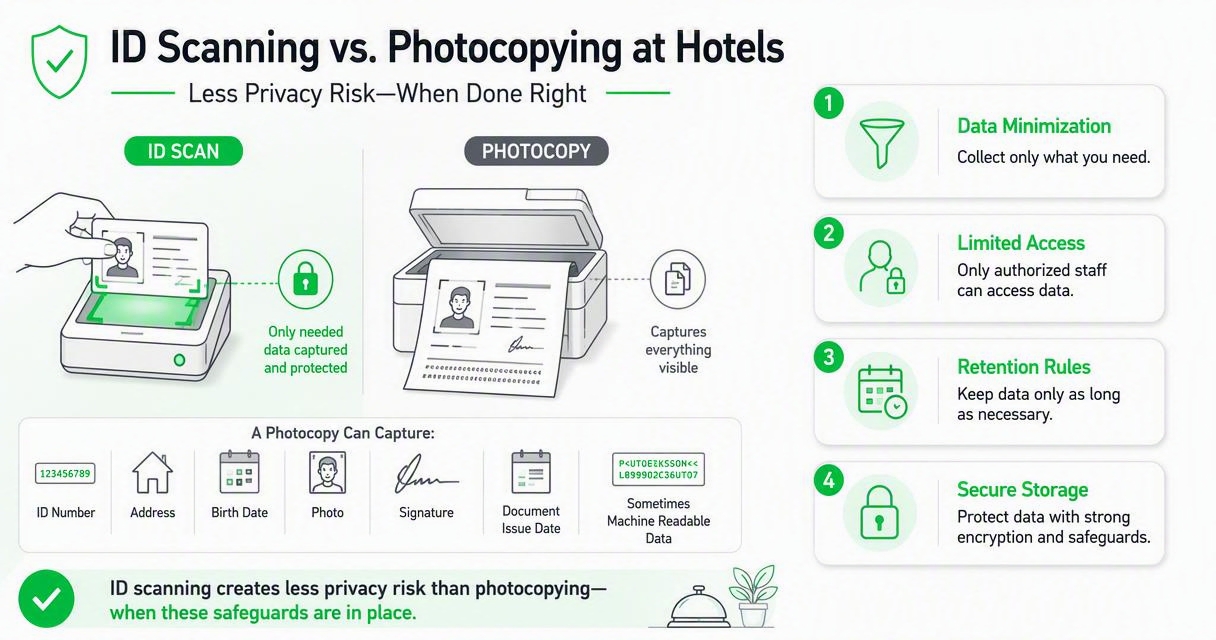
A photocopy captures everything visible on the document. That can include an ID number, address, birth date, photo, signature, document issue data, and sometimes machine-readable elements. If the copy sits in a drawer, binder, email inbox, or shared folder, the hotel has created a sensitive record without much control.
Digital scanning can be better because it can separate the fact of verification from the full image of the ID. A well-designed workflow can store name, document type, last four characters, check-in timestamp, and staff user ID while deleting or restricting the image.
"Personal data shall be adequate, relevant and limited to what is necessary in relation to the purposes for which they are processed.", European Union, General Data Protection Regulation, Article 5
Privacy controls hotels should require
- Purpose limitation: define why ID data is collected, such as guest verification, age policy, payment disputes, or legal reporting.
- Field minimization: capture only the fields needed for that purpose.
- Role-based access: restrict who can view ID images or sensitive fields.
- Retention schedules: delete or mask records when they are no longer needed.
- Audit trails: record who accessed or changed a guest identity record.
- Secure disposal: shred paper copies and permanently delete expired digital images.
A hotel that scans every ID and keeps full images forever has not solved the privacy problem. It has moved the problem into software. The better practice is to scan with rules, not scan everything by habit.
Which method is better for chargebacks and guest disputes?
ID scanners usually create stronger chargeback and dispute documentation because they connect identity capture to a timestamped, searchable guest record.
For card-not-present bookings, prepaid reservations, walk-ins, and no-show disputes, documentation matters. A paper copy may show that an ID existed, but staff often struggle to find it, match it to the reservation, or prove the exact check-in sequence.
A scan-based workflow can support a clearer evidence packet. The hotel can show the document type checked, the arrival time, the matched guest name, the staff account involved, and the reservation details linked in the PMS.
Evidence quality comparison
| Documentation need | ID scanner workflow | Photocopy workflow |
|---|---|---|
| Find record quickly | Search by guest, date, room, or reservation | Search paper files or image folders |
| Prove timing | Uses system timestamps | Depends on handwritten notes or copier timing |
| Match to PMS | Can connect to guest profile | Usually separate from PMS |
| Limit exposure | Can export selected fields | Often exposes full document copy |
| Multi-property review | Easier to standardize across locations | Harder to audit consistently |
If chargebacks are a major reason you review ID workflows, see this guide to using the best hotel ID scanner to prevent chargebacks, flag problem guests, and auto-fill PMS records.
How GuestBan ID Scanning handles this workflow
GuestBan ID Scanning handles hotel ID capture by turning the front desk check into a structured workflow instead of a loose paper-copy habit.
The GuestBan ID Scanning platform is designed for hotels that want faster check-ins, cleaner guest data, and better operational visibility without relying on stacks of photocopied documents. The value is not just the scan; it is the record structure around the scan.
What a structured scanning workflow should include
| Workflow element | Why it matters at check-in |
|---|---|
| ID and passport capture | Supports domestic and international arrivals |
| PMS-ready data | Reduces retyping and spelling errors |
| Timestamped activity | Helps document disputes and staff actions |
| Guest history signals | Helps teams identify repeat risk patterns |
| Retention controls | Reduces unnecessary storage of sensitive images |
Hotels moving away from paper copies can also review GuestBan's guide on how to automate safer, faster check-ins instead of photocopying IDs. For product fit, I'd look at the document types your property sees most often, the PMS process your agents already follow, and the amount of dispute evidence your managers need monthly.
When should a hotel avoid retaining ID images?
A hotel should avoid retaining full ID images when the business purpose can be met with extracted fields, verification logs, or limited masked data.
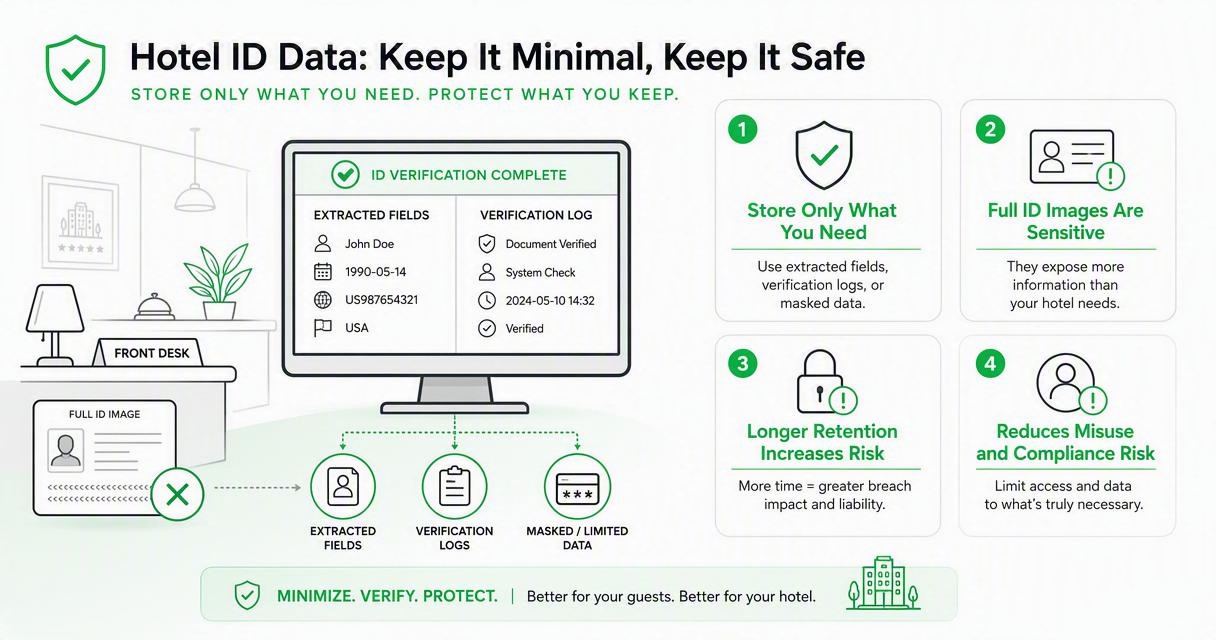
Full ID images are sensitive because they can expose more information than the hotel needs. Keeping them longer than necessary increases breach impact, internal misuse risk, and guest trust concerns. Some locations may have legal registration duties, while others only need to confirm identity at arrival.
Retention decision checklist
- Does a law, regulation, brand rule, insurer, or contract require image retention?
- Can the hotel prove check-in using fields and timestamps instead of a full image?
- Who can view the stored image, and is access logged?
- How long does the hotel need the record for disputes or audits?
- Is deletion automatic, or does someone have to remember?
Bruce Schneier's security warning applies well to hotel identity records:
"If you think technology can solve your security problems, then you don't understand the problems and you don't understand the technology.", Bruce Schneier, Crypto-Gram Newsletter
For a deeper policy view, use this guide on how long hotels should keep scanned IDs before setting a retention schedule.
How should hotels choose an ID scanning setup in 2026?
Hotels should choose an ID scanning setup by matching document mix, PMS workflow, privacy rules, physical desk layout, and staff training needs.
A boutique property with mostly domestic driver's licenses may need a compact ID scanner. An airport hotel or resort with international guests may need stronger passport and RFID support. A multi-property group needs standard reporting and consistent rules more than a single device spec.
Buying criteria for hotel teams
- Document coverage: confirm support for driver's licenses, passports, and national IDs used by your guest base.
- PMS compatibility: decide whether you need auto-fill, exports, or staff review before posting.
- Desk footprint: pick hardware that fits the real check-in counter, not a lab setup.
- Training load: choose a workflow a new front desk agent can follow on a busy shift.
- Retention control: require configurable storage, deletion, and access permissions.
- Support model: verify installation help, troubleshooting, and multi-property rollout options.
For device research, start with the current Best Document Scanners for Hotel Front Desks in 2026. If you want a guided next step, visit guestban.com and compare the workflow against your current copier, PMS, and chargeback process.
What should hotels expect next in 2027?
Hotel ID workflows in 2027 will likely move toward less stored image data, more automated field capture, and stronger connections between identity checks, risk flags, and PMS records.
Guest expectations are changing. People are more aware of privacy and less patient with slow check-ins. Operators are also under pressure to document risk without collecting more sensitive data than needed.
Likely shifts for hotel check-in teams
- More properties will replace photocopies with scan logs and selective field retention.
- PMS integrations will become a core buying requirement, not a bonus.
- Hotels will ask vendors for clearer deletion controls and audit reporting.
- Front desk teams will use identity capture alongside age checks, chargeback files, and internal do-not-rent policies.
Recent posts on hotel operations are already moving in this direction, especially around late arrivals, underage guest prevention, and scanner selection. The strongest hotels will not just buy hardware; they'll rewrite the check-in policy around the data they actually need.
FAQ: ID scanner vs photocopying IDs at hotel check-in
Do hotels legally have to scan or copy a guest ID?
Hotel ID requirements depend on location, guest type, and property policy. Many hotels require guests to present ID at check-in, but presentation does not always mean the hotel must keep a copy. Operators should confirm local law, brand standards, and insurer expectations before deciding whether to scan, copy, or simply verify and log selected details.
Is scanning an ID the same as photocopying it?
No. Photocopying creates a visual duplicate of the document, while scanning can extract structured fields, connect the check to a reservation, and apply access or retention controls. A scanner may also store an image, but a well-configured hotel workflow should decide whether that image is needed or should be deleted after verification.
Will guests object less to scanning than photocopying?
Guests often respond better when staff explain what is collected and why. A scanner can feel more professional than a paper copy, especially if the hotel returns the ID immediately and states that only required data is retained. Clear signage and a short front desk script help prevent confusion during check-in.
What is the safest replacement for ID photocopies?
The safest replacement is a structured ID scanning workflow with limited data capture, controlled access, PMS matching, audit logs, and automatic retention rules. The goal is not to collect more data. The goal is to prove the hotel performed a reasonable identity check while reducing loose paper, manual typing, and unnecessary image storage.
Conclusion
For most properties, the answer to ID scanner vs photocopying IDs at hotel check-in is clear: scanning is the better operating model when it is paired with privacy controls, staff training, and a defined retention policy. Photocopies may feel familiar, but they create paper risk, search problems, and extra typing.
Start by mapping your current check-in process, then decide which ID fields you truly need, how long you need them, and who should access them. If you're ready to replace copier-based identity capture with a cleaner workflow, evaluate GuestBan ID Scanning and head to guestban.com to plan the next front desk upgrade.

