No products in the cart.

TL;DR
AutoClerk Atlas passport scanning helps hotels capture guest identity data faster, place it in the right reservation, and retain better records for disputes, incidents, and lawful requests. The best setup combines a scanner, a clear front desk workflow, secure storage rules, and staff training before rollout.
AutoClerk Atlas Passport Scanning matters because the front desk is where speed, safety, and record quality collide. BWH Hotels’ 2025 launch coverage, including Hotel Business reporting on AutoClerk Atlas, signals a larger shift toward cloud PMS workflows that reduce manual work at check-in. For properties evaluating a passport scanner for hotels, GuestBan ID Scanning can support the practical side of guest data capture, secure records, and front desk accountability without turning check-in into a paperwork drill.
Table of Contents
What is AutoClerk Atlas Passport Scanning?
AutoClerk Atlas Passport Scanning is the workflow of scanning a guest’s passport or driver’s license, extracting identity details, matching the guest to the correct AutoClerk Atlas reservation, and retaining the record under the hotel’s security and privacy rules.
AutoClerk Atlas Passport Scanning: a hotel front desk process that uses ID scanning hardware and software to capture guest identity information and connect it to a PMS reservation.
Passport: a formal government travel document that certifies a person’s identity and nationality for international travel.
The phrase “BWH Hotels Unveils AutoClerk Atlas, a Next Generation Property Management System Powered by HotelKey” reflects the market positioning around Atlas: a newer PMS environment built for modern hotel operations. For front desk teams, the ID scanning layer is not just a gadget. It becomes part of reservation accuracy, risk control, and service speed.
Key insight: A scanner is only useful when the workflow tells staff what to scan, where the data goes, who can view it, and how long the hotel keeps it.
Why hotels add scanning to Atlas check-in
Hotels add passport and driver’s license scanning to Atlas check-in to reduce typing, avoid mismatched guest records, and create more reliable documentation when a stay later becomes disputed or sensitive.
Manual entry creates small errors that become large problems. A transposed letter in a surname can complicate folio lookup. A missing address can weaken a chargeback response. An unclear photocopy can be useless when a manager reviews an incident weeks later.
For a general manager, the case is operational. For a front desk manager, it is about consistency. For a risk team, it is about proof.
- Faster arrivals: staff scan the document instead of typing every field.
- Cleaner records: names, ID numbers, and expiration dates are captured more consistently.
- Better accountability: staff follow one process across shifts.
- Improved dispute support: records are easier to retrieve for chargebacks.
- Safer escalation: incidents can be tied to verified guest data when policy allows.
Privacy still matters. Hotels should collect only what they need, limit access, and document their retention policy.
“Personal data shall be processed lawfully, fairly and in a transparent manner in relation to the data subject.”, European Parliament and Council, GDPR Article 5
Recommended front desk workflow
The best front desk workflow is to verify the reservation first, scan the guest ID second, confirm the extracted details third, then save the record to the correct reservation before issuing keys.
- Open the reservation in AutoClerk Atlas. Confirm arrival date, guest name, room type, payment status, and any brand or property notes.
- Ask for a government ID. Accept a passport, driver’s license, or other approved document based on property policy and local rules.
- Scan the document. Place the ID in the scanner and let the software capture the supported fields.
- Review the extracted data. Staff should confirm spelling, expiration date, date of birth if collected, and document type.
- Transfer the data to the reservation. The record should attach to the correct Atlas booking, not a duplicate profile.
- Check for alerts or notes. If your property uses incident records or DNR controls, review them before completing check-in.
- Securely retain the record. Follow your retention schedule for chargebacks, incidents, and lawful law enforcement requests.
- Complete the guest interaction. Return the ID, issue keys, and explain any required registration or deposit terms.
I recommend training staff to say one simple line: “I’ll scan your ID to verify the reservation and complete the registration record.” That sounds normal, direct, and less alarming than vague language about “keeping a copy.”
For a deeper step-by-step process, see this 2026 guide on how to verify guest ID at hotel check-in.
What an AutoClerk Atlas Passport Scanner should support
An AutoClerk Atlas Passport Scanner should support passports, driver’s licenses, PMS record transfer, secure storage, permission controls, and support processes that hotel staff can actually follow during busy arrivals.
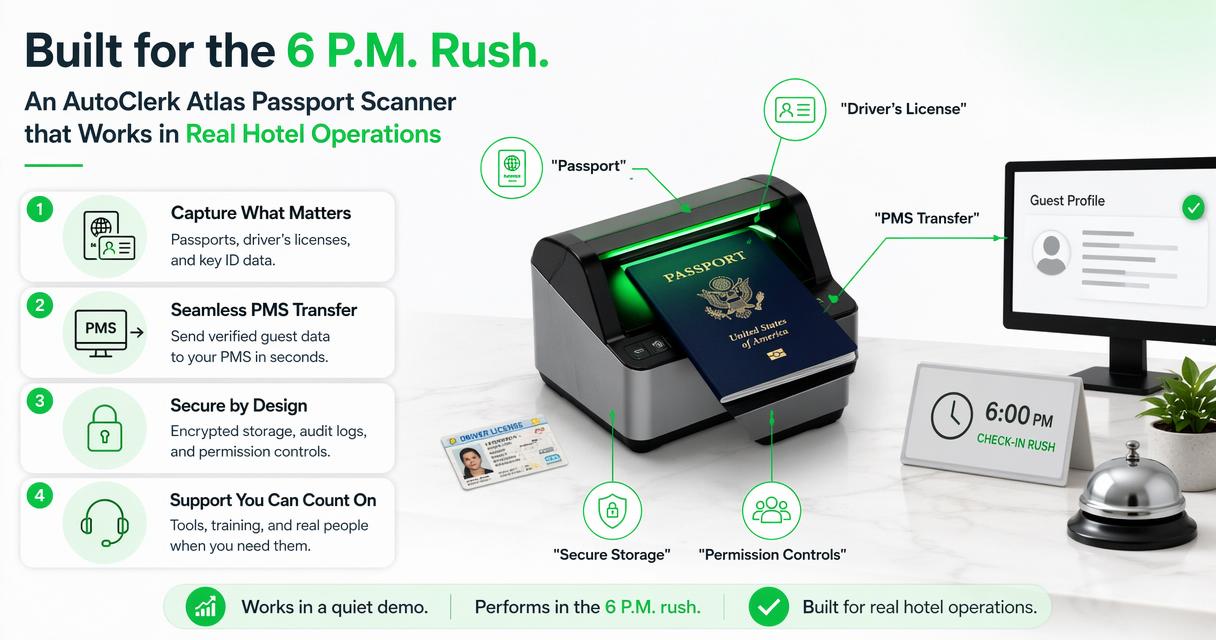
A scanner that works in a quiet demo can still fail the hotel if it slows the 6 p.m. rush. The practical test is simple: can a new desk agent scan, confirm, and save the right guest record without calling a manager every time?
Feature checklist for hotel managers
| Requirement | Why it matters | Manager question |
|---|---|---|
| Passport and license capture | Hotels serve domestic and international guests | Which document types are supported? |
| Atlas reservation transfer | Prevents duplicate profiles and loose files | Can staff attach scans to the correct booking? |
| Field review before save | OCR can misread damaged IDs | Can agents correct data before storing it? |
| Secure retention | Guest IDs are sensitive records | Who can view, export, or delete records? |
| Incident documentation | Supports safety and risk workflows | Can records connect to notes or reports? |
| Chargeback evidence | Helps managers respond to payment disputes | Can records be retrieved quickly? |
| Staff permissions | Limits unnecessary access | Are roles different for agents and managers? |
| Vendor support | Reduces rollout friction | Who handles setup, support, and training? |
How GuestBan ID Scanning handles this
GuestBan ID Scanning helps hotels turn ID capture into a usable guest record workflow by combining scanning, guest history, DNR awareness, incident documentation, and retrieval for operational review.
The GuestBan ID Scanning platform is a fit for hotel teams that want more than a saved image. The value is in linking the ID record to front desk decisions: who checked in, what was verified, what happened during the stay, and what evidence exists if a dispute appears later.
Hotels still need to confirm their exact AutoClerk Atlas integration path, because PMS environments, property settings, and vendor permissions vary. In my view, the strongest buying question is not “Does it scan?” It is “Can my staff use the scan correctly every shift?”
For related product evaluation criteria, review GuestBan’s guide to hotel ID scanning software in 2026. You can also find practical hotel operations articles on guestban.com.
Manual entry vs photocopying vs ID scanning
| Method | Strength | Weakness | Best use |
|---|---|---|---|
| Manual entry | No hardware needed | Slow and error-prone | Low-volume properties with light risk |
| Photocopying IDs | Familiar to staff | Hard to search, harder to secure | Legacy workflows being phased out |
| ID scanning | Faster capture and cleaner records | Requires setup and training | Hotels that want consistent check-in data |
| PMS-linked scanning | Connects identity to the reservation | Needs integration planning | Properties using Atlas as the main guest record |
Records for chargebacks, incidents, and lawful requests
ID scanning supports chargebacks, incident reviews, and lawful requests by giving managers a structured record tied to a guest stay instead of scattered paper, unclear photocopies, or memory-based notes.
Chargebacks are one of the clearest reasons to keep accurate check-in records. A hotel may need to show that the cardholder or authorized guest was present, that the stay occurred, and that the reservation record matches the guest interaction. ID scans do not guarantee a win, but weak records can make a response harder.
Incident documentation is similar. If a guest damages a room, threatens staff, refuses payment, or triggers a safety concern, the record should connect the person, room, folio, notes, photos if used, staff names, and follow-up actions. A DNR decision should be based on documented behavior, not rumor.
- Keep ID records tied to the stay, not saved on a shared desktop.
- Limit access to managers and approved staff roles.
- Use written incident notes while details are fresh.
- Retain records only as long as your policy and law allow.
- Document when information is shared with law enforcement.
For payment disputes, GuestBan’s hotel chargeback documentation evidence guide explains how ID records can support a stronger response package. For guest restrictions, see the guide to hotel do not rent list software.
“Develop, implement, and maintain a complete information security program.”, Federal Trade Commission, Standards for Safeguarding Customer Information
Implementation considerations before rollout
A successful rollout depends on hardware fit, PMS access, staff training, privacy rules, support coverage, and a written policy for what the hotel scans and stores.
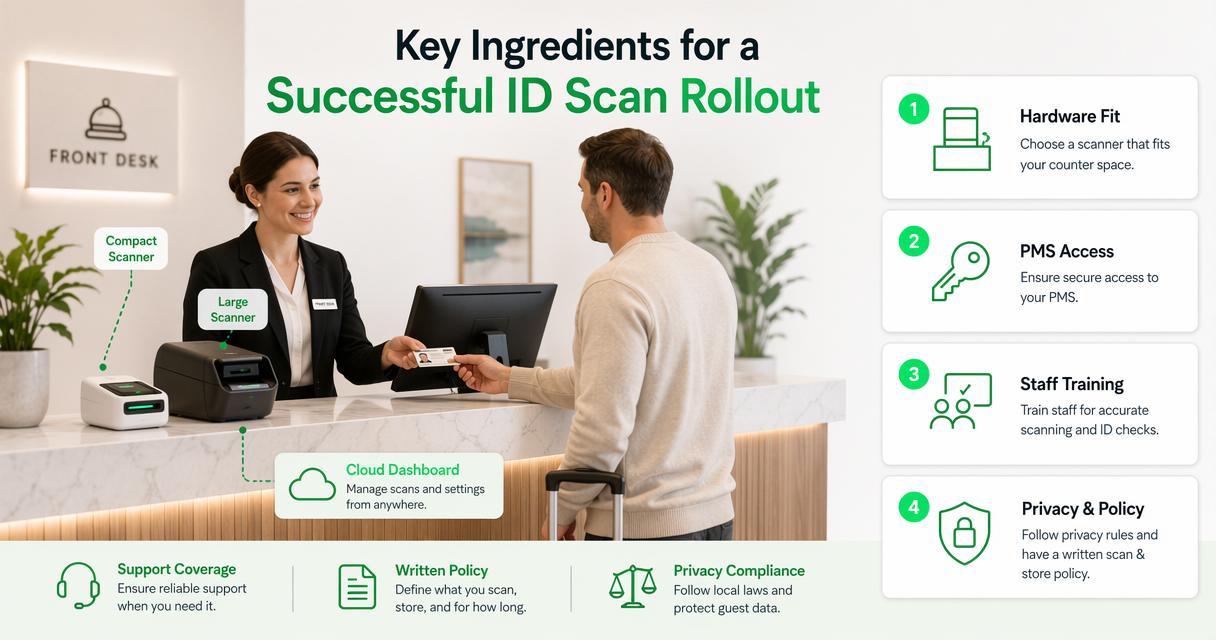
Start with the front desk environment. A compact scanner may work better than a large device if counter space is limited. A cloud dashboard may help managers at multi-property groups, but only if permissions are set carefully.
Avoid making the rollout a vague “new scanner” project. Treat it as a guest record process. Assign an owner, write the standard operating procedure, test edge cases, and train each shift with live examples.
Common setup questions include:
- Which fields will transfer into AutoClerk Atlas?
- Will scans attach to reservations, guest profiles, or both?
- What happens when a walk-in guest has no existing reservation?
- Who can search historical records?
- How are failed scans corrected?
- What is the support process after hours?
- What should staff say if a guest asks why the ID is scanned?
Support deserves special attention. Hotels operate nights, weekends, holidays, and sold-out event dates. Before signing off, ask the vendor how contact, support, setup changes, and scanner replacement are handled.
Manager checklist for choosing a scanner
Hotel managers should choose an AutoClerk Atlas Passport Scanner by testing the full check-in workflow, not by comparing hardware specs alone.
Use this concise checklist during vendor calls, demos, and pilot testing:
- Document support: confirm passports, driver’s licenses, and other approved IDs.
- Atlas workflow: verify how data reaches the correct reservation.
- Data review: require staff confirmation before saving extracted fields.
- Security controls: check role permissions, audit logs, and export rules.
- Retention policy: define how long records are kept and who can delete them.
- Incident use: confirm whether notes, photos, or reports can be connected.
- Chargeback retrieval: test how quickly managers can find a record.
- Multi-property needs: decide whether group-level visibility is required.
- Training plan: require written staff instructions and shift coverage.
- Support path: document who to contact when scanning or transfer fails.
A good pilot should include normal arrivals, walk-ins, international passports, damaged IDs, name mismatches, and high-volume check-in periods. If the workflow only works when one expert is present, it is not ready for daily operations.
What to expect in 2027
Hotel ID scanning will likely move closer to automated guest record review, risk alerts, and pre-arrival identity workflows as PMS platforms become more connected.
The next phase is not just better OCR. Expect more emphasis on permission-based record access, audit trails, multi-property guest history, and staff prompts that reduce missed steps. AI may help flag mismatches, but managers should still require human review before taking action that affects a guest.
For Atlas users, the practical opportunity is to make identity capture part of a cleaner operating model. A PMS can manage rooms and folios. A scanning workflow can improve the accuracy of the people and documents tied to those rooms and folios.
GuestBan ID Scanning is relevant here because the future of check-in is not only speed. It is speed plus documentation, safety controls, and records that managers can trust when questions arise.
FAQ
Does AutoClerk Atlas include passport scanning by default?
AutoClerk Atlas is a property management system, while passport scanning usually depends on the hotel’s selected scanner, software configuration, and integration setup. Hotels should confirm supported devices, data transfer behavior, permissions, and support responsibilities before assuming scanning is included in the standard PMS workflow.
Can hotel staff scan both passports and driver’s licenses?
Yes, a proper hotel ID scanning setup should support both passports and driver’s licenses when the property’s policy allows those documents. Managers should verify supported countries, document formats, barcode or MRZ reading, and how staff correct extracted fields before saving records to the reservation.
Is scanning IDs better than photocopying them?
ID scanning is usually better for searchable, structured, and permission-controlled guest records. Photocopies can be hard to read, easy to misfile, and difficult to audit. Hotels moving away from photocopies should create clear retention, access, and deletion rules before changing the front desk process.
How long should a hotel keep scanned guest ID records?
Retention depends on local law, brand standards, payment dispute needs, and the hotel’s privacy policy. A hotel should avoid indefinite storage by default. Managers should define a retention period, limit who can access records, and document exceptions for chargebacks, incidents, or lawful requests.
Conclusion
AutoClerk Atlas Passport Scanning is most valuable when it becomes a clear operating process: scan the guest’s ID, confirm the data, attach it to the right reservation, and retain the record securely for legitimate business needs. If your hotel is still typing IDs by hand or storing photocopies, start by mapping your current check-in steps and identifying where errors, delays, and record gaps appear.
Next, run a short pilot with real front desk agents, not only managers. Test passports, driver’s licenses, walk-ins, name mismatches, and busy arrival windows. If you want a stronger guest record workflow around scanning, DNR awareness, and dispute documentation, evaluate GuestBan ID Scanning and head to guestban.com to plan the next step.