

TL;DR
Hotel ID scanners are usually the better fit for busy front desks, multi-property groups, and hotels that need consistent guest records. Manual ID entry can work at very small properties, but it creates more typing work, less standardized documentation, and weaker chargeback evidence.
A hotel check-in process can lose its rhythm in seconds when staff must read, type, verify, and store guest identity details by hand. The practical question in 2026 is no longer whether hotels should confirm identity, but whether an automated scanner or manual typing creates better records with less friction. In an ID scanner vs manual ID entry hotel check-in comparison, the scanner usually wins on repeatability, audit quality, and staff workload. GuestBan ID Scanning fits that operational need by capturing guest identity document data, supporting PMS transfer, storing records, and helping front desk teams act on Do-Not-Rent alerts.
Table of Contents
What is hotel ID scanning?
Hotel ID scanning: a check-in method that reads a guest identity document, captures key data fields, and stores or transfers those details for verification, reporting, and property management workflows.
Hotel ID scanning replaces most manual typing with document capture. A front desk agent scans a driver’s license, passport, passport card, visa, green card, Puerto Rico ID, select Mexico ID card, or supported international ID, then reviews the extracted information before completing check-in.
ID scanning is not just a faster data-entry method. It creates a more consistent guest identity record that can support operations, chargeback response, and risk management.
What is manual ID entry at hotel check-in?
Manual ID entry: a check-in method where staff visually inspect a guest identity document and type guest details into a property management system, registration card, spreadsheet, or internal record.
Manual entry can appear simple because it requires no scanner hardware or capture software. In practice, the process depends heavily on staff attention, document readability, training, and the front desk workload at the exact moment of arrival.
A manual process may include these steps:
- Inspect the physical ID and compare it with the guest.
- Read the name, address, date of birth, ID number, and expiration date.
- Type the details into the PMS or registration form.
- Check name against do not rent list.
- Add payment and reservation details.
- Re-check the record if a dispute, incident, or chargeback occurs.
Manual entry can work for low-volume properties with simple recordkeeping needs. It becomes harder to defend when a hotel group needs consistent fields, searchable history, documented incidents, or standardized workflows across locations.
ID scanner vs manual ID entry hotel check-in comparison
An ID scanner vs manual ID entry hotel check-in comparison shows that scanners provide stronger consistency, while manual entry mainly offers lower initial complexity.
The right choice depends on volume, risk exposure, PMS workflows, and how often guest records must support audits, disputes, or Do-Not-Rent decisions. For busy arrival windows, automation helps keep front desk decisions consistent even when staffing is thin.
Side-by-side front desk comparison
| Decision factor | ID scanner workflow | Manual ID entry workflow | Better fit |
|---|---|---|---|
| Check-in speed | Captures document data quickly and reduces typing | Slower when staff must read and type each field | ID scanner |
| Accuracy | Standardizes captured fields and reduces transcription mistakes | Depends on agent focus, handwriting, lighting, and document familiarity | ID scanner |
| Chargeback documentation | Can preserve scanned ID records, guest details, stored images, and printable reports | Often depends on notes, partial fields, or separate files | ID scanner |
| Guest record consistency | Uses repeatable fields across shifts and properties | Field formats may vary by employee or property | ID scanner |
| Staff workload | Shifts effort from typing to verification | Requires typing, rechecking, and correction | ID scanner |
| Setup complexity | Requires software, policies, permissions, and possible PMS integration | Simple to start with existing PMS fields | Manual entry |
| Multi-property control | Supports shared standards, central access, and alerts when platform supports it | Difficult to enforce across locations | ID scanner |
| Low-volume use | Useful, but may be more than a small inn needs | Acceptable when arrivals and risk are limited | Manual entry |
The strongest argument for scanning is repeatability. Hotels can train staff to verify captured data instead of asking every agent to become equally good at reading every document format under pressure.
How scanners improve speed and queue control
ID scanners improve queue control by reducing the number of fields staff must type during each arrival.
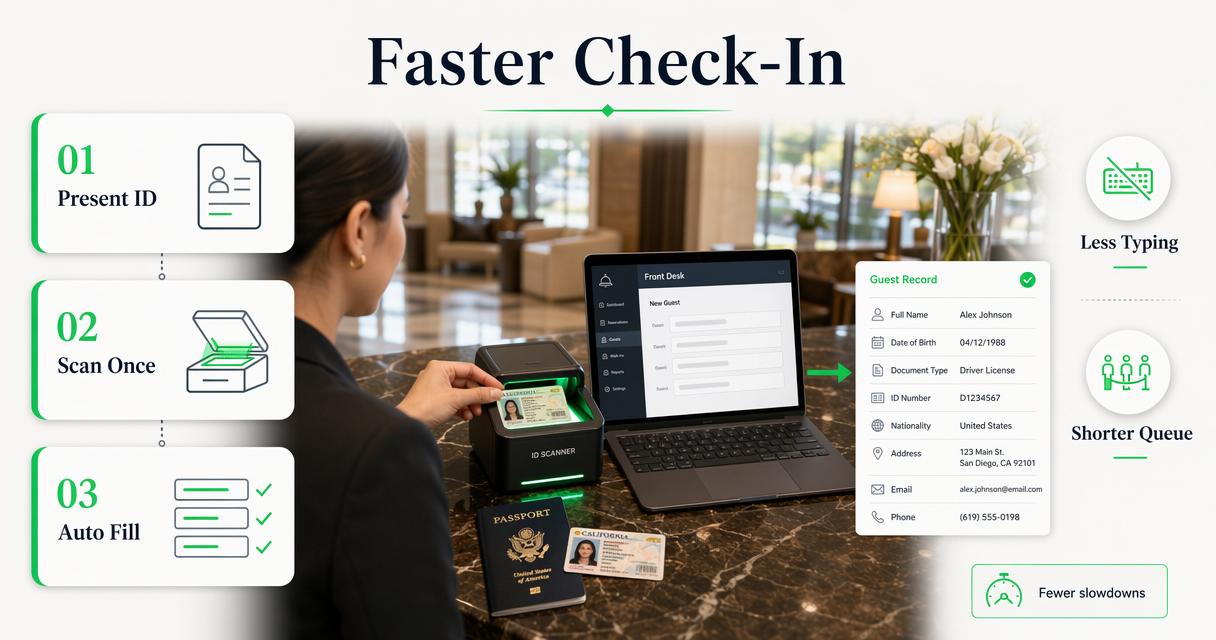
Search competitors commonly emphasize fast check-in as the main benefit. One top-ranking 2025 article even frames AI ID scanning around short hotel arrivals, while another 2026 result highlights passport and ID scanners as tools that reduce manual typing and standardize accuracy. Those SERP patterns match the operational reality at the desk: less typing means fewer slowdowns.
A faster check-in flow usually follows this sequence:
- Guest presents an identity document.
- Staff scans the document.
- The system captures standard guest details.
- Staff verifies the guest and record.
- PMS data is transferred or entered through an approved workflow.
- The guest proceeds to keys, payment completion, and arrival instructions.
Speed matters most during group arrivals, event weekends, late-night rushes, airline crew blocks, and understaffed shifts. In those periods, manual entry creates a bottleneck because each additional field adds a chance for hesitation or correction.
Operational takeaway: Scanning does not remove human judgment. It removes repetitive typing so staff can focus on verification, policy, payment, and service recovery.
Why accuracy affects more than the name field
Accuracy affects billing, incident records, Do-Not-Rent decisions, guest lookup, tax records, and follow-up documentation.
Manual data entry problems rarely start as major failures. They often begin with a misspelled last name, a transposed number, an incomplete address, or an inconsistent date format. The cost appears later when staff cannot locate the right stay, connect a repeat incident, or support a disputed transaction.
Scanners help standardize identity capture, but hotels still need review steps. A strong front desk policy treats scanning as assisted verification, not blind automation.
Accuracy controls that matter in 2026
- Document type support: broader ID support reduces exceptions that force manual fallbacks.
- PMS transfer: captured fields should move into the PMS workflow where supported.
- Field review: agents should confirm name, date of birth, expiration, and address before saving.
- Permission controls: managers should decide who can view, edit, export, or delete guest records.
- Audit trails: record access and changes should be traceable for internal accountability.
The 2026 hotel ID scanning software buyer guide explains these features in more detail for properties comparing capture tools, PMS workflows, secure storage, and alerting.
How ID records support chargebacks and incidents
ID records support chargebacks and incidents by giving hotels a clearer record of who checked in, what document was presented, and which stay or report the identity was tied to.
Card-not-present risk, friendly fraud, room damage, smoking fees, policy violations, and unpaid balances all become harder to document when the guest record is incomplete. Manual notes can help, but scattered notes are less useful than structured records that connect ID details, stay data, and incident reports.
GuestBan ID Scanning is designed for that hotel-specific documentation layer. The platform can support scanned ID records, stored ID images, guest details, printable reports, and Do-Not-Rent incident reports, giving managers stronger materials when responding to disputes or reviewing repeat problems.
Important documentation elements include:
- Guest identity details captured at check-in.
- ID image storage where permitted by policy and law.
- Time-linked stay or reservation information.
- Incident notes with staff and manager context.
- Printable reports for chargeback response or internal review.
- Do-Not-Rent records connected to specific events.
Hotels should align retention and access rules with applicable law. GuestBan’s resource on hotel CCPA compliance considerations is useful for California privacy planning, while the broader ID scanning laws directory helps operators review state-level issues before setting capture policies.
When manual entry still makes sense
Manual entry still makes sense for very small properties, unusual exceptions, outages, and cases where scanning is not legally or operationally appropriate.
Automation should not be treated as a universal substitute for policy. Some properties may only process a handful of arrivals each day. Others may have legacy PMS limits, strict local storage rules, or document types that require fallback handling. A practical hotel identity policy should define both the primary method and the exception path.
Manual entry is most reasonable when:
- Arrival volume is low and queues are rare.
- The property has no PMS integration needs.
- The hotel does not store ID images by policy.
- The document cannot be read by the scanner.
- Temporary connectivity or hardware issues interrupt scanning.
- A manager-approved exception is needed for a specific guest scenario.
Even then, manual records should use standardized fields. Free-text notes alone are weak because one agent may write “DL checked,” another may enter a partial number, and a third may skip the field during a rush.
How multi-property operators benefit from scanning
Multi-property operators benefit from scanning because identity capture, alerts, permissions, and reports can follow a consistent standard across locations.
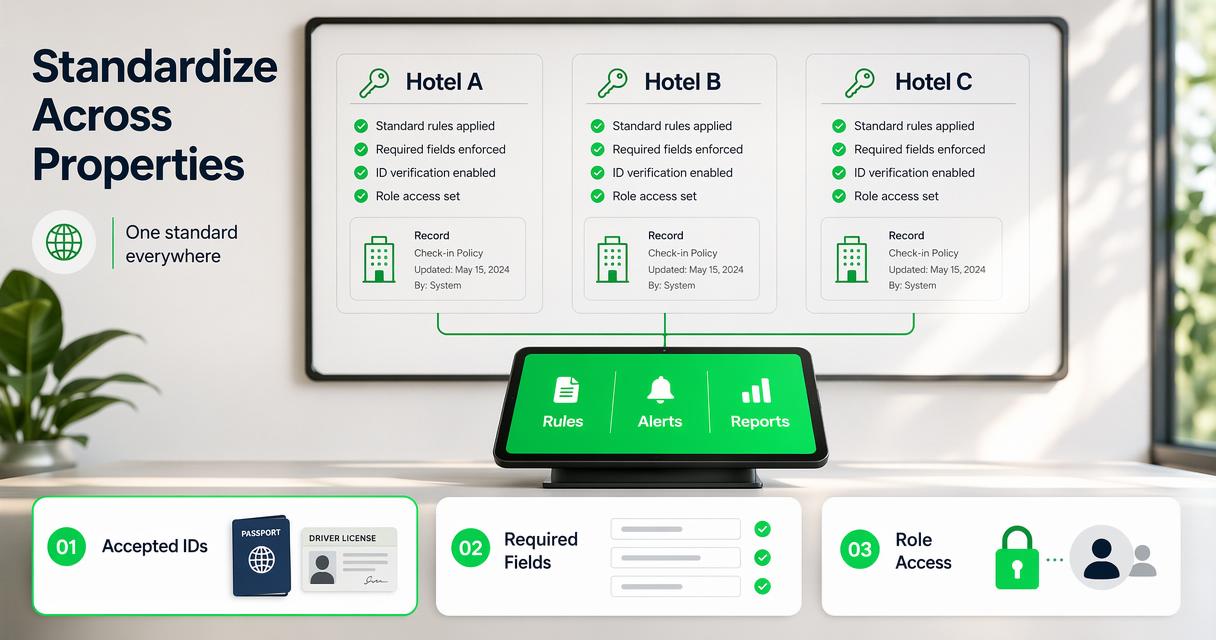
Single-property hotels can often fix process gaps through direct supervision. Groups with several front desks need system controls. A manager cannot personally monitor every night audit shift, every weekend arrival, or every incident note across the portfolio.
A platform approach helps hotel groups standardize:
- Which ID types are accepted.
- Which fields are required before check-in is complete.
- Which roles can access stored records.
- Which incidents trigger Do-Not-Rent status.
- Which alerts appear at the desk.
- Which reports managers can print or export.
The GuestBan ID Scanning platform is especially relevant for groups that need property-level and network-wide Do-Not-Rent list management. A front desk alert can help staff respond consistently when a guest record matches an internal risk policy.
For buyer criteria beyond this comparison, the best ID scanner for hotels guide covers ID support, PMS integration, DNR alerts, reporting, cloud access, and security controls.
Privacy and legal considerations for ID capture
Privacy and legal considerations should shape what hotels scan, store, access, and delete.
Identity documents contain sensitive personal information. A hotel that scans IDs should have written rules for document types, retention periods, access permissions, reporting, and guest data requests. The presence of a scanner does not remove the need for governance.
In the United States, guests commonly present driver’s licenses, state ID cards, passports, passport cards, military IDs, or permanent resident cards at check-in. These documents can include full legal names, dates of birth, addresses, document numbers, expiration dates, photos, and machine-readable barcode data. Because this information can be used to identify or verify a guest, hotels should treat government ID data as sensitive personal information, not ordinary contact data.
Hotel operators should avoid these weak practices:
- Allowing every user to access every stored ID record.
- Keeping scans longer than business or legal needs require.
- Mixing incident notes with casual comments.
- Exporting ID images without manager approval.
- Using one shared login at the front desk.
- Treating state laws as identical across the United States.
A practical program uses role-based access, limited retention, manager review, staff training, and documented legal review. Research methodology in social and technology fields often emphasizes choosing methods based on the question being answered, as seen in Dash and Paul’s 2021 comparison of CB-SEM and PLS-SEM methods in Technological Forecasting and Social Change (DOI). Hotel ID capture should follow the same logic: the method must fit the operational and legal purpose.
What to expect from hotel ID check-in in 2027
Hotel ID check-in in 2027 will likely move toward more integrated, policy-driven identity workflows rather than standalone scanning at the desk.
The current trends already shows a shift from basic scanner equipment toward digital identity verification, passport scanning, AI-assisted capture, and PMS-connected workflows. That direction suggests hotel operators will increasingly evaluate ID tools as part of risk management and operations, not as simple peripherals.
Expected changes include:
- More PMS-connected capture: fewer duplicate fields and cleaner guest profiles.
- Stronger permission controls: tighter manager access and better audit trails.
- Better international ID support: more attention to passports, visas, and non-U.S. formats.
- Expanded screening options: optional checks tied to property policy and local law.
- More structured incident reporting: fewer informal notes and more standardized records.
- Privacy-by-design settings: clearer retention, deletion, and access workflows.
GuestBan ID Scanning already aligns with several of these trends through cloud access, role-based permissions, multi-user access, supported ID types, optional screening support, and reporting tools. Properties evaluating next-year budgets can review guestban.com for platform details before replacing manual entry with a more controlled workflow.
FAQ
Do hotels have to scan a guest ID?
Hotels commonly check identity at arrival, but scanning requirements depend on property policy, jurisdiction, brand standards, and the type of transaction. Some hotels inspect an ID without storing an image, while others scan documents for verification, chargeback documentation, guest records, or Do-Not-Rent workflows. Legal review is recommended before setting retention rules.
Is an ID scanner faster than typing guest details?
An ID scanner is usually faster because it captures standard document fields and reduces typing during arrival. The time savings are most visible during peak check-in periods, group arrivals, late-night shifts, and high-turnover front desks. Staff still need to verify the captured information before completing the stay record.
Can manual ID entry be accurate enough for a small hotel?
Manual entry can be accurate enough when arrival volume is low, staff are well trained, and records are reviewed consistently. The main challenge is repeatability. As occupancy, staffing complexity, or dispute risk grows, typed records become harder to standardize across shifts and properties.
What ID types should a hotel scanner support?
A hotel scanner should support the documents the property actually sees, including U.S. and Canadian driver’s licenses, passports, passport cards, visas, green cards, Puerto Rico IDs, and relevant international IDs. Broader document support reduces manual exceptions and helps staff maintain the same workflow for domestic and international guests.
How should hotels compare ID scanning vendors?
Hotels should compare vendors by ID type support, PMS transfer options, secure cloud access, role-based permissions, reporting, chargeback documentation, Do-Not-Rent alerts, privacy controls, and multi-property management. Hardware speed matters, but the stronger long-term value comes from accurate records and consistent operational controls.
Conclusion
The ID scanner vs manual ID entry hotel check-in decision comes down to consistency. Manual typing can serve a small, low-risk property, but ID scanning is the stronger option for hotels that need faster arrivals, cleaner PMS records, better chargeback documentation, and repeatable front desk controls. The next step is practical: map the current check-in fields, list the documents most often presented, define retention rules, and compare those needs against a hotel-focused scanning platform. For properties ready to move beyond typing, visit guestban.com and evaluate how GuestBan ID Scanning fits the property’s PMS workflow, Do-Not-Rent process, and documentation standards.