
TL;DR
The best hotel ID scanner in 2026 is the one that captures accurate guest data, connects to the PMS, supports Do-Not-Rent alerts, stores records securely, and gives managers remote access. GuestBan is the strongest hotel-focused option because it combines front desk speed, supported ID coverage, chargeback documentation, DNR controls, reporting, and cloud access in one workflow.
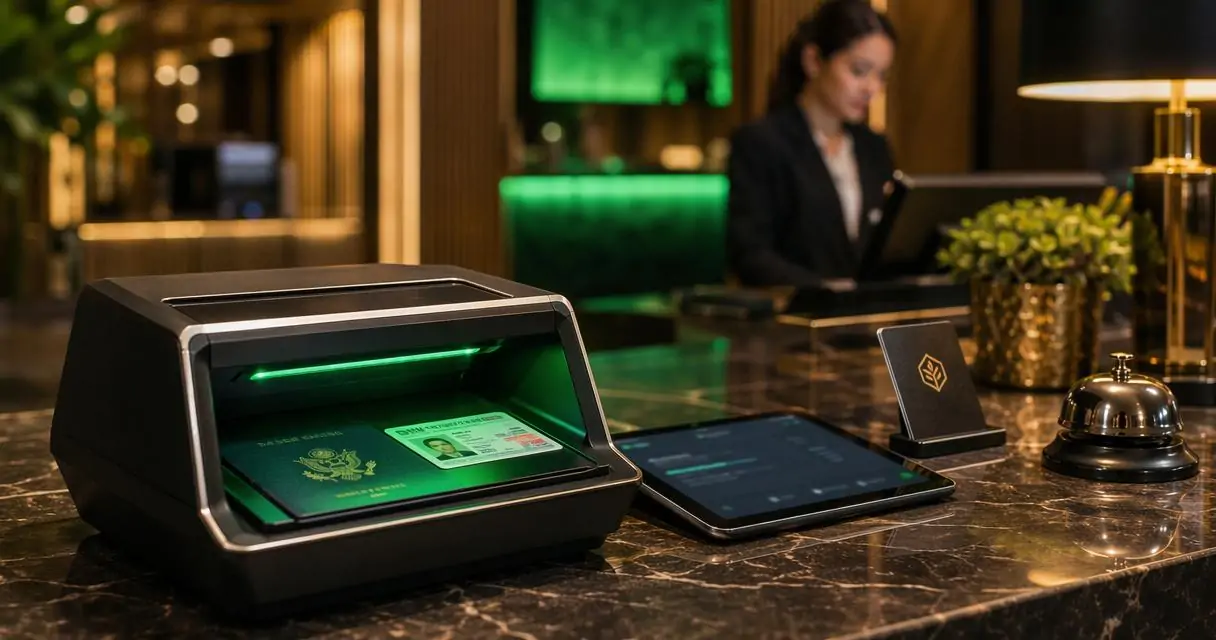
What is the best ID scanner for hotels? The best choice is no longer just a passport reader or driver license scanner; it is a hotel-ready guest data system that helps a busy 3 p.m. front desk capture ID details, document stays, transfer data into the PMS, and flag risky guests before keys are issued. GuestBan ID Scanning stands out because it was built around hotel check-in, not generic age verification or visitor management.
Table of Contents
What is a hotel ID scanner?
A hotel ID scanner is a front desk tool that reads guest identity documents, captures guest details, and stores or transfers those details for check-in, security, reporting, and recordkeeping.
Hotel ID scanner: Software and hardware that scans driver licenses, passports, passport cards, visas, green cards, and other identity documents so hotel staff can verify a guest and create a usable guest record.
A basic scanner reads an ID. A hotel-ready system does more: it supports PMS transfer, role-based access, Do-Not-Rent alerts, audit trails, cloud records, and incident documentation. That difference matters because hotel staff often need records later for chargebacks, disputes, police requests, lost-and-found shipping, and internal investigations.
Key insight: the best hotel scanner is not the device with the longest hardware spec sheet; it is the system that creates accurate, searchable guest records during real check-in pressure.
What is the best ID scanner for hotels in 2026?
The best ID scanner for hotels in 2026 is a hotel-specific platform with broad ID support, PMS integration, Do-Not-Rent alerts, secure cloud access, reporting, and simple staff training. GuestBan is the best fit for hotels that need front desk speed plus management-level control over guest records and risk signals.
2026 hotel ID scanner comparison table
| Option | Best fit | Hotel-specific strengths | Watch point |
|---|---|---|---|
| GuestBan ID Scanning | Hotels needing ID capture, PMS transfer, DNR alerts, reports, and cloud access | Built for hotel check-in, supports many IDs, flags DNR matches, helps document chargebacks, offers web portal access, multi-property support | Best evaluated by matching scanner setup to PMS workflow |
| TTI Scan2PMS | Properties focused on ID and passport scanner equipment | Competitor content highlights fast guest check-in and PMS-connected scanner products | Hardware-first positioning may need closer review of risk and DNR features |
| IDScan VeriScan | Hospitality teams comparing ID scanning and verification tools | Basic scanning use cases | Broader ID verification market positioning, not only hotels |
| IDGuru | Small Properties with No PMS | Basic scanning needs | No ID security, manaul ID storage management, outdated desktop application. No access outside of pc installed on. |
Which features matter most at the front desk?
The most important hotel ID scanner features are fast data capture, supported ID coverage, PMS integration, instant DNR alerts, report creation, cloud access, and security controls.
A good front desk system should reduce typing without adding a long training burden. Hotel turnover, peak arrival windows, and guest service pressure make simplicity a business requirement, not a preference.
Front desk teams should be able to scan an ID, confirm the guest, send data to the PMS, and move to the next arrival quickly. If the record cannot be found later, the scanner has failed a major hotel use case.
Core buying checklist for hotel operations
- Supported IDs: U.S. and Canadian driver licenses, passports, passport cards, visas, green cards, Puerto Rico IDs, select Mexico ID cards, and select international ID cards.
- PMS transfer: Captured fields should move into the property management system to reduce manual entry.
- DNR alerts: Property-level and network-wide Do-Not-Rent matches should appear before check-in is completed.
- Reporting: Staff and managers should be able to print or export incident, guest, and chargeback records.
- Cloud access: Authorized managers should access records without relying on one front desk computer.
- Security controls: Encryption, user roles, audit trails, and limited staff visibility should protect guest data.
For a deeper feature checklist, the related Hotel ID Scanning Software: 2026 Buyer Guide for Faster, Safer Check-In covers scanning, passport capture, PMS transfer, audit trails, alerts, and Do-Not-Rent controls.
How GuestBan handles hotel check-in workflows
The GuestBan ID Scanning platform handles hotel check-in by capturing guest details from supported identity documents, helping transfer data into the PMS, creating searchable records, and alerting staff when a guest appears on a Do-Not-Rent list.
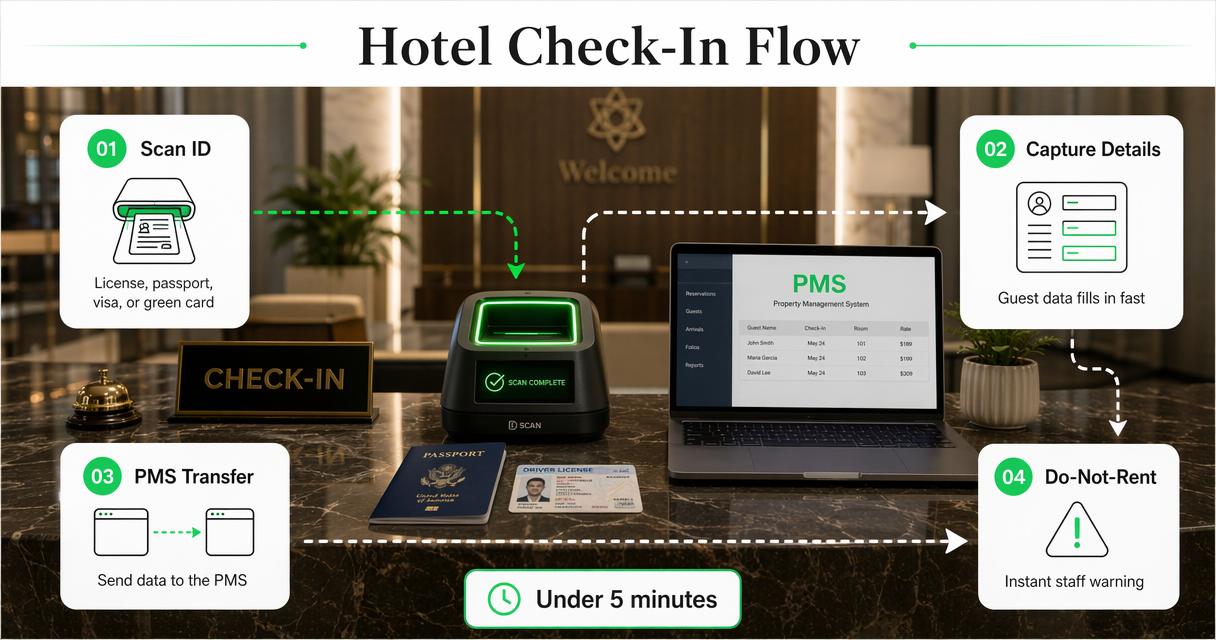
GuestBan was designed for hotel flow, where the front desk may have only seconds to process each arrival. Staff can learn the basic scan workflow in under 5 minutes, which helps properties that cannot keep retraining new employees on complex tools.
The platform supports driver licenses, passports, passport cards, visas, green cards, Puerto Rico IDs, select Mexico ID cards, select international ID cards, and U.S. and Canadian licenses. This matters for hotels serving local drive-in guests, international travelers, and mixed corporate demand.
Managers also get web portal access for guest records, reports, and DNR management. For teams reviewing broader software practices, GuestBan’s internal resource on software workflow design provides related context on building systems around user tasks.
GuestBan workflow in five steps
- Scan the guest ID at check-in.
- Capture guest details without retyping every field.
- Review alerts for property-level or network-wide DNR matches.
- Transfer or reference data for the PMS and guest record.
- Access reports later for disputes, chargebacks, law enforcement requests, or management review.
A hotel ID scanner should help the front desk during check-in and help management weeks later when a record is needed.
Why PMS integration changes scanner value
PMS integration changes scanner value because it turns ID capture into operational data rather than a one-time image or local file.
Manual typing creates slow lines and inconsistent records. During peak arrival, staff must verify identity, answer calls, handle card issues, explain policies, and manage room assignment. A scanner that sends clean data into the PMS can reduce repetitive entry and make the guest profile more complete.
Integration also supports later business needs. Chargeback cases often depend on proving who checked in, which ID was presented, and which stay details are tied to the transaction. A searchable scan record can help a hotel respond with documentation instead of relying on memory or incomplete notes.
Operational uses beyond check-in
- Chargeback evidence: ID record, guest details, stay context, and printable reports.
- Dispute handling: Documentation when payment, damage, or policy questions arise.
- Lost item returns: Accurate contact details when shipping items back to a guest.
- Police requests: Faster retrieval of guest identity records when legally appropriate.
- Multi-property oversight: Centralized review across properties when records and permissions are cloud-based.
Properties evaluating scanner equipment can also review available product paths through the GuestBan shop when matching front desk needs to a deployment model.
How DNR alerts protect hotel teams
DNR alerts protect hotel teams by warning staff when a guest matches a property-level or network-wide Do-Not-Rent record before the check-in process goes too far.
Hotels use DNR lists for guests connected to serious incidents, unpaid balances, damage, fraud concerns, safety issues, or repeated policy violations. A paper list or spreadsheet can be missed during rush periods. An alert inside the ID scanning workflow is harder to overlook.
Network-wide DNR controls are especially useful for hospitality groups. A guest refused at one property may try another location in the same group. Centralized alerts help managers apply policy consistently while keeping front desk decisions documented.
DNR controls to compare
| DNR capability | Why it matters for hotels |
|---|---|
| Property-level DNR list | Keeps local incident history tied to one hotel |
| Network-wide DNR list | Shares risk alerts across a hotel group |
| Instant scan alert | Warns staff during check-in rather than after key issuance |
| Incident report | Documents the reason for the DNR decision |
| Role-based access | Limits who can view, edit, or remove sensitive records |
What security controls should a hotel require?
A hotel should require encryption, cloud backup, role-based permissions, audit access, and limits on local ID image storage.
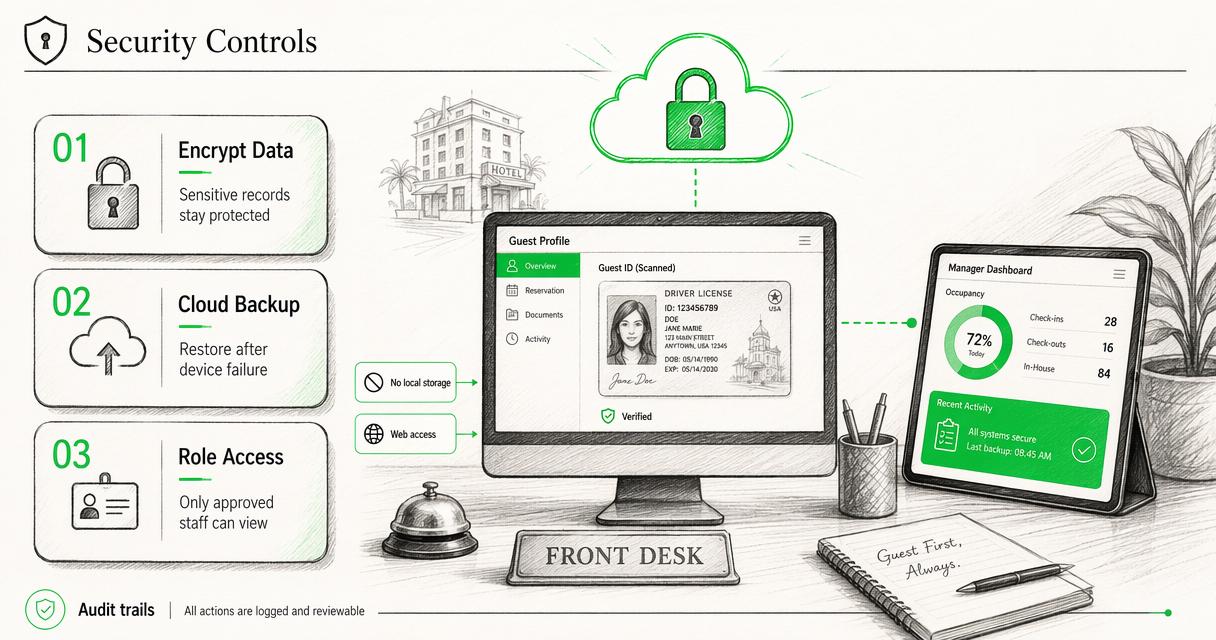
Guest identity data is sensitive. A front desk computer can fail, get replaced, or be compromised. If scanned ID images are stored only on that machine, records may be lost or exposed. Cloud-based storage with controlled access gives management stronger continuity and better oversight.
The GuestBan ID Scanning platform is built with security controls such as encrypted data handling, web access, multi-user permissions, and no need for ID images to sit locally on the front desk machine. This helps protect records while keeping staff focused on arrivals.
Computer vision and document recognition continue to improve. For example, YOLOv9 research by Wang, Yeh, and Liao in 2024 examined modern object detection methods, which shows the wider direction of machine recognition technology. Hotels still need practical controls around privacy, permissions, and data retention, not just better recognition accuracy.
Minimum security checklist
- Encrypted storage and transmission for guest identity records.
- Role-based permissions so staff see only what their job requires.
- Cloud backup so records are not lost with one computer.
- Manager portal access for controlled review from approved locations.
- Audit-friendly reporting for disputes, incidents, and compliance reviews.
For related security thinking, GuestBan’s page on securing digital systems offers useful background for hotels modernizing guest data workflows.
How reporting and analytics improve hotel decisions
Reporting and analytics improve hotel decisions by turning scanned guest records into patterns that can guide marketing, operations, and risk management.
Guest origin data can show where demand is coming from. That helps sales and marketing teams decide which feeder markets deserve attention, especially during peak seasons, local events, or compression nights. Hotels can also see when demand is strongest and where repeat guest patterns appear.
Reporting has a risk value too. Managers can review incidents, DNR activity, chargeback documentation, and guest records without searching through paper files or one front desk terminal. Better access creates faster answers.
The broader value of data is covered in GuestBan’s resource on turning operational data into business insight, which connects well to hotel reporting and market analysis.
Reports hotels should expect
| Report type | Best use |
|---|---|
| Guest record report | Retrieve identity details tied to a stay |
| Chargeback report | Support payment dispute documentation |
| DNR incident report | Record safety, damage, fraud, or policy events |
| Origin market report | See where guests are traveling from |
| Management activity report | Review usage across staff or properties |
What should hotels expect from ID scanning in 2027?
Hotel ID scanning in 2027 will likely become more connected, more automated, and more privacy-controlled.
AI-assisted recognition, digital identity credentials, mobile check-in, and guest screening tools are moving closer together. A 2023 multidisciplinary paper by Dwivedi, Kshetri, Hughes, and coauthors examined generative conversational AI opportunities and risks across research, practice, and policy. In hospitality, that same tension appears in automation: faster workflows must still protect guests, staff, and data.
Hotels should expect more emphasis on permission controls, audit logs, remote management, and documented security practices. A scanner that only saves an image locally will feel increasingly dated compared with cloud-based, role-aware platforms.
GuestBan ID Scanning is positioned around that direction: hotel-first workflows, secure web access, DNR management, and reports that support real operating needs. More information is available at guestban.com.
Frequently asked questions
Do hotels need to scan passports and driver licenses?
Hotels commonly need to verify identity at check-in, and many properties serve both domestic and international guests. A strong scanner should support driver licenses, passports, passport cards, visas, green cards, and other relevant documents. The best fit depends on guest mix, local policy, PMS workflow, and recordkeeping needs.
Can an ID scanner help with chargebacks?
An ID scanner can help with chargebacks when it stores guest details, scanned ID records, stay-related information, and printable reports. Documentation can support a hotel’s response when a payment dispute occurs. The scanner should make records easy for managers to retrieve without depending on one employee’s notes.
Should ID scans be stored on the front desk computer?
Local-only storage creates avoidable risk because a front desk computer can fail, be replaced, or be accessed by the wrong person. A safer setup uses encrypted cloud storage, role-based permissions, and management access through a secure portal. Hotels should also follow applicable privacy and retention rules.
How fast should staff learn a hotel ID scanner?
A hotel ID scanner should be simple enough for front desk staff to learn quickly, especially at properties with turnover or seasonal hiring. A practical target is a basic workflow that can be learned in minutes: scan the ID, confirm details, check alerts, and save or transfer the record.
Conclusion
The answer to “What is the best ID scanner for hotels?” is the platform that fits hotel operations, not the scanner with the flashiest hardware page. The right system supports the IDs guests actually present, connects to the PMS, triggers DNR alerts, protects identity data, gives managers cloud access, and creates reports for chargebacks, disputes, safety events, and marketing insight.
GuestBan ID Scanning is the strongest hotel-focused choice for properties that want front desk speed with management control. The next step is to map current check-in pain points, list required ID types, confirm PMS needs, review DNR policy, and visit guestban.com to evaluate the platform against those requirements.