
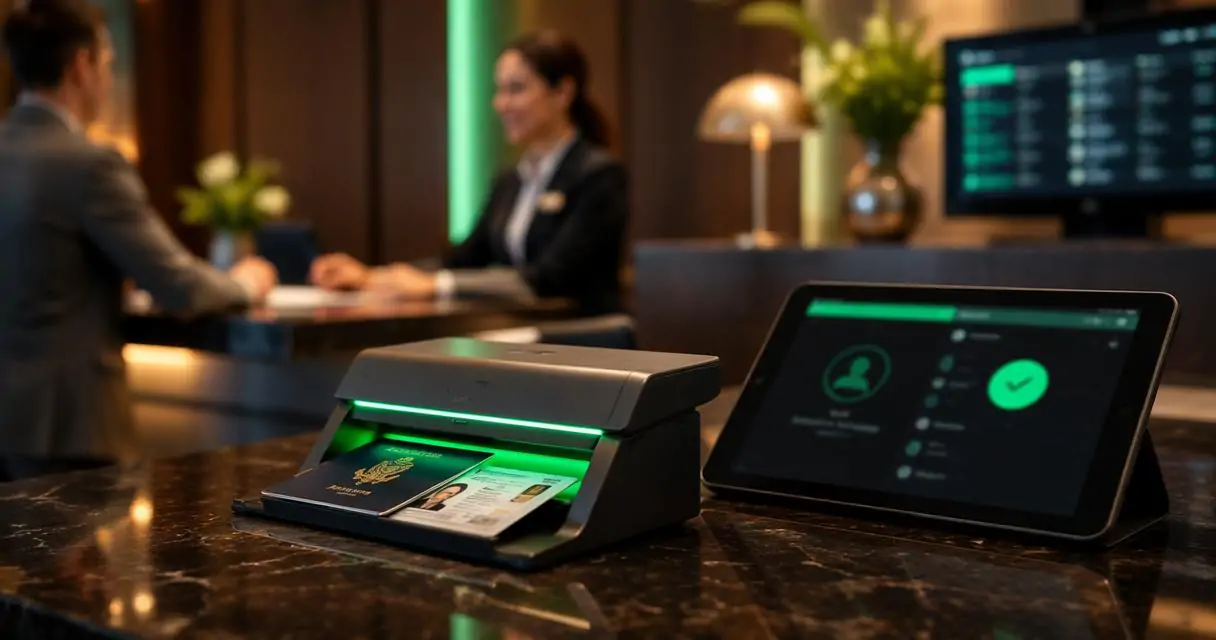
TL;DR
Hotel ID scanning software should capture licenses and passports, transfer clean guest data into the PMS, store records securely, and alert staff when a guest matches a risk list. Hotels should prioritize hospitality-specific workflows, audit trails, role-based access, and Do-Not-Rent management before buying hardware or scanner apps.
A slow ID check can affect the first three minutes of a guest stay, while a weak identity workflow can affect chargebacks, security reviews, and incident documentation long after checkout. Hotel ID scanning software gives hotel teams a structured way to capture identity documents, verify guest details, and move accurate data into operational systems. Hotels comparing check-in automation and risk controls can evaluate GuestBan ID Scanning as a hotel-focused option for ID capture, PMS transfer, and Do-Not-Rent alerts.
Table of Contents
What is hotel ID scanning software?
Hotel ID scanning software is a front desk system that scans guest identity documents, extracts key data, stores a digital record, and can transfer verified guest details into a property management system. It is built for check-in workflows, not general office scanning, because it connects identity capture with hotel operations, alerts, and documentation.
Hotel ID scanning software: A hospitality tool that captures information from driver licenses, passports, passport cards, and other identity documents for guest registration, verification, storage, and PMS transfer.
A scanner, in the general technology sense, optically captures images, printed text, handwriting, or objects and converts them into digital images, as described in the Wikipedia entry for image scanners. Hotel systems add document parsing, workflow rules, and guest record management on top of that basic scanning function.
Key insight: A hotel scanner should not be judged only by scan speed. The stronger test is whether it creates a usable guest record that supports check-in, security, chargeback response, and future audits.
Core terminology hotels should separate
ID capture: The process of scanning or photographing the identity document.
Data extraction: The software step that reads fields such as name, date of birth, document number, address, and expiration date.
PMS transfer: The movement of captured guest data into the property management system to reduce manual typing.
Audit trail: A time-stamped record showing who accessed, edited, exported, or reviewed guest identity information.
Do-Not-Rent list: A property-level or group-level list used to flag guests connected to prior incidents, unpaid balances, chargebacks, fraud concerns, or policy violations.
What should hotel ID scanning software do in 2026?
A modern hotel ID scanning platform should capture multiple document types, transfer clean data into the PMS, store records securely, generate audit trails, and show front desk alerts before a room is assigned. In 2026, the best systems connect registration accuracy with risk prevention rather than treating scanning as a standalone task.
The strongest buyer requirement is fit for hospitality operations. Competitor pages in the search results often emphasize five-second registration, equipment bundles, or generic hospitality scanning, but many under-explain the operational controls hotel managers need after the scan.
Essential capability checklist
| Capability | What it should support | Why it matters |
|---|---|---|
| License scanning | U.S. and Canadian driver licenses where supported | Speeds domestic guest registration |
| Passport scanning | Passports, passport cards, visas, and related travel IDs | Supports international arrivals |
| PMS data transfer | Name, address, document fields, and registration data | Reduces manual entry errors |
| Secure image storage | Stored document images with access controls | Supports audits and disputes |
| Audit trails | Time stamps, user activity, and record history | Helps managers review access and incidents |
| Front desk alerts | Matches against internal lists or screening rules | Flags issues before keys are issued |
| Multi-property controls | Central or property-specific rules | Helps hotel groups manage risk consistently |
The buyer checklist is simple: scan the document, extract accurate data, move it to the PMS, secure the record, log access, and alert staff when risk rules match.
How does ID scanning work during hotel check-in?
Hotel ID scanning works by capturing the guest document, reading the document data, matching the information to the reservation workflow, and saving a searchable record for authorized hotel staff. The process should feel fast at the desk, but it also needs background controls for accuracy and accountability.
- Guest presents an identity document. The front desk agent scans a driver license, passport, passport card, visa, or supported ID card.
- The scanner captures the image. The device or camera creates a digital image of the document.
- The software extracts fields. Optical reading and parsing identify name, address, document number, date of birth, and expiration details where available.
- The record is reviewed. The agent confirms that captured details match the guest and the reservation.
- The PMS receives data. Approved fields transfer into the hotel's property management system.
- Rules run in the background. Internal lists, Do-Not-Rent records, or screening settings can trigger alerts.
- The record is stored. Authorized staff can later access the scan, report, or incident record based on role permissions.
Front desk workflow map
| Check-in moment | Software action | Staff outcome |
|---|---|---|
| ID presented | Captures front and relevant document data | Less typing at the desk |
| Data extracted | Populates guest fields | Fewer spelling and address errors |
| PMS transfer | Sends details to the reservation record | Faster registration |
| Alert check | Compares against internal rules | Earlier risk awareness |
| Record storage | Saves evidence and activity history | Better post-stay documentation |
A useful system also makes exceptions easy to handle. Manual review remains necessary when a document is damaged, a guest uses an uncommon international ID, or a reservation name does not match the presented document.
Which ID types should hotels support?
Hotels should support the identity documents most likely to appear at the front desk: driver licenses, passports, passport cards, visas, permanent resident cards, and regional ID cards relevant to the property's guest mix. Coverage matters because unsupported IDs push staff back into manual entry.
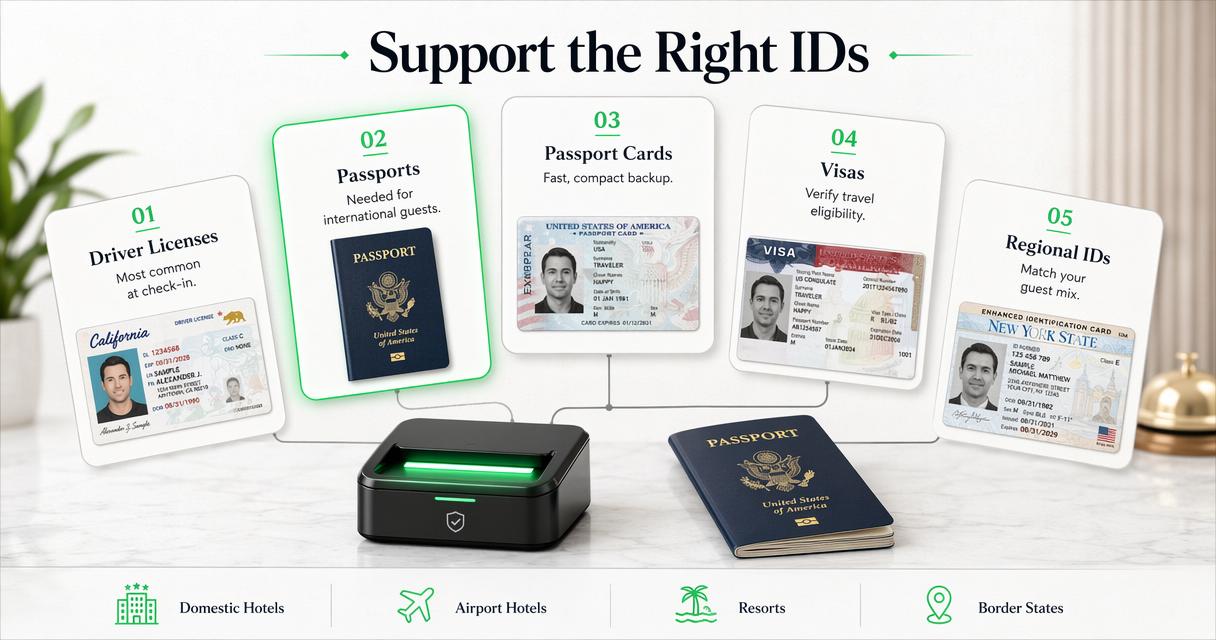
Domestic limited-service hotels may rely heavily on driver licenses. Airport hotels, resorts, convention properties, and urban hotels need stronger passport and international document support. Border-state hotels may also see more regional cards, permanent resident cards, and cross-border IDs.
Document support priorities by property type
| Property type | Priority IDs | Operational reason |
|---|---|---|
| Highway hotel | Driver licenses, state IDs | High domestic transient volume |
| Airport hotel | Passports, passport cards, visas | International arrivals and crews |
| Resort | Passports, licenses, permanent resident cards | Mixed leisure and foreign guests |
| Extended stay | Licenses, passports, green cards | Longer records and billing exposure |
| Multi-property group | Broad ID support across markets | Standardized training and records |
Support for more ID types does not remove the need for staff judgment. A scanned record helps organize information, while the property's policies determine what document is acceptable for check-in.
How should PMS integration be evaluated?
PMS integration should be evaluated by field accuracy, workflow fit, transfer speed, exception handling, and the amount of manual correction still required after a scan. A hotel gains little from scanning if front desk staff must retype the same information into the PMS.
Integration needs vary by brand, management company, and property management system. Some hotels need direct field transfer during check-in. Others need export files, middleware, or browser-based workflows. The safest buying process starts with the exact PMS version, not just the PMS brand name.
PMS integration questions for buyers
- Which guest fields transfer into the PMS, and which remain in the scanner portal?
- Does the transfer happen during the active check-in flow?
- Can the system handle duplicate profiles or returning guests?
- What happens when extracted data conflicts with an existing reservation?
- Does the integration support multiple properties with different PMS setups?
- Are field mappings documented for training and support?
A direct integration should also protect data quality. Clean capitalization, address formatting, and document field mapping help downstream departments, including accounting, security, and guest services.
What security controls protect scanned guest IDs?
Security controls should include encrypted storage, role-based permissions, secure web access, audit logs, retention controls, and clear limits on who can view or export identity records. Scanned IDs contain sensitive personal information, so convenience should never outrank access discipline.
The hotel industry handles identity documents for legal, operational, and risk reasons, but those records can create exposure if access is loose. A good system narrows access by job role and logs activity in a way managers can review.
Research on AI governance by Dwivedi, Kshetri, Hughes, and co-authors in the International Journal of Information Management examined opportunities, challenges, and policy implications of generative AI. The practical takeaway for hotels is broader than AI: any automated decision or data capture system needs governance, access control, and human oversight.
Security controls to require before purchase
| Control | Buyer expectation |
|---|---|
| Role-based access | Agents, managers, and administrators receive different permissions |
| Audit logs | Views, edits, exports, and record actions are traceable |
| Secure portal | Records are available only through authenticated access |
| Retention settings | Stored IDs follow property policy and legal requirements |
| Export controls | Reports and images are limited to approved users |
| Multi-user management | Former employees can be removed quickly |
Sensitive guest data should be treated as operational evidence, not as a shared folder of images.
How do alerts and Do-Not-Rent lists improve risk control?
Alerts and Do-Not-Rent lists improve risk control by warning staff when a scanned guest record matches a property or network-level concern before check-in is completed. This gives hotels a chance to follow policy early, rather than discovering a problem after room assignment.
Common alert use cases include prior property damage, unpaid balances, chargeback disputes, banned guests, security incidents, and internal watchlist rules. The most useful systems show clear information without forcing front desk agents to search old notes or message another property.
Alert types that matter at the desk
- Property-level alerts: Records created and managed by a single hotel.
- Network-wide alerts: Shared risk records across a hotel group or management company.
- Incident-linked alerts: Alerts connected to past reports, photos, chargeback files, or manager notes.
- Screening alerts: Optional checks based on configured third-party or internal screening rules.
- Document alerts: Notifications tied to expired, mismatched, or unsupported document details.
Alert governance is as important as alert speed. Hotels need clear rules for who can add a guest, what evidence is required, how long a record remains active, and how disputes or corrections are handled.
How GuestBan ID Scanning handles hotel workflows
GuestBan ID Scanning is built around hotel identity capture, PMS transfer, secure records, and Do-Not-Rent controls rather than generic visitor management. The platform supports driver licenses, passports, passport cards, visas, green cards, Puerto Rico IDs, select Mexico ID cards, and select international ID cards.
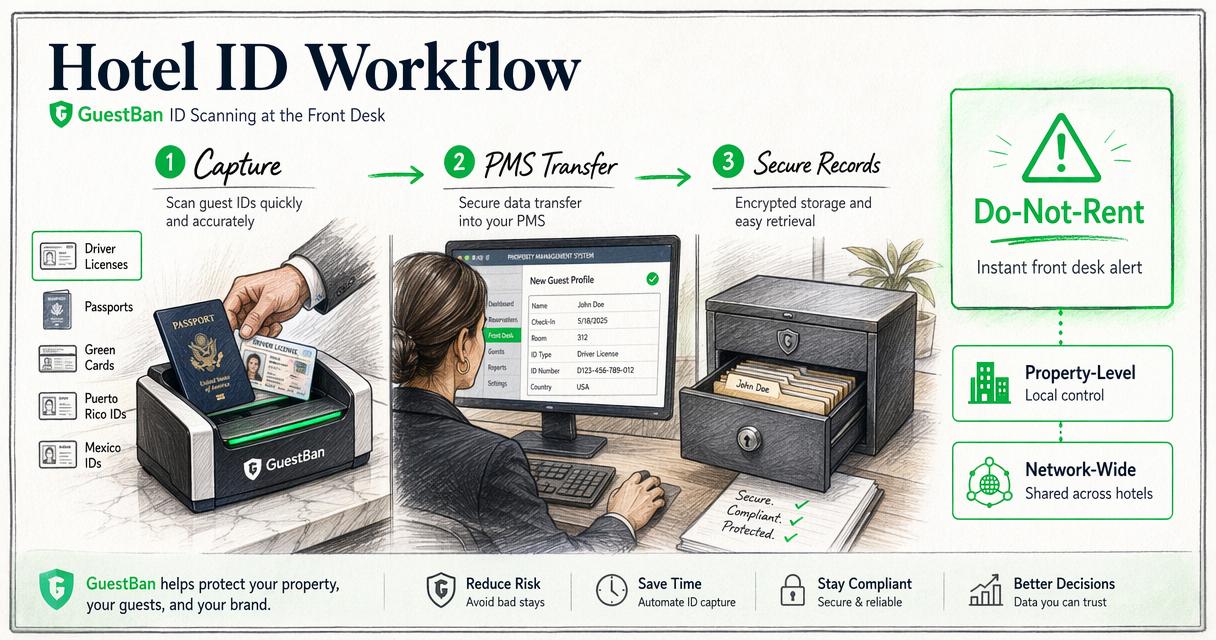
The GuestBan ID Scanning platform also supports property-level and network-wide Do-Not-Rent list management with instant front desk alerts. That matters for hospitality groups because risk often moves between properties, while guest data and incident evidence can remain scattered.
GuestBan workflow fit
| Hotel need | GuestBan ID Scanning support |
|---|---|
| Fast ID capture | Scans licenses, passports, and supported identity documents |
| PMS transfer | Moves captured guest details into hotel systems where configured |
| Evidence records | Stores ID images, guest details, printable reports, and incident reports |
| Do-Not-Rent management | Supports property and network lists with desk alerts |
| Secure access | Uses web-based access, cloud storage, permissions, and controls |
| Optional screening | Supports add-ons such as sex offender checks, criminal background screening, UV capture, and law enforcement reporting |
Hotels researching implementation details can visit guestban.com to compare the platform against current front desk, risk management, and documentation requirements.
What buying mistakes should hotels avoid?
Hotels should avoid buying ID scanning tools based only on hardware price, scan speed, or a generic promise of automation. The better buying test is whether the tool improves the full check-in and post-incident workflow across front desk, management, accounting, and security teams.
A low-cost scanner can still create expensive problems if it leaves staff copying data, saving images outside policy, or missing risk alerts. Software fit matters more than the scanner shell sitting on the desk.
Common evaluation mistakes
- Choosing a scanner before confirming PMS compatibility.
- Treating passport support as optional at properties with international guests.
- Storing scanned IDs without role-based access or audit logs.
- Ignoring Do-Not-Rent workflows until after an incident occurs.
- Failing to define retention rules for identity records.
- Buying a generic visitor tool that lacks hotel registration logic.
Procurement teams should also ask who owns training. A system that only one manager understands can fail during night audit, high-volume arrivals, or staff turnover.
What should hotels expect in 2027?
Hotels should expect ID scanning to become more connected to digital identity, fraud prevention, guest risk workflows, and AI-assisted review by 2027. The front desk will still need human judgment, but more systems will pre-check documents, reservations, and internal records before arrival.
Several technology trends point in that direction. Identity verification companies such as Acuant, described by Wikipedia as a former identity verification, document authentication, and fraud prevention provider headquartered in Los Angeles, helped define the broader market for document authentication. The hospitality version of that market is now becoming more operational and less hardware-only.
Research on connected systems, such as Ahangar, Ahmed, Khan, and co-authors' survey of autonomous vehicle communication technologies, is not hotel-specific, but it reflects a wider technology pattern: automated systems depend on reliable communication, data exchange, and error handling. Hotel ID tools will face the same pressure as PMS, payment, mobile key, and security systems become more connected.
Likely 2027 shifts
| Trend | Expected hotel impact |
|---|---|
| More digital ID acceptance | Policies will need to define accepted digital credentials |
| Stronger fraud signals | Document, payment, and reservation risk may be reviewed together |
| More AI-assisted review | Staff may receive clearer alerts and suggested next steps |
| Tighter data governance | Access logs and retention settings will receive more attention |
| Group-level intelligence | Hotel groups will centralize risk rules across properties |
Technology will not replace policy. The hotels that benefit most will have written check-in rules, clear escalation paths, and trained staff.
FAQ about hotel ID scanning software
Hotel leaders usually ask about speed, legality, PMS fit, storage, and front desk adoption before approving an ID scanning project. The answers below focus on practical selection and implementation issues rather than vendor slogans.
Does every hotel need to scan guest IDs?
Not every property must use scanning, but most hotels benefit from a structured identity capture process. Local law, brand standards, insurance expectations, and management policy may affect requirements. Scanning becomes more valuable when a property handles chargebacks, international guests, security incidents, or repeated Do-Not-Rent concerns.
Can ID scanning reduce chargeback work?
ID scanning can support chargeback response by preserving guest details, document images, registration data, and related reports. It does not guarantee a dispute win because card rules and evidence standards vary. The operational value comes from having organized documentation instead of searching emails, paper registration cards, or camera footage.
Is passport scanning different from license scanning?
Passport scanning often requires different document reading support than driver license scanning. A hotel with international guests should confirm passport, passport card, visa, and permanent resident card coverage before purchase. The scanner should also handle names, nationality fields, document numbers, and expiration dates in a format staff can verify.
Should scanned IDs be stored in the PMS?
Many hotels prefer a dedicated secure portal or integrated identity record rather than storing raw ID images directly in the PMS. The right setup depends on PMS capability, policy, and access controls. Stored records should have role permissions, audit logs, retention rules, and export limits.
Conclusion
The best hotel ID scanning software in 2026 does more than capture a document image. It supports licenses and passports, transfers clean data into the PMS, protects stored records, logs access, and warns staff when a guest matches a risk rule or Do-Not-Rent record.
A practical next step is to map the current check-in process, list supported ID types, confirm PMS integration needs, and define who may access stored records. Hotels that want ID capture tied directly to Do-Not-Rent management, chargeback documentation, and secure web access can compare those requirements with GuestBan ID Scanning, then review implementation details at guestban.com.