
TL;DR
Choose a Mews ID scanning workflow based on documented connectivity, accurate guest-record matching, and clear data permissions. Verify native, partner, or manual handling first, then pilot field mapping and support procedures before rolling out across properties.
An ID scanner can read a passport correctly and still send its details to the wrong guest profile. ID scanning for Mews PMS should therefore be evaluated as a complete check-in workflow, not just a document-reading feature.
ID scanning: Software-assisted capture of information from identity documents for review and, where supported, transfer into a guest record.
For hotels considering GuestBan ID Scanning, I recommend starting with the intended front-desk process and requesting written confirmation of the Mews connection. In 2026, the buying question is specific: which information reaches which record, through which supported route?
Table of Contents
What are the options for ID scanning alongside Mews?
ID scanning alongside Mews can use a native workflow, a documented partner connection, or a separate scanning tool with manual transfer. Hotels should distinguish these routes because document capture, automatic profile updates, and vendor support are separate capabilities. Evidence should identify the actual workflow available to your property.
Native, partner, and manual routes compared
Each route requires different evidence before a hotel can rely on it.
| Route | Evidence to request | Operational consideration |
|---|---|---|
| Native Mews workflow | Current Mews instructions and account availability | Confirm supported devices, documents, and fields |
| Partner connection | Named connector, setup documentation, and support owner | Confirm matching rules and update permissions |
| Manual transfer | Demonstrated scan, review, and entry procedure | Define staff checks and data storage |
The supplied search research includes a Mews Operations help result about scanning identity documents. That supports investigating a native route, but the available excerpt doesn't establish its complete field coverage, hardware requirements, or availability for every account.
Verified integration: A connection supported by current documentation and demonstrated for the hotel's intended use.
Manual workflow: Staff review captured information and enter approved details into Mews without an established automated connection.
Buying guidance: A scanner demonstration proves capture. A successful update to the intended Mews guest record proves the handoff.
I would choose a native route when its documented scope fits the property, a partner connection when its supported workflow adds needed functionality, and manual handling when a controlled staff process is sufficient.
How do you map scanned fields to Mews guest records?
- Identify the Mews guest record connected to the reservation.
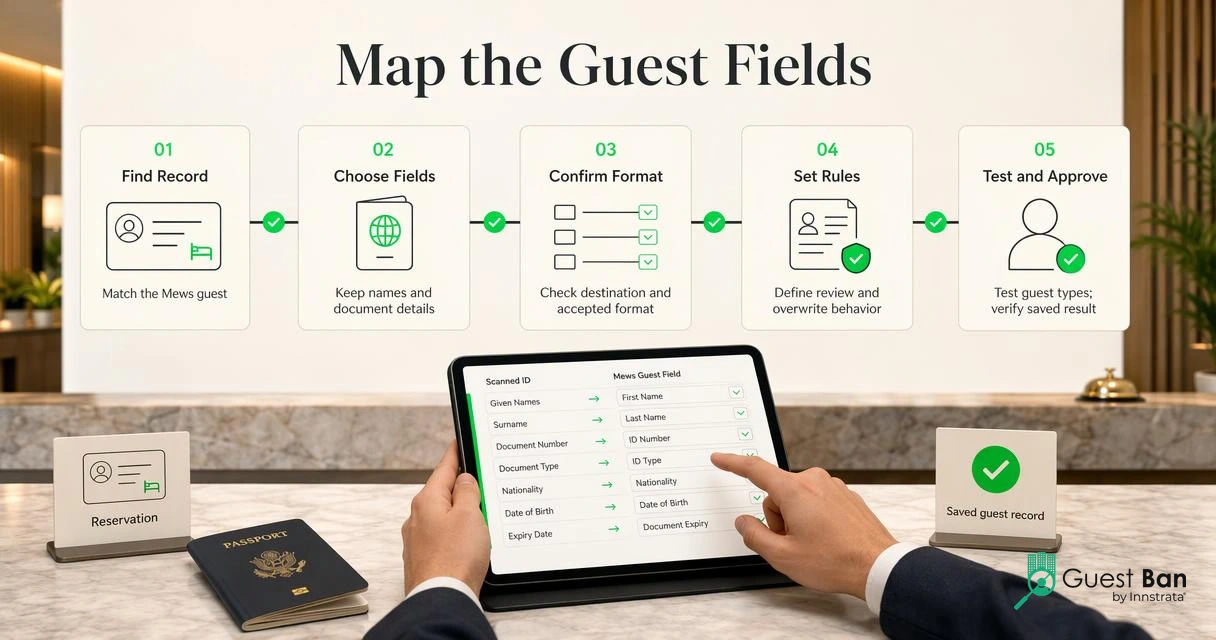
- Select the document fields your hotel needs.
- Confirm each destination field and accepted format.
- Set review and overwrite rules.
- Test new, returning, and group guests.
- Approve the mapping only after staff can verify the saved result.
Field-mapping checklist for the pilot
Field mapping should document meaning and update behavior, not just matching labels.
- Names: Preserve given names, surnames, accents, and compound names appropriately.
- Birth date: Confirm date order and handling of unreadable values.
- Document details: Establish destinations for document type, number, issuing country, and expiry where supported and needed.
- Nationality and address: Keep distinct concepts separate; don't infer citizenship from an address.
- Contact details: Preserve existing email addresses and phone numbers unless an approved source supplies replacements.
- Record identifiers: Document how the workflow selects the guest and reservation.
- Images: Decide whether retaining a document image serves a lawful, necessary purpose.
For example, test a returning guest whose passport surname differs from the reservation name. I would require staff review rather than let name similarity alone determine the update.
Record the original value, scanned value, approved value, and final destination during testing. For storage decisions, read the passport scanning versus photocopying guide.
Which vendor questions establish a supportable workflow?
A supportable workflow has documented matching rules, limited access permissions, visible outcomes, and a named support owner. Ask vendors to demonstrate these controls using your property setup rather than relying on a general statement that their scanner works with hotel software.
Questions for vendors and property administrators
The answers should become part of your acceptance criteria.
- Matching: Which identifiers select an existing profile? What happens when several records look similar?
- Updates: Can staff preview changes? Which existing values can be overwritten?
- Permissions: Which Mews credentials or permissions are required, and who authorizes access?
- Failures: How does staff distinguish a completed update from a pending or unsuccessful transfer?
- Support: Who owns scanner, connector, and Mews-side troubleshooting?
- Privacy: Where are extracted fields and images stored, and how are retention and deletion handled?
- Multiple properties: Are access, settings, and support responsibilities separated by hotel?
A successful document read doesn't establish identity authenticity, guest authorization, or a lawful reason to retain every captured field. Those are separate decisions.
Use the hotel ID scanning compliance checklist to organize notice, access, retention, and staff training. If an API connection is proposed, the hotel ID scanning API buying guide offers follow-up evaluation topics.
Evaluating GuestBan ID Scanning for a Mews property
GuestBan ID Scanning is a relevant option to evaluate against your hotel's document-capture and guest-record requirements. The appropriate next step is a workflow discussion supported by written confirmation of Mews compatibility, the proposed connection method, mapped fields, and responsibilities.
A focused demonstration brief
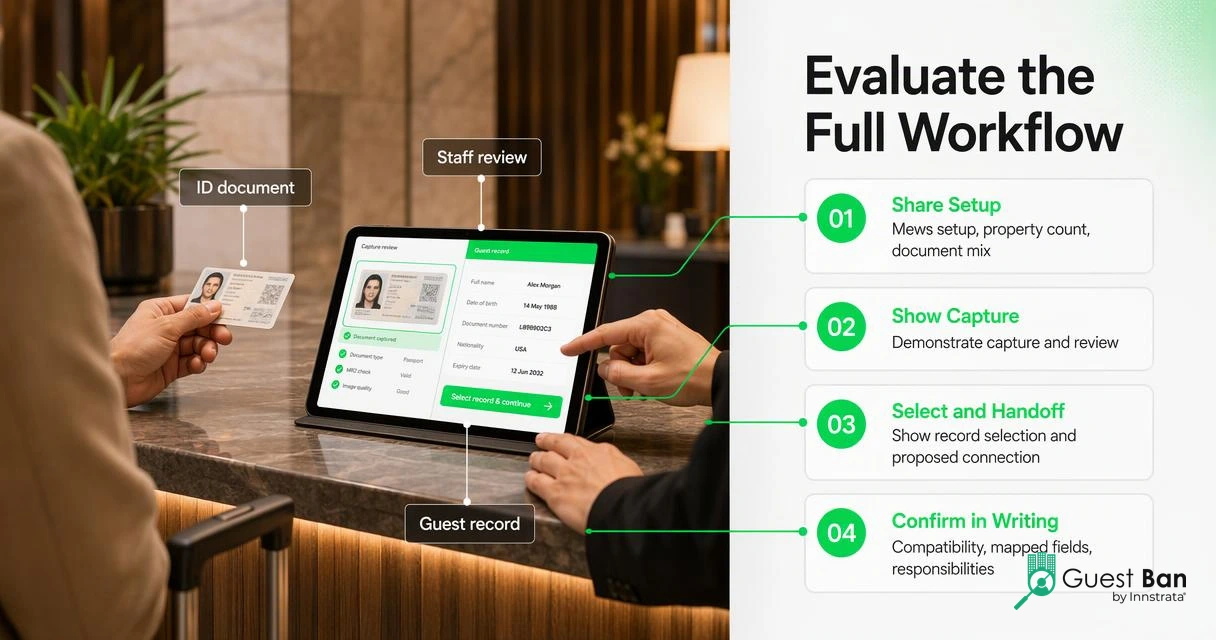
A property-specific demonstration should show the entire process from document presentation to staff confirmation.
- Share your Mews setup, property count, document mix, and intended capture method.
- Request a demonstration covering capture, review, record selection, and the proposed handoff.
- Ask which functions belong to the scanner, a connector, Mews, or staff.
- Agree on acceptance tests and support ownership before procurement.
I would pilot one desk before a group-wide rollout. Use representative documents and approved test records, then compare correction effort, completed handoffs, and staff confidence. These are local measurements to collect, not promised performance benchmarks.
Frequently asked questions about Mews ID capture
Hotels should resolve these practical questions before selecting equipment or authorizing guest-data access.
Does Mews offer native identity-document scanning?
The supplied research identifies a Mews Operations help article about scanning identity documents. Confirm current instructions, account availability, supported equipment, and populated fields directly with Mews. A search excerpt alone doesn't establish the exact workflow available to your hotel or whether a separate scanner connection is needed.
Can any ID scanner automatically populate Mews?
Automatic population requires a supported connection and defined field mapping; reading a document isn't enough. Ask for current documentation and a demonstration that saves approved information to the intended guest profile. A standalone scanner may instead support a staff-reviewed manual process, which should be described clearly before purchase.
Should hotels keep a scanned passport image?
Keep a passport image only when your hotel's legal obligations and documented purpose justify retention. Extracting required registration details and retaining the complete document are different choices. Review applicable requirements, restrict access, set a retention schedule, and establish deletion procedures before enabling image storage.
Conclusion
For ID scanning for Mews PMS, make verified workflow behavior your purchase criterion. Prepare your field checklist and acceptance tests, then visit guestban.com to discuss GuestBan ID Scanning for your property. Request written compatibility confirmation and a property-specific demonstration before approving rollout.