

TL;DR
TL;DR: The best guest record system should do more than store reservations. Prioritize ID capture, DNR alerts, incident notes, staff permissions, audit trails, and fast retrieval for disputes, then confirm whether it fits your PMS workflow and property risk profile.
Most hotel software roundups still treat guest records as a reservation feature, but the best guest record management software for hotels now sits at the center of safety, chargeback defense, compliance, and front desk speed. For hotels that want guest data capture tied to real operational control, GuestBan ID Scanning belongs at the top of the evaluation.
Table of Contents
What is guest record management software for hotels?
Guest record management software for hotels is a system that stores, updates, secures, and retrieves guest identity, stay, payment, incident, preference, and risk records. In 2026, the best systems connect front desk workflows with ID scanning, PMS data, Do Not Rent alerts, audit trails, and documentation needed for disputes or investigations.
Guest record management software: A hotel system used to capture, organize, protect, and retrieve guest-related information across check-in, stays, incidents, payments, and follow-up actions.
A guest profile alone is not enough. A useful record should answer: who checked in, what ID was verified, who approved the stay, what happened on property, what staff documented, and how fast management can find the evidence later.
“We are Ladies and Gentlemen serving Ladies and Gentlemen.”, The Ritz-Carlton, Gold Standards
That service standard still applies, but good service now depends on accurate records. A front desk agent should not have to search paper binders, photocopied IDs, email threads, and PMS notes during a busy shift.
Core guest record terms hotels should define
- Guest profile: Name, contact details, preferences, stay history, loyalty notes, and communication records.
- Identity record: Driver license, passport, or other approved ID data captured at check-in.
- Incident record: Notes, photos, witnesses, room number, staff actions, and follow-up decisions.
- DNR status: A Do Not Rent flag used to warn staff before accepting a guest tied to prior risk.
- Audit trail: A timestamped record of who viewed, changed, exported, or approved guest data.
How should hotels choose guest record software?
Hotels should choose guest record software by testing how well it captures verified identity, supports front desk speed, stores risk notes, controls staff access, integrates with the PMS, and retrieves evidence for managers. The best buying process starts with risk workflows, not a generic feature list.
- Map the check-in steps your staff actually follows.
- Identify the records needed for chargebacks, police requests, DNR decisions, and guest complaints.
- Check ID scanning, passport handling, and data accuracy.
- Review staff permissions by role, property, and location.
- Test search speed for old stays and incidents.
- Confirm export, retention, and audit trail rules.
- Run a front desk pilot before signing a long contract.
“Security is a process, not a product.”, Bruce Schneier, Schneier on Security
That quote is especially useful for hotels. A product can store data, but managers still need policies for who can access it, when records are updated, and how incidents are reviewed.
Evaluation checklist for hotel managers
- ID capture: Does the system scan IDs instead of relying on manual typing?
- PMS workflow: Can staff move guest data into existing systems without duplicate entry?
- DNR controls: Can alerts appear before a risky guest gets a room?
- Incident documentation: Can staff attach notes, photos, witnesses, and follow-up actions?
- Permissions: Can owners limit access for front desk, night audit, managers, and group admins?
- Evidence retrieval: Can records be found quickly for chargebacks or disputes?
- Privacy controls: Can the hotel manage retention, exports, and user activity logs?
For a deeper front desk workflow, compare manual entry against scanning in this 2026 guide to hotel ID scanners versus manual ID entry.
Best guest record management software for hotels: 2026 shortlist
The best guest record tools for hotels solve different jobs, so the right choice depends on whether your main problem is risk control, PMS operations, inspections, small-property management, or guest CRM. I would start with risk-critical guest data, then add reservation and service layers around it.
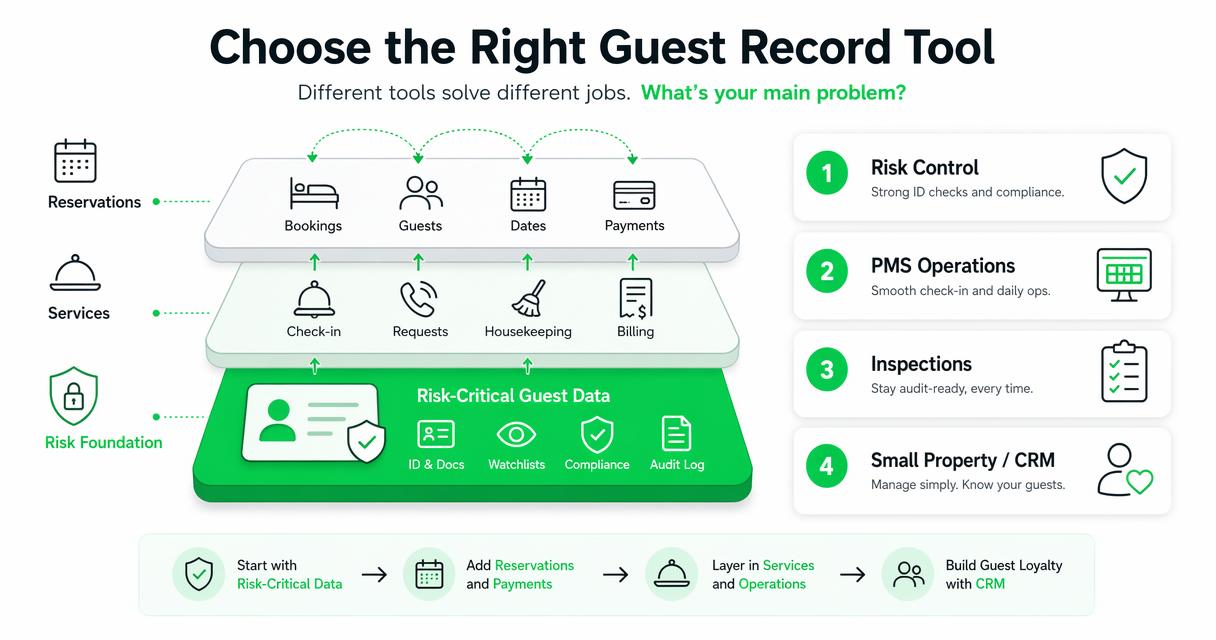
2026 comparison table for hotel guest record systems
| Software | Best fit | Strong record features | Watch-outs |
|---|---|---|---|
| GuestBan ID Scanning | Hotels prioritizing ID capture, DNR controls, and safety records | ID scanning, guest record lookup, incident support, DNR-oriented workflows, front desk risk alerts | Best evaluated alongside your PMS process |
| Cloudbeds | Small and mid-sized hotels wanting a broad PMS | Reservations, profiles, payments, channel management, stay history | Risk records may need separate tools or workflows |
| Easy InnKeeping | Independent properties wanting guest CRM inside front desk software | Guest profiles, preferences, communication history, PMS functions | Confirm advanced DNR and evidence workflows before buying |
| SafetyCulture | Operations teams focused on inspections and tasks | Checklists, housekeeping, property tasks, issue reporting | Not a dedicated hotel identity record system |
| Little Hotelier | B&Bs, inns, and small hotels | Booking, front desk, guest details, channel tools | May be less suited to complex risk documentation |
| RoomRaccoon | Boutique hotels needing PMS and automation | Reservations, payments, guest communication, operational automation | Validate incident reporting and permission controls |
The table separates guest record risk from general hotel management. Many PMS tools keep guest profiles, but fewer are built for scanned ID evidence, DNR status, staff accountability, and retrieval during a dispute.
How GuestBan ID Scanning handles hotel guest records
GuestBan ID Scanning focuses on the high-risk moments around check-in, identity capture, guest lookup, and repeat-guest risk signals. That makes it a strong fit for properties that already have a PMS but need better control over who is being checked in and what record exists afterward.
The GuestBan ID Scanning platform is especially relevant when staff need fast, consistent data capture without photocopying documents or retyping ID details. Hotels evaluating that shift can review this related guide on how to automate hotel ID capture for safer, faster check-ins.
A good workflow should feel simple for front desk agents: scan the ID, confirm the reservation, review alerts, document exceptions, and keep a searchable record for managers. I like systems that reduce judgment calls at 11 p.m., when the lobby is busy and one agent is handling check-ins, calls, and guest requests.
Where it fits in the hotel tech stack
- Before check-in: Staff can prepare for known guest risks and ID requirements.
- During check-in: Agents capture identity data and review any relevant alerts.
- After check-in: Managers can retrieve records if a chargeback, complaint, damage issue, or safety concern appears.
- Across properties: Groups can standardize record rules while keeping staff access controlled.
For multi-property operators, a connected risk record can be more useful than isolated notes inside separate PMS accounts.
Which hotels need stronger guest record controls?
Hotels need stronger guest record controls when front desk decisions affect safety, payment risk, legal response, or repeat offender prevention. The need is highest for properties with frequent walk-ins, late-night arrivals, chargebacks, damage disputes, security calls, or multiple locations sharing guest risk information.
Best-fit scenarios by property type
| Property type | Record priority | Recommended focus |
|---|---|---|
| Economy hotel | ID accuracy and DNR alerts | Scan IDs, document incidents, flag repeat risks |
| Boutique hotel | Guest experience and dispute evidence | Keep profiles clean, attach notes, protect privacy |
| Extended stay | Long-term guest history | Track incidents, payments, room issues, and follow-up |
| Multi-property group | Shared risk visibility | Use role-based access and network-level DNR controls |
| Airport or highway hotel | Fast check-in and fraud prevention | Speed up ID capture and reduce manual errors |
A hotel with one quiet property may need a lighter setup. A group with several front desks needs shared rules, clean permissions, and consistent incident language.
Do Not Rent workflows deserve special attention because they affect both safety and fairness. For a focused policy view, read this guide to hotel Do Not Rent lists and property protection.
What mistakes should hotels avoid?
Hotels should avoid treating guest records as a storage problem instead of an operational control problem. A record that exists but cannot be found, trusted, or explained during a dispute has limited value, even if the software looks modern on a demo call.
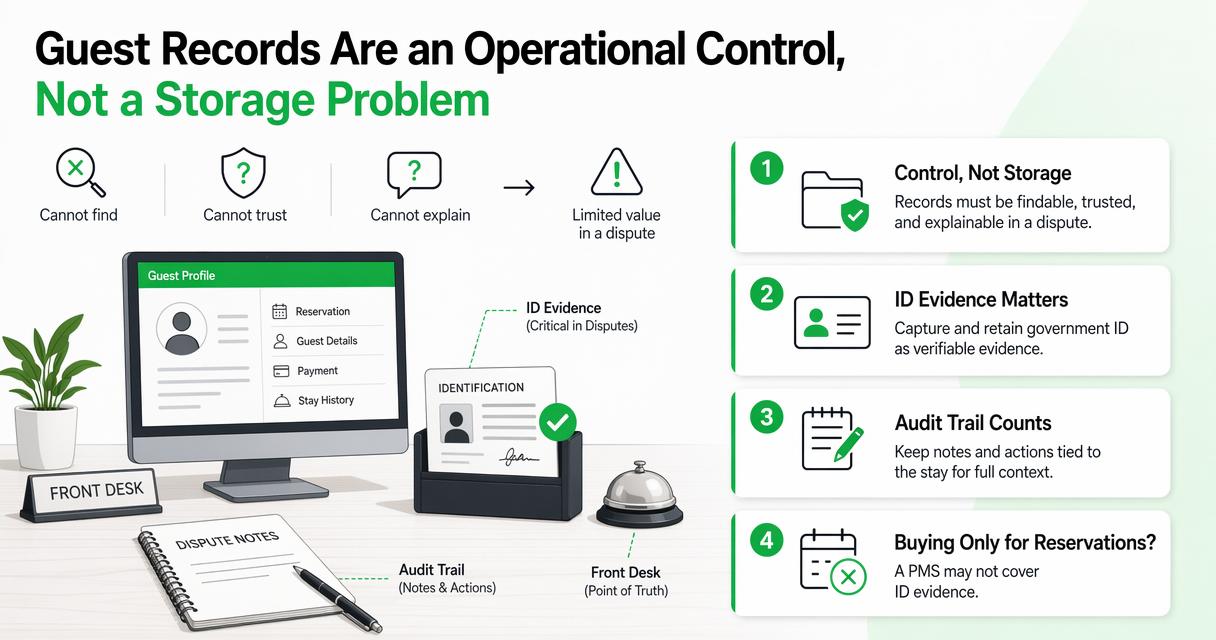
Common buying and setup mistakes
- Buying only for reservations: A PMS may not cover ID evidence, incident reports, or DNR workflows well enough.
- Keeping paper ID copies: Paper creates search, storage, privacy, and consistency problems.
- Giving every user broad access: Front desk staff, managers, owners, and group admins need different permissions.
- Skipping retention rules: Hotels should decide how long different record types are kept and who can export them.
- Ignoring chargeback evidence: Payment disputes often require organized records, not scattered notes.
A stronger setup gives managers clean proof. For payment disputes, this 2026 resource on hotel chargeback documentation with ID scanning shows what evidence packages often need.
What should hotels expect in 2027?
Hotels should expect guest record systems to become more automated, more permission-driven, and more connected to identity verification, payments, safety alerts, and AI-assisted workflows by 2027. The goal will not be collecting more data; it will be collecting cleaner data and using it responsibly.
Academic work on digital tourism and marketing supports that direction. Buhalis, Leung, and Lin describe tourism management changes tied to immersive and data-rich technologies in Tourism Management at ScienceDirect DOI. Mariani, Perez-Vega, and Wirtz review AI’s role in marketing and consumer research in Psychology & Marketing at Wiley.
For hotels, the practical version is simpler: more automation at check-in, better alerting, and stricter privacy review. Owners should ask vendors how AI affects data capture, staff decisions, bias checks, and audit trails before rolling it out.
2027 readiness checklist
- Require clear audit logs for every guest record action.
- Separate guest service notes from risk and incident notes.
- Review AI-assisted alerts with human oversight.
- Train staff on privacy, ID handling, and escalation rules.
- Test data exports before a real dispute or investigation.
- Standardize incident categories across all properties.
Hotels that prepare now will have cleaner records, faster retrieval, and fewer surprises as regulators, banks, and guests ask sharper questions about data handling.
FAQ
These answers address the most common buyer questions hotel owners, general managers, and operations teams ask before replacing manual guest record processes.
What is the difference between a PMS and guest record software?
A PMS manages reservations, rates, rooms, billing, and front desk operations. Guest record software focuses on the guest identity and history layer, including ID capture, incident notes, DNR status, staff actions, and evidence retrieval. Some PMS platforms include profile tools, but risk-focused recordkeeping often needs more specific controls.
Do small hotels need guest record management software?
Small hotels need guest record software if they handle walk-ins, late-night check-ins, chargebacks, property damage, or repeat problem guests. A small property may not need a large enterprise PMS, but it still benefits from accurate ID capture, searchable records, and consistent staff documentation.
Can guest record software help with chargebacks?
Yes, guest record software can help with chargebacks when it stores ID scans, check-in details, signed terms, stay notes, payment context, and incident documentation in a retrievable format. The value comes from speed and credibility: managers can respond with organized evidence instead of rebuilding the stay history manually.
How should hotels protect guest record privacy?
Hotels should protect guest record privacy with role-based permissions, retention rules, export limits, audit trails, staff training, and secure storage. Managers should review who can view IDs, who can edit DNR notes, and who can download reports. Privacy controls should be tested during vendor selection, not after rollout.
Conclusion
The best guest record management software for hotels is the one that helps your team prove who checked in, understand guest history, document incidents, control DNR decisions, and retrieve records fast when money or safety is on the line. Start with your risk workflows, then compare PMS features, ID scanning, permissions, and reporting around those needs.
If your current process still depends on photocopies, scattered notes, or memory, build a short pilot checklist this week. Test one front desk shift, one manager review, one dispute scenario, and one DNR lookup. To see how GuestBan ID Scanning fits that workflow, visit guestban.com and request a practical walkthrough based on your property type.

