ID Scanning for AutoClerk Atlas

Scan & Save IDs For AutoClerk Atlas.

  • Scan supported guest IDs in about 4 seconds
  • Check Do Not Rent lists and display potential risk alerts
  • Fill supported guest details in AutoClerk Atlas with one click
  • Securely store the records you may need for chargebacks

Built for AutoClerk Atlas properties. Remote installation, training, and support are included.

AutoClerk Atlas Transfer Fill guest details with one click
Automatic Alerts Age, local and DNR checks
Cloud Portal Access Secure records from anywhere
AutoClerk Atlas front desk workflow
Live scan

Scanner connected

Automatic ID detection starts the scanning process

UV scanning for fake ID screening

Guest Ban ID scanner

Scan progress

Preparing the secure scan

Need help with AutoClerk Atlas setup? Call our team to discuss scanners, installation, and the right plan for your property.

Call (425) 484 0915
Give AutoClerk Atlas more power at check in

Verify the ID, surface important alerts, and save useful records before the room key is issued.

AutoClerk Atlas Ready
AutoClerk Atlas Transfer
Fast ID Scanning
Do Not Rent Alerts
Chargeback Records
UV ID Capture
Watch the Complete AutoClerk Atlas Workflow

Industry Recognition

Recognized by hospitality and technology leaders

Innstrata awards including OHLA, Travel and Hospitality Tech Outlook, LUXlife Magazine, and New World Report

AutoClerk Atlas Plus Guest Ban

The Reservation Is Only Part of the Check In Decision

AutoClerk Atlas manages the reservation. Guest Ban helps your team verify who is standing at the desk, identify potential concerns, and preserve the record before the stay begins.

Fill AutoClerk Atlas Accurately

Capture supported guest information from the ID and transfer it with one click, reducing rushed typing and missing details.

Catch Do Not Rent Matches

Compare the scanned identity with property and network Do Not Rent records while staff can still decide whether to continue.

See Alerts Before the Key

Give staff clear age, local guest, repeat guest, Do Not Rent, and available screening alerts before check in is completed.

Keep the Record You May Need

Store the scanned ID, captured details, timestamps, and incident information for faster chargeback and management review.

Simple for Every Shift

From ID to AutoClerk Atlas in Three Steps

No complicated front desk workflow. Remote setup and staff training are included.

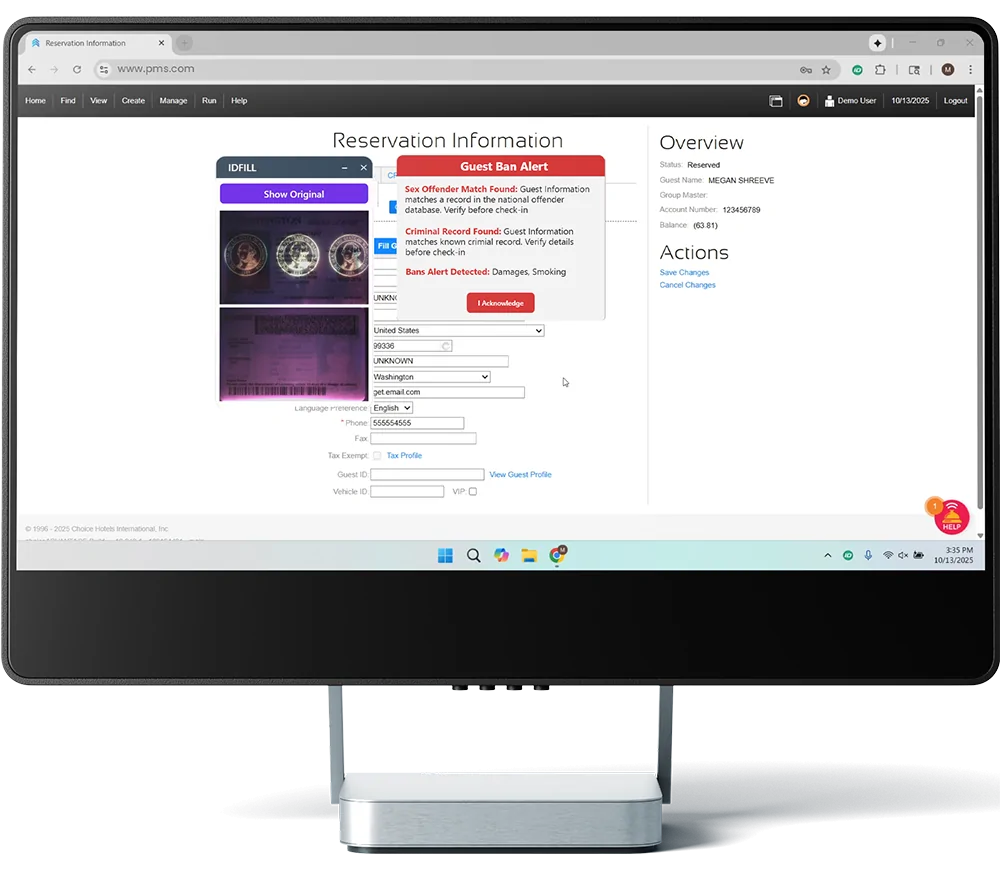
Live front desk workflow Guest Ban alerts displayed during hotel check in before PMS transfer
01

Place the ID on the Scanner

Guest Ban captures supported driver licenses, government IDs, and passports in about 4 seconds.

02

Review the Result

Staff see the captured details, ID image, UV image when available, and any applicable alerts before continuing.

03

Fill AutoClerk Atlas

Transfer supported guest information with one click while Guest Ban securely saves the record in the background.

See It In Action

See the Complete AutoClerk Atlas Workflow

See how a front desk agent scans an ID, reviews the guest record and alerts, and transfers the details into AutoClerk Atlas.

Stop Relying on Memory

A Do Not Rent List Only Works When Staff See the Match

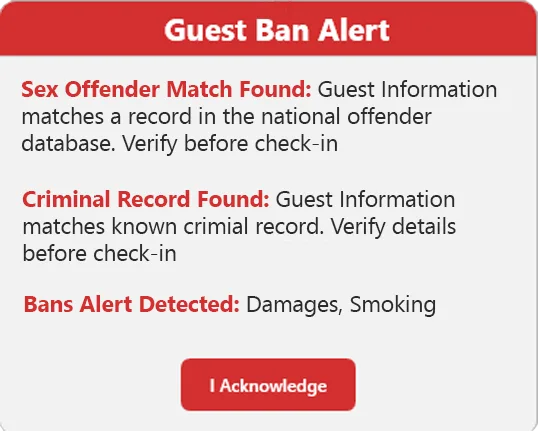
Paper lists, shift notes, and employee memory leave room for restricted guests to return. Guest Ban compares each scanned identity with your property and network Do Not Rent records and displays the alert before a key is issued.
  • Property Do Not Rent lists
  • Shared lists across your hotel portfolio
  • Incident details and supporting photos
  • Immediate desktop and email alerts
  • Controlled access for managers and staff
Live DNR alert Guest Ban Do Not Rent alert on the front desk

Stop Retyping Guest Details

Give AutoClerk Atlas the Details Without the Manual Entry

When the lobby is busy, every manually typed field adds time and another chance for an error. Guest Ban reads supported information from the ID, lets staff confirm it, and fills AutoClerk Atlas with one click.

Less Repetitive Typing Reduce manual entry for supported names, addresses, birth dates, expiration dates, and other guest fields.
One Click to AutoClerk Atlas Send confirmed guest details into the AutoClerk Atlas workflow.
More Consistent Records Help every employee follow the same guest verification process on every shift.
Review Before Transfer Let staff confirm captured information and alerts before completing the AutoClerk Atlas entry.
Guest Ban transferring captured guest details into AutoClerk Atlas

Capture the Evidence at Arrival

The Dispute May Come Later. The Record Starts Now.

When a stay is disputed weeks later, a AutoClerk Atlas reservation alone may not contain every record your team wants to review. Guest Ban keeps the scanned ID, captured details, scan timestamp, and related incident documentation together.
  • Scanned ID images
  • Captured guest details
  • Timestamp of ID scanned images
  • Incident documentation
  • Printable evidence reports
Guest Ban desktop alert and scanned ID evidence for chargeback documentation

Keep Managers Informed

Your Guest Protection Should Not Live on One Front Desk Computer

The Guest Ban web portal gives authorized owners and managers access to guest records, Do Not Rent activity, users, alerts, and property information without opening AutoClerk Atlas at the desk.
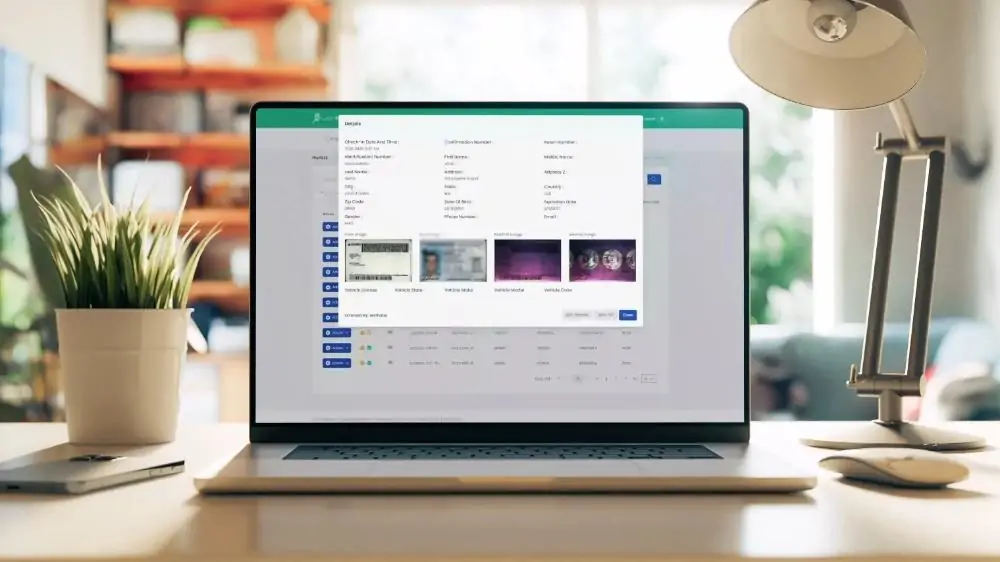
Multi Property Visibility Review and manage participating hotels from one account.
Role Based Access Give each employee access that matches their responsibilities.
Secure Cloud Records Keep authorized records available even when a front desk computer is replaced.
Retention by Plan Choose the record retention level that fits your hotel and operating requirements.
Guest Ban in use at a hotel front desk

More Than PMS Integration

Add the Alerts AutoClerk Atlas Does Not Provide

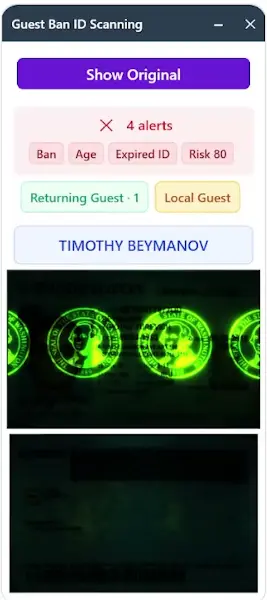
Guest Ban adds identity based alerts and optional screening tools to your front desk process. Alerts support staff decisions and should always be used with your written policies and human review.
Age rule alerts
Local guest alerts
UV security image capture
Network DNR Alerts
Sex offender screening options
Criminal history screening options
Guest Ban ID scanning interface with UV security capture and front desk alerts

One Fast Step Before the AutoClerk Atlas Check In Is Complete

~4 seconds to scan a supported ID
One click transfer into AutoClerk Atlas
Property + network Do Not Rent checks
From $360 / year plans with setup included

AutoClerk Atlas Hotel Pricing

Choose How Much Protection Your Property Needs

Every plan helps your team scan IDs and fill AutoClerk Atlas. Choose the level of alerts, visibility, and record retention that fits your operation.

Starter

$360 per year

  • AutoClerk Atlas Auto Fill
  • Secure Web Access
  • Digital DNR List
  • Automatic DNR Alerts
  • Age Alerts
  • Chargeback Proof
Choose Starter

Enterprise

Custom pricing

  • Everything in Professional
  • Portfolio Reporting
  • API Access
  • Advanced Workflows
  • Custom Reports
  • Rollout Support
Call for Enterprise

Every plan includes AutoClerk Atlas setup assistance, remote installation, training, support, and a 30 day money back guarantee. Scanner hardware is sold separately unless included with a qualifying three year plan.

Common Questions

Frequently Asked Questions

No. Guest Ban works alongside AutoClerk Atlas. Your team scans and reviews the ID in Guest Ban, then transfers supported guest details into the AutoClerk Atlas workflow.
After the ID is scanned and the captured information is reviewed, staff use one click to fill supported guest fields in AutoClerk Atlas. Guest Ban securely saves its own scan record in the background.
You need a compatible Windows front desk computer, an available USB port, and a supported Plustek or Thales scanner. We will recommend the right model based on whether you scan ID cards, passports, or both.
Guest Ban is designed for front desk speed. A supported ID can be captured in about 4 seconds. Staff review the result and use one click to send supported details to AutoClerk Atlas. Remote installation and training are included.
Yes. Your current restricted guest list can be imported so your team can begin checking new scans against existing records.
Yes. Authorized managers can use the Guest Ban web portal to review records, users, alerts, and Do Not Rent activity. Management and view only access can be provided without purchasing another active scanning station.
Possibly. Guest Ban supports many Plustek and Thales scanner models. Send us the model name or a photo and we will confirm compatibility.
Guest Ban includes remote installation, AutoClerk Atlas setup assistance, staff training, and ongoing support. Call us with your scanner needs and the number of front desk computers, and we will recommend the right setup.

Make the Next Check In Stronger

Your Team Already Uses AutoClerk Atlas. Add the Layer That Verifies, Alerts, and Documents.

Give every shift a faster way to capture guest details and a more consistent way to review risk before handing over the key.

Remote installation, AutoClerk Atlas setup assistance, training, and ongoing support are included.

Guest Ban is an independent product. AutoClerk Atlas is referenced for compatibility purposes.
Thumb 1Thumb 2Thumb 3Thumb 4Thumb 5Thumb 6

Trusted by
Leading Hotels.

Our success in creating business solutions is due in large part
to our talented and highly committed team.


Contact Us

Schedule a Callback or Online Demo

© Copyright 2026 Guest Ban by Innstrata. All Rights Reserved.
Guest Ban product is not formally endorsed by or affiliated with any logos, brands, or products displayed on this website, unless explicitly stated. All externally listed products, company names, and trademarks are the property of their respective holders. Third-party products, logos, and trademarks used on this website are for educational, informational, or compatibility purposes only and do not imply any official partnership or endorsement.

Shopping Cart